Webiny-js: Better support for video content via Mux integration
Currently Webiny supports a generic file content type which could be used to upload a video. However this doesn't support the sorts of features you'd usually need when working with videos, e.g. thumbnails, adaptive bitrate streams etc.
This is:
- Feature request
Detailed Description
For my personal use case I only need support in the headless CMS. A way for content editors to see the thumbnail (maybe even select a later time in the video to take the thumbnail from) and preview the video would be ideal.
I assume it would also be useful to provide plugins for other apps, like the page builder.
Possible Solution
Ultimately it could make sense to build this functionality with AWS Media Services, but a quick win would be to have an optional integration with Mux:
https://mux.com/
The basic workflow is:
Upload video file to S3 bucket -> Call Mux API providing the location of the video -> Get a Playback ID back from Mux which can be used to construct URLs for an adaptive HLS video stream, and thumbnails at different sizes and times (and more - including analytics on your video views).
If the total effort required to do this is not too high, I'd be interested in working on it. I have previous experience working with AWS Lambda, S3, API Gateway, CloudFront etc.
 markwilcox
All 12 comments
Just trying to figure out how would this work.
So, you would be doing all uploads in the standard way - via the File Manager.
And then, we call the Mux API, so we let the Mux app know about the newly uploaded video.
And the goal is to have Mux URLs in the File Manager, right? I mean, in case you wanted to add a video file to an existing content entry, we would always work with Mux URLs, right? Never with CloudFront URLs?
Thanks for creating the issue @markwilcox! :)
 doitadrian
on 7 Aug 2020
doitadrian
on 7 Aug 2020
@markwilcox @doitadrian Here's another suggestion: to handle Mux API you would create a new field plugin which would be like an enhanced file plugin, which would upload the video file to S3 using our File Manager, then send the file URL to Mux API and retrieve the playback ID. In that plugin you can then handle your videos however you like and upgrade with thumbnails, etc.
 Pavel910
on 7 Aug 2020
Pavel910
on 7 Aug 2020
Thanks for the input so far. I've been reading through some of the code this afternoon to try to understand how this should work.
So, you would be doing all uploads in the standard way - via the File Manager.
I don't know. I think the interaction with Mux to ingest the video should really happen on the backend (to avoid exposing the Mux API credentials in the client code). I guess I could use the standard File Manager and then make another request.
It'd be cleaner to have an alternative uploader in this case that calls an API to upload the file and pass it on to Mux, returning the relevant URLs for streaming the video from Mux and fetching a thumbnail. I don't know if this is going to create unnecessary extra work versus splitting the calls. From my initial scan of the code it looks like there's a single file uploader plugin that could be replaced with one that cared about the content type it was uploading, but no way to have separate uploaders for each content type. Is that correct?
And the goal is to have Mux URLs in the File Manager, right? I mean, in case you wanted to add a video file to an existing content entry, we would always work with Mux URLs, right? Never with CloudFront URLs?
Yes. I haven't read enough to know if it gets more messy here, but ideally I could pick out an existing video to add to a new entry in the CMS. I assume making it a separate field type could either help or complicate things here?
Here's another suggestion: to handle Mux API you would create a new field plugin which would be like an enhanced file plugin, which would upload the video file to S3 using our File Manager, then send the file URL to Mux API and retrieve the playback ID. In that plugin you can then handle your videos however you like and upgrade with thumbnails, etc.
Which plugins specifically are we talking about here, and are there any docs for them? I found a "cms-editor-field-type-file" and a "cms-editor-field-renderer-file" in the app-headless-cms plugins. Are these the right ones? Are there others involved?
markwilcox
on 10 Aug 2020
Sorry for delay @markwilcox !
If you're aiming to use Mux only in Headless CMS (and not e.g. also in PB), then @Pavel910's suggestion seems legit as well.
So, what Pavel meant here, is adding a field here:
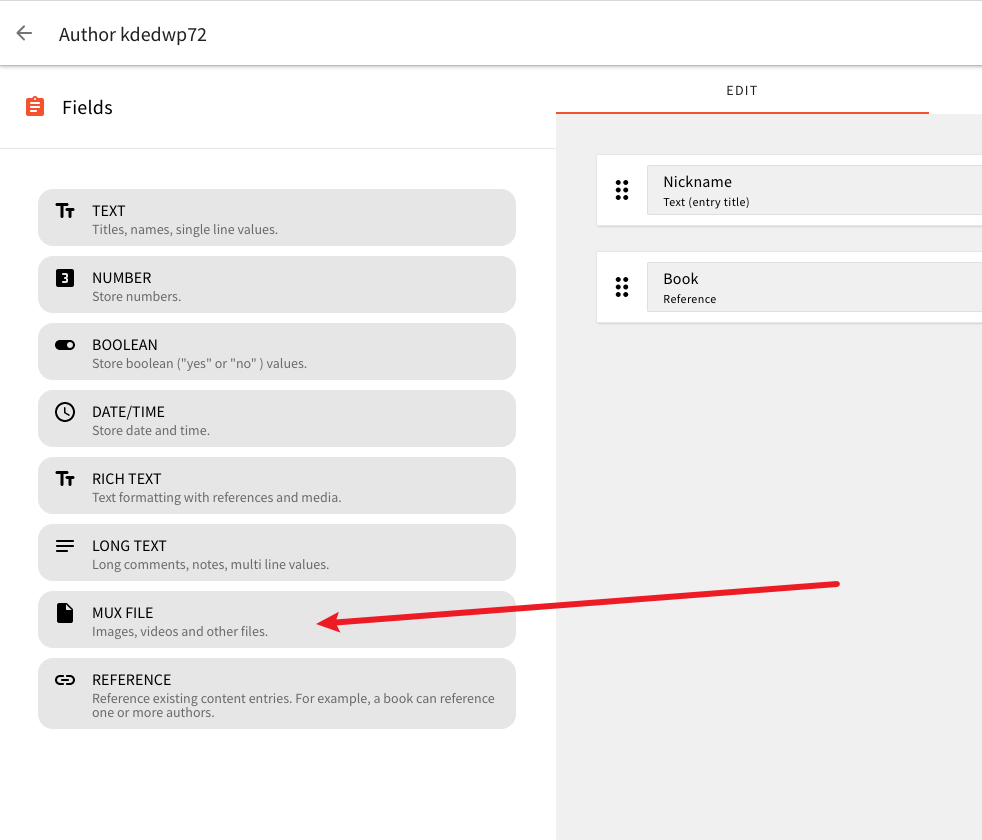
To achieve this, the first step is to add necessary plugins in the React app.
We're talking about these two plugins (used Files field as an example):
- Field plugin - https://github.com/webiny/webiny-js/blob/master/packages/app-headless-cms/src/admin/plugins/fields/file.tsx
- Field renderer plugin - https://github.com/webiny/webiny-js/blob/master/packages/app-headless-cms/src/admin/plugins/fieldRenderers/file/fileField.tsx
So, the first adds the field to the editor and defines its options, and the other one just defines how the field is rendered in the actual form (this is done so you can actually use multiple renderers for the same field, if needed).
Once you're done with that, you'll also need to add the necessary field functionality on the API side.
This consists of a couple of plugins as well.
- Commodo model field definition - https://github.com/webiny/webiny-js/blob/master/packages/api-headless-cms/src/content/plugins/modelFields/file.ts
- GraphQL field definition - https://github.com/webiny/webiny-js/blob/master/packages/api-headless-cms/src/content/plugins/graphqlFields/file.ts
Here, the first plugin defines what (=which field) should be added to the dynamically created Commodo model. Every model consists of fields that are defined in the UI, so here we say which field we want to add to the model. In case of Mux, since we'll be storing links, I think a simple string field should suffice. The second plugin defines how the GraphQL schema (available on xyz.cloudfront.net/cms/{type}/{environment}) should be updated - more specifically, with what types. The type in the mentioned URL can be read and manage, that's why you have the same properties in the actual plugin. You can have different types (and you will have) for every API type. Just check how other fields have implemented it, it's not too complicated.
Anyways, yeah.... a total of four plugins. Not a lot, but it's not a single plugin too :)
If something is confusing (I believe there might be some confusion), let us know, and we'll try our best to help you out.
We'd really like to see this come to life, and possibly include it in our Plugins Repository.
doitadrian
on 11 Aug 2020
Let us know if you need more help here @markwilcox. 🧐
doitadrian
on 14 Aug 2020
Sorry for the slow cycle time here, I have quite a lot of time off with the kids this summer, and other projects to work on. I'm still getting my head around how it all fits together, but the total effort looks reasonable, so I'm going to start working on this today. Will probably be back with more questions!
markwilcox
on 14 Aug 2020
Hehe that's awesome @markwilcox!
No worries really, I was just checking to see if you got stuck at some point.
Take your time, and of course, if there will be anything else to go through, ping here!
🍻
doitadrian
on 14 Aug 2020
I've had another chunk of time to work on this at last today. As expected I have a few queries :smile:
- For the plugins in question, is there currently a mechanism to add third party plugins? I'm currently adding mine with the others, as they seem to get added as part of static lists in the relevant index.ts in each folder. I can see that not everyone would want these plugins though. I'm just not sure how you'd add them if they were distributed separately.
- It looks like I want to reuse lots of the file fieldRenderer plugin with slight tweaks. I'm wondering if you'd accept a PR with modifications to that so you can pass mime types to accept in and through SingleFile.tsx and MultipleFile.tsx (the FileUpload.tsx can already manage this, there's just no way to pass them through currently). Also to add support for (optionally) recognising video mime types and showing a thumbnail if there is one? The alternative is I make copies of these and modify them, but it seems like they might be generally useful changes?
- The file manager itself is generic. Although it can restrict the mime types accepted, it looks like it will always show the left sidebar with the text about image tagging. I've not looked deeply enough to know what's best to do here yet, but do you think it would be easy to either remove or replace it based on the accepted mime types? In this case I imagine I'd want video tagging similar to the image tagging.
- I think I want to simply store the Mux Playback ID (maybe also Asset ID) as a string (or JSON if both I guess) in the database, but return some JSON with two strings (for the video and thumbnail URLs) in the GraphQL. I'm not clear if I'm going to create trouble for myself with this approach though? All the examples I've looked at seem to be more direct mappings (or simple string manipulation to add/remove the source prefix in the case of files).
- Where do you think it would be best to manage a check for the existence of files already on Mux? I assume if I use the file manager I'm going to see the source files I've uploaded to S3, but if I select one I need to check if Mux has already ingested it. Possibly I want to store the original URLs with the IDs from Mux. This suggests I want to create a MuxFile collection to parallel to the File collection, which also works with the file manager, or maybe I can add the IDs to the metadata associated with the File objects in the database?
Any thoughts on the above appreciated!
markwilcox
on 26 Aug 2020
I'm back from a week of holiday and about to start looking at this again @doitadrian - any thoughts on the above queries before I get stuck in?
markwilcox
on 7 Sep 2020
This issue is stale because it has been open 30 days with no activity. Remove stale label or comment or this will be closed in 5 days.
![github-actions[bot] picture](https://avatars2.githubusercontent.com/in/15368?v=4&s=40) github-actions[bot]
on 19 Oct 2020
github-actions[bot]
on 19 Oct 2020
I still intend to finish this, but have paused with a plan to pick it up again on the v5 beta.
markwilcox
on 19 Oct 2020
This issue is stale because it has been open 60 days with no activity. Remove stale label or comment or this will be closed in 7 days.
 webiny-bot
on 19 Dec 2020
webiny-bot
on 19 Dec 2020
Related issues
Pavel910
·
6Comments
doitadrian
·
5Comments
 TommyJackson85
·
6Comments
doitadrian
·
7Comments
TommyJackson85
·
6Comments
doitadrian
·
7Comments
 jsblx
·
4Comments
jsblx
·
4Comments