Web-stories-wp: Disable Features When User Role Does Not Have Permissions
Feature Description
This is a follow up to #196
There are WP roles that do not have certain capabilities e.g. Upload. In order to provide a good UX we need to disable / hide the relevant features in the Plugin.
_Do not alter or remove anything below. The following sections will be managed by moderators only._
Acceptance Criteria
- When a user does not have the ability to upload, ?
- When a user does not have the ability to add tags / categories, ?
- When a user does not have the ability to publish, ?
- When a user does not have the ability to add a feature image, ?
QA Instructions
- When a user does not have the permission to upload, an error message is displayed
- When a user does not have the permission to publish the story, an error message is displayed
 jauyong
All 25 comments
@o-fernandez Seems like this needs more info from your side..?
 swissspidy
on 20 May 2020
swissspidy
on 20 May 2020
@samitron7 @spacedmonkey I think we had a thread in which we decided we'd just have some error message, plus disable buttons, based on user permissions:
- if user can't upload media, disable upload button and throw an error if they drag something to canvas or media panel
- if user can't publish, disable publish button
Not sure which others we had that were critical to address in the editor, based on WP permissions. But those two seemed to be the most important ones to address.
 o-fernandez
on 20 May 2020
o-fernandez
on 20 May 2020
I think we had a thread in which we decided we'd just have some error message, plus disable buttons, based on user permissions:
- if user can't upload media, disable upload button and throw an error if they drag something to canvas or media panel
- if user can't publish, disable publish button
Not sure which others we had that were critical to address in the editor, based on WP permissions. But those two seemed to be the most important ones to address.
I have shared a video here of what it looks like to be logged in as a contributor who doesn't have upload or publish capability. https://youtu.be/NFXJJVHFGlg
The experience isn't great, as you can't publish or upload, but you using existing image to get a draft ready for someone else to publish, might might be useful.
I have already address the above in https://github.com/google/web-stories-wp/pull/1825 and https://github.com/google/web-stories-wp/pull/1825 .
I think we can mark this as done and get it QAed. Thoughts @o-fernandez
 spacedmonkey
on 20 May 2020
spacedmonkey
on 20 May 2020
If @samitron7 is OK with this approach (see video Jonny posted) then we can close this issue.
o-fernandez
on 20 May 2020
@o-fernandez For information in case it's relevant:
In WordPress, when the user does not have Publish permissions, a button for "Submit for Review" is displayed instead:

This is basically used if the Contributor has finished the draft but doesn't have publishing permissions. The status is then set to pending so it's clear that it's not a draft anymore, and an editor can review and publish it.
 miina
on 22 May 2020
miina
on 22 May 2020
@o-fernandez For information in case it's relevant:
In WordPress, when the user does not have Publish permissions, a button for "Submit for Review" is displayed instead:
This is basically used if the Contributor has finished the draft but doesn't have publishing permissions. The status is then set to
pendingso it's clear that it's not a draft anymore, and an editor can review and publish it.
It should be pretty simple to do this. Just change the publish button to 'Submit for review' and change the status to publish to pending when you press it.
spacedmonkey
on 22 May 2020
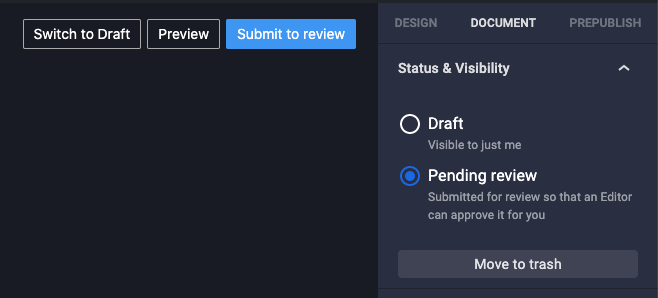
I mocked this up ^
What do you think @samitron7 ?
spacedmonkey
on 25 May 2020
I have a WIP PR for this - https://github.com/google/web-stories-wp/pull/1975
spacedmonkey
on 25 May 2020
I mocked this up ^
What do you think @samitron7 ?
How would "pending review" posts be reflected in the dashboard? If we haven't spec'd a "pending review" state and how it works overall, I'd prefer to stick to the simpler approach of not letting the user publish, they can simply save as draft.
As we get user feedback we can build "pending review" properly, with the right representation/filtering/views in the dashboard, etc. LMK if that makes sense.
o-fernandez
on 26 May 2020
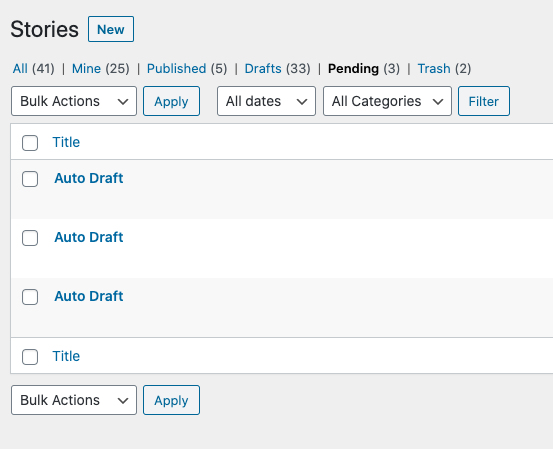
This is what pending looks like in the post list page. You are right, there is no UX for the dashboard. We are revisit this post stable.
We may not just want support this at all.
spacedmonkey
on 26 May 2020
@o-fernandez, what's the verdict on this one? Do we do anything about this pre-beta or punt all of it to post-beta?
 barklund
on 3 Jun 2020
barklund
on 3 Jun 2020
The issue should be fixed, the last suggestion by Johny (having a pending review option) is not part of this ticket and should be ignored for this ticket.
o-fernandez
on 3 Jun 2020
@spacedmonkey, are you working on this issue solving it not using the pending state suggestion? And should we spin the "pending" state to a new issue (and re-target the PR you have already created) and target it for stable?
barklund
on 3 Jun 2020
I have create a breakout issue for the pending status at #2239 . I will leave it @o-fernandez to priority this new ticket.
I will change #1975 to reflect this.
I am not sure what is to be done other than what has been done. Contributors can save as draft currently and that works fine.
spacedmonkey
on 4 Jun 2020
Let's close this one then?
swissspidy
on 4 Jun 2020
Yup, since that's been broken out, this can be passed on for QA.
o-fernandez
on 4 Jun 2020
@csossi you might want to create new user accounts on the QA site for the various roles. e.g. claudio-contributor with <yourname>[email protected] or something.
swissspidy
on 4 Jun 2020
I added a comment to a related issue (1372). Jonny's approach looks good to me but to summarize the comment in 1372:
I think a dialog box is warranted for this special case since we need to be super clear why this is happening. Since I was unresponsive and you all made a decision, I think we can move on with Jonny's approach but I think at the very least we should do the following:
- Change the upload error message to "You don't have access to upload images. Check with your administrator to request access."
- When you hover over the publish button, display a tooltip with message "You don't have access to publish. Check with your administrator to request access."
@o-fernandez OK to file a separate ticket for this also. The current message doesn't tell me why i'm not able to upload
 samitron7
on 11 Jun 2020
samitron7
on 11 Jun 2020
I added a comment to a related issue (1372). Jonny's approach looks good to me but to summarize the comment in 1372:
I think a dialog box is warranted for this special case since we need to be super clear why this is happening. Since I was unresponsive and you all made a decision, I think we can move on with Jonny's approach but I think at the very least we should do the following:
- Change the upload error message to "You don't have access to upload images. Check with your administrator to request access."
- When you hover over the publish button, display a tooltip with message "You don't have access to publish. Check with your administrator to request access."
@o-fernandez OK to file a separate ticket for this also. The current message doesn't tell me why i'm not able to upload
Thanks Sam, let's create a new ticket for the change in messaging/optimization here.
o-fernandez
on 11 Jun 2020
Upload
As "Contributor" - not permitted:

As "Author" - permitted
As "Editor" permitted
As "Subscriber" - unable to access Stories
Publishing
As "Subscriber" - unable to access Stories
As "Author" - permitted
As "Contributor" - can "Submit to review":
Which only appears in "All Stories" at this point, and not in Dashboard:
As Editor - permitted


 csossi
on 16 Jun 2020
csossi
on 16 Jun 2020
@csossi @spacedmonkey @swissspidy per our comments before, I thought "Submit to Review" was NOT going to be in scope for this change (since we don't have a way to surface in the dashboard).
Relevant comments:
o-fernandez
on 16 Jun 2020
@o-fernandez It isn't. And it also isn't implemented. I think @csossi simply tested the #1975 PR, which is just Jonny's proof-of-concept.
@csossi For clarification, can you re-test as contributor on master?
swissspidy
on 16 Jun 2020
@o-fernandez @swissspidy
On Master/Contributor:
 csossi
on 18 Jun 2020
csossi
on 18 Jun 2020
That looks as expected then, thanks!
swissspidy
on 18 Jun 2020
For UAT, please be aware of #2481 and #2464 and similar follow-up tickets.
swissspidy
on 18 Jun 2020
Related issues
swissspidy
·
3Comments
 injainja
·
4Comments
o-fernandez
·
4Comments
swissspidy
·
3Comments
o-fernandez
·
3Comments
injainja
·
4Comments
o-fernandez
·
4Comments
swissspidy
·
3Comments
o-fernandez
·
3Comments