Web-stories-wp: Editor crashing when writing in Japanese
Bug Description
I wrote some text in Japanese, the editor crashed. :'(
Expected Behaviour
Don't want it to crash.
Steps to Reproduce
See video.
Screenshots
Editor crashing when writing JP text.zip
_Do not alter or remove anything below. The following sections will be managed by moderators only._
Acceptance Criteria
QA Instructions
- Add a text field
- Click to enter edit mode
- Use the Mac OS X built-in Hiragana keyboard
- Type the characters "kon" and press space
- Observe that Japanese characters are correctly inserted rather than the whole editor crashing.
 o-fernandez
All 4 comments
Which tool are you using for that? Looks like a Chrome extension or perhaps Google Input Tools.
 swissspidy
on 19 May 2020
swissspidy
on 19 May 2020
Which tool are you using for that? Looks like a Chrome extension or perhaps Google Input Tools.
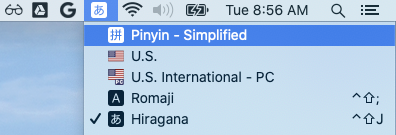
Just my mac's hiragana input
o-fernandez
on 19 May 2020
I used the Mac OS X built-in Hiragana keyboard and wrote types in roman
characters "kon" and pressed the space bar, which gets it to コン
I was trying to type konnichi こんにち.
Hope that helps?
On Mon, May 25, 2020 at 1:31 PM Beto Muniz notifications@github.com wrote:
Trying to reproduce the issue, I was not able to input the same character
of the video and crash the editor as described in the issue description.
Can you please share with me the input used, @o-fernandez
https://github.com/o-fernandez?Anyway, typing some Japanese characters from "Hiragana" keyboard, it
reported console errors and did not persist the respective Japanese
characters typed. It seems a draftjs known issue, which I am looking to
workaround.—
You are receiving this because you were mentioned.
Reply to this email directly, view it on GitHub
https://github.com/google/web-stories-wp/issues/1836#issuecomment-633662028,
or unsubscribe
https://github.com/notifications/unsubscribe-auth/ADGFBLPTK37TWVUYOHWPW5DRTKTN7ANCNFSM4NEQHUUQ
.
o-fernandez
on 26 May 2020
verified in QA

 csossi
on 16 Jun 2020
csossi
on 16 Jun 2020
Related issues
 injainja
·
4Comments
injainja
·
4Comments
 LuckynaSan
·
3Comments
LuckynaSan
·
3Comments
 obetomuniz
·
3Comments
swissspidy
·
3Comments
swissspidy
·
3Comments
obetomuniz
·
3Comments
swissspidy
·
3Comments
swissspidy
·
3Comments