Web-bugs: medium.com - Navigation menu not displayed while scrolling
URL: https://medium.com
Browser / Version: Firefox Nightly Mobile 67.0a1 (2019-02-10)
Operating System: Huawei P10 (Android 8.0) - 1080 x 1920 pixels (~432 ppi pixel density)
Tested Another Browser: Yes
Problem type: Design is broken
Description: Navigation menu not displayed while scrolling
Steps to Reproduce:
- Navigate to https://medium.com
- Scroll down the screen.
- Observe the navigation menu on the top of the screen while scrolling.
Expected Behavior:
The navigation menu must be displayed on the top side of the screen while scrolling.
Actual Behavior:
The navigation menu is missing.
Notes:
- The issue is not reproducible on Chrome Mobile 72.0.3626.96
- Screenshot attached.
Watchers:
@softvision-oana-arbuzov
@softvision-sergiulogigan
@cipriansv
sv;
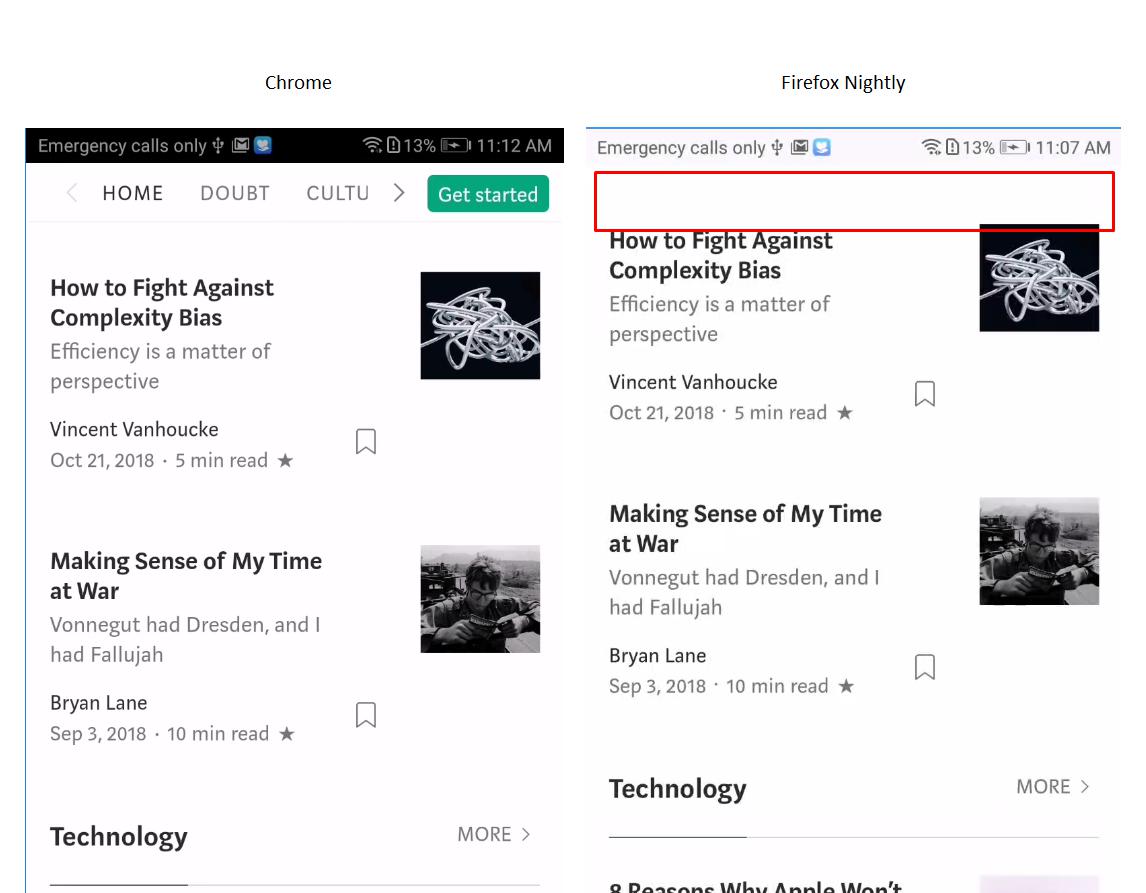
Browser Configuration
- None
_From webcompat.com with ❤️_
 cipriansv
All 11 comments
on my pixel 2 android, in Firefox Nightly, I don't get any menu at all. Not even the white part.
but I do get it in Chrome.
This is user agent sniffing. When I change the UA string, I get the same behavior than Chrome on Firefox.
<body itemscope="" class="browser-chrome os-android is-withMagicUnderlines v-glyph v-glyph--m2 is-js " data-action-scope="_actionscope_0" style="margin-top: 0px; transition: all 0.375s ease 0s;">
vs
<body itemscope="" class="browser-firefox os-android is-withMagicUnderlines v-glyph v-glyph--m2 is-js " data-action-scope="_actionscope_0" style="margin-top: 0px; transition: all 0.375s ease 0s;">
 karlcow
on 12 Feb 2019
karlcow
on 12 Feb 2019
Reaching out to our friends at Medium.com.
 adamopenweb
on 14 Mar 2019
adamopenweb
on 14 Mar 2019
We'll fix that next week, thanks for the report!
 valueof
on 14 Mar 2019
valueof
on 14 Mar 2019
Thanks @valueof!
adamopenweb
on 14 Mar 2019
Filed the bug internally, I'll try to get to it this week, otherwise the product team in question will deal with it.
valueof
on 18 Mar 2019
Hi all!
Sorry to bring bad news. The product team has just updated me that they're prioritizing it as an equivalent of a P4 at Mozilla so no ETA on when it's going to be fixed.
Wish I could be of more help.
valueof
on 25 Apr 2019
The fix which is in place right, is that instead of a position fixed at the top, the menu is crolling, so there is no more white space at least.
Thanks @valueof for the followup.
karlcow
on 26 Apr 2019
I retested the issue and it is still reproducible on my side.
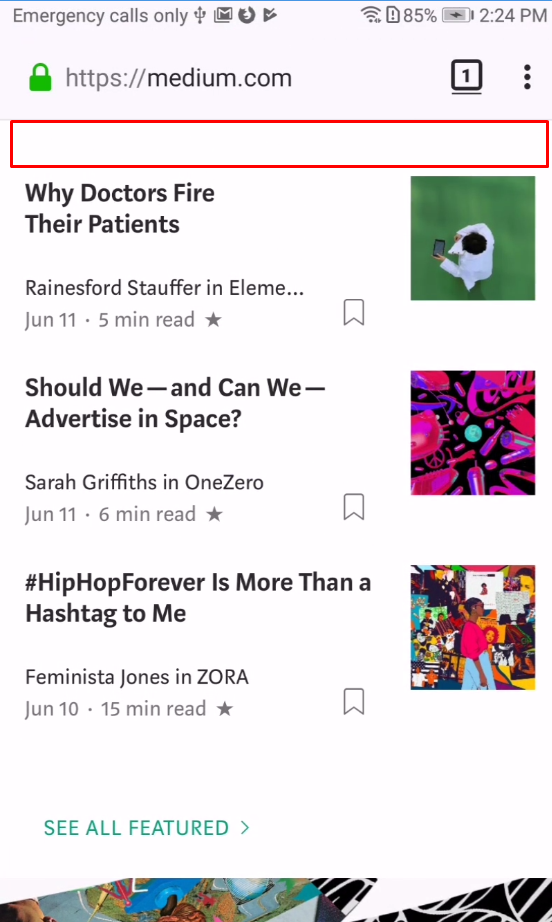
Tested with:
Browser / Version: Firefox Nightly 68.0a1 (2019-06-11), Firefox Fenix (Preview) 1.0.1924
Operating System: Huawei P10 (Android 8.0) - 1080 x 1920 pixels (~432 ppi pixel density)
cipriansv
on 12 Jun 2019
 ksy36
on 2 Aug 2019
ksy36
on 2 Aug 2019
After retesting the issue I noticed that the navigation menu layout has changed.
Also, having the intervention disabled the navigation menu stays on the top of the screen while scrolling the page.

Tested with:
Browser / Version: Mobile 68.5a1 (2020-01-13), Firefox Preview Nightly 200113 (🦎 74.0a1-20200110095023)
Operating System: Huawei P10 (Android 9.0) - 1080 x 1920 pixels (~432 ppi pixel density)
@ksy36, is this still an issue?
cipriansv
on 14 Jan 2020
They now require users to be signed in in order to view articles. I've signed up for an account and tested it with an intervention disabled, the issue is still reproducible :( @cipriansv
ksy36
on 15 Jan 2020
Related issues
 bull500
·
5Comments
bull500
·
5Comments
 oksas
·
5Comments
oksas
·
5Comments
 GeorgeWL
·
5Comments
GeorgeWL
·
5Comments
 Ezio916
·
4Comments
Ezio916
·
4Comments
 bvanrijn
·
4Comments
bvanrijn
·
4Comments