Web-bugs: info.credly.com - Missing page content
Browser / Version: Firefox 64.0
Operating System: Ubuntu
Tested Another Browser: Yes
Problem type: Something else
Description: Graphics and images don't render in Firefox
Steps to Reproduce:
- Click through any dialogs
Graphics that are rendered in Chrome are absent in Firefox. Firefox just shows blue background color.
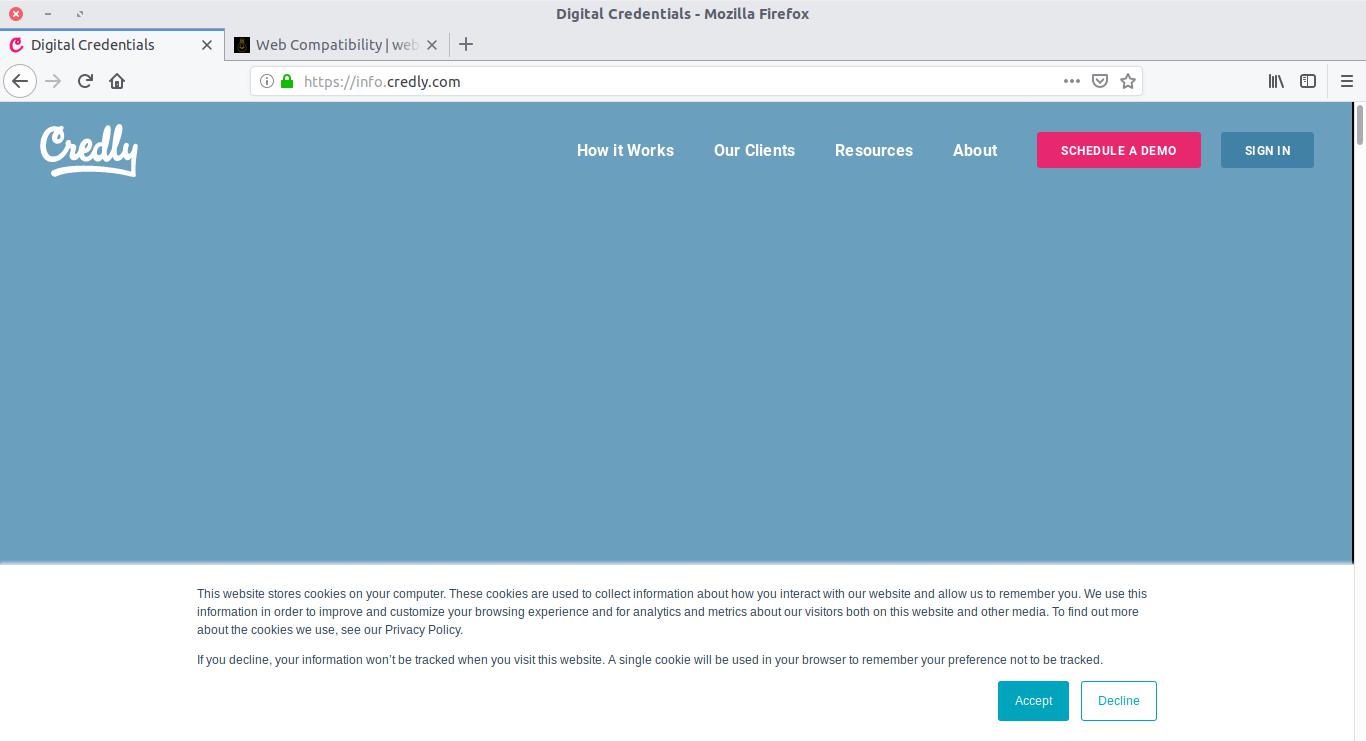
Browser Configuration
- None
_From webcompat.com with ❤️_
 webcompat-bot
All 16 comments
Thanks for the report, I was able to reproduce the issue.

Note: The issue is reproducible regardless if Tracking Protection is enabled or not.
Tested with:
Browser / Version: Firefox Nightly 66.0a1 (2018-12-17)
Operating System: Windows 10 Pro
Moving to Needsdiagnosis for further investigation.
 softvision-oana-arbuzov
on 18 Dec 2018
softvision-oana-arbuzov
on 18 Dec 2018
The images are displayed then disappear
and the height of the html box is impressive :)
1241×8957640px
It is increasing through big steps, when we look at the layout widget in devtools.
The footer is even more hilarious… it has a negative height: 1241×-8944380
 karlcow
on 20 Dec 2018
karlcow
on 20 Dec 2018
When rendering the page, at a point it enters in lazyRender
in https://info.credly.com/hubfs/credly/js/TweenMax.min.js
    q = E.lazyRender = function () {
      var t,
      e = I.length;
      for (F = {
      }; --e > - 1; ) t = I[e],
      t && t._lazy !== !1 && (t.render(t._lazy[0], t._lazy[1], !0), t._lazy = !1);
      I.length = 0
    };
at this point I.length is 0 and when it returns from this sequence, the images disappear.
then
    j._startTime = a.time,
    B._startTime = a.frame,
    j._active = B._active = !0,
    setTimeout(q, 1),
    A._updateRoot = D.render = function () {
      var t,
      e,
      i;
      if (I.length && q(), j.render((a.time - j._startTime) * j._timeScale, !1, !1), B.render((a.frame - B._startTime) * B._timeScale, !1, !1), I.length && q(), !(a.frame % 120)) {
        for (i in L) {
          for (e = L[i].tweens, t = e.length; --t > - 1; ) e[t]._gc && e.splice(t, 1);
          0 === e.length && delete L[i]
        }
        if (i = j._first, (!i || i._paused) && D.autoSleep && !B._first && 1 === a._listeners.tick.length) {
          for (; i && i._paused; ) i = i._next;
          i || a.sleep()
        }
      }
    },
and
/*!
 * VERSION: 1.15.1
 * DATE: 2015-01-20
 * UPDATES AND DOCS AT: http://greensock.com
 *
 * Includes all of the following: TweenLite, TweenMax, TimelineLite, TimelineMax, EasePack, CSSPlugin, RoundPropsPlugin, BezierPlugin, AttrPlugin, DirectionalRotationPlugin
 *
 * @license Copyright (c) 2008-2015, GreenSock. All rights reserved.
 * This work is subject to the terms at http://greensock.com/standard-license or for
 * Club GreenSock members, the software agreement that was issued with your membership.
 *
 * @author: Jack Doyle, [email protected]
 **/
I still haven't figured out why it is breaking.
Here a perf profile focused on the moment images disappear.
https://perfht.ml/2ECDM3h
I wonder if @emilio has an idea, maybe a render issue.
karlcow
on 20 Dec 2018
Stuff is there, it's just that it's in a giant element. All the slides grow exponentially. I don't know which slider library are they using but it is messing up stuff badly.
 emilio
on 20 Dec 2018
emilio
on 20 Dec 2018
The exponentially growing slider makes WebRender OOM after a while btw, I filed https://bugzilla.mozilla.org/show_bug.cgi?id=1515700 for that.
emilio
on 20 Dec 2018
I took a look to what stack sets the bogus width (hey, the good thing of being on PTO is that I can look at these bizarre things with more calm :P):
(rr) p DumpJSStack()
0 style(    <Failed to get argument while inspecting stack frame>
c = "width", d = "668672px") ["https://info.credly.com/hs/hsstatic/jquery-libs/static-1.1/jquery/jquery-1.7.1.js":4:6084]
    <failed to get 'this' value>
1 f.fn.css/<(a = [unavailable], c = [unavailable], d = [unavailable], [unavailable]) ["https://info.credly.com/hs/hsstatic/jquery-libs/static-1.1/jquery/jquery-1.7.1.js":4:5320]
2 access(a = [unavailable], c = [unavailable], d = [unavailable], f = [unavailable], g = [unavailable]) ["https://info.credly.com/hs/hsstatic/jquery-libs/static-1.1/jquery/jquery-1.7.1.js":2:13371]
3 f.fn.css(a = "width", c = "668672px") ["https://info.credly.com/hs/hsstatic/jquery-libs/static-1.1/jquery/jquery-1.7.1.js":4:5270]
    <failed to get 'this' value>
4 f.fn[d](a = 668672) ["https://info.credly.com/hs/hsstatic/jquery-libs/static-1.1/jquery/jquery-1.7.1.js":4:28473]
    <failed to get 'this' value>
5 e.prototype.setDimensions() ["https://cdnjs.cloudflare.com/ajax/libs/slick-carousel/1.8.1/slick.min.js":1:29488]
    <failed to get 'this' value>
6 e.prototype.setPosition() ["https://cdnjs.cloudflare.com/ajax/libs/slick-carousel/1.8.1/slick.min.js":1:31311]
    <failed to get 'this' value>
7 g() ["https://info.credly.com/hs/hsstatic/jquery-libs/static-1.1/jquery/jquery-1.7.1.js":2:13111]
    <failed to get 'this' value>
8 e.prototype.postSlide(e = 2) ["https://cdnjs.cloudflare.com/ajax/libs/slick-carousel/1.8.1/slick.min.js":1:25135]
    <failed to get 'this' value>
9 e.prototype.slideHandler/<() ["https://cdnjs.cloudflare.com/ajax/libs/slick-carousel/1.8.1/slick.min.js":1:36681]
10 e.prototype.fadeSlide/<() ["https://cdnjs.cloudflare.com/ajax/libs/slick-carousel/1.8.1/slick.min.js":1:14185]
    <failed to get 'this' value>
They're relying on a Chrome Flexbox bug (cc @dholbert). Adding min-width: 0 around fixes the issue.
I cannot test the page in Chrome Canary because there's no Canary for Linux, but I think it should be equally broken as Firefox.
The issue is that that slider does set the position and dimension of the track over and over, and in this case the width of the slider container depends on the content, so they don't stop growing.
Can somebody contact the author of the page to add min-width: 0 to the flex items to fix this, or max-width so that the element doesn't stretch indefinitely?
And also maybe confirm that the page is broken in Chrome Canary?
emilio
on 20 Dec 2018
Thanks @emilio for your further investigation.
Maybe @adamopenweb could contact them about this.
softvision-oana-arbuzov
on 21 Dec 2018
Chrome dev channel (roughly equivalent to canary) renders the site just fine, so there's still some remaining incompatibility there.
Looks like this is really a version of https://bugzilla.mozilla.org/show_bug.cgi?id=1316534 -- the wide flex items in question both have a reasonable "width" value which we're supposed to be using as an upper-bound when we resolve the min-width:auto based on the (huge) content.
 dholbert
on 21 Dec 2018
dholbert
on 21 Dec 2018
And I think this is entirely https://bugzilla.mozilla.org/show_bug.cgi?id=1316534 -- the site isn't relying on a Chrome bug after all.
They can work around it by adding min-width:0 to the element with class="span7 ban_hide", but really it's our bug.
dholbert
on 22 Dec 2018
Leaving as needscontact for now as it has already been added to the bug. @adamopenweb can decide if he thinks we should contact them with the previous comment suggestion.
karlcow
on 7 Jan 2019
They have a contact page
https://info.credly.com/contactus
Ah @CredlyDev is on github.
So maybe this bug can be solved by @ahripak or someone there.
karlcow
on 7 Jan 2019
Hi! 👋
Appreciate you all looking into this issue and for flagging us down. I've raised the issue internally and will get back to you on when we've implemented the proposed fix.
 ahripak
on 8 Jan 2019
ahripak
on 8 Jan 2019
It's me again! We ended up implementing the proposed fix and it appears to be resolved.
Not sure if that means we close this issue or what. Let me know how I can help 😺
ahripak
on 28 Jan 2019
Thanks @ahripak that's great! Let's close this report.
 adamopenweb
on 28 Jan 2019
adamopenweb
on 28 Jan 2019
This issue has been automatically locked since there has not been any recent activity after it was closed. Please open a new issue at https://webcompat.com/issues/new if you are experiencing a similar problem.
![lock[bot] picture](https://avatars1.githubusercontent.com/in/6672?v=4&s=40) lock[bot]
on 5 Feb 2019
lock[bot]
on 5 Feb 2019
Related issues
webcompat-bot
·
5Comments
 IngrownMink4
·
3Comments
IngrownMink4
·
3Comments
 massic80
·
5Comments
massic80
·
5Comments
 bull500
·
5Comments
webcompat-bot
·
4Comments
bull500
·
5Comments
webcompat-bot
·
4Comments
Most helpful comment
It's me again! We ended up implementing the proposed fix and it appears to be resolved.
Not sure if that means we close this issue or what. Let me know how I can help 😺