Waveboxapp: [Bug] Google drive - Search in same directory causes lock in google drive (needs verification)
- Wavebox Version: 4.7.11beta
- Operating System & Version: Windows 10
- Account type (if applicable): Google Drive
Expected & actual behavior
Only skip or reload current location.
Locks google drive and need to reload manually.
Steps to reproduce
- Ctrl+T and search for item in Google Drive
- While standing in same location
- Do another search for same item
- There are 2 choices to select where one is: The drive in general the other is the same location you are in. (This happened when I was searching for PDFs)
- Select the last item that is the same location (long path)
- Google drive locks and needs to be hard reloaded
Is the bug persistent or intermittent?
Tested 4 times with the same effect. However would need to get some verification from someone else if it can be reproduced.
Additional information
Only tested on google drive.
 nmat
nmat
All 10 comments
Just check if I'm doing the same as you here...
- Ctrl+T Search Google Drive. Click the test entry. (Opens Google drive in the test folder)
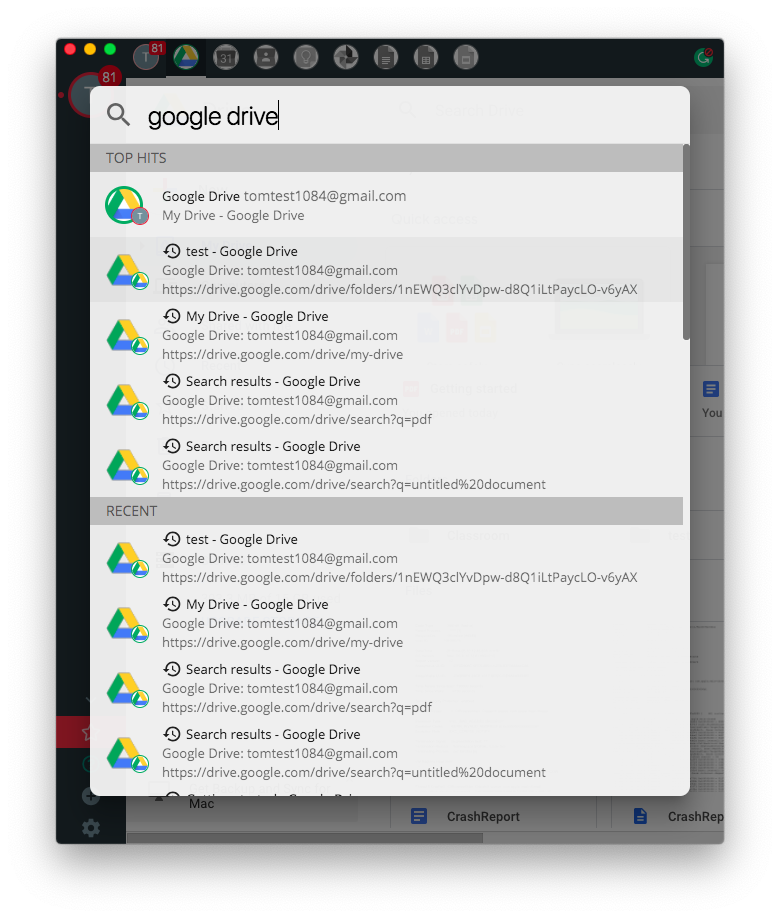
- Ctrl+T Search Google Drive. Click the same test entry
Not that I can imagine it would make too much difference, but what's the icon next to the search result entry you're clicking? The pin/backwards clock/tick?
 Thomas101
on 27 Feb 2019
Thomas101
on 27 Feb 2019
On the second search I select the one with the clock
So to say I stand where the items are and search for the exact same thing and select the one with the Clock.
nmat
on 27 Feb 2019
That seems to be the same thing that I was doing here :-/.
I'm guessing you were searching for something, so the url would have been along the lines of drive.google.com/drive/search?q=my%20search%20term. Are you able to share the search term? Just wondered if it's an encoding thing.
Were you waiting any amount of time between hitting Ctrl+T, or doing it in quick succession?
Other than that, have you tried restarting the app?
Thomas101
on 27 Feb 2019
Looks like this happens when the drive is sleeping.
Waking it up with Ctrl+T and then search again.
Or force it to sleep -> Wake -> Search -> Search -> (lock)
nmat
on 27 Feb 2019
Result from my testing from GIT master (6e968976c2).
Sleep process manually -> Ctrl+T (search) (nolock) -> Ctrl+T Search (lock) -> Ctrl+T Search (nolock)
So on the second search it locks. But on the third search it unlocks.
nmat
on 27 Feb 2019
So looking a bit further into this, it looks like when the error occurs the page encounters a tcp/ip error. This either results in the other end hanging up or the connection being reset. Either way it doesn't load correctly.
It's much harder to reproduce when devtools are open which initially made me think it was some kind of timing problem, but that's not the case. I've also found it much harder to reproduce this morning vs last night which is weird. I can't seem to reproduce it anywhere other than with Google Drive either.
Upstream chromium moved to a new dns resolved called metro. I get the feeling it's probably something to do with this, although as to what the actual root of the error is, I'm not sure.
I've put a less than ideal fix in, but it should stop it getting stuck. Firstly, capturing the network errors and showing the error up to the user - this means the page won't just freeze and at least you're aware that an error occurred. Secondly when we come across a tcp/ip error we retry the request to see if can be resolved on a second attempt. It does mean that when you see this bug, you'll briefly see the error screen but because it's very much a fringe case I think this is okay :-/
Thomas101
on 28 Feb 2019
That kind of makes sense since its a strange case to begin with. However I went through the test in my head thinking that "What if you do not know which item is which and you are stressed?" Then the thought would still be to push either one and go to the same spot.
Will give this a test later tonight so I can see how it acts up. For now any workaround is better then a complete lock I would say. If it fails well then it fails. However the user should be aware or wavebox could retry again if it locks up. (Then instead it would be a minor glitch in my eyes)
Nice catch on the error searching. :)
nmat
on 28 Feb 2019
Looks good. If you want you can probably hide the "Failed to connect" message and have it in a debug option instead if needed or turned on, and just force reload it.
But in general it gives the correct information and the problem is solved from my standpoint. Its just one of those weird corner cases I believe.
nmat
on 28 Feb 2019
Gonna close of this issue as fixed.
nmat
on 28 Feb 2019
Thanks again, this has just gone out in 4.7.12beta :)
Thomas101
on 7 Mar 2019
Related issues
 CharlesWiltgen
·
3Comments
CharlesWiltgen
·
3Comments
 Ash258
·
3Comments
Ash258
·
3Comments
 phcyso
·
4Comments
Thomas101
·
3Comments
phcyso
·
4Comments
Thomas101
·
3Comments
 cdeutsch
·
3Comments
cdeutsch
·
3Comments