Waveboxapp: Different notification sounds per account
One for gmail, slack, etc...
feature
 Thomas101
👍4
All 3 comments
Also ability to have some accounts silent
 BertLamb
on 11 Apr 2017
BertLamb
on 11 Apr 2017
👍1
Good idea!
Thomas101
on 11 Apr 2017
Hi we've added this to the latest version of Wavebox. Here's how to use it...
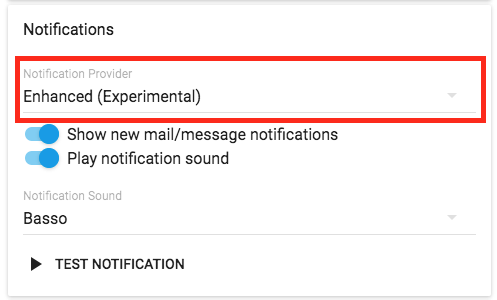
1.) Open settings & Enable the new Enhanced notifications (these aren't enabled by default in this version)
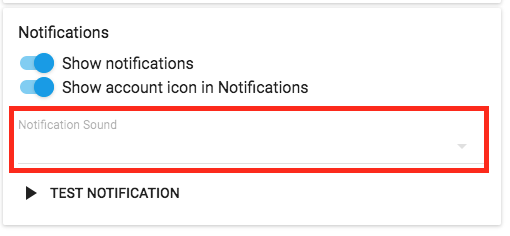
2.) Open the settings for each account. The notification sound field will be empty, which means it will use the notification sound set in the main settings. Click on the dropdown and pick from the list of sounds to change it for just this account
Thomas101
on 22 Jun 2017
👍3
Was this page helpful?
0 / 5 - 0 ratings
Related issues
 cdeutsch
·
3Comments
cdeutsch
·
3Comments
 dctucker
·
4Comments
dctucker
·
4Comments
 iocanel
·
4Comments
iocanel
·
4Comments
 phileasb
·
3Comments
phileasb
·
3Comments
 lots0logs
·
3Comments
lots0logs
·
3Comments
Most helpful comment
Hi we've added this to the latest version of Wavebox. Here's how to use it...
1.) Open settings & Enable the new Enhanced notifications (these aren't enabled by default in this version)

2.) Open the settings for each account. The notification sound field will be empty, which means it will use the notification sound set in the main settings. Click on the dropdown and pick from the list of sounds to change it for just this account
