Waveboxapp: Provide a way to scale the ui
- Wavebox Version: 4.7.x
- Operating System & Version: all
Is your feature request related to a problem? Please describe.
Some information about what the problem is.
For some apps the fonts are two small to read.
Is your feature request related to an account type?
No
Describe the solution you'd like
I'd like to be able to scale up/down the ui in a similar way I can do it in chrome.
Additional info
 iocanel
All 4 comments
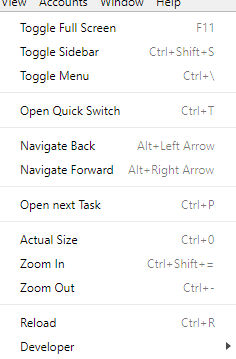
There is a possibility to zoom the page in and out using Ctrl++, Ctrl+- and Ctrl+0
To change icon sizes in wavebox and so on you can change:
Sidebar Size:
and much more
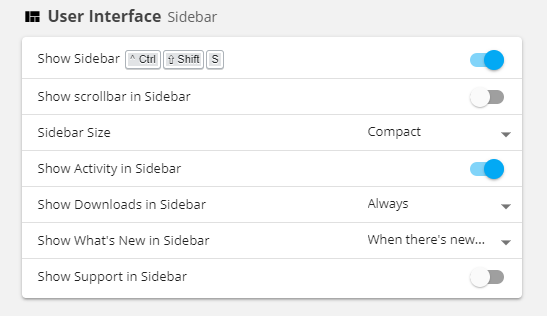
In this case I wonder what type of scale you want to change. You also have the view menu where you can change the size of various items:
 nmat
on 2 Mar 2019
nmat
on 2 Mar 2019
There is also the possibility to change even more.
You can read about it here:
https://wavebox.io/kb/change-theme
https://wavebox.io/kb/lock-sidebar
https://wavebox.io/kb/resize-sidebar
And many more. Most of which are located in the knowledge base. As mentioned before I am not sure which sort of size change you want to change. I myself use Ctrl+-, Ctrl++ and Ctrl+0 to change sizes for the content.
nmat
on 2 Mar 2019
@nmat: Thank you so much! Ctrl + and Ctrl - does the trick for me. Even better seems that my settings persist restarts too.
I am covered and thus closing the issue.
iocanel
on 3 Mar 2019
@iocanel thats perfect! You are most welcome
nmat
on 3 Mar 2019
Related issues
 tnaseem
·
4Comments
tnaseem
·
4Comments
 lots0logs
·
3Comments
lots0logs
·
3Comments
 bashfulrobot
·
4Comments
bashfulrobot
·
4Comments
 phcyso
·
4Comments
phcyso
·
4Comments
 Ash258
·
3Comments
Ash258
·
3Comments
Most helpful comment
@nmat: Thank you so much! Ctrl + and Ctrl - does the trick for me. Even better seems that my settings persist restarts too.
I am covered and thus closing the issue.