Waveboxapp: Open link in browser shortcut
- Wavebox Version: 4.5.3
- Operating System & Version: Windows 10 Enterprise 1803, 17134.407
Is your feature request related to a problem? Please describe.
Maybe I missed something, but I cannot find some shortcut which would force link to be opened within browser.
You could use CTRL+Click to open link in new Wavebox window, but none shortcut I tested does not open link in Browser (without using right clicking link and selecting Open link in browser)
Tested common shortcuts with clicking:
- CTRL+SHIFT
- CTRL+ALT+SHIFT
- ALT
- ALT+SHIFT
Describe the solution you'd like
I would expect shortcut to open link in browser like Chrome (for example) have. CTRL+CLICK (open in new tab) and SHIFT+CLICK (open in new window). So for Wavebox purposes it would keep CTRL for opening in new Wavebox window and add new one for opening in browser (ALT or SHIFT would be best).
 Ash258
All 3 comments
This is something we've still yet to add. I'll see if there's any way we can listen out for shift/ctrl/alt before the context menu fires up
 Thomas101
on 10 Dec 2018
Thomas101
on 10 Dec 2018
Hi, we’ve just released this to the beta channel of Wavebox in version 4.5.6. If you want to give it a try there are some instructions on how to use the beta channel here.
To change the current default behaviour, open up Settings and then the Links section. There's two options to change the setting for Ctrl / Cmd + Click and also Shift + Click. Each has support for the default behaviour (the attached popup window), opening in a Wavebox Window, or opening in the Default Browser.
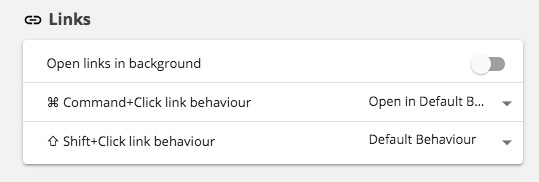
(Your settings will be slightly different to the screenshot as you're using Windows)
Thanks
Thomas101
on 17 Dec 2018
Works like a charm. Tested from Discord, custom github notifications and Slack. 👌🎉
Ash258
on 17 Dec 2018
Related issues
 yermulnik
·
3Comments
yermulnik
·
3Comments
 cdeutsch
·
3Comments
Thomas101
·
3Comments
cdeutsch
·
3Comments
Thomas101
·
3Comments
 bashfulrobot
·
4Comments
bashfulrobot
·
4Comments
 atrasatti
·
3Comments
atrasatti
·
3Comments
Most helpful comment
Hi, we’ve just released this to the beta channel of Wavebox in version 4.5.6. If you want to give it a try there are some instructions on how to use the beta channel here.
To change the current default behaviour, open up Settings and then the Links section. There's two options to change the setting for Ctrl / Cmd + Click and also Shift + Click. Each has support for the default behaviour (the attached popup window), opening in a Wavebox Window, or opening in the Default Browser.
(Your settings will be slightly different to the screenshot as you're using Windows)
Thanks