Waveboxapp: How to set up Proxy Server?
As we all know, Gmail cannot be logged in in China, so proxy servers need to be set up.
But I didn't find any settings for proxy servers.
Network settings like Socks5 and HTTPS.
Maybe I didn't see it?
Thanks.
 remmina
All 9 comments
Hi, it should pick the proxy settings up from your operating system and use those automatically. Which OS and version are you using?
 Thomas101
on 22 Feb 2019
Thomas101
on 22 Feb 2019
Ubuntu 18.04 64 bit
Setting up a proxy server for the entire system is a hassle
Because if you modify the proxy server of the entire system, other software will also be affected, such as the browser.
I just want to make the wavebox use a proxy server.
I remember that telegram has this feature, like this:

remmina
on 22 Feb 2019
Would ProxyChains work?
 Xeonacid
on 24 Feb 2019
Xeonacid
on 24 Feb 2019
@Xeonacid It should be working properly.
But that needs to be started from the terminal, I think it is not very convenient.
I remember that wavebox can be started with parameters.
The parameter format is the same as chrome.
Proxy server can also be set with parameters.
But this is still not very convenient.
remmina
on 24 Feb 2019
I agree the command line isn't a great way to do it. I'll have a look to see if we can add something into the next beta :)
Thomas101
on 25 Feb 2019
Hi, we’ve just released this to the beta channel of Wavebox in version 4.7.12. You can find the proxy settings under Settings > Network
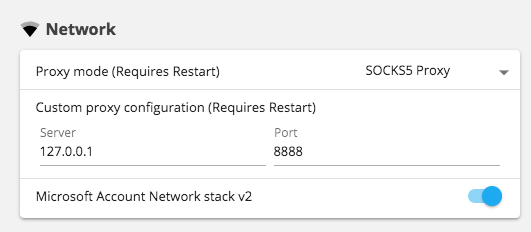
Alternatively, if you find yourself locked out of the app on-launch you can change the proxy settings from the connection screen too.
If you want to give it a try there are some instructions on how to use the beta channel here. Thanks
Thomas101
on 7 Mar 2019
It works well.
Thanks very much.
I wish you a happy life.
remmina
on 8 Mar 2019
Thanks, for implementation, does it allow to set per-service proxy, or only one for all services?
 MurzNN
on 22 Mar 2019
MurzNN
on 22 Mar 2019
@MurzNN only for all services at the moment
Thomas101
on 22 Mar 2019
Related issues
 cdeutsch
·
3Comments
Thomas101
·
3Comments
cdeutsch
·
3Comments
Thomas101
·
3Comments
 dctucker
·
4Comments
dctucker
·
4Comments
 phileasb
·
3Comments
phileasb
·
3Comments
 Ash258
·
3Comments
Ash258
·
3Comments
Most helpful comment
It works well.
Thanks very much.
I wish you a happy life.