Waveboxapp: Gmail offline browser notifications show despite being disabled
- Wavebox Version: 4
- Operating System & Version: osx 10.12.6
- Account type (if applicable): gmail
Expected & actual behavior
Notifications from Gmail show up in the OSX notifications center even though notifications are completely disabled in Wavebox settings. I tested this with the experimental and regular notification provider.
Is the bug persistent or intermittent?
Persistent.

 jlhjlh
All 23 comments
Hi, thanks for reporting. I'm having a little bit of trouble reproducing this, it would be great to have little more info so I can see if I can get to the bottom of it.
Would you be able to send a screenshot of the notification settings under the gmail account, e.g.
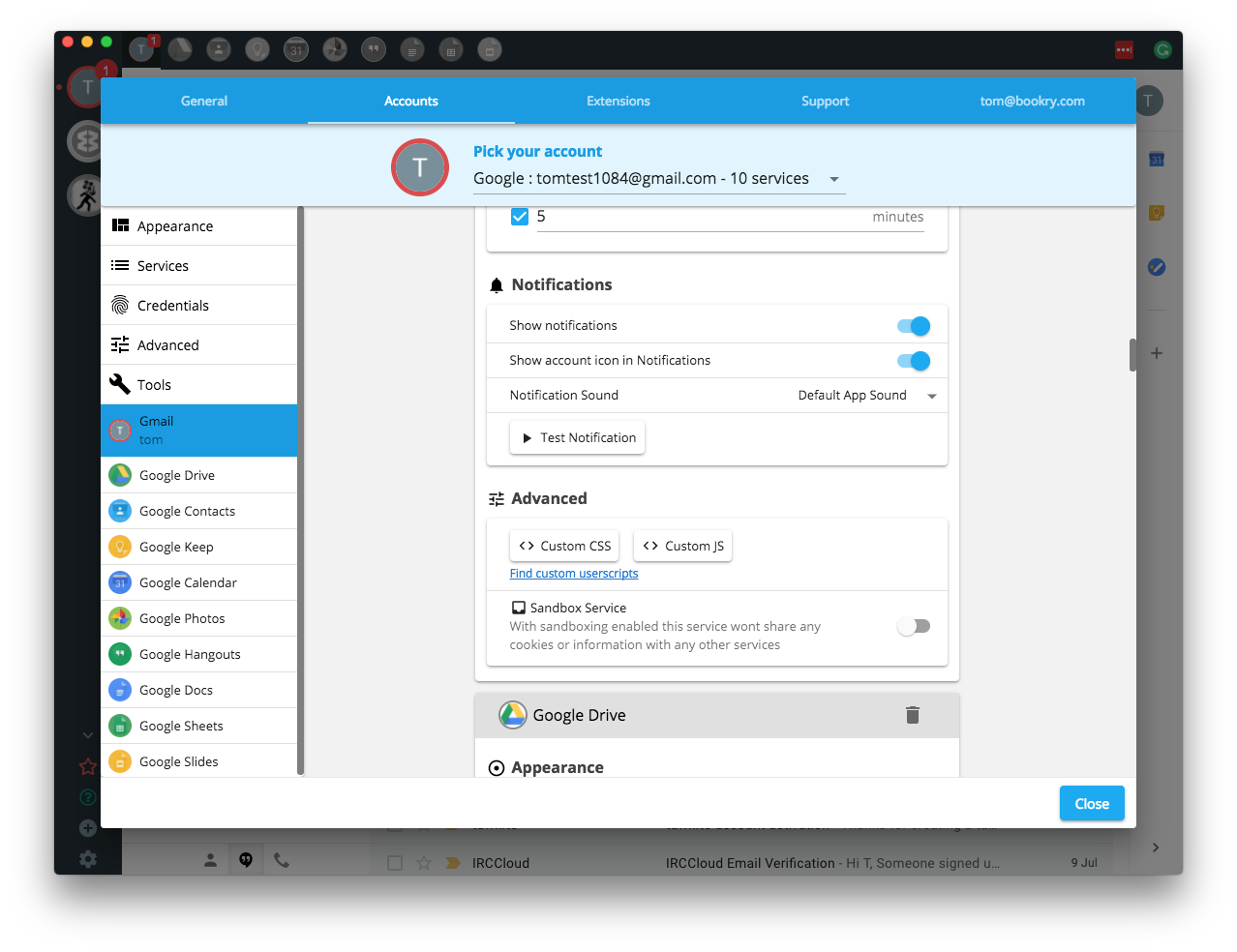
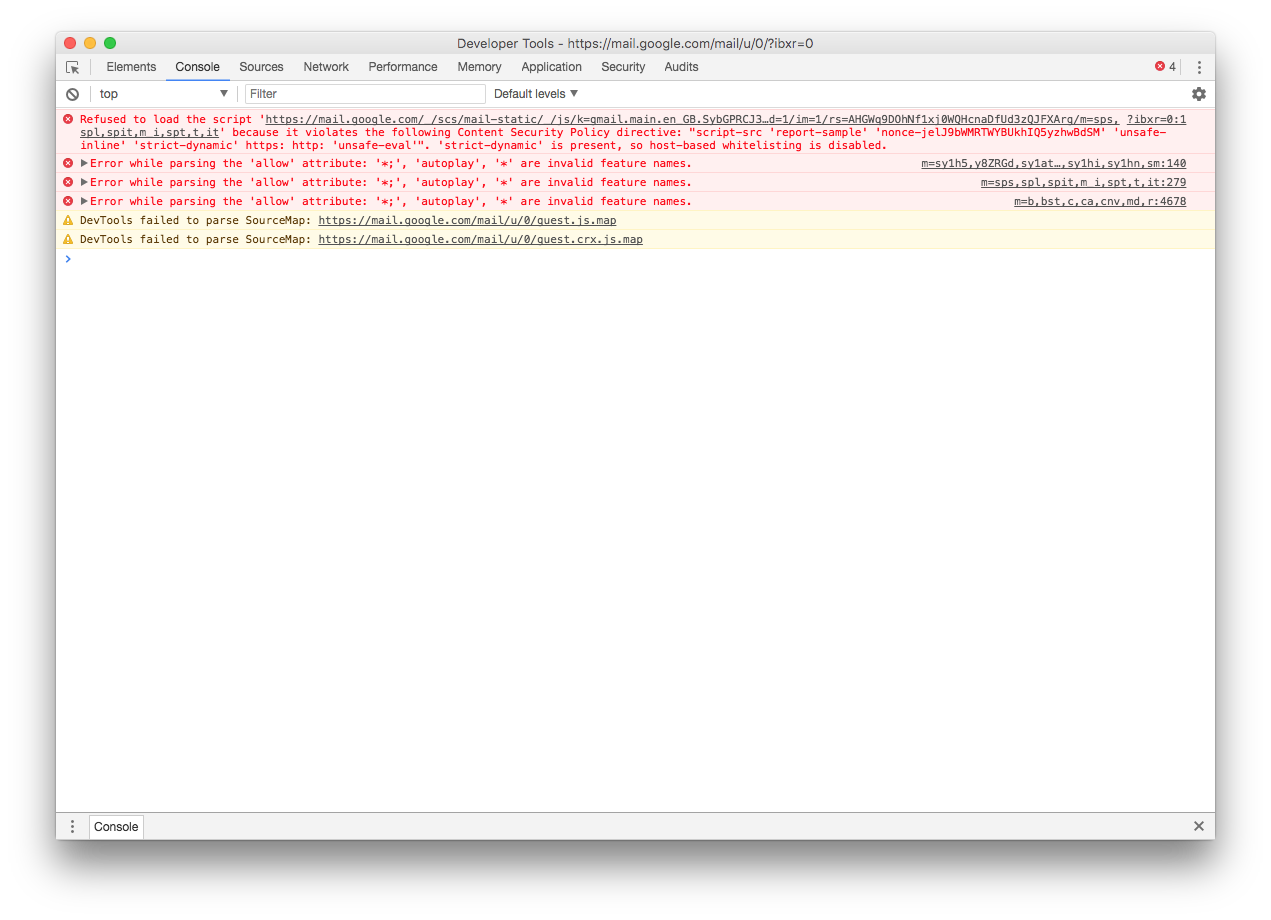
Would you also be able to take a look under the developer tools to see if any errors have come up in the Gmail window. You can do this by doing the following
- Reload your Gmail tab by right clicking on the icon in the left sidebar then
Reload - Right clicking anywhere in the Gmail window and pick
Inspect - In the window that appears, click on the
consoletab and send a screenshot. It should look something like this...
- Reload your Gmail tab by right clicking on the icon in the left sidebar then
Thanks
 Thomas101
on 11 Sep 2018
Thomas101
on 11 Sep 2018
for me, I get slack notifications. Even though currently in slack tab talking to the person im getting notifications for.
 jcarroll-mediafly
on 12 Sep 2018
jcarroll-mediafly
on 12 Sep 2018
@jlhjlh we think we've found the bug. Can you try this to see if it fixes it for you...
- Quit Wavebox
- Remove the
~/Library/Application Support/wavebox/notification_permissions.records - Start Wavebox back up again
@jcarroll-mediafly this one's unrelated, but there's a fix in the code already (84958fb5d60cb61068b348ee93753bd646ab6676) and should be out in a new version early next week. Sorry about the duplicates!
Thomas101
on 13 Sep 2018
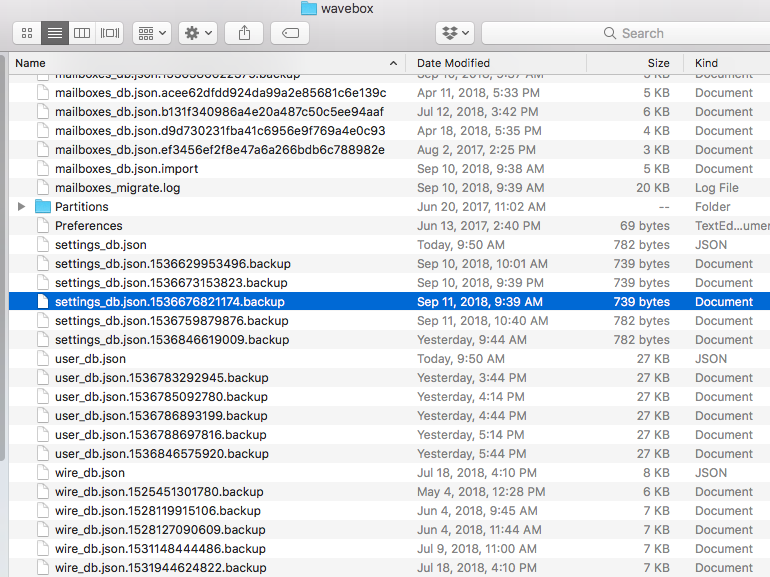
Hi. Thanks for writing me back.
That file does not exist for me:
 jacobcrp
on 13 Sep 2018
jacobcrp
on 13 Sep 2018
@jacobCRP are you seeing the same issue as jcarroll-mediafly or jlhjlh?
Thomas101
on 13 Sep 2018
Yes. They're both my accounts. I responded with the wrong account.
jacobcrp
on 13 Sep 2018
I am jlhjlh. And it happens on my work and home computer.
On Thu, Sep 13, 2018 at 12:33 PM jacobCRP notifications@github.com wrote:
Yes. They're both my accounts. I responded with the wrong account.
—
You are receiving this because you were mentioned.
Reply to this email directly, view it on GitHub
https://github.com/wavebox/waveboxapp/issues/780#issuecomment-421069970,
or mute the thread
https://github.com/notifications/unsubscribe-auth/AKKyAFXM_67iuJ5wqwIyrm0D-qvCgHU8ks5uaojjgaJpZM4WhfTb
.
jlhjlh
on 13 Sep 2018
@jacobCRP there's a fix in the next release for the slack notifications
@jlhjlh did you try removing the file mentioned in https://github.com/wavebox/waveboxapp/issues/780#issuecomment-420944444 ?
Thomas101
on 14 Sep 2018
Hi. I'm both jljlh and jacobCRP. The file doesn't exist on either of my
systems to remove.
On Fri, Sep 14, 2018 at 6:24 AM, Thomas Beverley notifications@github.com
wrote:
@jacobCRP https://github.com/jacobCRP there's a fix in the next release
for the slack notifications@jlhjlh https://github.com/jlhjlh did you try removing the file
mentioned in #780 (comment)
https://github.com/wavebox/waveboxapp/issues/780#issuecomment-420944444
?—
You are receiving this because you were mentioned.
Reply to this email directly, view it on GitHub
https://github.com/wavebox/waveboxapp/issues/780#issuecomment-421310935,
or mute the thread
https://github.com/notifications/unsubscribe-auth/ARTwDNavRl5ts7psm5g-0DTaGe18w78pks5ua4PagaJpZM4WhfTb
.
jacobcrp
on 14 Sep 2018
Sorry my confusion! Looks like the permission thing that I was looking at before isn't the cause then.
If you head into your Gmail settings via the cog in the top right of the gmail tab....
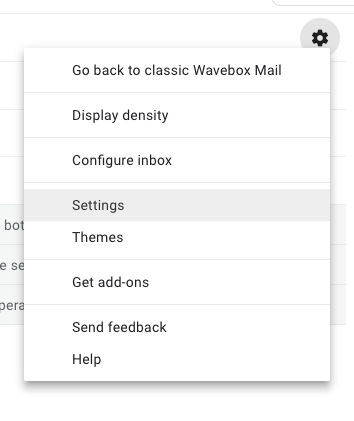
...and then scroll down to Desktop Notifications, which setting is selected? Do you see the _Notifications have been disabled in this browser_ message as highlighted?

Thomas101
on 14 Sep 2018
It's enabled.
Disabling now:
On Fri, Sep 14, 2018 at 10:32 AM, Thomas Beverley notifications@github.com
wrote:
Sorry my confusion! Looks like the permission thing that I was looking at
before isn't the cause then.If you head into your Gmail settings via the cog in the top right of the
gmail tab....
[image: screen shot 2018-09-14 at 15 28 50]
https://user-images.githubusercontent.com/103586/45556425-26e22d80-b833-11e8-9f26-cc9c5046bc4a.png
...and then scroll down to Desktop Notifications, which setting is
selected? Do you see the Notifications have been disabled in this
browser message as highlighted?
[image: screen shot 2018-09-14 at 15 29 03]
https://user-images.githubusercontent.com/103586/45556435-2a75b480-b833-11e8-8d23-54c2b6c96780.png—
You are receiving this because you were mentioned.
Reply to this email directly, view it on GitHub
https://github.com/wavebox/waveboxapp/issues/780#issuecomment-421377208,
or mute the thread
https://github.com/notifications/unsubscribe-auth/ARTwDMGHAMnAlRZYABGbi5E7bQ4fSlZgks5ua73kgaJpZM4WhfTb
.
jacobcrp
on 14 Sep 2018
Okay. Did you have the Notifications have been disabled in this browser message?
Disabling them isn't a "real" solution as it will disable them if you use Gmail in any other browser. Wavebox should be blocking them by default...
Thomas101
on 14 Sep 2018
Yes, I did receive it. And I don't like notifications in any browser so
that's fine. Still, it's a bug.
On Fri, Sep 14, 2018 at 10:41 AM, Thomas Beverley notifications@github.com
wrote:
Okay. Did you have the Notifications have been disabled in this browser
message?Disabling them isn't a "real" solution as it will disable them if you use
Gmail in any other browser. Wavebox should be blocking them by default...—
You are receiving this because you were mentioned.
Reply to this email directly, view it on GitHub
https://github.com/wavebox/waveboxapp/issues/780#issuecomment-421380266,
or mute the thread
https://github.com/notifications/unsubscribe-auth/ARTwDFGiWnVKPooIJlMutQ8rkrX6SfeTks5ua8A3gaJpZM4WhfTb
.
jacobcrp
on 14 Sep 2018
@jcarroll-mediafly the issue with the Slack notifications has just been released in the latest version of Wavebox (4.1.0)
@jacobCRP still looking into the Gmail notifications and will update shortly
Thomas101
on 17 Sep 2018
For the original issue, this looks to be isolated to Gmail when a certain configuration is used.
I've added a KB article with some more information and some workarounds until we have a more permanent fix
Thomas101
on 18 Sep 2018
Thank you.
On Tue, Sep 18, 2018 at 9:37 AM, Thomas Beverley notifications@github.com
wrote:
For the original issue, this looks to be isolated to Gmail when a certain
configuration is used.I've added a KB article
https://wavebox.io/kb/duplicate-gmail-notifications with some more
information and some workarounds until we have a more permanent fix—
You are receiving this because you were mentioned.
Reply to this email directly, view it on GitHub
https://github.com/wavebox/waveboxapp/issues/780#issuecomment-422395976,
or mute the thread
https://github.com/notifications/unsubscribe-auth/ARTwDG8j5vTL75Gd1ao9Hyy61NjKiIG5ks5ucPccgaJpZM4WhfTb
.
jacobcrp
on 18 Sep 2018
I've having this issue on 4.4.0 with MacOS: no notifications. I am using new style gmail, Gmail notifications are switched off in Gmail settings, offline is disabled.
I have notifications enabled in Wavebox and when I press the Test Notification button nothing happens with both Default and Enhanced.
Any ideas how to get them working? They worked fine up until recently. Is it a 4.4.0 issue?
_(I also tried deleting ~/Library/Application Support/wavebox/notification_permissions.records to no avail)_
 texelate
on 25 Oct 2018
texelate
on 25 Oct 2018
Turns out my issues was fixed by a restart. I'll post back if it returns.
texelate
on 29 Oct 2018
FYI I'm having a related but slightly different issue:
- No offline mode enabled
- GMail notifications disabled from GMail
- Notifications enabled in Wavebox
But I still receive Wavebox notifications for my GMail account.
There's an easy workaround for me - disabling the Wavebox notifications for the GMail account only - but hopefully helpful as a case regardless
 max-sixty
on 21 Mar 2019
max-sixty
on 21 Mar 2019
@max-sixty the notification setting in Gmail itself will have no effect as Wavebox pulls the notifications separately so it can continue providing notifications when the account is not running :)
Thomas101
on 22 Mar 2019
Thanks as ever @Thomas101
max-sixty
on 22 Mar 2019
Sorry if this is OT, but is offline browsing supported in gmail and Gdocs? It looks to me like Wavebox doesn't support the necessary plugin, am I wrong? Happy to file a separate issue if that's the right way
 atrasatti
on 5 Aug 2019
atrasatti
on 5 Aug 2019
@atrasatti Gmail offline is, but Google Docs isn't right now (working on an autumn release for that). If you want to track that specifically, feel free to open a new issue - I don't think there's a specific one right now
Thomas101
on 6 Aug 2019
Related issues
 CheechGe
·
4Comments
CheechGe
·
4Comments
 cdeutsch
·
3Comments
cdeutsch
·
3Comments
 tnaseem
·
4Comments
tnaseem
·
4Comments
 dctucker
·
4Comments
dctucker
·
4Comments
 phileasb
·
3Comments
phileasb
·
3Comments