Waveboxapp: Wavebox takes minutes to load gmail
- Wavebox Version: [e.g. 3.0.0]
4.7.1 - Operating System & Version: [e.g. Windows 10, Mac OSX 10.3.4, Ubuntu 17.10]
Windows 10 - (Linux only) Install method: [e.g. Debian installer, Snap Package, Tar, Apt-Repo, etc...]
- Account type (if applicable): [e.g. Gmail, Office 365, Trello, etc...]
Gmail
Expected & actual behavior
Some information about what you expect to happen and what actually happens.
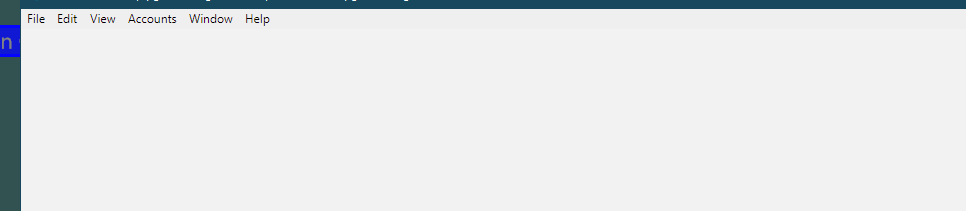
Since this latest release it sometimes takes 5 minutes to load my gmail account. After it loads the first time if WB is minimized and then maximized it goes through the same process. this only started since this latest update. After WB is maximized the only thing that appears is the menu bar. The rest of the screen is blank until it finally loads up.
Steps to reproduce
Are there any steps that we can take to reproduce the bug?
explained above
Is the bug persistent or intermittent?
Do you only see it sometimes or does it always happen?
Everytime
Screenshots
Screenshots often help us narrow down a bug more easily.
Additional information
Add any other context about the problem here.
 CheechGe
All 4 comments
Thanks for reporting, I think this is an issue that causes the window to not repaint correctly on some machine configurations. We've got a proper fix coming for this our beta channel shortly.
In the meantime there are a couple of things to try, each in turn as the first one of these normally works...
- Under Settings > Advanced, enable
Force window repaint on restore - Under Settings > Advanced, disable
Hardware Acceleration
Failing that, does if it happens again, does resizing the window make it render again?
 Thomas101
on 15 Feb 2019
Thomas101
on 15 Feb 2019
Hi Thomas
I tried your first 2 suggestions independently and neither of them worked
so I set them back to their original settings. Resizing the window does
cause the window to repaint. After I submitted the bug report I had
noticed that playing around with the window did cause it to repaint. I
thought it happened when I just moved the window but it is possible that I
had inadvertently resized it in the process.
Thanks,
Frank
On Fri, Feb 15, 2019 at 9:39 AM Thomas Beverley notifications@github.com
wrote:
Thanks for reporting, I think this is an issue that causes the window to
not repaint correctly on some machine configurations. We've got a proper
fix coming for this our beta channel shortly.In the meantime there are a couple of things to try, each in turn as the
first one of these normally works...
- Under Settings > Advanced, enable Force window repaint on restore
- Under Settings > Advanced, disable Hardware Acceleration
Failing that, does if it happens again, does resizing the window make it
render again?—
You are receiving this because you authored the thread.
Reply to this email directly, view it on GitHub
https://github.com/wavebox/waveboxapp/issues/939#issuecomment-464072817,
or mute the thread
https://github.com/notifications/unsubscribe-auth/ADfAB2eCQOyZNCa9d3vagoYraC0384KOks5vNsa4gaJpZM4a9uZ8
.
CheechGe
on 15 Feb 2019
At first blush the 4.7.2 update that just came out appears to have fixed the repaint problem. Please leave the ticket open for a few more days if possible and I will close it out if no more problems occur.
Thank you, good job.
CheechGe
on 16 Feb 2019
Let me know if this comes up again - I'll close it off for now :)
Thomas101
on 25 Feb 2019
Related issues
 dzg
·
4Comments
dzg
·
4Comments
 phileasb
·
3Comments
phileasb
·
3Comments
 lots0logs
·
3Comments
lots0logs
·
3Comments
 yermulnik
·
3Comments
yermulnik
·
3Comments
 MichaelTunnell
·
4Comments
MichaelTunnell
·
4Comments
Most helpful comment
At first blush the 4.7.2 update that just came out appears to have fixed the repaint problem. Please leave the ticket open for a few more days if possible and I will close it out if no more problems occur.
Thank you, good job.