Waveboxapp: Feature Request: Specify default browser for different accounts
Which version of Wavebox are you using?
3.1.12Which Operating System are you using?
MacOS 10.12.6 Beta (16G18a)
A feature which would allow you to specify the default browser used for different accounts would be immensely helpful to me. For my separate work/personal accounts, I use a different browser loaded up with my tabs/bookmarks/etc.
Right now:
- If I click a link in Wavebox in my personal account, it opens the system default browser (great).
- If I click a link in Wavebox in my work account, it also opens the system default browser (not so great).
Desired:
- Optionally specify a browser executable (with or without extra parameters) in each account's settings. Use this browser for external links which are opened inside that account's containers.
Most apps seem to open in the "last active" browser window, which isn't perfect but I've grown accustomed to. Wavebox always opens in the system default, no matter what.
Clearly, when I simply had my Inbox session open in each browser separately, this wasn't an issue that needed addressing because all links were opened natively.
 signe
signe
All 12 comments
Hi, it's a bit tricky to pick the browser for each link open, however we could give the option to open links in Wavebox browser windows (keeping the context). So if you're logged into your accounts in those sessions it will carry through to the open pages.
We could do this either through a per account configuration option, context menu or both. Would this help with your workflow?
 Thomas101
on 29 Jun 2017
Thomas101
on 29 Jun 2017
hi @Thomas101 from my point of view the context menu is a minimum that could permits me to open links associated with a Google.accounts context (inside Wavebox) with a specific browser (Chrome) different from the default browser.
Of course if you permit us to do it per account it could be better because if I could add a contexte at the browser launch (like a session) and be able to open links of each Google accounts (inside Wavebox) in the right browser context !
 iopsthecloud
on 10 Jul 2017
iopsthecloud
on 10 Jul 2017
This would still be really useful. Using something like opn to open external links instead of Electron's shell.openExternal would probably make it easier to implement.
 jason0x43
on 26 Sep 2017
jason0x43
on 26 Sep 2017
Was there any progress on this? Would be very helpful. When I go to join a hangouts via my personal account it opens in chrome where I'm logged in with my work account and I get access denied. I use chrome for work, and firefox for personal. Would be nice to have my personal open with firefox.
 ghost
on 22 Mar 2018
ghost
on 22 Mar 2018
Hi, it's a bit tricky to pick the browser for each link open...
I, at least, am looking for a per-account browser option, not a per-site or per-link option. So, right now I can tell an account to open all links in either a desktop browser or the WaveBox browser. It'd be nice if there were simply additional options at the account level. Like, use Firefox for all links in my work Slack account, and the WaveBox browser for all links opened from my Twitter account.
jason0x43
on 23 Mar 2018
The new "per account" choice of internal vs. external browser is a partial fix, but it really needs to have the option to select a different (non-system default) browser as well.
signe
on 25 Jan 2019
Hi, we've been working on this and have added some tools into the beta channel in version 4.5.12. If you want to give it a try, instructions here.
As this is more of an advanced feature, it requires a little bit of setup. I think it should give enough tooling to setup the workflow you're after though.
To add a Custom Link Opener, go to the Settings > Links section. From here, you can add a new blank opener or use and edit one of the examples...
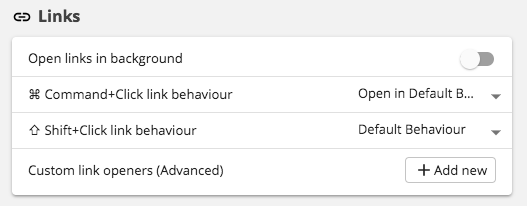
When editing, you're basically setting up a shell command that gets run in the background, so it's a case of setting the command and a number of arguments. In this example, it opens Firefox on macOS. The examples are specific to each platform, so should give a general idea of how to setup.

Once you've created an opener, it will appear in the Window Open Ask popup which was added this release. (Side note, if you've manually set the Window open behaviour for an account, you'll need to change this to Ask under Account Settings > Links).
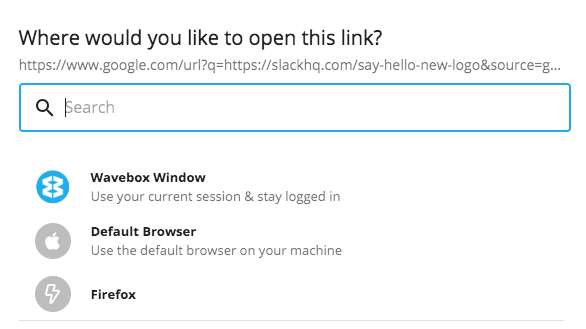
The Ask popup also allows you set this as the behaviour to run everytime, or the behaviour to run everytime based on target urls. There's more discussion around this here... #428
With this, it should let you set certain accounts to open in certain browser, or with browser profiles, or do either of those for a subset of links. Let me know if you've got any feedback on this!
Thanks
Thomas101
on 5 Feb 2019
Nice! I tried this out this morning, and it works very well.
From a usability perspective it'd be nice if the custom browsers showed up in the account Links settings (along with Default and Wavebox) rather than having to go through the "Ask each time" process.
jason0x43
on 5 Feb 2019
From a usability perspective it'd be nice if the custom browsers showed up in the account Links settings (along with Default and Wavebox) rather than having to go through the "Ask each time" process.
@jason0x43 yep I agree!
Thomas101
on 5 Feb 2019
@jason0x43 that's just gone out in 4.5.14 beta :)
Thomas101
on 5 Feb 2019
I finally got a chance to play with this for the first time today because I've been recovering from surgery —
Knowing that this is a feature for advanced users, I think the way that this is performing in beta currently (4.6.1beta) looks great and accomplishes exactly what I needed in the feature request. I can keep my work and personal data separate without always having to copy and paste links, or end up logged in with the wrong account in the wrong browser.
Thanks, @Thomas101 !
Ready to close once it's released to stable, IMO.
signe
on 11 Feb 2019
I finally got a chance to play with this for the first time today because I've been recovering from surgery
@signe hope you're alright!
This has just gone out in the latest stable 4.7.0. Thanks!
Thomas101
on 12 Feb 2019
Related issues
 lots0logs
·
3Comments
lots0logs
·
3Comments
 CheechGe
·
4Comments
CheechGe
·
4Comments
 Ash258
·
3Comments
Ash258
·
3Comments
 cdeutsch
·
3Comments
cdeutsch
·
3Comments
 Tahini-123
·
4Comments
Tahini-123
·
4Comments