Vscode-pull-request-github: API: Cannot sign in with VSCodium URI
Hello,
I use Codium. The sign in/authentication API prevents me from signing in with Codium's URI, contrary to VS Code's URI. I've already authenticated the plugin with my account here. The API doesn't like the vscodium:// URI, contrary to the vscode:// URI, as shown in this GIF:

The API will let me through with the vscode:// API with an 801 code (I don't have VS Code installed), and it forbids me if I use the vscodium:// URI with Forbidden.
I got to this page from the GitHub Pull Requests: Sign In command - it redirected me here from this editor. This is the link to authenticate, with state and windowId redacted:
https://vscode-auth.github.com/authorize/?callbackUri=vscodium://github.vscode-pull-request-github/did-authenticate%253F...&scope=read:user%20user:email%20repo%20write:discussion&responseType=code&authServer=https://github.com/
The callback URI differs:
+ ✔️ (-> 801)       ?callbackUri=vscode://github.vscode-pull-request-github/did-authenticate
- ❌ (-> Forbidden) ?callbackUri=vscodium://github.vscode-pull-request-github/did-authenticate
If it helps, I'm using Codium as a portable binary, and I opened the link with it running in the background.
(Also, this shouldn't have anything to do with my container tabs.)
Extension version: 0.15.0
VS Code version: VSCodium 1.44.2 (ff915844119ce9485abfe8aa9076ec76b5300ddd, 2020-04-18T10:22:21.470Z) - portable binary
OS version: Windows_NT x64 10.0.18362
Process Argv: --enable-proposed-api GitHub.vscode-pull-request-github
 7automaton
All 18 comments
I figured out how to workaround this issue.
- Go to your user settings on github.com, then go into Developer > Personal access tokens.
- Click "generate new token".
- Call the token whatever you want, like "VS Codium GitHub Pull Requests plugin token".
- Scroll down and check the following boxes:
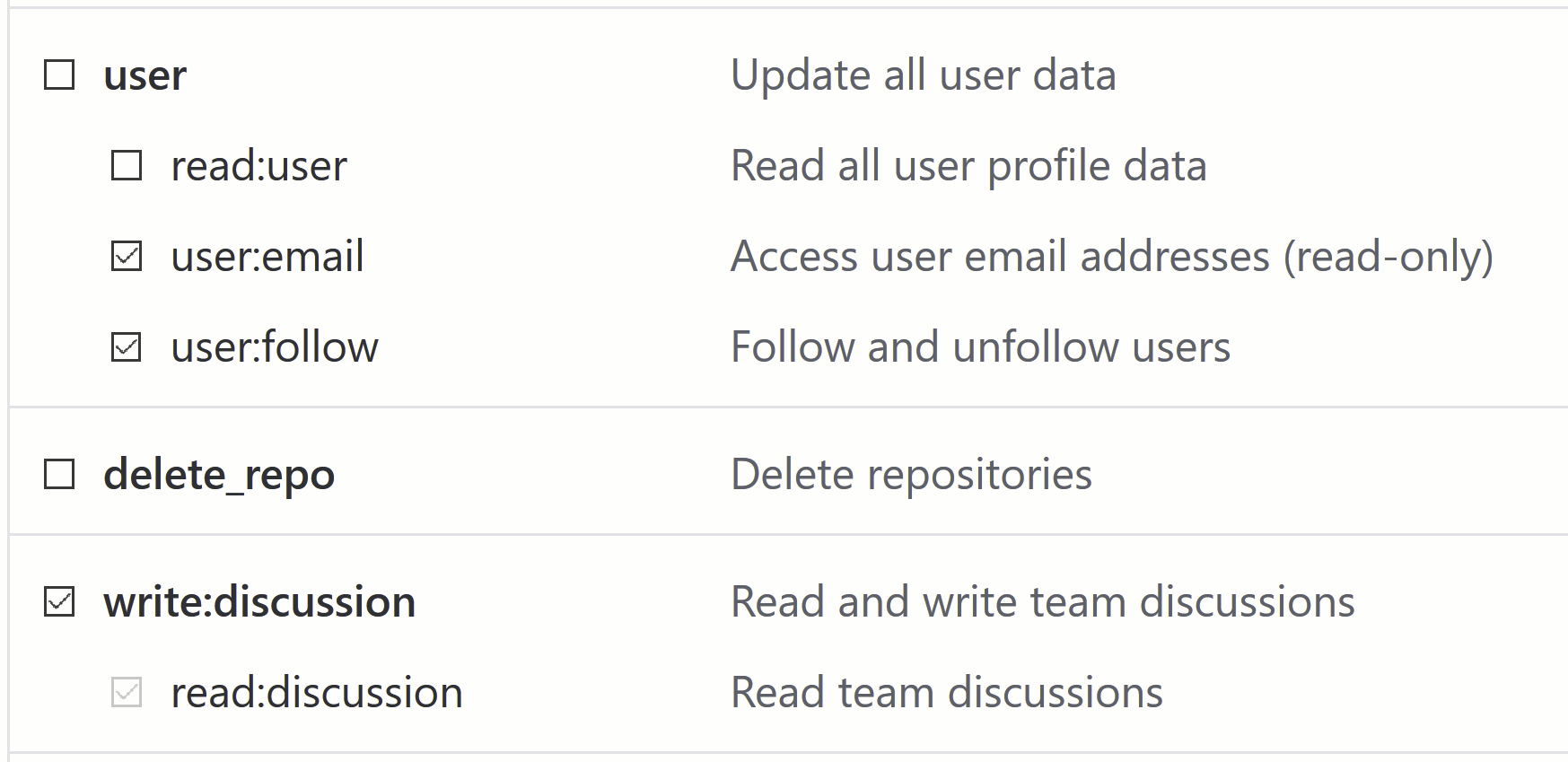
- Click generate token.
- Copy the token ID when you're told to, and keep it in your clipboard. Like it says, you won't be able to find it again.
- Enter VS Codium with the plugin installed. Click the "Sign in" button located on the bottom status bar. If a dialogue opens to redirect you to a website, hit cancel. Then click the sign in button again. A "Token" text field should appear.
- Paste your token into that text field, and press enter. Then for the host, type github.com.
- It should authenticate you into the plugin.
This is more of a temporary workaround while the frontend for doing this through the website won't work.
7automaton
on 8 May 2020
After trying your solution this is the response i get from GitHub Authentication Provider: "The input did not matched the expected format".
VSCodium version: 1.45.0
GitHub PullRequests version: 0.16.0
 soszilla
on 13 May 2020
soszilla
on 13 May 2020
I also have this problem, is there some way to enter the token manually in a config file or settings? If not, how can I configure the git command to use a token for all https requests to github?
 zyansheep
on 14 May 2020
zyansheep
on 14 May 2020
I can also confirm this problem as reported by @7automaton and mentioned by @marcorichetta in this issue.
My environment:
- OS: RHEL 8.2 (Gnome 3.32.2 in Xorg mode with Linux kernel 4.18.0)
- Architecture: x86_64
- VSCodium version: 1.45.0 (no Github extensions, just vanilla git support)
This is a jarring UX problem. How can we help fix it?
 penyuan
on 15 May 2020
penyuan
on 15 May 2020
I changed the link:
https://vscode-auth.github.com/authorize/?callbackUri=vscodium://github.vscode-pull-request-github/did-authenticate%[other parts]
to
https://vscode-auth.github.com/authorize/?callbackUri=vscode://github.vscode-pull-request-github/did-authenticate%[other parts]
(The callback part from vscodium to vscode)
then a get the link for when you are not redirected:
vscode://vscode.github-authentication/did-authenticate?[other parts]
and change the vscode part again to vscodium:
vscodium://vscode.github-authentication/did-authenticate?[other parts]
then I past it in the browser and it works. :)
Sorry for my english. Its a work in progress. Feel free to correct me.
 DanielCostaCarvalho
on 17 May 2020
DanielCostaCarvalho
on 17 May 2020
Sorry @DanielCostaCarvalho I don't understand your workaround.
I changed the link:
https://vscode-auth.github.com/authorize/?callbackUri=vscodium://github.vscode-pull-request-github/did-authenticate%[other parts]
Where do you do this?
(The callback part from vscodium to vscode) then a get the link for when you are not redirected:
What does this mean?
penyuan
on 18 May 2020
When I try to authenticate, I changed the URI like the GIF, but when a changed the mention of vscode, I am redirected to a new page saying that I am not redirected back to the vscode. In this page, they give me a token, this token is a URI that I changed vscode for vscodium and paste it in my browser.
DanielCostaCarvalho
on 18 May 2020
@DanielCostaCarvalho that worked but I had to use a browser session where I was not logged in to Github already.
soszilla
on 20 May 2020
Sorry @DanielCostaCarvalho I don't understand your workaround.
I changed the link:
https://vscode-auth.github.com/authorize/?callbackUri=vscodium://github.vscode-pull-request-github/did-authenticate%[other parts]Where do you do this?
After clicking "Sign in" from inside vscodium, that link is opened in your browser. Change "vscodium" to "vscode" in the URL and proceed with authorization.
(The callback part from vscodium to vscode) then a get the link for when you are not redirected:
What does this mean?
After auth you will receive a token in which you should change "vscode" to "vscodium".
Also note my comment above, it might be relevant to you as well.
soszilla
on 20 May 2020
@DanielCostaCarvalho's solution works! This needs to be fixed on https://vscode-auth.github.com/ as it seems to be denying requests for vscodium.
 whizzzkid
on 21 May 2020
whizzzkid
on 21 May 2020
@marcorichetta over in this issue provided a graphical step-by-step walkthrough of the workaround, and it worked for me. I suspect @DanielCostaCarvalho was describing a similar process, sorry but I just wasn't able to understand the text of their description.
Anyway, I hope this issue can be solved more systematically so that this hacky workaround wouldn't be necessary.
penyuan
on 3 Jun 2020
This extension doesn't officially support anything other than VS Code.
 alexr00
on 11 Nov 2020
alexr00
on 11 Nov 2020
This extension doesn't officially support anything other than VS Code.
If you are not for it, it doesn't hurt to not be against it.
 jtagcat
on 11 Nov 2020
jtagcat
on 11 Nov 2020
I changed the link:
[https://vscode-auth.github.com/authorize/?callbackUri=vscodium://github.vscode-pull-request-github/did-authenticate%[other](https://vscode-auth.github.com/authorize/?callbackUri=vscodium://github.vscode-pull-request-github/did-authenticate%%5Bother) parts]
to
[https://vscode-auth.github.com/authorize/?callbackUri=vscode://github.vscode-pull-request-github/did-authenticate%[other](https://vscode-auth.github.com/authorize/?callbackUri=vscode://github.vscode-pull-request-github/did-authenticate%%5Bother) parts]
(The callback part from vscodium to vscode)
then a get the link for when you are not redirected:vscode://vscode.github-authentication/did-authenticate?[other parts]
and change the vscode part again to vscodium:
vscodium://vscode.github-authentication/did-authenticate?[other parts]
then I past it in the browser and it works. :)
Sorry for my english. Its a work in progress. Feel free to correct me.
-> Obrigado pela sua ajuda! Isto resolveu o meu problema!
-> Thanks for your help! This solved my problem!
 WernerLuiz92
on 11 Feb 2021
WernerLuiz92
on 11 Feb 2021
@alexr00
This extension doesn't officially support anything other than VS Code.
VSCodium is the Open Source version of Visual Studio Code with slightly differing build instructions.
It is NOT:
1) a patchset
2) a fork
3) a different project
Microsoft says they _love_ open source. Are they also willing to back it up by allowing the open source version (which is officially maintained by Microsoft), community-driven binary releases of it (f.e. code, available from all kinds of official FOSS software repositories) and VSCodium (a precompiled, binary build of MICROSOFTS OSS Visual Studio Code) to also have access to official integrations, such as the one with GitHub? I think it is unreasonable to treat anything that isn't Microsofts branded proprietary release from their homepage as unsupported.
As a side note, I don't think this is an issue with this extension, but with GitHub not allowing other types of editors to request PAT tokens. Try opening an issue there instead.
 GitGangGuy
on 8 Mar 2021
GitGangGuy
on 8 Mar 2021
@GitGangGuy So should the extension contributors raise that ticket with Github?
Would it solve perhaps if vscodium or extension is registered as an OAuth app? with supposed application name as vscodium and callback URL vscodium://github.vscode-pull-request-github/did-authenticate
Unless these conditions are met OAuth would fail I think.
 pmahend1
on 17 Mar 2021
pmahend1
on 17 Mar 2021
I switch from kali to parrot, then vscodium is pre-installed in it. I cannot even open account option to sign in. Then uninstalled vscodium and installed visual studio code by
sudo apt purge vscode
sudo apt purge vscodium
sudo apt purge codium
I installed VSC in .deb format and installed using
sudo apt install ./filename.deb
It is now working!!!
 ibrahimaroosi
on 2 Apr 2021
ibrahimaroosi
on 2 Apr 2021
I changed the link:
[https://vscode-auth.github.com/authorize/?callbackUri=vscodium://github.vscode-pull-request-github/did-authenticate%[other](https://vscode-auth.github.com/authorize/?callbackUri=vscodium://github.vscode-pull-request-github/did-authenticate%%5Bother) parts]
to
[https://vscode-auth.github.com/authorize/?callbackUri=vscode://github.vscode-pull-request-github/did-authenticate%[other](https://vscode-auth.github.com/authorize/?callbackUri=vscode://github.vscode-pull-request-github/did-authenticate%%5Bother) parts]
(The callback part from vscodium to vscode)
then a get the link for when you are not redirected:vscode://vscode.github-authentication/did-authenticate?[other parts]
and change the vscode part again to vscodium:
vscodium://vscode.github-authentication/did-authenticate?[other parts]
then I past it in the browser and it works. :)
Sorry for my english. Its a work in progress. Feel free to correct me.
Thanks! This worked for me
 unexploredtest
on 10 Apr 2021
unexploredtest
on 10 Apr 2021
Related issues
 erihanse
·
4Comments
erihanse
·
4Comments
 dbaeumer
·
4Comments
dbaeumer
·
4Comments
 Tyriar
·
4Comments
Tyriar
·
4Comments
 alexdima
·
3Comments
alexdima
·
3Comments
 kieferrm
·
4Comments
kieferrm
·
4Comments
Most helpful comment
I changed the link:
to
(The callback part from vscodium to vscode)
then a get the link for when you are not redirected:
and change the vscode part again to vscodium:
then I past it in the browser and it works. :)
Sorry for my english. Its a work in progress. Feel free to correct me.