Vscode-jupyter: python.dataScience.textOutputLimit does not work
This setting does not work. I get the message below. I have already set it to 0 but still the same message. I also increased max output size already.
Output was trimmed for performance reasons.
To see the full output set the setting "python.dataScience.textOutputLimit" to 0.
...
 simonm3
All 5 comments
We should investigate.
 greazer
on 14 May 2020
greazer
on 14 May 2020
I had the same issue. For me, this setting actually changes the behaviour, but the message persists even when the output is not actually truncated if the cell is marked so once.
I opened the notebook file in a different editor and manually removed outputPrepend tags, then the message went away. Maybe related to microsoft/vscode-python#11726.
 kkadowa
on 15 May 2020
kkadowa
on 15 May 2020
Hi, how do you actually set the python.dataScience.textOutputLimit to 0 ?
I can't find where/how to do it, thanks.
 fabrizioschiano
on 25 May 2020
fabrizioschiano
on 25 May 2020
@fabrizioschiano you can type that into your settings.json or use the settings UI in vscode to set it:
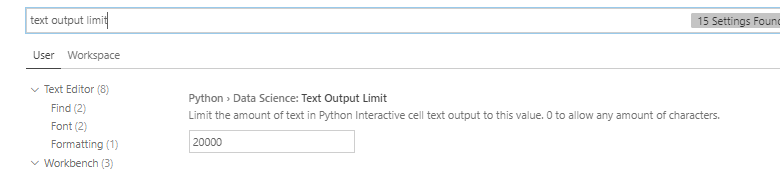
 rchiodo
on 26 May 2020
rchiodo
on 26 May 2020
This issue should be fixed with commit https://github.com/microsoft/vscode-python/pull/11871
greazer
on 28 May 2020
Related issues
greazer
·
64Comments
 collinmccarthy
·
103Comments
collinmccarthy
·
103Comments
 craph
·
39Comments
craph
·
39Comments
 Louis-DR
·
61Comments
Louis-DR
·
61Comments
 rannirabadi
·
37Comments
rannirabadi
·
37Comments