Vscode-jupyter: Jupyter kernel cannot be started from 'Python 3.7.0 64-bit ('env': venv)'. Using closest match Python 3.7.2 64-bit instead.
I'm getting this error message when I try to run file in Python Interactive:

rchiodo suggested adding ipykernel, which I did do:
_Originally posted by @rchiodo in https://github.com/Microsoft/vscode-python/issues/3579#issuecomment-445995665_

but that didn't work
 rannirabadi
All 37 comments
I believe that warning is actually out of date. I believe it's attempting to run 'python -m jupyter notebook --version' and that's failing in your 'env' environment.
If you goto Help | Toggle Developer Tools, click on the Console tab, and right click and pick "Save As", I can look at the log to make sure. It should show us attempting different python modules in the different environments.
 rchiodo
on 11 Apr 2019
rchiodo
on 11 Apr 2019
Please see log attached
rannirabadi
on 12 Apr 2019
Yeah it's not finding the notebook module in your main environment, so it's falling back on one that has. The first error is this:
workbench.main.js:sourcemap:235 [Extension Host] Python Extension: getActivatedEnvironmentVariables, Class name = b, Arg 1: undefined, Arg 2: {"architecture":3,"path":"c:\33Bondi\blooms-cloud-functions\env\Scripts\python.exe","version":{"raw":"3.7.0-final","major":3,"minor":7,"patch":0,"prerelease":["final"],"build":[],"version":"3.7.0-final"},"sysPrefix":"c:\33Bondi\blooms-cloud-functions\env","fileHash":"a50f3a09a758a563835957dfde4a517d8b2ec2ab171545c00ebfd8baefb456d537d68566d5e2168f5a3190e5aa0a0a9fe8da8c710997adec9aa7113e0b4c0406","envName":"env","type":"Venv","displayName":"Python 3.7.0 64-bit ('env': venv)"}, Arg 3: true
workbench.main.js:sourcemap:235 [Extension Host] Python Extension: Error: c:\33Bondi\blooms-cloud-functions\env\Scripts\python.exe: No module named jupyter
for c:\33Bondi\blooms-cloud-functions\env\Scripts\python.exe
t.log @ workbench.main.js:sourcemap:235
workbench.main.js:sourcemap:235 [Extension Host] Python Extension: Error: c:\33Bondi\blooms-cloud-functions\env\Scripts\python.exe: No module named notebook
for c:\33Bondi\blooms-cloud-functions\env\Scripts\python.exe
t.log @ workbench.main.js:sourcemap:235
rchiodo
on 12 Apr 2019
So the real bug here is our message is confusing. We should just state we can't find jupyter notebook in your 'env' venv.
rchiodo
on 12 Apr 2019
@rchiodo What's the solution for this issue. I just updated Python to 3.7.3 last night and got the same message. I have read some issues like microsoft/vscode-python#4402 and microsoft/vscode-python#3579. I tried to specify the pythonpath and install ipykernel, but neither works. Am I missing something?


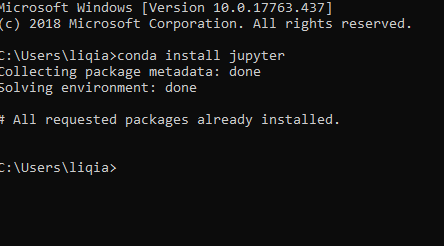
I've also seen this post and tried to reinstall jupyter
 StevenLi-DS
on 27 Apr 2019
StevenLi-DS
on 27 Apr 2019
@StevenLi-DS this error means that your 'base' environment is not able to run 'python -m jupyter notebook --version'
If you try that in an anaconda prompt, what do you get?
rchiodo
on 29 Apr 2019
I got "jupyter command not found" and then I tried conda install -c anaconda jupyter and got this:

I also check conda list and did see ipykernel and jupyter but VScode still gets me the same message. Is there anything I need to do from VScode side?
@rchiodo Could you please leave me some instructions or resources to solve this. I haven't found anything useful and stuck on this issue for a few days.
StevenLi-DS
on 29 Apr 2019
@rchiodo ?
StevenLi-DS
on 30 Apr 2019
Sorry didn't notice your update.
VS Code doesn't run from the base environment? What does our Console output show? (Goto Help | Toggle Developer Tools, click on the Console panel, right click and save Save As).
rchiodo
on 1 May 2019
@rchiodo should've done this before... please take a look:
StevenLi-DS
on 1 May 2019
Looks to me like the message you have above is the problem.
    Install tornado itself to use zmq with the tornado IOLoop.

  from jupyter_client.session import Session
It's saying you need to install tornado. Not sure why. That's why the rstudio environment isn't working. But base does.
If you do try to install tornado, make sure you install the older one though. At least I believe Jupyter has problems with the latest:
https://github.com/jupyter/notebook/issues/4439
rchiodo
on 1 May 2019
I thought the base one wasn't working, which is the reason why VScode switched to the rstudio environment. The funny thing is that I have another IDE that threw me the same message but is still working.
I just did:
conda install tornado==5.1.1
and everything is working now. Thanks buddy!
StevenLi-DS
on 1 May 2019
Awesome. Glad to help
rchiodo
on 1 May 2019
Similar issue here, but the above does not help.
Run in terminal works, run in interactive does not.
In regards to the above:
I believe that warning is actually out of date. I believe it's attempting to run 'python -m jupyter notebook --version' and that's failing in your 'env' environment.
(python3) ~: python -m jupyter notebook --version
5.7.8
Getting:
Jupyter kernel cannot be started from 'Python 3.7.3 64-bit ('python3': virtualenv)'. Using closest match Python 3.7.3 64-bit instead.
And this is the developer console log:
error.log
Thoughts?
UPDATE: No idea what I changed, swapped between a RemoteSSH workspace, and then back to localhost, now I am not getting any problem :| ... magic.
 taiya
on 5 Jul 2019
taiya
on 5 Jul 2019
@ataiya Your error log doesn't look like the full thing. There should be a bunch of logging around trying to find the jupyter that can be used.
rchiodo
on 5 Jul 2019
I am getting the same error.
Jupyter kernel cannot be started from 'Python 3.7.4 64-bit ('venv_project': venv)'. Using closest match Python 3.7.3 64-bit ('base': conda) instead.
I tried following:
1) conda update conda
2) conda install jupyter (throwing error : RemoveError: 'setuptools' is a dependency of conda and cannot be removed from conda's operating environment.)
In order to resolve this error I used I tried to install it using pip as suggested here but it gave the same error when I called the kernel
3) To resolve the error from 2 I removed setuptools using pip uninstall setuptoolsand called conda install jupyter but It gave the same error (RemoveError: 'setuptools' is a dependency of conda and cannot be removed from conda's operating environment.)
 ravinderkhatri
on 20 Jul 2019
ravinderkhatri
on 20 Jul 2019
Experiencing the same. Using bare python 3.7.4-amd64, Windows 10, no conda.
Version: 1.36.1 (user setup)
Commit: 2213894ea0415ee8c85c5eea0d0ff81ecc191529
Date: 2019-07-08T22:59:35.033Z
Electron: 4.2.5
Chrome: 69.0.3497.128
Node.js: 10.11.0
V8: 6.9.427.31-electron.0
OS: Windows_NT x64 10.0.17134
Flow to repeat is pretty simple:
- Set up virtualenv
- Ran any lime in Interactive mode via Shift + Enter
- VSCode is trying to start Jupyter server for the interactive shell debugging, but cannot, so it starts Jupyter in nearest Interpreter - the main one, which (in most cases) doesn't have all necessary libraries.
Even in case jupyter is installed and\or running within this virtual env, it is not working.
 AZhyrenkov
on 21 Jul 2019
AZhyrenkov
on 21 Jul 2019
@ravinderkhatri It looks like your original python was a virtual environment, not a conda environment. You should use pip in your virtual env to install jupyter.
@AZhyrenkov In order for your virtual env to work, it needs jupyter and jupyter notebook installed. You can check this running the following command from the virtual env
'python -m jupyter notebook --version'
If that works, I can take a look at your console log if you upload it here. It should list out all the things we tried and what the result was.
Console log can be found from 'Help | Toggle Developer Tools, click on Console, right click and Save as'
rchiodo
on 22 Jul 2019
I am also desperately fighting this error. I've tried installing tornado=5.1.1 but that didn't help. I can run jupyter notebook from both base env and myenv from CMD and git bash without issue but VS Code won't open the jupyter server under myenv.
python -m jupyter notebook --version shows 6.0.0 under both envs
This is happening for both VSCode 1.36 and 1.37. WIndows 10, 1903
I would greatly appreciate it if you looked at my log! Thanks!
 dschneiderch
on 23 Jul 2019
dschneiderch
on 23 Jul 2019
It looks like it's running this python here:
C:\Users\dominikschneider\Miniconda3\envs\plantcv\python.exe
And that plantcv environment doesn't look to have jupyter installed correctly. It's getting this when running jupyter notebook --version:
ImportError: DLL load failed: The specified module could not be found.
Sorry, the environment myenv is actually plantcv.
Jupyter appears to be working properly in both envs when run from git bash.
dschneiderch
on 23 Jul 2019
If you go to the command line and run this:
C:\Users\dominikschneider\Miniconda3\envs\plantcv\python.exe -m jupyter notebook --version
What do you get?
rchiodo
on 23 Jul 2019
@rchiodo
@AZhyrenkov In order for your virtual env to work, it needs jupyter and jupyter notebook installed. You can check this running the following command from the virtual env
'python -m jupyter notebook --version'
It was the first thing I tried - to install a jupyter inside a venv and it's wasn't the solution. But after restart of laptop everything has started working :)
Thank you!
AZhyrenkov
on 23 Jul 2019
If you go to the command line and run this:
C:\Users\dominikschneider\Miniconda3\envs\plantcv\python.exe -m jupyter notebook --versionWhat do you get?
@rchiodo, looks as it should I think.
Dominik Schneider@CPPC1 MINGW64 ~/Documents/plantcv (master)
$ "C:\Users\dominikschneider\Miniconda3\envs\plantcv\python.exe" -m jupyter notebook --version
6.0.0
(base)
Dominik Schneider@CPPC1 MINGW64 ~/Documents/plantcv (master)
$ "C:\Users\dominikschneider\Miniconda3\python.exe" -m jupyter notebook --version
6.0.0
(base)
Dominik Schneider@CPPC1 MINGW64 ~/Documents/plantcv (master)
$
Sorry I meant not in an activated environment. I'm guessing there's a path problem and that's why a dll is failing to load.
What happens if you run that command from a plain vanilla command prompt?
rchiodo
on 23 Jul 2019
@rchiodo first clue!
command prompt:
C:\Users\dominikschneider>"C:\Users\dominikschneider\Miniconda3\envs\plantcv\python.exe" -m jupyter notebook --version
Error executing Jupyter command 'notebook': [Errno 'jupyter-notebook' not found] 2
Yeah that's a dll load failure. Error 2 is File not found.
So if you run the conda environment and print the path, then compare that to your path in the default environment, is there a difference?
Like for me, this is on the path in the anaconda environment (but not in the vanilla case)
C:\Users\rchiodo.REDMOND\AppData\Local\Continuum\anaconda3;C:\Users\rchiodo.REDMOND\AppData\Local\Continuum\anaconda3\Library\mingw-w64\bin;C:\Users\rchiodo.REDMOND\AppData\Local\Continuum\anaconda3\Library\usr\bin;C:\Users\rchiodo.REDMOND\AppData\Local\Continuum\anaconda3\Library\bin;C:\Users\rchiodo.REDMOND\AppData\Local\Continuum\anaconda3\Scripts;C:\Users\rchiodo.REDMOND\AppData\Local\Continuum\anaconda3\bin;C:\Users\rchiodo.REDMOND\AppData\Local\Continuum\anaconda3\condabin;
Something must be depending upon that that you have installed. Although I thought we added those to the path, so not sure why it doesn't work.
rchiodo
on 23 Jul 2019
@rchiodo
(base) C:\Users\dominikschneider>echo %PATH%
C:\Users\dominikschneider\Miniconda3;C:\Users\dominikschneider\Miniconda3\Library\mingw-w64\bin;C:\Users\dominikschneider\Miniconda3\Library\usr\bin;C:\Users\dominikschneider\Miniconda3\Library\bin;C:\Users\dominikschneider\Miniconda3\Scripts;C:\Users\dominikschneider\Miniconda3\bin;C:\Users\dominikschneider\Miniconda3\condabin;C:\Program Files\Microsoft MPI\Bin;C:\Python27;C:\Python27\Scripts;C:\ProgramData\Boxstarter;C:\Rtools\bin;C:\Rtools\mingw_32\bin;C:\Program Files (x86)\Common Files\Oracle\Java\javapath;C:\Program Files (x86)\Intel\Intel(R) Management Engine Components\iCLS;C:\Program Files\Intel\Intel(R) Management Engine Components\iCLS;C:\Windows\system32;C:\Windows;C:\Windows\System32\Wbem;C:\Windows\System32\WindowsPowerShell\v1.0;C:\Windows\System32\OpenSSH;C:\Program Files (x86)\Intel\Intel(R) Management Engine Components\DAL;C:\Program Files\Intel\Intel(R) Management Engine Components\DAL;C:\Program Files (x86)\NVIDIA Corporation\PhysX\Common;C:\Program Files\CMake\bin;C:\Program Files\dcraw;C:\Program Files\nodejs;C:\ProgramData\chocolatey\bin;C:\Users\dominikschneider\AppData\Local\Programs\orca;C:\Program Files\Pandoc;C:\Program Files\MATLAB\R2019a\bin;C:\WINDOWS\System32\OpenSSH;C:\WINDOWS\system32;C:\WINDOWS;C:\WINDOWS\System32\Wbem;C:\WINDOWS\System32\WindowsPowerShell\v1.0;C:\Users\Dominik Schneider\AppData\Local\atom\bin;C:\Users\Dominik Schneider\AppData\Roaming\npm;C:\Program Files (x86)\Nmap;C:\Users\dominikschneider\AppData\Local\Microsoft\WindowsApps;C:\Users\dominikschneider\AppData\Local\GitHubDesktop\bin;C:\Users\dominikschneider\AppData\Local\Programs\Microsoft VS Code Insiders\bin

(base) C:\Users\dominikschneider>conda activate plantcv

(plantcv) C:\Users\dominikschneider>echo %PATH%
C:\Users\dominikschneider\Miniconda3\envs\plantcv;C:\Users\dominikschneider\Miniconda3\envs\plantcv\Library\mingw-w64\bin;C:\Users\dominikschneider\Miniconda3\envs\plantcv\Library\usr\bin;C:\Users\dominikschneider\Miniconda3\envs\plantcv\Library\bin;C:\Users\dominikschneider\Miniconda3\envs\plantcv\Scripts;C:\Users\dominikschneider\Miniconda3\envs\plantcv\bin;C:\Users\dominikschneider\Miniconda3\condabin;C:\Program Files\Microsoft MPI\Bin;C:\Python27;C:\Python27\Scripts;C:\ProgramData\Boxstarter;C:\Rtools\bin;C:\Rtools\mingw_32\bin;C:\Program Files (x86)\Common Files\Oracle\Java\javapath;C:\Program Files (x86)\Intel\Intel(R) Management Engine Components\iCLS;C:\Program Files\Intel\Intel(R) Management Engine Components\iCLS;C:\Windows\system32;C:\Windows;C:\Windows\System32\Wbem;C:\Windows\System32\WindowsPowerShell\v1.0;C:\Windows\System32\OpenSSH;C:\Program Files (x86)\Intel\Intel(R) Management Engine Components\DAL;C:\Program Files\Intel\Intel(R) Management Engine Components\DAL;C:\Program Files (x86)\NVIDIA Corporation\PhysX\Common;C:\Program Files\CMake\bin;C:\Program Files\dcraw;C:\Program Files\nodejs;C:\ProgramData\chocolatey\bin;C:\Users\dominikschneider\AppData\Local\Programs\orca;C:\Program Files\Pandoc;C:\Program Files\MATLAB\R2019a\bin;C:\WINDOWS\System32\OpenSSH;C:\WINDOWS\system32;C:\WINDOWS;C:\WINDOWS\System32\Wbem;C:\WINDOWS\System32\WindowsPowerShell\v1.0;C:\Users\Dominik Schneider\AppData\Local\atom\bin;C:\Users\Dominik Schneider\AppData\Roaming\npm;C:\Program Files (x86)\Nmap;C:\Users\dominikschneider\AppData\Local\Microsoft\WindowsApps;C:\Users\dominikschneider\AppData\Local\GitHubDesktop\bin;C:\Users\dominikschneider\AppData\Local\Programs\Microsoft VS Code Insiders\bin
vs vanilla path. i guess its not surprising that the vanilla cmd can't run jupyter from python because it doesn't know where jupyter lives.
C:\Users\dominikschneider>echo %PATH%
C:\Program Files\Microsoft MPI\Bin\;C:\Python27\;C:\Python27\Scripts;C:\ProgramData\Boxstarter;C:\Rtools\bin;C:\Rtools\mingw_32\bin;C:\Program Files (x86)\Common Files\Oracle\Java\javapath;C:\Program Files (x86)\Intel\Intel(R) Management Engine Components\iCLS\;C:\Program Files\Intel\Intel(R) Management Engine Components\iCLS\;C:\Windows\system32;C:\Windows;C:\Windows\System32\Wbem;C:\Windows\System32\WindowsPowerShell\v1.0\;C:\Windows\System32\OpenSSH\;C:\Program Files (x86)\Intel\Intel(R) Management Engine Components\DAL;C:\Program Files\Intel\Intel(R) Management Engine Components\DAL;C:\Program Files (x86)\NVIDIA Corporation\PhysX\Common;C:\Program Files\CMake\bin;C:\Program Files\dcraw;C:\Program Files\nodejs\;C:\ProgramData\chocolatey\bin;C:\Users\dominikschneider\AppData\Local\Programs\orca;C:\Program Files\Pandoc\;C:\Program Files\MATLAB\R2019a\bin;C:\WINDOWS\System32\OpenSSH\;C:\WINDOWS\system32;C:\WINDOWS;C:\WINDOWS\System32\Wbem;C:\WINDOWS\System32\WindowsPowerShell\v1.0\;C:\Users\Dominik Schneider\AppData\Local\atom\bin;C:\Users\Dominik Schneider\AppData\Roaming\npm;C:\Program Files (x86)\Nmap;C:\Users\dominikschneider\AppData\Local\Microsoft\WindowsApps;C:\Users\dominikschneider\AppData\Local\GitHubDesktop\bin;C:\Users\dominikschneider\AppData\Local\Programs\Microsoft VS Code Insiders\bin
@DonJayamanne do you know if we cache the path information when we parse the conda environments? Perhaps the cache needs to be cleared?
rchiodo
on 23 Jul 2019
@rchiodo might be relevant, but I've never been able to use the conda tab in jupyter notebook. It shows an "internal error" when I install the nb_conda extension.
dschneiderch
on 23 Jul 2019
success! If I start vs code with code . from git bash with the env activated then it will load jupyter for that environment. Is this how it is designed to work? The documentation gives the impression that selecting the interpreter from within vs code will take care of the env specific paths.
dschneiderch
on 23 Jul 2019
No it should work without having to start it from the environment you're using. It does consistently elsewhere. Something is messing up the path parsing I think.
rchiodo
on 23 Jul 2019
ok, let me know if you need me to try anything else. THanks for your help!
dschneiderch
on 23 Jul 2019
Yeah, I have met the same problem on my macOS Mojave too. Just like the same mistake log before. I think it is a path error problem in VSCode.
 jsw-zorro
on 7 Aug 2019
jsw-zorro
on 7 Aug 2019
Can you try it with our latest release? There was a problem with miniconda not working that I fixed.
Additionally please let me know if the workaround of starting VS code from the conda environment works or not.
rchiodo
on 7 Aug 2019
Thanks a lot! I just removed the jupyter package from my extension list and kept the latest Microsoft Python Package. And the problem is solved by this. Thanks a lot!
jsw-zorro
on 7 Aug 2019
This issue has multiple problems and solutions. If you are still experiencing a problem in this issue that hasn't been resolved, please open a new issue. Thanks!
 greazer
on 9 Aug 2019
greazer
on 9 Aug 2019
Related issues
 n-a-sz
·
3Comments
n-a-sz
·
3Comments
 entron
·
4Comments
entron
·
4Comments
 AlbertDeFusco
·
4Comments
AlbertDeFusco
·
4Comments
 SimonCrios
·
3Comments
greazer
·
3Comments
SimonCrios
·
3Comments
greazer
·
3Comments
Most helpful comment
Awesome. Glad to help