Vscode-jupyter: DS: Fix general debugging bugs for Python Interactive Window and Cells
This epic covers any functionality relating to debugging python interactive cells with this extension. This includes breakpoints, stepping, data visualization, etc.
 greazer
All 64 comments
How is the progress now ?
 AeneasZhu
on 14 May 2019
AeneasZhu
on 14 May 2019
any updates?
 YoniChechik
on 9 Jun 2019
YoniChechik
on 9 Jun 2019
Sorry this is still in progress. We're currently working on modifying the debugger to support this scenario without impacting the rest of the interactive execution.
Fundamentally it's different than normal debugging. Normally you start a python process in order to debug it. In our case, the python process is already running and we need to attach, but then detach and continue to run. The detach has some performance implications that we're working through. We don't want to mess up the perf of all of the cells that run after you debug a cell.
 rchiodo
on 13 Jun 2019
rchiodo
on 13 Jun 2019
Sorry this is still in progress. We're currently working on modifying the debugger to support this scenario without impacting the rest of the interactive execution.
Fundamentally it's different than normal debugging. Normally you start a python process in order to debug it. In our case, the python process is already running and we need to attach, but then detach and continue to run. The detach has some performance implications that we're working through. We don't want to mess up the perf of all of the cells that run after you debug a cell.
Perhaps, you can release an alpha or beta version for tests on vscode insider or exploration if possible. I cannot wait
for this damn brillliant features.
AeneasZhu
on 18 Jun 2019
Would you accept user contributions towards this feature? There doesn't seem to be a (public) PR for it and microsoft/vscode-python#3671 is the only issue I can find with details on how to implement this.
 janosh
on 13 Jul 2019
janosh
on 13 Jul 2019
@janosh we're actually mostly complete on this issue. Here are some other issues related to debugging:
microsoft/vscode-python#6378
microsoft/vscode-python#6379
microsoft/vscode-python#6502
microsoft/vscode-python#5900
microsoft/vscode-python#6376
microsoft/vscode-python#6318
microsoft/vscode-python#6377
They're all in the 'sign off' phase. For us that means they're complete and just waiting to be shipped. They will be shipping at the end of july.
rchiodo
on 15 Jul 2019
Oh nice, very glad to hear that! I didn't realize implementing cell debugging had been split into many manageable chunks of work. (Makes sense though.) 😄
janosh
on 15 Jul 2019
This is all available in the insider's build right now if you want to try it out.
@ronglums also has a video she posted to twitter:
https://twitter.com/davorabbit/status/1149062343231455238
rchiodo
on 15 Jul 2019
@rchiodo I _am_ using the insider's build and noticed the debug cell code lens action. I tried it a few times with different debug configurations (current file, attach & module) but all that ever happened was the cell being executed (although slower than usual), no matter if and how many break points I set. So I assumed this simply wasn't implemented yet but I guess instead I must be doing something wrong. Any docs for this yet?
janosh
on 15 Jul 2019
What’s your version number for the insider’s build? It doesn’t currently auto-update, but rather stays at the one you installed.
The latest version is 2019.7.25177-dev
rchiodo
on 15 Jul 2019
Thanks for the hint! I updated the insider's build and tried "Debug cell" again. It prompted me that my version of ptvsd (4.2.10) didn't support cell debugging and if I wanted to update. Clicking yes didn't do anything. So I manually upgraded with pip install ptvsd==4.3.0b1.
And now it works! Damn, this is cool!
janosh
on 15 Jul 2019
Thank y'all!!! This feature makes VSCode greater!!( not great again. It is very great so far)
AeneasZhu
on 16 Jul 2019
@janosh Thanks for the report there. There is an issue with the install prompt currently, particularly with the update scenario. I've filed microsoft/vscode-python#6592 to track this and I'm looking at it now. I see the issue, so fix should be incoming soon.
 IanMatthewHuff
on 16 Jul 2019
IanMatthewHuff
on 16 Jul 2019
@IanMatthewHuff I updated to the latest insider today and for some reason cell debugging stopped working. I now get the a message
Pip module ptvsd is required for debugging cells. Install ptvsd and continue to debug cell?
even though I have ptvsd==4.3.0b1 installed. Reinstalling or updating to 4.3.0b2 didn't help. Could the Python extension somehow be picking up the wrong path or environment?
janosh
on 18 Jul 2019
@janosh what happens if you run '!python -c "import ptvsd;print(ptvsd.__version__)"' from a jupyter cell? That's what @IanMatthewHuff changed our check to use.
rchiodo
on 18 Jul 2019
@rchiodo I get
Traceback (most recent call last):
File "", line 1, in
ImportError: No module named ptvsd
janosh
on 18 Jul 2019
Okay so ptvsd isn't installed then, but for some reason our installation isn't working. We run this to install it:
!pip install ptvsd==v4.3.0b1
Wait does just plain 'import ptvsd' work?
rchiodo
on 18 Jul 2019
The problem seems to be that the interactive window doesn't pick up on my conda environment.
Running echo "${PATH//:/\n}" in the integrated terminal prints
/usr/local/miniconda3/envs/thermo/bin
/usr/local/miniconda3/condabin
/usr/local/bin
/usr/bin
/bin
/usr/sbin
/sbin
while !echo "${PATH//:/\n}" in the interactive window gives
/usr/local/miniconda3/condabin
/usr/local/bin
/usr/bin
/bin
/usr/sbin
/sbin
Can you go to 'Help | Developer Tools', click on the Console page, right click, save as, and upload the log? Sounds like an activation problem.
Also what does
import sys
sys.path
print out in the interactive window?
rchiodo
on 18 Jul 2019
@rchiodo Here are the logs.
And this is what import sys; sys.path outputs:
['/usr/local/miniconda3/envs/thermo/lib/python36.zip',
 '/usr/local/miniconda3/envs/thermo/lib/python3.6',
 '/usr/local/miniconda3/envs/thermo/lib/python3.6/lib-dynload',
 '',
 '/usr/local/miniconda3/envs/thermo/lib/python3.6/site-packages',
 '/usr/local/miniconda3/envs/thermo/lib/python3.6/site-packages/IPython/extensions',
 '/Users/Janosh/.ipython']
Ah I bet I know what the problem is. It's running the wrong python. We shouldn't be running
python -c 'import ptvsd;print(ptvs.__version__)
We should do this first in a cell:
import sys
sys.executable
Then run something like this as a result of what sys.executable is:
/usr/local/miniconda3/envs/thermo/python -c 'import ptvsd;print(ptvsd.__version__)'
@IanMatthewHuff what do you think?
@janosh if you compute the sys.executable path and then run the code I had, does that work?
(And by the way thanks a ton for investigating this 👍 )
rchiodo
on 18 Jul 2019
It's running the wrong python.
@rchiodo That's correct. Running !python --version gave me Python 2.7.10.
And running import sys; sys.executable which prints
'/usr/local/miniconda3/envs/thermo/bin/python'
followed by
!/usr/local/miniconda3/envs/thermo/bin/python -c 'import ptvsd;print(ptvsd.__version__)'
gives 4.3.0b2 as expected.
janosh
on 18 Jul 2019
Thanks.
We likely need to change the pip install command too.
Instead of
!pip install ptvsd==v4.3.0b1
We should do
!/usr/local/miniconda3/envs/thermo/bin/python -m pip install ptvsd==v4.3.0b1
(And by the way thanks a ton for investigating this 👍 )
@rchiodo Happy to help! Thanks to you guys, I finally have a Python IDE that I really enjoy working with. Keep up the great work!
janosh
on 18 Jul 2019
Yeah, my mistake on what was on the path for the interactive window. I think that I happened to be in a situation where the path worked when I tested this so I didn't notice. I'll look at fixing this up today.
IanMatthewHuff
on 18 Jul 2019
@janosh I've got microsoft/vscode-python#6638 in progress currently. I expect this to be in today and that is should resolve the issue. Thanks for the report.
IanMatthewHuff
on 18 Jul 2019
@IanMatthewHuff Fix confirmed. Cell debugging is working again. And for the first time this time, the ptvsd install prompt worked.
janosh
on 19 Jul 2019
When will the July Update be released? It's August now.
AeneasZhu
on 1 Aug 2019
Also really looking forward to that! :)
janosh
on 1 Aug 2019
Not until after August 5th I believe. We're waiting on a fix from a 3rd party.
However you can use the insider's build if you want to try debugging now.
rchiodo
on 1 Aug 2019
Not until after August 5th I believe. We're waiting on a fix from a 3rd party.
However you can use the insider's build if you want to try debugging now.
Thanks. I got it.
AeneasZhu
on 2 Aug 2019
Not until after August 5th I believe. We're waiting on a fix from a 3rd party.
However you can use the insider's build if you want to try debugging now.
The insider version will update to final version automatically?
AeneasZhu
on 2 Aug 2019
Yes it should. It's based on version number, so if the insider's build you have is older than our release when it goes out, it should update automatically.
rchiodo
on 2 Aug 2019
This is a great feature, thank you everyone.
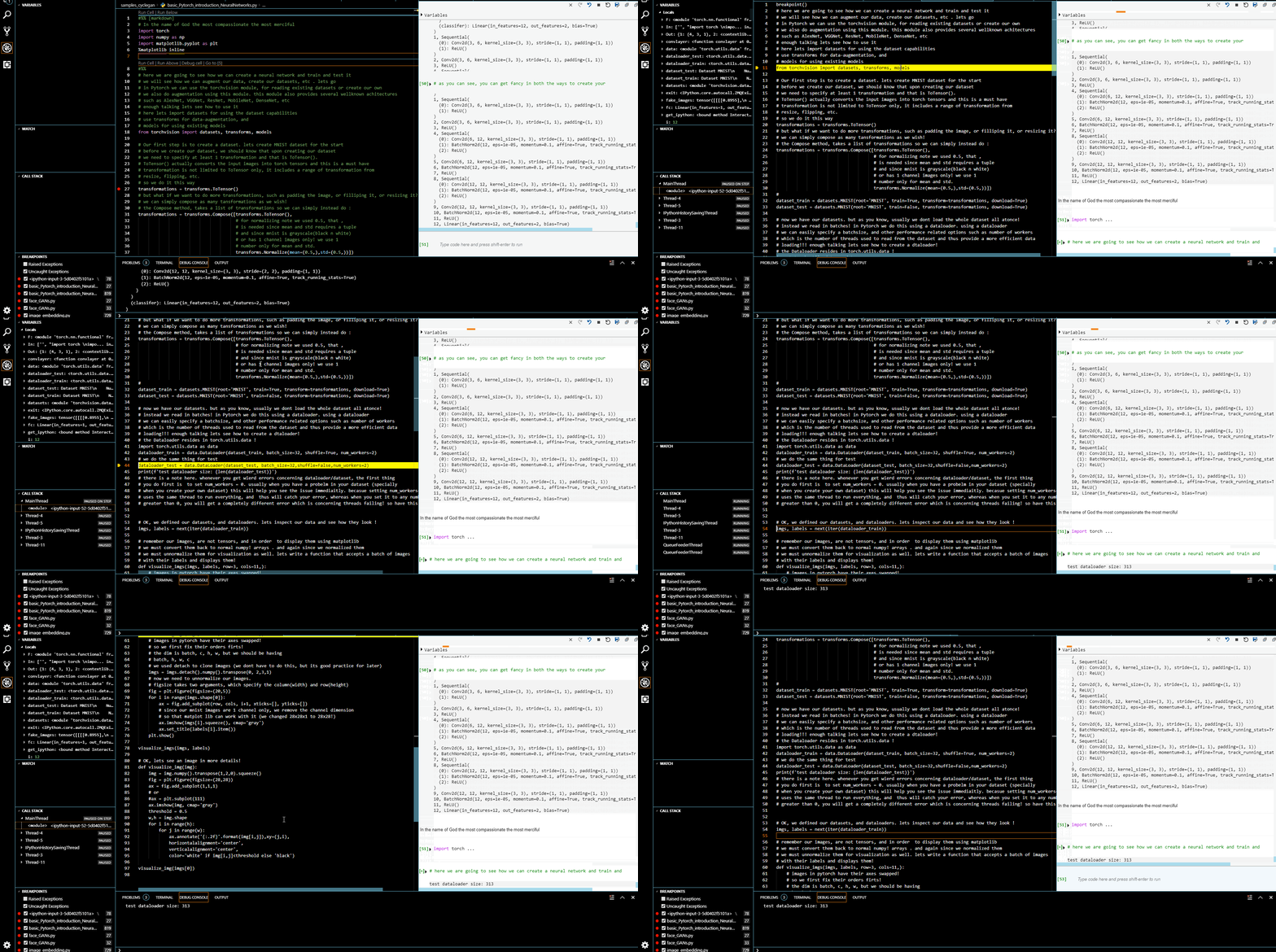
However,is there a way to get the syntax highlighting to work as well?
since this is a Jupyter notebook thing, and there can be lots of raw text (in markup) in addition to the actual code, or the notebook is just heavily commented , this makes the reading the code very hard.
Is there a workaround for this?
 Coderx7
on 7 Aug 2019
Coderx7
on 7 Aug 2019
Can you post a screenshot? Colorization should be working during debugging as well. If it isn't there's likely a bug somewhere.
rchiodo
on 7 Aug 2019
Here is a gif showing everything :
Coderx7
on 7 Aug 2019
Yeah that's a bug. Can you share you source?
When we launch the debugger we have to generate a hash of the source code and tell the debugger that a certain location in a file matches the hash (jupyter creates dummy files with a hash of the input). The debugger then maps the jupyter dummy file to your real file.
In your gif, it looks to me like the hash is failing.
@Coderx7 are you using the released version? There were some last minute fixes to the hashing. But the best way for us to fix it would be to get your source.
rchiodo
on 7 Aug 2019
Yeah that's a bug. Can you share you source?
When we launch the debugger we have to generate a hash of the source code and tell the debugger that a certain location in a file matches the hash (jupyter creates dummy files with a hash of the input). The debugger then maps the jupyter dummy file to your real file.
In your gif, it looks to me like the hash is failing.
@Coderx7 are you using the released version? There were some last minute fixes to the hashing. But the best way for us to fix it would be to get your source.
For now, we'd better use insider version, right ?
AeneasZhu
on 7 Aug 2019
@AeneasZhu the insider's and the release version as far as this feature is concerned are the same at the moment. Our last bug fix for this was put into the release version.
rchiodo
on 7 Aug 2019
@rchiodo : I'm using the latest release version (2019.8.29288 (6 August 2019))
and it is not specific to that source code, I just created a new test.py and wrote these:
#%%
import torch
import numpy as np
import matplotlib.pyplot as plt
%matplotlib inline
# some test comments here!
#%%
from torchvision import datasets, transforms, models

transformations = transforms.ToTensor()

transformations = transforms.Compose([transforms.ToTensor(),
                                      # for normalizing note we used 0.5, that ,
                                      # is needed since mean and std requires a tuple
                                      transforms.Normalize(mean=(0.5,),std=(0.5,))])
#
dataset_train = datasets.MNIST(root='MNIST', train=True, transform=transformations, download=True)
dataset_test = datasets.MNIST(root='MNIST', train=False, transform=transformations, download=True)

import torch.utils.data as data
dataloader_train = data.DataLoader(dataset_train, batch_size=32, shuffle=True, num_workers=2)
# we do the same thing for test
dataloader_test = data.DataLoader(dataset_test, batch_size=32,shuffle=False,num_workers=2)
print(f'test dataloader size: {len(dataloader_test)}')
Here is the actual file for Download
and the result is the same :

Coderx7
on 7 Aug 2019
@rchiodo I've experienced this a couple of times myself with very different pieces of code so I wasn't able to pinpoint what's triggering it but it's not uncommon.
@Coderx7 You can simply close that unwanted tab and carry on with your cell debugging with syntax highlighting in the original file.
janosh
on 7 Aug 2019
@janosh : that's not possible, if I close that temp file, and carry on with the debugging,
it will regenerate that file again and debugging continues inside it .
here is how it looks :

Coderx7
on 7 Aug 2019
Interesting. That's different from what I saw...
janosh
on 7 Aug 2019
I can't repro. Your test file works fine for me. You might try removing %matplotlib inline as the line/cell magics can also cause this problem. (Although the second cell works fine for me).
Can you upload your console log? (Help | Toggle Developer Tools, click on console, right click and save as)
rchiodo
on 7 Aug 2019
Actually we should doing this in a new issue. This is a separate issue than the implementation of the debugger.
I've created a new one here:
https://github.com/microsoft/vscode-python/issues/6892
rchiodo
on 7 Aug 2019
@rchiodo I post the console log and other information on the new issue then!
Coderx7
on 7 Aug 2019
I still get the issue with
Executing code failed : Error: Pip module ptvsd is required for debugging cells. You will need to install it to debug cells.
Yet running
import ptvsd
print(ptvsd.__version__)
Yields 4.3.0b1
 preachermaan
on 22 Aug 2019
preachermaan
on 22 Aug 2019
@safekidda. Can you post what you see in the developer console log? Seems like something else might be going on here in your scenario.
IanMatthewHuff
on 22 Aug 2019
I'd like to know if it's possible, or why it's currently not possible, to run Python: Debug current file in Python Interactive window and have:
- The breakpoints I set in the gutter work
- The variables show up in the variable viewer of the interactive python window instead of in the vscode debug window
Is it in the roadmap to have a better way to view variables, like large arrays, that's fast like in Spyder? With Data Science, I do a lot of that in Matlab and in Python, without using Spyder, which I'd rather not, there isn't a good way to quickly and nicely view data arrays and large datasets.
 gaetawoo
on 5 Nov 2019
gaetawoo
on 5 Nov 2019
It would best if you entered a new suggestion. Essentially you want two new features:
- Run an entire file under the debugger in the interactive window
- Modify the debugger to support the dataviewer in some way (which could really be independent of interactive debugging)
Both of these are possible, but not currently supported.
rchiodo
on 5 Nov 2019
Hi guys! Great progress meanwhile.
I'd like to ask that if you are debugging a script, stopping at the breakpoint, selecting some code and hitting "Shift+Enter", the interactive window would open in the debugger's context.
 igrinis
on 12 Nov 2019
igrinis
on 12 Nov 2019
@igrinis Not sure what you mean by
debugging a script, stopping at the breakpoint, selecting some code and hitting "Shift+Enter", the interactive window would open in the debugger's context
Do you mean you're debugging a normal python script, you select some code while you're debugging, and then hit SHIFT+ENTER, that suddenly the interactive window would open and debug the code you just selected?
Wouldn't this create two debug contexts? You can't really start executing other code while you're stopped at a breakpoint.
rchiodo
on 12 Nov 2019
I will try to explain better. See example:
print('===')
x = 5
x = x+3 # <- set a breakpoint here, run debugger, when it stops here, select this two lines
print(x) #  and press Shift + Enter
All I want that the last two lines would be "magically" executed in the context of the debugger, so I will receive "8" in the process output window, under the '==='. Obviously, the value of x in debug variables window will also get updated to 8.
I get the desired behavior if I manually copy the code to the Debug console, but it's SO inconvenient.
Currently (at least in VSCode-insiders) in this scenario I get REPL window opened and NameError: name 'x' is not defined exception is reported. What I meant in the original post is that the newly opened REPL window will be aware of existence of x, i.e. have the same context as the debugger..
Ideally, I see that Debug console, Python Interactive and REPL windows will get merged in the future, as they mostly repeat the same functionality.
igrinis
on 12 Nov 2019
Ah so it sounds like you want the interactive window to be able to connect to your currently running process. I believe we already have a similar issue:
https://github.com/microsoft/vscode-python/issues/6972
rchiodo
on 12 Nov 2019
You are correct. But until it is implemented I would ask to change the behavior of Shift+Enter to copy code into Debug Console (if during debug session), instead to the unrelated REPL.
igrinis
on 12 Nov 2019
Can you enter a separate issue for that? It will likely get lost just leaving it here.
rchiodo
on 12 Nov 2019
After some consideration, I think it would be better to wait for proper implementation. Shift+Enter is already overloaded. It wouldn't be right to add clutter. Thank you for the discussion, anyways.
igrinis
on 12 Nov 2019
@janosh : that's not possible, if I close that temp file, and carry on with the debugging,
it will regenerate that file again and debugging continues inside it .
here is how it looks :
FWIW, I've also started experiencing this exact behavior, i.e. the debugger persistently carrying out the session in an ipython-input-7-987237...py file without syntax highlighting.
janosh
on 24 Feb 2020
@janosh would you have happened to opened an notebook editor too? This bug might be the cause:
https://github.com/microsoft/vscode-python/issues/10206
rchiodo
on 24 Feb 2020
By notebook, do you mean an .ipynb file or a .py file with # %% cells or either? I only use the latter.
janosh
on 24 Feb 2020
An ipynb file. It looks like you have one open in the background? Part 3 - Training neural networks?
rchiodo
on 24 Feb 2020
In that case, no notebooks involved on my end. That GIF was just quoted from @Coderx7's post above.
janosh
on 24 Feb 2020
Ah, thanks. Do you happen to have some repro code then?
rchiodo
on 24 Feb 2020
Sorry, don't have a way of deliberately causing this at the moment. It seems to happen more often in a kernel that's been running for a while. So maybe it's to do with accumulation of state. I'll keep an eye out for a reliable trigger.
janosh
on 24 Feb 2020
Related issues
 PolishShatter
·
4Comments
PolishShatter
·
4Comments
 qdlmcfresh
·
3Comments
qdlmcfresh
·
3Comments
 entron
·
4Comments
rchiodo
·
3Comments
entron
·
4Comments
rchiodo
·
3Comments
 sonulohani
·
3Comments
sonulohani
·
3Comments
Most helpful comment
Sorry this is still in progress. We're currently working on modifying the debugger to support this scenario without impacting the rest of the interactive execution.
Fundamentally it's different than normal debugging. Normally you start a python process in order to debug it. In our case, the python process is already running and we need to attach, but then detach and continue to run. The detach has some performance implications that we're working through. We don't want to mess up the perf of all of the cells that run after you debug a cell.