Vscode-gitlens: Extension host terminated unexpectedly - Message always appearing
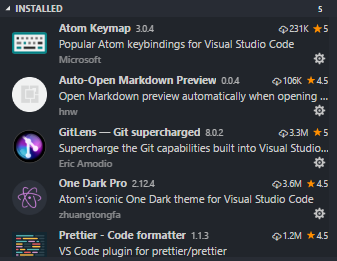
Hi there! I am receiving this annoying error once VSCode was opened:

You may see additional details on https://github.com/Microsoft/vscode/issues/44265
GitLens Version:
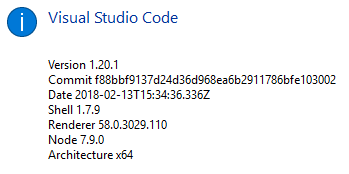
VSCode Version:
OS Version:
Windows 10 Enterprise
Steps to Reproduce:
As seen on https://github.com/Microsoft/vscode/issues/44265
- Updated VSCode to
January 2018 (version 1.20) - Installed GitLens
 KBPsystem777
All 8 comments
Hrm, first I would suggest uninstalling GitLens, restarting vscode (twice), and then re-installing GitLens, to rule out any installation issues.
If the issue still persists after that, with no extensions enabled other than GitLens, can you enable logging to see if anything shows up? You can enable output channel logging by setting "gitlens.outputLevel": "verbose" in your settings.json. This will enable logging to the GitLens channel in the Output pane. Once enabled, please attempt to reproduce the issue (if possible) and attach the relevant log lines from the GitLens channel.
 eamodio
on 27 Feb 2018
eamodio
on 27 Feb 2018
@KBPsystem777 Can you retry with the latest GitLens version and see if you are still experiencing this issue?
eamodio
on 7 Mar 2018
@eamodio trying now, will get back here for feedback :)
KBPsystem777
on 9 Mar 2018
@eamodio issue seems to be resolved. I just updated GitLens to new version, restarted VSCode and the error message didnt showed up again. I waited 2 days but so far, no message is showing up :)
KBPsystem777
on 19 Mar 2018
Great! Glad to hear it. I'm going to close this then. Please reopen if it comes back.
eamodio
on 19 Mar 2018
I am getting this error and I am getting this error after having latest update of VS code. I am running react native. The non-react-native people are not getting that error.
 itsmasud
on 12 Feb 2019
itsmasud
on 12 Feb 2019
@itsmasud can you follow the steps here: https://github.com/eamodio/vscode-gitlens/issues/298#issuecomment-368944503 and post back?
eamodio
on 12 Feb 2019
This issue has been automatically locked since there has not been any recent activity after it was closed. Please open a new issue for related bugs.
![github-actions[bot] picture](https://avatars2.githubusercontent.com/in/15368?v=4&s=40) github-actions[bot]
on 4 Dec 2020
github-actions[bot]
on 4 Dec 2020
Related issues
 derrickstolee
·
3Comments
derrickstolee
·
3Comments
 isaacwashere
·
3Comments
isaacwashere
·
3Comments
 carlleeswanson
·
3Comments
carlleeswanson
·
3Comments
 JP-Ellis
·
3Comments
JP-Ellis
·
3Comments
 batjko
·
4Comments
batjko
·
4Comments