Vscode-gitlens: Why does GitLens show commits by me as multiple contributors?
Odd Behavior(s)
- When I go to the GitLens tab in the Activity Bar, under the
Repositoriessection (for a repo that is solely my own), I see myself multiple times - One has a gravatar, my full name and gmail, while the other has a gravatar, my GitHub username and gmail, and a final one will have my GitHub avatar, my full name, and a
[email protected]email - Is it possible to merge all those versions for me into 1 (not saying this is what I want, just curious)?
- Is it possible to have only information for one (or pick one) of those versions of me to show up "on hover"?
- I'd appreciate any information that would shed some light on this 👍
Tools
- Using Mac running OSX Catalina
- On the standard version of VS Code (Version: 1.39.2)
- I do have the email privacy setup on my GitHub account
- My question is within the context of working in a personal repo where I am/you are the only contributor
Thoughts
- The
git logshows commits on my machine by me (the gmail), and PRs by me (the[email protected]); commits I made on GitHub.com seem to have my username (and gmail), commits I made on my machine have my full name (and gmail), and PR's merged also have my full name (but with the[email protected]email) - Maybe the
[email protected]email is being used for what I do on GitHub.com (like merging PRs) and thegmail.comfor local commits (?) But the gmail is also being used for commits I made on GitHub.com 😕
Notes
- I didn't file this as an issue because I'm not sure this is one. I think it's more of a misunderstanding on my part
- This is similar to https://github.com/eamodio/vscode-gitlens/issues/686
- I really just want my GitHub avatar to show up on hover (yep, it's enabled) and for some reason it's not :( But in trying to figure _that_ out, I stumbled on this question (hover shows the gmail account which doesn't have a GH avatar for some reason)
Relevant image
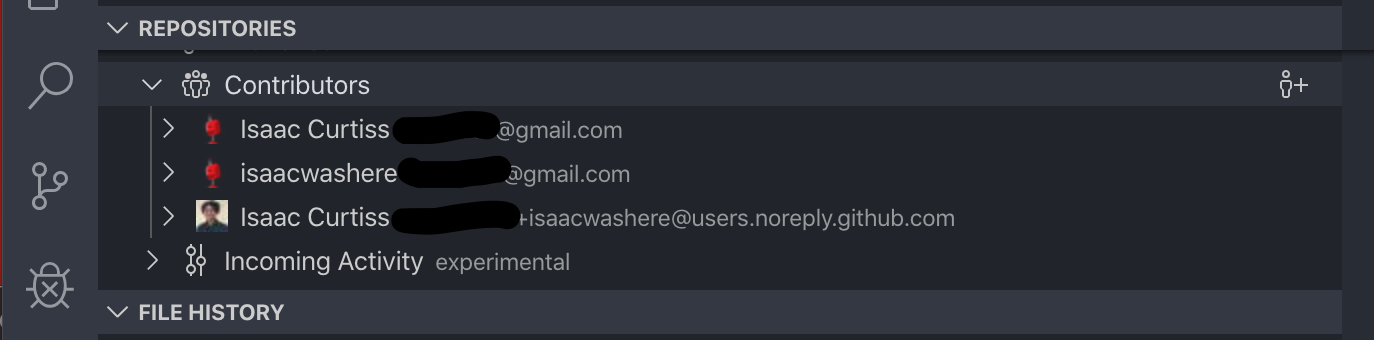
question
 isaacwashere
All 3 comments
You can use the "mailmap" feature of Git (via a .mailmap file) to merge multiple commit identities into 1 (which GitLens will then honor).
Here is a good overview of Git mailmap (while this is from Atlassian it isn't Atlassian/Bitbucket specific): https://blog.developer.atlassian.com/aliasing-authors-in-git/
Hope that helps!
 eamodio
on 11 Nov 2019
eamodio
on 11 Nov 2019
👍4
🎉3
Thanks! That's exactly what I needed! I appreciate the help! 👍
isaacwashere
on 13 Nov 2019
This issue has been automatically locked since there has not been any recent activity after it was closed. Please open a new issue for related bugs.
![github-actions[bot] picture](https://avatars2.githubusercontent.com/in/15368?v=4&s=40) github-actions[bot]
on 27 Nov 2020
github-actions[bot]
on 27 Nov 2020
Was this page helpful?
0 / 5 - 0 ratings
Related issues
 minj
·
24Comments
minj
·
24Comments
 captain-yossarian
·
28Comments
captain-yossarian
·
28Comments
 sandy081
·
25Comments
sandy081
·
25Comments
 lindskogen
·
20Comments
lindskogen
·
20Comments
 SiTaggart
·
46Comments
SiTaggart
·
46Comments
Most helpful comment
You can use the "mailmap" feature of Git (via a
.mailmapfile) to merge multiple commit identities into 1 (which GitLens will then honor).Here is a good overview of Git mailmap (while this is from Atlassian it isn't Atlassian/Bitbucket specific): https://blog.developer.atlassian.com/aliasing-authors-in-git/
Hope that helps!