Vscode-gitlens: GitLens stop working
I have update VS Code to 1.27.2 and GitLens stop to work.
WIndows 10 x64,
Node:8.9.3
 captain-yossarian
All 28 comments
Same with VS Code 1.28.1 on MacOS X
 amarinov
on 12 Oct 2018
amarinov
on 12 Oct 2018
GitLens isn't working on 1.28.1 x64 Windows 10
 PerfectionVR
on 12 Oct 2018
PerfectionVR
on 12 Oct 2018
I am seeing the same
Version: 1.28.1 (system setup)
Commit: 3368db6750222d319c851f6d90eb619d886e08f5
Date: 2018-10-11T18:13:53.910Z
Electron: 2.0.9
Chrome: 61.0.3163.100
Node.js: 8.9.3
V8: 6.1.534.41
Architecture: x64
 ekrapfl
on 12 Oct 2018
ekrapfl
on 12 Oct 2018
Can you please enable output channel logging by setting "gitlens.outputLevel": "debug" in your settings.json. This will enable logging to the GitLens channel in the Output pane. Once enabled, please reproduce the issue (if possible) and attach the log lines from the GitLens channel.
 eamodio
on 12 Oct 2018
eamodio
on 12 Oct 2018
Turning that on does not result in any ouptut. In fact, I can even try running the command to show the welcome page, and I still get no output. Just the following error message on screen:

ekrapfl
on 12 Oct 2018
Hrm, can you try uninstalling GitLens, restarting vscode twice (make sure there are no running instances), and then reinstall GitLens?
If that still doesn't help, can you look in your extensions folder (~/.vscode/extensions) and see if there is more than 1 GitLens folder?
eamodio
on 12 Oct 2018
Hi. I just followed your latest instructions and it's still not working.
And in ~/.vscode/extensions I have only one folder of it. eamodio.gitlens-8.5.6.
 marquezw
on 12 Oct 2018
marquezw
on 12 Oct 2018
Ok, I fixed the issue by reinstalling the Command Line Tools.
xcode-select --install
This is on Mac with macOS Mojave.
marquezw
on 12 Oct 2018
@marquezw before you installed the tools, when GitLens was failing -- was there any output in the GitLens output channel? I really don't see how GitLens could be failing without logging something.
eamodio
on 12 Oct 2018
Uninstalling and reinstalling the plugin worked on Windows as well.
ekrapfl
on 12 Oct 2018
@eamodio working well as you told
 luguoshaonian
on 13 Oct 2018
luguoshaonian
on 13 Oct 2018
@eamodio I have uninstalled GitLens and after two reloads its began to work. Thank you very much!
captain-yossarian
on 15 Oct 2018
Gitlens stopped working for me. I'm currently running VS Code 1.28.1 (user setup) on Windows 10 x64.
I tried to uninstall Gitlens, restart VS Code and install it again. It did not help.
When I uninstalled Gitlens, closed VS Code and removed the .vscode\extensions\eamodio.gitlens-8.5.6 folder, I was able to install Gitlens again.
I compared contents of the old and new folders and only difference is missing out\extension.js file in the old folder.
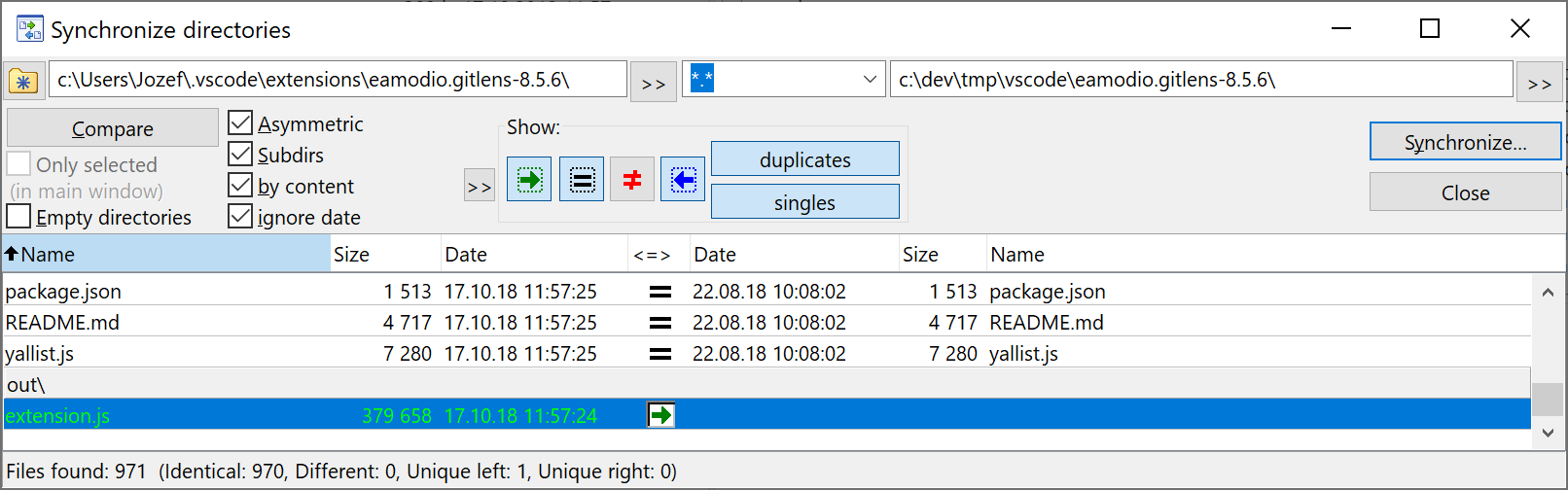
 jozefizso
on 17 Oct 2018
jozefizso
on 17 Oct 2018
I had the same problem on Windows 10, VSCode 1.28.1. Tried to uninstall/reinstall many times didn't help. Then after an uninstall I removed the Gitlens related folders from .vscode/extensions then installed Gitlens and it started to work again o/
 zfeher
on 17 Oct 2018
zfeher
on 17 Oct 2018
It seems that somehow GitLens was falsely identified as having a virus/trojan by some AV systems and they deleted the extension.js file 😢 It seems to have been fixed in the AV systems I've heard about, but unfortunately only a full uninstall/re-install will work
eamodio
on 17 Oct 2018
Now that you mentioned AVs, Eset complained about something and maybe quarantined it as well recently I think that was the extension.js file yes.
zfeher
on 17 Oct 2018
I am running ESET as well and had this issue occur. Silly admins putting apps on my computer, inhibiting my productivity!
 davidhesson
on 17 Oct 2018
davidhesson
on 17 Oct 2018
@eamodio restarting twice help me
captain-yossarian
on 17 Oct 2018
had the same issue on windows 10. Reinstall extension helped.
 ppatalong
on 18 Oct 2018
ppatalong
on 18 Oct 2018
Scratch that, it was ESET that put a file in quarantine.
PerfectionVR
on 18 Oct 2018
Myself, and my colleague both lost gitlens a week ago. Manually deleting the folder after uninstall and then reinstalling seems to have worked for us as well.
 BrendanBeltzNIH
on 18 Oct 2018
BrendanBeltzNIH
on 18 Oct 2018
I had same problem in Windows 10 with VS Code 1.28.2. Tried uninstall/reinstall many times in only VS Code didn't help. Need remove the GitLens related folder and then it started to work again.
Depending on your platform, the location is in the following folder:
- Windows %USERPROFILE%.vscodeextensions
- macOS ~/.vscode/extensions
- Linux ~/.vscode/extensions
 thanhduyvo
on 18 Oct 2018
thanhduyvo
on 18 Oct 2018
I'm closing this -- as the main issue seems to be extension installation issue, which I cannot control (vscode handles extension installation).
eamodio
on 11 Nov 2018
I hope this helps someone. Spent a week trying to understand why my gitlens was not working.
Opening visual code directly from the terminal using code command works.
https://code.visualstudio.com/docs/setup/mac
 viggy28
on 1 Aug 2019
viggy28
on 1 Aug 2019
@viggy28 are you on Catalina?
eamodio
on 1 Aug 2019
Actually, I used to live near LA, so I thought you were asking about Catalina island.
Googled it. Well, I am in Mojave 10.1.4.3. VScode 1.36.1 GitLens 9.9.2. (I tried earlier different versions of GitLens too)
viggy28
on 1 Aug 2019
Hehe... hrm, I've only seen issues with Catalina.
Can you send me logs for when it fails? You can enable output channel logging by setting "gitlens.outputLevel": "debug" in your settings.json. This will enable logging to the GitLens channel in the Output pane. Once enabled, please reproduce the issue (if possible) and attach the log lines from the GitLens channel.
eamodio
on 1 Aug 2019
This issue has been automatically locked since there has not been any recent activity after it was closed. Please open a new issue for related bugs.
![github-actions[bot] picture](https://avatars2.githubusercontent.com/in/15368?v=4&s=40) github-actions[bot]
on 29 Nov 2020
github-actions[bot]
on 29 Nov 2020
Related issues
 tianbis
·
19Comments
tianbis
·
19Comments
 rjbruin
·
22Comments
rjbruin
·
22Comments
 lindskogen
·
20Comments
lindskogen
·
20Comments
 catexis
·
21Comments
catexis
·
21Comments
 waiholiu
·
28Comments
waiholiu
·
28Comments
Most helpful comment
Hrm, can you try uninstalling GitLens, restarting vscode twice (make sure there are no running instances), and then reinstall GitLens?
If that still doesn't help, can you look in your extensions folder (
~/.vscode/extensions) and see if there is more than 1 GitLens folder?