Vscode-gitlens: Installed, but can't execute

Has anyone seen this before? GitLens has stopped working for me, and removing and reinstalling hasn't made any difference. If I turn on verbose logging for GitLens, nothing is logged, it's like it's completely not running in VS Code.
I even tried showing the welcome screen using the command palette in VS Code, and it presented me with the above error command 'gitLens.showWelcomePage' not found.
It used to work on this machine, it was great. Only recently noticed it stopped, I'm not often in VS Code these days so I don't exactly know _when_ it stopped working. I'm stumped.
- GitLens Version: 8.1.1
- VSCode Version: 1.21.1
- OS Version: MacOS 10.13.3
Steps to Reproduce:
- Install GitLens
 SiTaggart
All 46 comments
I willing to bet this is an installation issue. Could you try removing GitLens again, completely exit all instances of vscode, start vscode, exit vscode. Then verify that in ~/.vscode/extensions there are no folders that start with eamodio.gitlens-. If there are please remove them. After that you should be able to start vscode and install GitLens again.
Please let me know if this helps.
 eamodio
on 20 Mar 2018
eamodio
on 20 Mar 2018
I'm getting the same issue on Linux Mint 18.3 with GitLens version 8.1.1 and VSCode 1.21.1. I wiped out the extensions directory and even all my local settings, but that didn't resolve the problem. In addition to that error, GitLens isn't showing up on Explorer. There is no option to display it.
I downloaded and installed a copy of 8.1.0, and that works without any problems.
 aghecht
on 20 Mar 2018
aghecht
on 20 Mar 2018
@aghecht Thank you for the additional information! If you open the devtools (Developer: Toggle Developer Tools from the command palette) do you see any errors in the console? If so can you post them here?
Thanks!
eamodio
on 20 Mar 2018
@eamodio
I was seeing a 'could not parse package.json' error. I looked at the directory, and this is what I saw:
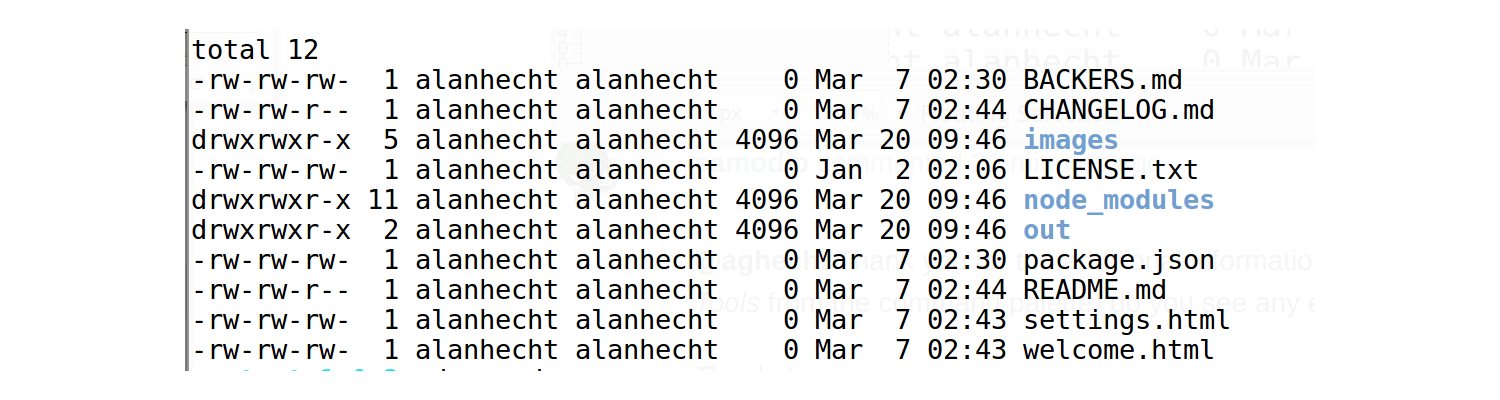
I'm not sure how those files got zeroed out.
Edit: Tried reinstalling the latest version and it worked. Weird. VSCode is my primary editor, so I'll look at the contents again if/when GitLens stops working again.
aghecht
on 20 Mar 2018
@aghecht are you installing GitLens from the marketplace or from the vsix directly? (for the 8.1.1 version)
eamodio
on 20 Mar 2018
@eamodio I installed 8.1.1 from the marketplace. The previous versions were installed directly by extracting the contents of the install file and copying over the 'extension' directory.
aghecht
on 20 Mar 2018
Could you try downloading 8.1.1 from GitHub and then when everything is clean, use vscode's built-in support for installing a vsix and see if that works? You can access it via the ... menu in the extensions pane
eamodio
on 20 Mar 2018
@eamodio Yup, I had to uninstall it from VS Code, and I noticed the folder was still present in .vscode/extensions/. I manually removed that, opened VS and reinstalled the package and it worked again. Thanks, I should have tried that myself!
SiTaggart
on 20 Mar 2018
@eamodio Downloading 8.1.1 from GitHub and installing the vsix file works.
aghecht
on 20 Mar 2018
@aghecht I'm so confused 😕 — there seems to be some bad behavior with extension installation lately. So both vsix work, but installing from the marketplace still doesn't?
eamodio
on 20 Mar 2018
@eamodio You and me both. I have been seeing a little bit of weirdness with extension installation over the past week. GitLens is one of my most used plugins, which is why I would notice it first.
aghecht
on 20 Mar 2018
Just installed GitLens for the first time on Ubuntu 15.6, Code 1.21.1 (GitLens 8.1.1)
Welcome page and settings are working - nothing else seems to exist. No comments on files under Git, no Git Explorer pane in Explorer view, and only two GitLens commands in command Pallette (Welcome and Settings) (both of which work fine). As I'm new to GitLens I may be missing a step - I'm using git locally with files synced to a local gitlab server.
I've unistalled/exited/cleared .extensions/.gitlens. and installed vsix from GitHub. Nothing seems to help.
Developer console is showing nothing of interest - in fact I'm seeing little evidence of GitLens in the developer tools at all, other than if I change a setting and get the following as expected.
[Embedded Page] SettingsApp.executeCommand: command=command:gitlens.saveSettings?%7B%22changes%22:%7B%22gitExplorer.enabled%22:true%7D,%22scope%22:%22user%22,%22uri%22:%22gitlens://authority/settings%22%7D
Any other info I can gather to try and help?
 rjh21
on 27 Mar 2018
rjh21
on 27 Mar 2018
@rjh21 Can you try https://github.com/eamodio/vscode-gitlens/issues/295#issuecomment-377961163 to see if that helps? And sorry for the long delay :(
eamodio
on 11 Apr 2018
@aghecht are you still experience this issue?
eamodio
on 11 Apr 2018
I had the same issue with a clean install of 8.2.1 from the marketplace.
I tried:
Restarting, uninstalling, reinstalling restarting. (Wiggling).
Installing the 8.2.1.vsix manually. (Hitting it with a hammer).
Installing 8.2.0.vsix manually. (Hitting it with an old hammer).
In the end I had to disable automatic plugin updates, remove the folders in .vscode/extensions and then manually install gitlens-8.2.0.vsix from the ... menu in marketplace. Now it starts fine!
 simon-engledew
on 13 Apr 2018
simon-engledew
on 13 Apr 2018
I'd like to try this as well, as I'm also having this issue, but I can't find old releases.
@simon-engledew Where did you donwload the gitlens-8.2.0.vsix file?
 embiem
on 17 Apr 2018
embiem
on 17 Apr 2018
I'm really at a loss to explain way some people are having installation issues (vscode completely owns the installation process for GitLens)
@simon-engledew @mBeierl what OS' are you on? If you turn on logging is there any insights in the GitLens output channel?
@mBeierl You can find all of the recent releases here: https://github.com/eamodio/vscode-gitlens/releases
eamodio
on 17 Apr 2018
@eamodio I'm on Win10 x64. I will have a little debugging session tomorrow. This was happening on my work laptop. I can however confirm, that it's not happening on my personal laptop, which also runs Win10 x64.
embiem
on 17 Apr 2018
I'm on macOS. I installed the vsix file from the Github releases page.
I had a poke around in the extensions folder while the install was broken and all the files appeared to be present and correct.
simon-engledew
on 19 Apr 2018
Also finding this issue, Win10 x64 with VSCode 1.22.2 installing GitLens 8.2.3 from the marketplace.
Tried the steps of uninstalling, deleting the leftover folder in the extensions directory, and reinstalling without any luck. Going to try the vsix method now.
EDIT: Installing 8.2.3 from the vsix also produces the same result (only two commands added, Welcome and Open Settings, which both say "command gitlens.### not found" on use.
EDIT#2: Looks like setting my git path and setting git to enabled explicitly in my user settings fixed it!
 Novynn
on 22 Apr 2018
Novynn
on 22 Apr 2018
@Novynn Any chance you can re-break this with logging turned on so I can see what the underlying issue is?
eamodio
on 22 Apr 2018
Who on this thread had this issue "fixed" by setting the git.path setting? And who is still having issues? I really want to get to the bottom of this.
eamodio
on 22 Apr 2018
If you're referring to the log messages in the Developer Tools console, there were only the same messages as I mentioned above, "command gitlens.### not found".
I'm not sure how to enable any more verbose logging than this, could you direct me?
Novynn
on 22 Apr 2018
Sure, sorry -- please enable output channel logging by setting "gitlens.outputLevel": "verbose" in your settings.json. This will enable logging to the GitLens channel in the Output pane. Once enabled, please attempt to reproduce the issue and attach the log lines from the GitLens channel.
eamodio
on 22 Apr 2018
GitLens(v8.2.3) was NOT activated -- "git.enabled": false
Looks like this was my problem, I must have some global settings somewhere forcing git to be off. With git enabled it appears to find the git path automatically without it having to be set:
Git found: 2.16.2.windows.1 @ C:\Program Files\Git\cmd\git.exe in 70 ms
So my contribution won't be of much help I'm afraid, maybe someone with more sane default settings can help you out.
Thanks for your extension by the way, super handy.
Novynn
on 22 Apr 2018
@Novynn Thank you for you help. It seems at least I should add a notification or something that lets you know GitLens won't work with "git.enabled": false
eamodio
on 22 Apr 2018
Anyone still experiencing this issue?
eamodio
on 28 Apr 2018
I got this issue today.
I set the "gitlens.advanced.git" to my current git bin path and everything is working now.
VSCode 1.22.2
OS: Ubuntu 16.04.4 LTS
 drub4n
on 30 Apr 2018
drub4n
on 30 Apr 2018
So in my case it was because my user settings had: "git.path": "/usr/bin/env git"
I think I had this because at home I use Arch but at work I have to use a Mac.
Whats weird is that this works on the mac, but not on my home machine.
The fix was to just completely remove the git.path settings and then reinstall the extension.
 slyboots
on 6 May 2018
slyboots
on 6 May 2018
I am seeing something similar. I have VSC v1.23.0 installed with GitLens 8.2.4 (and previous versions didn't work either). I am getting the following in the Output terminal:
Git found: 2.7.4 @ /users/mrhicks/bin/git in 6 ms
Starting repository search in 1 folders
Searching for repositories (depth=1) in '/users/mrhicks/projects/xxx/repo' ...
Running(/users/mrhicks/projects/xxx/repo): git rev-parse --show-toplevel
GitLens(v8.2.4) activated in 27 ms
FAILED(/users/mrhicks/projects/xxx/repo): git rev-parse --show-toplevel FAILED in 11 ms
Running(/users/mrhicks/projects/xxx/repo): git rev-parse --show-toplevel
FAILED(/users/mrhicks/projects/xxx/repo): git rev-parse --show-toplevel FAILED in 2 ms
Searching for repositories (depth=1) in '/users/mrhicks/projects/xxx/repo' took 78 ms
Running(/users/mrhicks/.config/Code/User): git rev-parse --show-toplevel
FAILED(/users/mrhicks/.config/Code/User): git rev-parse --show-toplevel FAILED in 3 ms
isTracked('/users/mrhicks/.config/Code/User/settings.json', 'undefined', 'undefined')
Running(): git ls-files /users/mrhicks/.config/Code/User/settings.json
FAILED(): git ls-files /users/mrhicks/.config/Code/User/settings.json FAILED in 2 ms
if I run the git command git rev-parse --show-toplevel I do get an output that shows "/users/mrhicks/projects/xxx/repo".
in VSC, if I select the Source Control icon I do see the branch that I checkout, so it seems some level of git is working within VSC.
 LordHog
on 10 May 2018
LordHog
on 10 May 2018
Any updates on this problem. I tried every method above but no luck. I removed extensions folder, disable auto update, install from vsix version, 8.1.1, 8.2.4 but none working, only 2 commands appear.
 halink0803
on 29 May 2018
halink0803
on 29 May 2018
Thank god, I found the problem. I turn on the "gitlens.outputLevel": "verbose", then check the output (take me some time to find the log), and there are a folder inside the workspace is not a git repository and it failed checking it. I removed that folder from workspace and gitlens works as expected.
@eamodio I think you could improve this behavior, when there are directory which is not a git folder, you can ignore it and continue indexing other. Could it be possible?
halink0803
on 30 May 2018
@halink0803 Can you provide the logs for the issue you saw? And explain in more detail what you mean with a folder inside the workspaces that is not a git repo?
eamodio
on 30 May 2018
@eamodio I have multiple directories in my workspace, one of those is not a git repo (without .git folder). I remembered I saw the error, I remove the folder from workspace and reload gitlens, and it works.
Searching for repositories (depth=1) in '/Users/apple/Code/queryScript' ...
Running(/Users/apple/Code/queryScript): git rev-parse --show-toplevel
Error(/Users/apple/Code/queryScript): /usr/local/git/bin/git -c core.quotepath=false -c color.ui=false rev-parse --show-toplevel)
    (128) Command failed: /usr/local/git/bin/git -c core.quotepath=false -c color.ui=false rev-parse --show-toplevel
fatal: Not a git repository (or any of the parent directories): .git

fatal: Not a git repository (or any of the parent directories): .git

FAILED(/Users/apple/Code/queryScript): git rev-parse --show-toplevel FAILED in 7 ms
Searching for repositories (depth=1) in '/Users/apple/Code/queryScript' took 9 ms
However, after it worked, I reproduce the error and add queryScript folder back to workspace but gitlens still works. I am confused that I am not sure if this causes the problem or not. Anw, I provided the log above hope that it might help.
halink0803
on 30 May 2018
@halink0803 There error is benign -- it is expected (and handled) for any root without a git repo. Could there have been any other changes?
eamodio
on 31 May 2018
@LordHog Can you post the first few lines of the Git channel in the Output pane? I want to see what version & location of Git vscode found and is using
eamodio
on 31 May 2018
@eamodio No, there is no other changes. Just remove and add a directory. I would provide more information if I find any.
halink0803
on 31 May 2018
FYI GitLens 8.3.3 now uses the same git path that vscode uses (if you have the built-in Git extension enabled) and you haven't set gitlens.advanced.git. Hopefully that will resolve any issues where vscode works, but GitLens isn't.
eamodio
on 2 Jun 2018
I am going to close this as 8.3.3 should hopefully address these issues, but if not please post with logs and we can re-open this.
eamodio
on 2 Jun 2018
After upgrading I needed to set the gitlens.advanced.git setting. So, for me, I needed to set it to:
"gitlens.advanced.git": "/usr/bin/git",
Now gitlens appears to be working now.
LordHog
on 4 Jun 2018
@LordHog can you post logs when that setting isn't set and when it is? I'd like to see the difference in the git version found
eamodio
on 4 Jun 2018
Mr. @eamodio ,
Here is the log when the setting isn't configured:
Git found: 2.7.4 @ /users/mrhicks/bin/git in 14 ms
Starting repository search in 1 folders
Searching for repositories (depth=1) in '/users/mrhicks/projects/eagle/repo' ...
Running(/users/mrhicks/projects/eagle/repo): git rev-parse --show-toplevel
GitLens(v8.3.3) activated in 68 ms
FAILED(/users/mrhicks/projects/eagle/repo): git rev-parse --show-toplevel FAILED in 14 ms
Running(/users/mrhicks/projects/eagle/repo): git rev-parse --show-toplevel
FAILED(/users/mrhicks/projects/eagle/repo): git rev-parse --show-toplevel FAILED in 5 ms
Searching for repositories (depth=1) in '/users/mrhicks/projects/eagle/repo' took 73 ms
Running(/users/mrhicks/.config/Code/User): git rev-parse --show-toplevel
Awaiting(/users/mrhicks/.config/Code/User): git rev-parse --show-toplevel
FAILED(/users/mrhicks/.config/Code/User): git rev-parse --show-toplevel FAILED in 6 ms
FAILED(/users/mrhicks/.config/Code/User): git rev-parse --show-toplevel FAILED in 0 ms
isTracked('/users/mrhicks/.config/Code/User/settings.json', 'undefined', 'undefined')
Running(): git ls-files /users/mrhicks/.config/Code/User/settings.json
FAILED(): git ls-files /users/mrhicks/.config/Code/User/settings.json FAILED in 4 ms
As from the output, it seems that gitlens thinks it found git in /users/mrhicks/bin/git, but this really isn't where git is at (I just noticed this). This is a directory of some git scripts that I have as you will see below.
Here is some console output. As you can see, git is located in /usr/bin/git or is the one the system is using.
[mrhicks@XXX repo]$ which git
/usr/bin/git

[mrhicks@XXX repo]$ whereis git
git: /usr/bin/git /users/mrhicks/bin/git /usr/share/man/man1/git.1.gz

[mrhicks@XXX repo]$ echo $PATH
.:/users/mrhicks/bin:/users/mrhicks/.local/bin:/usr/local/XXX/bin:/usr/local/bin:/usr/bin:/usr/local/sbin:/usr/sbin:/opt/xtensa/XtDevTools/install/tools/RG-2017.5-linux/XtensaTools/bin

[mrhicks@XXX repo]$ l ~/bin/
total 17M
drwxrwxr-x  4 mrhicks nve_collab 4.0K May  7 18:52 .
drwxrwx--- 26 mrhicks nve_collab 4.0K Jun  3 19:51 ..
-rwxrwxr-x  1 mrhicks nve_collab  143 Apr 17 16:46 chmod_release_scripts.sh
-rwxrwxr--  1 mrhicks nve_collab  11K May 15 18:44 eagle_flash
drwxrwxr-x  2 mrhicks nve_collab 4.0K Apr 17 16:46 git
-rwxrwxr-x  1 mrhicks nve_collab  16M Apr 17 16:46 grv
-rwxrwxr-x  1 mrhicks nve_collab  821 Apr 17 16:46 packagePrj
-rwxr-xr-x  1 mrhicks wheel      529K May  7 18:48 rar
drwxrwxr-x  2 mrhicks nve_collab 4.0K Apr 17 17:26 snap_archive
-rwxr-xr-x  1 mrhicks wheel      301K May  7 18:48 unrar

[mrhicks@XXX repo]$ l ~/bin/git/
total 24K
drwxrwxr-x 2 mrhicks nve_collab 4.0K Apr 17 16:46 .
drwxrwxr-x 4 mrhicks nve_collab 4.0K May  7 18:52 ..
-rw-rwxr-- 1 mrhicks nve_collab 3.3K Apr 17 16:46 common_git_merge.bash
-rw-rwxr-- 1 mrhicks nve_collab 2.9K Apr 17 16:46 createtask.py
-rw-rwxr-- 1 mrhicks nve_collab 1.9K Apr 17 16:46 ftl_git_merge.bash
-rw-rwxr-- 1 mrhicks nve_collab 1.8K Apr 17 16:46 hotfix_git_merge.bash
I haven't tried it, yet, but I might image if I changed the directory name from /users/mrhicks/bin/git to /users/mrhicks/bin/git_scripts it might work. Just tried and sure enough it does.
Git found: 2.7.4 @ /usr/bin/git in 14 ms
Starting repository search in 1 folders
Searching for repositories (depth=1) in '/users/mrhicks/projects/eagle/repo' ...
Running(/users/mrhicks/projects/eagle/repo): git rev-parse --show-toplevel
GitLens(v8.3.3) activated in 65 ms
So, I image gitlen is just looking for a directory called git and not verifying the actual executable exist there???
LordHog
on 4 Jun 2018
Either way, I do have gitlens working now on the CentOS machine, so I am happy
LordHog
on 4 Jun 2018
Like @SiTaggart told us, just:
- uninstall extension,
- remove folder on
.vscode/extensions/, - install again;
Now work very well, tnks
 rflmyk
on 11 Oct 2018
rflmyk
on 11 Oct 2018
Not sure if this helps anyone, but I thought I'd post what worked for me.
For me, this issue affected installation of any extension from the marketplace.
In VSCode, I went to View ---> Open View...
I then clicked on Log (Shared). Inspecting the log that appears, I found that the installation process was unable to access ~/.vscode/extensions/.obsolete due to issues with permissions. I cd'd into the directory and confirmed with ls -la that the file owner was root. I used chown <my_user> .obsolete to change the file owner. Then I restarted VSCode, and it worked :)
 MustaRohman
on 28 Oct 2019
MustaRohman
on 28 Oct 2019
This issue has been automatically locked since there has not been any recent activity after it was closed. Please open a new issue for related bugs.
![github-actions[bot] picture](https://avatars2.githubusercontent.com/in/15368?v=4&s=40) github-actions[bot]
on 27 Nov 2020
github-actions[bot]
on 27 Nov 2020
Related issues
 pankajpatel
·
20Comments
pankajpatel
·
20Comments
 jletey
·
39Comments
jletey
·
39Comments
 lcswillems
·
32Comments
lcswillems
·
32Comments
 lindskogen
·
20Comments
lindskogen
·
20Comments
 rotwurstesser
·
23Comments
rotwurstesser
·
23Comments
Most helpful comment
I willing to bet this is an installation issue. Could you try removing GitLens again, completely exit all instances of vscode, start vscode, exit vscode. Then verify that in
~/.vscode/extensionsthere are no folders that start witheamodio.gitlens-. If there are please remove them. After that you should be able to start vscode and install GitLens again.Please let me know if this helps.