Vscode-gitlens: List of branches on remote (origin - GitHub) shows deleted branches
As part of our development flow, we squash/merge dev branches to master on GitHub and delete the original branch.
My understanding is that the dev branch isn't really deleted, but is just somehow "flagged" as deleted on GitHub.
Using GitLens, when I look at the list of branches on remote (GitHub), it lists every branch including the "deleted" ones.
Is there currently a way for GitLens to only show active remote branches, and not "deleted" ones?
Or do I need to submit this as a feature request?
 carlleeswanson
All 3 comments
My guess is that you need to do a prune to get your local repo in sync with GitHub. Do the branches go away if you run git fetch --prune?
 eamodio
on 30 Nov 2020
eamodio
on 30 Nov 2020
@eamodio, Thank you! Yes, it was that simple. Obviously I still have a bit to learn about git/GitHub (and GitLens).
Is there a way to accomplish that from within GitLens? I don't see any settings related to that. I would have expected that to be the default behavior for "Refresh" (or to have a setting that controls the behavior).
carlleeswanson
on 30 Nov 2020
Using the _GitLens: Fetch_ command (from the command palette or the fetch button on the _Commits_ view) or choosing _fetch_ from the _GitLens: Git Command Palette_, you can choose _Fetch & Prune_
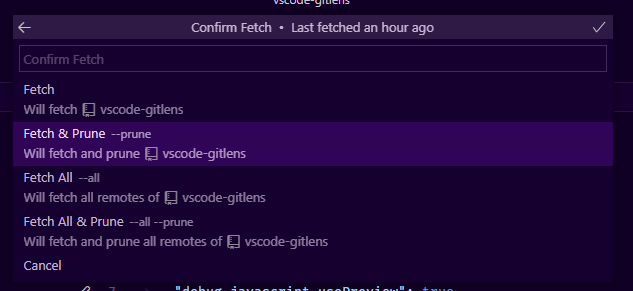
Also, if you want vscode to do this automatically on any fetch, you can set git.pruneOnFetch": true in your settings.json
eamodio
on 30 Nov 2020
Related issues
 ridhwaans
·
3Comments
ridhwaans
·
3Comments
 robertzauner
·
3Comments
eamodio
·
3Comments
robertzauner
·
3Comments
eamodio
·
3Comments
 JP-Ellis
·
3Comments
JP-Ellis
·
3Comments
 batjko
·
4Comments
batjko
·
4Comments
Most helpful comment
My guess is that you need to do a prune to get your local repo in sync with GitHub. Do the branches go away if you run
git fetch --prune?