Vscode-gitlens: Need an explanation / legend for explorer icons
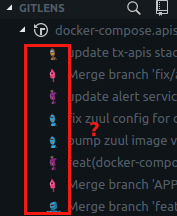
I can't find this in the big README or any related issues, so how can I find out what these icons mean?
 batjko
All 4 comments
They are avatar images pulled from the Gravatar service based on the e-mail address of the committer. If the e-mail address isn't registered with Gravatar then a fallback image is generated by Gravatar (unique per e-mail address).
You can toggle them on/off in the interactive settings editor. Check/uncheck the use avatars checkbox.
 eamodio
on 8 Mar 2018
eamodio
on 8 Mar 2018
Ah, Gravatar...
For a lot of people who use VSCode professionally, most commits will be done with their company email addresses, likely not associated with Gravatar accounts.
But even if they do have some, these tiny color blobs/shapes are completely unrecognizable. I wonder if anyone gets some good use out of this feature?
Anyway, thank you for the kind explanation @eamodio! 👍
batjko
on 8 Mar 2018
Yeah for that case it definitely makes them less useful, but I would still suggest they are more useful than not having them. Since the avatars are consistent for an e-mail address you can still identify who committed what by looking at the generated avatar.
You can also control the style of the fallback Gravatars by setting gitlens.defaultGravatarsStyle — See
https://github.com/eamodio/vscode-gitlens#general-settings
eamodio
on 8 Mar 2018
This issue has been automatically locked since there has not been any recent activity after it was closed. Please open a new issue for related bugs.
![github-actions[bot] picture](https://avatars2.githubusercontent.com/in/15368?v=4&s=40) github-actions[bot]
on 6 Dec 2020
github-actions[bot]
on 6 Dec 2020
Related issues
 waiholiu
·
28Comments
waiholiu
·
28Comments
 miluoshi
·
27Comments
miluoshi
·
27Comments
 TomaTomoe
·
35Comments
TomaTomoe
·
35Comments
 captain-yossarian
·
28Comments
captain-yossarian
·
28Comments
 rajesh996
·
29Comments
rajesh996
·
29Comments
Most helpful comment
Yeah for that case it definitely makes them less useful, but I would still suggest they are more useful than not having them. Since the avatars are consistent for an e-mail address you can still identify who committed what by looking at the generated avatar.
You can also control the style of the fallback Gravatars by setting
gitlens.defaultGravatarsStyle— Seehttps://github.com/eamodio/vscode-gitlens#general-settings