Vscode-gitlens: Interactive Rebase Editor - how to turn it off?
Please, could you kindly help me to turn off the Interactive Rebase Editor? I couldn't find this option in settings. Sorry for disturbing you. Many thanks in advance ^___^
 TomaTomoe
All 35 comments
I immediately uninstalled GitLens when this was added. Please make it optional!
 Spacerat
on 15 Nov 2020
Spacerat
on 15 Nov 2020
Really sorry for the inconvenience. You can turn it off by adding the following to your settings.json
    "workbench.editorAssociations": [
        {
            "viewType": "default",
            "filenamePattern": "git-rebase-todo"
        }
    ],
I will add a feature to more easily turn it off, which I thought would be really easy but instead is going to be quite tricky without vscode changes.
 eamodio
on 16 Nov 2020
eamodio
on 16 Nov 2020
Ah great - thanks for the config snippet!
Spacerat
on 16 Nov 2020
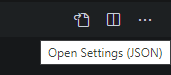
Would it be possible to add a link/icon inside the interactive rebase editor that could jump back to the text version of git-rebase-todo on-click? That way you don't have to turn the file association completely off if you want to perform a particular rebase textually.
Similar to the vscode icon to jump to the settings.json text file from inside the Settings GUI editor:
 plwalsh
on 16 Nov 2020
plwalsh
on 16 Nov 2020
Technically you can do this today with the vscode _Reopen With_ command, but the problem is that vscode closes the document and then re-opens it. Which breaks the wait behavior, because once the document is closed git will start the rebase. I'm hoping we can get that fixed in vscode so that this could work properly.
eamodio
on 16 Nov 2020
I wouldn't be angrily tweeting nasty things if it'd had an off switch :)
https://twitter.com/maxoverdrive/status/1328520498548932615
(no hard feelings, I know sometimes things aren't as loved as the hard work you put in to bring them to the world)
 jamie-pate
on 17 Nov 2020
jamie-pate
on 17 Nov 2020
For those that want to turn it off I will be adding an easy to toggle setting soon. But I would love any feedback as to what you don't like about it -- as I would love to improve it (even if you would ultimately still turn it off).
eamodio
on 17 Nov 2020
@eamodio - I turned it off because I frequently use interactive rebase and am used to my current workflow. Honestly, I might like it a lot if I was new to interactive rebasing, but as someone who already uses it a lot these things threw me off:
- the ordering is backwards from what I'm used to
- weirdly the spacing threw me off too, probably just cause I'm used to reading the text list, but them being farther apart than I expected was uncomfortable and felt hard to read
- clicking buttons is a lot slower than just using the keyboard to move lines around to where I want them and multi-edit a bunch of commits to fix up at once
- I couldn't drop the first commit, and I wanted to the first time I tried a rebase and this editor popped up (I often do something like
git rebase -i masterto just get my branch commits, and would like to be able modify all of them however I want)
Thank you so much for the awesome tool! I'm glad I can turn this off rather than disabling the plugin, which I really like.
 MandaBrown
on 17 Nov 2020
MandaBrown
on 17 Nov 2020
I've exactly same feedback as @MandaBrown haha 👌💯
Thanks for this great plugin @eamodio !
 Hotell
on 17 Nov 2020
Hotell
on 17 Nov 2020
Really sorry for the inconvenience. You can turn it off by adding the following to your
settings.json"workbench.editorAssociations": [ { "viewType": "default", "filenamePattern": "git-rebase-todo" } ],I will add a feature to more easily turn it off, which I thought would be really easy but instead is going to be quite tricky without vscode changes.
Can you consider having this feature be disabled by default? That way, it won't surprise people when they first install the extension.
 awshelley-beckman
on 17 Nov 2020
awshelley-beckman
on 17 Nov 2020
@MandaBrown Thanks for the feedback.
the ordering is backwards from what I'm used to
Agree, it took me a bit to get used to it this way, but imo this order is more natural/expected (if you weren't corrupted by the existing behavior). Would an option to switch the order make it better?
weirdly the spacing threw me off too, probably just cause I'm used to reading the text list, but them being farther apart than I expected was uncomfortable and felt hard to read
Hrm, I look into tightening it up a bit
clicking buttons is a lot slower than just using the keyboard to move lines around to where I want them and multi-edit a bunch of commits to fix up at once
The new UI, should be fully keyboard accessible -- just using the arrow keys to move around and the others listed:

I don't have any specific keyboard shortcut for the _Start Rebase_ button, but maybe I should add something like Ctrl+Enter. Although since this experience is just a facade on top of the normal git-rebase-todo document, can still use the normal vscode save shortcut to save the changes you made, and the close the tab (again with the normal vscode shortcut)
I couldn't drop the first commit, and I wanted to the first time I tried a rebase and this editor popped up (I often do something like git rebase -i master to just get my branch commits, and would like to be able modify all of them however I want)
There should be no difference in the commits that can be affected as part of the rebase. I think the confusion, is that in the rebase UI, I show you a "static" view of the commit that your rebase will sit on top of for added context.
eamodio
on 17 Nov 2020
@awshelley-beckman I don't have any plans to make it off by default -- as it would be completely undiscoverable. But I am planning to add a very simple/clear opt-out option (right in the UI) to go back to the default.
eamodio
on 17 Nov 2020
@eamodio I will admit, I was so completely thrown off by the sudden change, that I assumed there was no keyboard support and immediately looked for a way to disable it. That being said, unless I'm missing something, my assumption was correct for the one bit of keyboard support I actually care about.
As far as I can see, there's no way to set actions for multiple commits at once, and that's what I'd want before re-enabling the interactive editor. Frequently, the reason that I'm rebasing is that I want to squash a large number of consecutive commits (generally small fixups). If it were possible to e.g. hold shift to select multiple commits, then press act on all of them (e.g. f or alt↓), the new editor would be an improvement for me instead of a hinderance.
There are definitely some things I like about the new interface. It prevents you from accidentally making invalid or useless edits (like misspelling command names, or uselessly modifying commit messages), and the abort button is useful too.
I also agree with the idea that the buttons (both Continue and Abort) should have keyboard shortcuts, despite the fact (as you noted) that you can just save and close the tab to "save". When I'm working in text file mode, my mental model is "this is a file, and it will be processed when I close it", so saving/closing is natural. But when presented with a UI, even though the UI is just a facade over modifying the file, "saving and closing" isn't the obvious thing to do. Instead I want to press the buttons, but then if those buttons don't have key shortcuts, the UI becomes frustrating.
Spacerat
on 17 Nov 2020
@Spacerat Thank you for the feedback.
I will definitely add shortcut keys for the buttons -- ctrl+enter for start, and not sure on abort yet -- esc might be too easy to hit accidentally? Any thoughts on either of those?
As for multi-select, that had come up and I put off implementing it -- but it sound like it would be useful. At the same time, today while you can't do a shift select, you can just use arrow-down and then s to squash and just keep repeating that. I know it isn't the same, but 😄
eamodio
on 17 Nov 2020
Ah, cool, I also jumped away too soon to notice that there was keyboard support, but just like @Spacerat I often multi-select and edit that way. The suggestion there would help me, too.
Re: the spacing and order, it's probably more just what I'm used to than that this isn't better, but sometimes I do wind up with a pretty long list of commits.
Re: the static commit, I was pretty sure that the 'static' commit that was showing was the first commit that I wanted to edit in my rebase and not the commit prior. I'll see if I can repro later; I might have also just been thrown off by the new UI and confused. :)
You might be right about the order, although I would personally love an option to reverse them. When I'm doing an interactive rebase, I'm often trying to make sure my commits tell the story I want them to, so reading them oldest first makes a lot of sense in my mental model.
MandaBrown
on 17 Nov 2020
@MandaBrown Thanks again for the feedback! And definitely let me know on the "static" commit, because if there is an issue there, I definitely want to get that fixed.
I will definitely look to add a toggle to change the sort order (should be easy enough).
eamodio
on 17 Nov 2020
esc might be too easy to hit accidentally? Any thoughts on either of those?
Yeah I agree, you'd want to be careful there. As a mac user, I'd suggest cmd-A because I'm used to dialog button shortcuts which are "command + [first letter of dialog action]". Also for mac I think cmd-enter would be more intuitive than ctrl-enter. If the shortcuts are editable along with other vscode shortcuts, that would probably help too.
Spacerat
on 17 Nov 2020
OK, will try Ctrl|Cmd+R (don't want to use S because it will conflict with save) and Ctrl|Cmd+Enter for rebase, Ctrl|Cmd+A for abort. Ctrl|Cmd will depend on mac vs windows/linux.
I don't think I want to go down the configurable shortcut key path, unless I have to (would mean a lot more complexity)
eamodio
on 18 Nov 2020
And definitely let me know on the "static" commit, because if there is an issue there, I definitely want to get that fixed.
Must have just been me being confused, so sorry about that! Tried to repro and it looks right, the static commit is exactly what I would have expected.
MandaBrown
on 18 Nov 2020
The new interactive rebase looks exciting, but having it enabled, without my knowledge, made it frightening the first time it popped up. Thank you for allowing it to be turned off. I'll try it out when I'm ready, not when GitLens tells me it's time.
 tacc-wbomar
on 18 Nov 2020
tacc-wbomar
on 18 Nov 2020
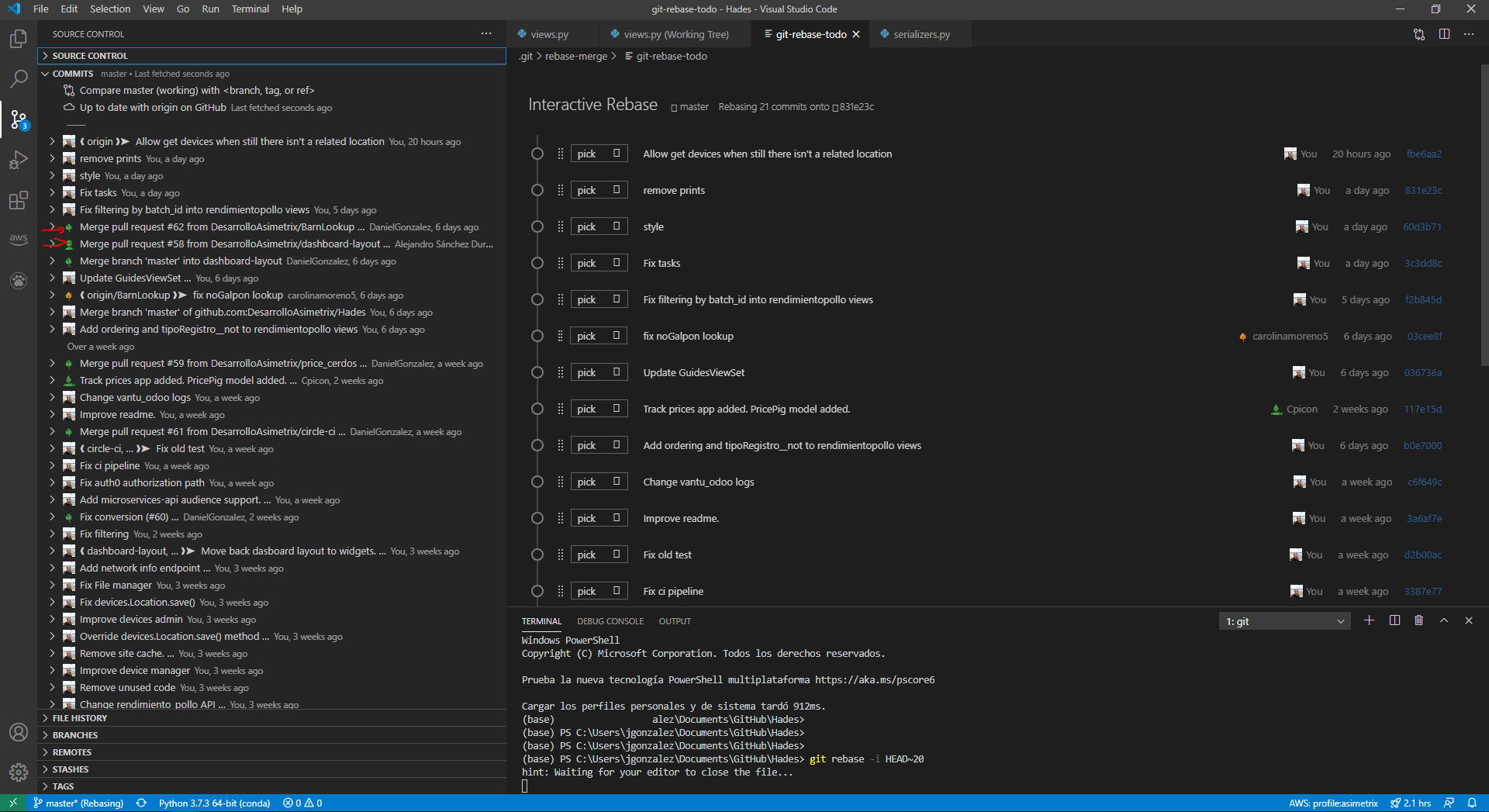
I'm really excited about the new GUI for interactive rebase, but I have the next issue:
The merge commits aren't displayed on this new GUI.
 DanielGnzlzVll
on 18 Nov 2020
DanielGnzlzVll
on 18 Nov 2020
I really appreciate the work you've done on GitLens. @eamodio, this project is fantastic! Anything below that is critical is meant to be purely informative.
I really do think that this being on by default is a bad effect. It was extremely jarring and frustrating. I am in that view dozens of times a day and a GUI is absolutely slower. Yes, an option to disable right inside the view would be good, but this is the one thing (that I have noticed) where GitLens is interjecting itself into someone's workflow without their explicit request.
I don't know what is possible within vs-code, but would you consider instead a pop-up message the first time someone does a rebase? That message could just tell the user that there is an option they can enable for a GUI. Additionally, I'd see no problem with defaulting to this new GUI _when an interactive rebase is invoked from within a GitLens sidebar_.
It also seems like _some_ of the interface suggestions in comments above are ultimately trying to get this view to behave more like the simple text buffer presented by Git. I personally think that you've nailed a GUI which is actually more intuitive for a person who is unfamiliar with that text version. So in my opinion, you'd be spinning your wheels to bother with some of these tiny changes. I don't think that a GUI must necessarily reflect the CLI interface it stems from. If it did, what would be the point?
Having said all that, I am going to go make a donation to the project, because I absolutely to appreciate it!
 happycollision
on 18 Nov 2020
happycollision
on 18 Nov 2020
@DanielGnzlzVll Can you open a new issue for that, and if possible provide an example repo that I can try this out with?
eamodio
on 19 Nov 2020
@eamodio sure, https://github.com/eamodio/vscode-gitlens/issues/1189
DanielGnzlzVll
on 19 Nov 2020
Here is a screenshot of changes coming to the rebase editor -- any thoughts?

eamodio
on 19 Nov 2020
The thing about this that made me mad is that the behavior of something I have done and used for years (interactive rebasing by editing a text file) has suddenly changed without warning (apparently because of GitLens auto-updating), and there is no obvious way to turn it off.
It does seem kind of cool, but I think it should be an option that the user needs to explicitly enable, or at least have an easy way to disable it.
The backwards ordering threw me off too. It is like someone unexpectedly snuck into my garage last night and decided it would be a good idea to switch around my gas and brake pedals without my permission.
 elias6
on 20 Nov 2020
elias6
on 20 Nov 2020
Closing this as GitLens 11.0.2 adds multiple options to enable/disable the new rebase UI. Please open new issues for any other issues that arise. And thank you all for your feedback!
eamodio
on 20 Nov 2020
Technically you can do this today with the vscode _Reopen With_ command, but the problem is that vscode closes the document and then re-opens it. Which breaks the wait behavior, because once the document is closed git will start the rebase. I'm hoping we can get that fixed in vscode so that this could work properly.
What I found to work:
- Duplicate editor tab (via icon in top right corner).
- Perform "Reopen with..." on that 2nd tab while keeping 1st one open.
This way, you can edit text file only when you want to, without aborting the rebase.
What's even better, the changes are immediately synced up between GUI/text editors, so you can e.g. use dropdown for actions but select-delete in text to drop a bunch of commits.
 RReverser
on 1 Dec 2020
RReverser
on 1 Dec 2020
Just be careful with that method - while it should work there are a few vscode bugs when you have both editors open at the same time.
eamodio
on 1 Dec 2020
Just be careful with that method - while it _should_ work there are a few vscode bugs when you have both editors open at the same time.
Didn't run into any issues yet, but good to know, thanks. TBH I wouldn't need the text view at all, but one of the common operations during interactive rebase for me is to bulk-delete (or bulk-fixup) a range of commits.
Git GUIs often allow to select a bunch of commits for this purpose, and then apply an action to them. Maybe GitLens could allow the same?
RReverser
on 1 Dec 2020
@RReverser see https://github.com/eamodio/vscode-gitlens/issues/1182 -- feel free to add any specific requirements you'd like to see
But also note, you can currently use the arrow keys and "action" keys to move and set things very quickly -- e.g. press d, then arrow-down, and keep repeating.
eamodio
on 1 Dec 2020
1182 looks good. Yeah, I suppose I could, but especially when rebasing between very different branches, I often end up keeping only 2-3 commits and deleting 10x.
RReverser
on 1 Dec 2020
FWIW my reason for turning it off was just that I like using my keyboard to do fast multi-line editing to change the action for each commit. The editor pushed me onto the mouse which made it all a bit slower! Appreciate it may well make things much easier for someone who wasn't used to it though :)
 peternixey
on 8 Dec 2020
peternixey
on 8 Dec 2020
@peternixey The rebase UI is fully keyboard accessible (no need to use the mouse). Was there an issue you ran into with that?
eamodio
on 8 Dec 2020
Hi Eric, I didn’t see that there were keyboards shortcuts. I’m not sure that there was any issue with the visual editor but there wasn’t any particular win that I experienced either (since I’m very happy with text) so it just slowed me down a little. I felt I was going to need to do a number of things just to reach parity with what I could already do in text.
However I can see it being really nice for less experienced developers. So maybe it’s just a case of asking if you want it and making it easy to switch it off from the editor itself (ideally). Also as other commenters mentioned I found it peculiar that it ordered commits newest to oldest. Not saying it’s wrong but it wasn’t what I was expecting.
Thanks for all of your great work with GitLens btw - it’s a great piece of kit 🙏🏻
peternixey
on 8 Dec 2020
Related issues
 catexis
·
21Comments
catexis
·
21Comments
 minj
·
24Comments
minj
·
24Comments
 captain-yossarian
·
28Comments
captain-yossarian
·
28Comments
 rotwurstesser
·
23Comments
rotwurstesser
·
23Comments
 lindskogen
·
20Comments
lindskogen
·
20Comments
Most helpful comment
Really sorry for the inconvenience. You can turn it off by adding the following to your
settings.jsonI will add a feature to more easily turn it off, which I thought would be really easy but instead is going to be quite tricky without vscode changes.