Vscode-arduino: unable to open serial port
Issue Type: Bug
Failed to open serial port COM3 due to error: + Error: \?c:Userslouis.vscodeextensionsvsciot-vscode.vscode-arduino-0.3.1outnode_modulesusb-detectionbuildReleasedetection.node is not a valid Win32 application. \?c:Userslouis.vscodeextensionsvsciot-vscode.vscode-arduino-0.3.1outnode_modulesusb-detectionbuildReleasedetection.node
Extension version: 0.3.1
VS Code version: Code 1.49.1 (58bb7b2331731bf72587010e943852e13e6fd3cf, 2020-09-16T23:27:51.792Z)
OS version: Windows_NT x64 10.0.18363
System Info
|Item|Value|
|---|---|
|CPUs|Intel(R) Core(TM) i5-8265U CPU @ 1.60GHz (8 x 1800)|
|GPU Status|2d_canvas: enabled
flash_3d: enabled
flash_stage3d: enabled
flash_stage3d_baseline: enabled
gpu_compositing: enabled
multiple_raster_threads: enabled_on
oop_rasterization: disabled_off
opengl: enabled_on
protected_video_decode: enabled
rasterization: enabled
skia_renderer: disabled_off_ok
video_decode: enabled
vulkan: disabled_off
webgl: enabled
webgl2: enabled|
|Load (avg)|undefined|
|Memory (System)|7.85GB (3.17GB free)|
|Process Argv|--crash-reporter-id b210f538-01a7-4912-9ec6-45c7a3b21307|
|Screen Reader|no|
|VM|0%|
 jilouchu
All 34 comments
As a workaround:
- open the folder where your .ino file resides
- open the .vscode folder
- edit arduino.json
- change the port
e.g.
{
  "port":"COM4"
}
 simonl65
on 21 Sep 2020
simonl65
on 21 Sep 2020
Thank you for your advice but this is not a solution. It doesn't resolve the problem. You can set COM port manually but if VSC can't open serial port, manual setting is of no use.
 Roberto6969
on 21 Sep 2020
Roberto6969
on 21 Sep 2020
Me same problem. Node.js version is wrong...

Downgrading to 0.30 restores expected function. (Damn, not anymore, now its completely useless.)
 iqapps
on 22 Sep 2020
iqapps
on 22 Sep 2020
Same problem, it says
Failed to open serial port COM4 due to error: + Error: The module '\\?\c:\Users\my username\.vscode\extensions\vsciot-vscode.vscode-arduino-0.3.2\out\node_modules\usb-detection\build\Release\detection.node' was compiled against a different Node.js version using NODE_MODULE_VERSION 75. This version of Node.js requires NODE_MODULE_VERSION 80. Please try re-compiling or re-installing the module (for instance, usingnpm rebuildornpm install).
I don't think it did this before.
 koderian
on 23 Sep 2020
koderian
on 23 Sep 2020
hi @dilin-MS
Is there someone looking into this show-stopper bug?
This not just fails but takes almost 5mins to go to the next step to compile/flash from below line of error.
2020-09-23T18:23:52.091Z INFO c.a.u.n.HttpConnectionManager:153 [cc.arduino.packages.discoverers.serial.SerialDiscovery] Connect to https://builder.arduino.cc/builder/v1/boards/0x10C4/0xEA60, method=GET, request id=03AEDFE99CC94B99
2020-09-23T18:23:53.557Z INFO c.a.u.n.HttpConnectionManager:157 [cc.arduino.packages.discoverers.serial.SerialDiscovery] Request complete URL="https://builder.arduino.cc/builder/v1/boards/0x10C4/0xEA60", method=GET, response code=404, request id=03AEDFE99CC94B99, headers={null=[HTTP/1.1 404 Not Found], Cache-Control=[no-cache, no-store, must-revalidate], Server=[nginx], Connection=[keep-alive], Vary=[Origin], Pragma=[no-cache], Expires=[0], Content-Length=[0], Date=[Wed, 23 Sep 2020 18:23:54 GMT]}
2020-09-23T18:23:53.558Z WARN p.a.h.BoardCloudResolver:64 [cc.arduino.packages.discoverers.serial.SerialDiscovery] Fail to get the Vid Pid information from the builder response code=404
Not sure why its trying to "SerialDiscovery" when serial is already mentioned in arduino.json
If not its time to ditch this extension and move to PlatformIO again.
 sukesh-ak
on 23 Sep 2020
sukesh-ak
on 23 Sep 2020
Hi @sukesh-ak , the failure of device discovery is due to VS Code's latest version 1.49.1 upgrades the Electron version to v9, causing the serialport function failure. Refer to #1097 for details.
Currently @robotdad is help looking into the issue.
A Workaround is to downgrade the VS Code to a version which Electron version lower than v9. The issue will be fixed once the related serialport libraries upgrade to use Electron v9. Thank you.
 dilin-MS
on 24 Sep 2020
dilin-MS
on 24 Sep 2020
Hi
I've the same problem.
Fedora 32
vscode 1.49.1
electron 9.2.1
node.js 12.41.1
arduino extension 0.3.2
I can upload the scketch to board adding to the arduino.json: "port": "/dev/ttyACM0" but I can't monitor the output in the serial monitor
Failed to open serial port /dev/ttyACM0 due to error: + Error: The module '/home/alfonso/.vscode/extensions/vsciot-vscode.vscode-arduino-0.3.2/out/node_modules/usb-detection/build/Release/detection.node'
was compiled against a different Node.js version using
NODE_MODULE_VERSION 67. This version of Node.js requires
NODE_MODULE_VERSION 80. Please try re-compiling or re-installing
the module (for instance, using npm rebuild or npm install).
 alfoquial
on 24 Sep 2020
alfoquial
on 24 Sep 2020
Hi @sukesh-ak , the failure of device discovery is due to VS Code's latest version 1.49.1 upgrades the Electron version to v9, causing the serialport function failure. Refer to #1097 for details.
Currently @robotdad is help looking into the issue.A Workaround is to downgrade the VS Code to a version which Electron version lower than v9. The issue will be fixed once the related serialport libraries upgrade to use Electron v9. Thank you.
Thank you @dilin-MS for the response.
Although the serial monitor issue is fixed after reverting to VS Code version v1_48 the error I mentioned and failure plus delay in next steps still exist.
2020-09-23T18:23:52.091Z INFO c.a.u.n.HttpConnectionManager:153 [cc.arduino.packages.discoverers.serial.SerialDiscovery] Connect to https://builder.arduino.cc/builder/v1/boards/0x10C4/0xEA60, method=GET, request id=03AEDFE99CC94B99
2020-09-23T18:23:53.557Z INFO c.a.u.n.HttpConnectionManager:157 [cc.arduino.packages.discoverers.serial.SerialDiscovery] Request complete URL="https://builder.arduino.cc/builder/v1/boards/0x10C4/0xEA60", method=GET, response code=404, request id=03AEDFE99CC94B99, headers={null=[HTTP/1.1 404 Not Found], Cache-Control=[no-cache, no-store, must-revalidate], Server=[nginx], Connection=[keep-alive], Vary=[Origin], Pragma=[no-cache], Expires=[0], Content-Length=[0], Date=[Wed, 23 Sep 2020 18:23:54 GMT]}
2020-09-23T18:23:53.558Z WARN p.a.h.BoardCloudResolver:64 [cc.arduino.packages.discoverers.serial.SerialDiscovery] Fail to get the Vid Pid information from the builder response code=404
@robotdad Can you suggest anything to get this fixed?
sukesh-ak
on 24 Sep 2020
Hi
I've the same problem.
Fedora 32
vscode 1.49.1
electron 9.2.1
node.js 12.41.1
arduino extension 0.3.2I can upload the scketch to board adding to the arduino.json: "port": "/dev/ttyACM0" but I can't monitor the output in the serial monitor
Failed to open serial port /dev/ttyACM0 due to error: + Error: The module '/home/alfonso/.vscode/extensions/vsciot-vscode.vscode-arduino-0.3.2/out/node_modules/usb-detection/build/Release/detection.node'
was compiled against a different Node.js version using
NODE_MODULE_VERSION 67. This version of Node.js requires
NODE_MODULE_VERSION 80. Please try re-compiling or re-installing
the module (for instance, usingnpm rebuildornpm install).
Switch to VS Code 1.48 and see if it gets fixed. At least that issue is fixed after I down graded to 1.48
sukesh-ak
on 24 Sep 2020
@sukesh-ak I hope the downgrade to 1.48.2 has got the serial monitor working for you - it has got mine working +1
Regarding your other error: that appears to be an issue with the arduino website - https://builder.arduino.cc/builder/v1/boards/0x10C4/0xEA60 comes back with a 404 Not Found error -1
simonl65
on 24 Sep 2020
@sukesh-ak I hope the downgrade to 1.48.2 has got the serial monitor working for you - it has got mine working +1
Regarding your other error: that appears to be an issue with the Arduino website -
https://builder.arduino.cc/builder/v1/boards/0x10C4/0xEA60comes back with a 404 Not Found error -1
Yes serial monitor is working now.
Where is that 404 call getting triggered (thought its part of this extension)?
This hits a delay of couple of mins before it proceeds to next step. So its still a blocker for using.
Since its working fine from Arduino IDE
sukesh-ak
on 24 Sep 2020
I have no idea where that call's being made, but I think it may be a "red herring" anyway - I've just noticed that it does the same for me!
The next step after that call appears to be the verify or compile step. For me that part takes about 15s, but I suspect it depends on the size of your code?
simonl65
on 24 Sep 2020
Actually, the next step is Preparing boards...
Oops - nope, that's just before the error - my bad
simonl65
on 24 Sep 2020
I have no idea where that call's being made, but I think it may be a "red herring" anyway - I've just noticed that it does the same for me!
The next step after that call appears to be the verify or compile step. For me that part takes about 15s, but I suspect it depends on the size of your code?
15seconds feel like a day :)
I am guessing that's trying to automagically detect the port/board, wonder why when its already selected through this extension.
I also saw that, Arduino is moving to a new CLI option for compile/flash etc.
sukesh-ak
on 24 Sep 2020
15seconds feel like a day :)
Haha - yes it does!
simonl65
on 24 Sep 2020
It feels like this should be marked as a duplicate of 1097 - since the behaviour here leads to that when I manually specified the port. Perhaps a note at the top of 1097 to state that being unable to select a port is a symptom of the same root cause?
 dannystaple
on 27 Sep 2020
dannystaple
on 27 Sep 2020
Downgrade. This is a solution. I fixed it by downgrading up to 1.48.2.
I hope you find this useful to fix your own situations.
 fidelbrea
on 1 Oct 2020
fidelbrea
on 1 Oct 2020
Confirmed that the downgrade to 1.48.2 solves this issue on Windows 10. Thank you all for doing the research.
EDIT: Well, not quite. The terminal opens the serial port now but there is no output.
[Starting] Opening the serial port - COM11
[Info] Opened the serial port - COM11
When I disconnect it and open the Arduino IDE serial monitor, I see all the expected output.
 scarolan
on 8 Oct 2020
scarolan
on 8 Oct 2020
for those that dont want to downgrade :
i made a small project that uses the internal serialport package
this at least prints out the serial
- there is currently no thought out config so just edit the COM3 to your com port and the baudRate in the index.js directly -
index.js
```const serial = require("serialport")
let chars = []
const port = new serial("COM3", { baudRate: 9600 }, (e) => {
if(e) {
console.error(e)
}
})
port.on('readable', function() {
chars.push(...port.read());
printChars();
})
function printChars() {
const newLine = chars.indexOf(10);
if(newLine != -1) {
const line = chars.splice(0, newLine + 1);
let lineStr = "";
for(let i = 0; i < line.length - 1; i++) {
lineStr += String.fromCharCode(line[i]);
}
console.log(lineStr)
printChars();
}
globalThis.write = (line) => {
        port.write(line)
}
}```
package json:
{
    "name": "serialmonitor",
    "dependencies": {
        "@types/node": "^14.11.8",
        "serialport": "^9.0.1"
    }
}
- create the 2 files in the same folder
- run npm install
- open launch/debug view (ctrl shift d)
- add config to your workspace (Node JS Launch Program)
- adjust launch json like this :
 {
            "type": "node",
            "request": "launch",
            "name": "Launch Program",
            "program": "${workspaceFolder}\\<path to index>\\index.js",
 }
- then just press f5 in the workspace
 jonnytest1
on 11 Oct 2020
jonnytest1
on 11 Oct 2020
@jonnytest1 Can you explain a bit more on how to use this?
sukesh-ak
on 12 Oct 2020
@jonnytest1 Can you explain a bit more on how to use this?
i added a guide to my previous comment
jonnytest1
on 12 Oct 2020
for those that dont want to downgrade :
i made a small project that uses the internal serialport packagethis at least prints out the serial
- there is currently no thought out config so just edit the COM3 to your com port and the baudRate in the index.js directly -
index.js
let chars = []

const port = new serial("COM3", { baudRate: 9600 }, (e) => {
    if(e) {
        console.error(e)
    }
})
port.on('readable', function() {
    chars.push(...port.read());
    printChars();
})

function printChars() {
    const newLine = chars.indexOf(10);
    if(newLine != -1) {
        const line = chars.splice(0, newLine + 1);
        let lineStr = "";
        for(let i = 0; i < line.length - 1; i++) {
            lineStr += String.fromCharCode(line[i]);
        }
        console.log(lineStr)
        printChars();
    }
}```


package json:
{
"name": "serialmonitor",
"dependencies": {
"@types/node": "^14.11.8",
"serialport": "^9.0.1"
}
}
- create the 2 files in the same folder
- run npm install
- open launch/debug view (ctrl shift d)
- add config to your workspace (Node JS Launch Program)
- adjust launch json like this :
{
"type": "node",
"request": "launch",
"name": "Launch Program",
"program": "${workspaceFolder}\index.js",
}- then just press f5 in the workspace
@jonnytest1 I don't want do downgrade, because all the time I have
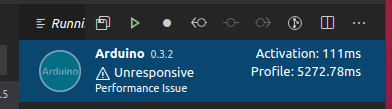
(already reported as #1051)
and I need to upgrade (because then propably this fix #1051 as in #1050).
Could you give more info how can I fix this on my own?
 rrakso
on 14 Oct 2020
rrakso
on 14 Oct 2020
@rrakso thanks, and very interesting, because I didn't know how to make such handy extensions. I have to look more into this.
But this dosn't enable Arduino programming (CTRL+ALT+U) and it doesn't allow sending (CTRL+SHIFT+S) also - right ?
iqapps
on 14 Oct 2020
@rrakso thanks, and very interesting, because I didn't know how to make such handy extensions. I have to look more into this.
But this dosn't enable Arduino programming (CTRL+ALT+U) and it doesn't allow sending (CTRL+SHIFT+S) also - right ?
this actually is not really a vscode "extension" but a small node project
and yes netiher puihsing a c program (which is already working in the extension in here)
nor sending data(which probably takes about 10 lines of cose to add tbh ) is currently supported
if sending data is a big plus for you I can look into it - shouldnt take long as its more or less just the reverse of reading
jonnytest1
on 14 Oct 2020
It more the matter of programming the Arduino that is the problem. But thanks.
I would rather have somebody to make this problem go away, so we can have trustworthy updates on the fly.
I would help myself if I could, but VS Code coding is way out of my comfortzone.
iqapps
on 14 Oct 2020
oh lol adding sending data was really easy :D
globalThis.write = (line) => {
port.write(line)
}
just adding these lines
and you can put
write("asf")
in the debug console and it will get forwarded to the serial port
tested with this code snippet: output changed after the write call for 3 characters
int incomingByte = 0;

void loop()
{
    Serial.println("test2");

    incomingByte = Serial.read();

    // say what you got:
    Serial.print("I received: ");
    Serial.println(incomingByte, DEC);

    delay(1000);
}
@rrakso sorry i dont know how to "fix" the original extension (not that i didnt try :3)
the way i did it is just a workaround that reimplements the functionality in a new project
jonnytest1
on 14 Oct 2020
i also noticed that unfortunately its necessary to close the serial monitor project while pushing a new program to the arduino
jonnytest1
on 14 Oct 2020
Anyway, is a patch for this issue coming in the next release?
 marcelo-lara
on 18 Oct 2020
marcelo-lara
on 18 Oct 2020
for everyone suffering try rebuilding the plugin following the steps from my https://github.com/microsoft/vscode-arduino/issues/1113#issuecomment-713100975.
 kseyhan
on 20 Oct 2020
kseyhan
on 20 Oct 2020
Prerelease build for the serial port issue is here: https://github.com/microsoft/vscode-arduino/releases/tag/v0.3.3-rc
I plan to publish a release with this fix tomorrow, Oct 30.
 robotdad
on 29 Oct 2020
robotdad
on 29 Oct 2020
Resolved in release 0.3.3
robotdad
on 30 Oct 2020
i was wondering - was it previously possible to send data through the serialmonitor ?
jonnytest1
on 31 Oct 2020
not resolved for me @robotdad
Version: 1.51.0 (user setup)
Electron: 9.3.3
Chrome: 83.0.4103.122
Node.js: 12.14.1
V8: 8.3.110.13-electron.0
OS: Windows_NT x64 10.0.19042
and Arduino Extension V 0.3.3
The error is:
Failed to open serial port COM4 due to error: + Error: \?***.vscode-serverextensionsvsciot-vscode.vscode-arduino-0.3.3outnode_modulesusb-detectionbuildReleasedetection.node is not a valid Win32 application.
\?*****.vscode-serverextensionsvsciot-vscode.vscode-arduino-0.3.3outnode_modulesusb-detectionbuildReleasedetection.node
 MaxBoyman
on 7 Nov 2020
MaxBoyman
on 7 Nov 2020
Related issues
 hellyzh
·
18Comments
hellyzh
·
18Comments
 Karlo-Emilo
·
17Comments
Karlo-Emilo
·
17Comments
 tranvan110
·
30Comments
tranvan110
·
30Comments
 rhit-jacksocr
·
18Comments
rhit-jacksocr
·
18Comments
 Proladon
·
16Comments
Proladon
·
16Comments
Most helpful comment
Resolved in release 0.3.3