Vscode-arduino: Error "Cannot read property 'map' of undefined" when calling Arduino commands
I am using Windows 10.
Arduino initialize, Arduino Examples, Arduino board manager.. all gives the error:
Cannot read property 'map' of undefined
 Karlo-Emilo
All 17 comments
Same here.
VSCode info:
Version 1.2.0
Shell 1.7.9
Renderer 58.0.3029.110
Node 7.9.0
Architecture x64
Arduino version 1.8.5
 lcguida
on 8 Feb 2018
lcguida
on 8 Feb 2018
@Karlo-Emilo can you paste the log details so that we can look into it? Thanks.
 liydu
on 9 Feb 2018
liydu
on 9 Feb 2018
The log:
messageService.ts:126 Cannot read property 'map' of undefined
e.doShow @ messageService.ts:126
e.show @ messageService.ts:105
e.resume @ messageService.ts:64
(anonymous) @ workbench.ts:1008
e.fire @ event.ts:142
(anonymous) @ quickOpenController.ts:534
Karlo-Emilo
on 9 Feb 2018
I'm getting the same thing. I tried checking out the code and debugging the extension, but I think I'm just seeing front end errors and I don't know how to debug the back end where the error is probably originating. Here's the call stack; I don't see anything in the output or debug console though:
(anonymous function) (c:\Users\bjeps\src\vscode-arduino\src\arduinoActivator.ts:19)
rejected (c:\Users\bjeps\src\vscode-arduino\out\src\arduinoActivator.js:7)
[ Promise.reject ] (Unknown Source:undefined)
rejected (c:\Users\bjeps\src\vscode-arduino\out\src\arduinoActivator.js:7)
[ Promise.reject ] (Unknown Source:undefined)
m (winjs.base.raw.js:1209)
enter (winjs.base.raw.js:852)
_run (winjs.base.raw.js:1068)
_completed (winjs.base.raw.js:1036)
e.resolveOk (lazyPromise.ts:65)
e._receiveReply (rpcProtocol.ts:135)
e._receiveOneMessage (rpcProtocol.ts:96)
(anonymous function) (rpcProtocol.ts:33)
(anonymous function) (rpcProtocol.ts:213)
(anonymous function) (event.ts:382)
e.fire (event.ts:142)
(anonymous function) (ipc.net.ts:81)
emitOne (events.js:96)
emit (events.js:191)
readableAddChunk (_stream_readable.js:178)
Readable.push (_stream_readable.js:136)
onread (net.js:560)
 bjepson
on 9 Feb 2018
bjepson
on 9 Feb 2018
Just wanted to note that I'm experiencing the same error (with the same stack trace) running VS Code 1.20.0 on macOS 10.13.3 with Arduino IDE 1.8.5.
 dstaley
on 9 Feb 2018
dstaley
on 9 Feb 2018
I reverted to VS Code 1.19.3, and the extension works fine. Looks like there were a lot of changes in 1.20, so it's likely related to one of those changes.
bjepson
on 10 Feb 2018
So it looks like this might be a VS Code bug, not related to this extension. To test, open a folder in VS Code (doesn't matter what kind of folder) and then try to run one of the Arduino commands. I can only replicate this issue when running in an empty workspace. The error seems to be coming from vscode.workspace.findFiles which seems to throw the error whenever the workspace is empty.
dstaley
on 11 Feb 2018
that's right I also just debugged this and basically looks like this error is thrown because the "arduino.json" is not found, also makes sense that it works then with an existing project.
 keyoke
on 15 Feb 2018
keyoke
on 15 Feb 2018
I opened Issue here for this
https://github.com/Microsoft/vscode/issues/43757
I also have workaround here where if the findfiles promise is rejected I still initialize the Arduino settings
keyoke
on 15 Feb 2018
same problem I meet emmm.....
Windows 10
VScode version:1.20.1
Arduino IDE version:1.8.5
It's must be VScode‘s bug,just wait for fix.
For now just rolling back to 1.19
 bleach103
on 26 Feb 2018
bleach103
on 26 Feb 2018
How to repro on:
- Open vs code new windows . here vs code not open any project.
- Press F1 and select Arduino :Examples command
- Verify the error: Cannot read property 'map' of undefined
 czgtest
on 7 Mar 2018
czgtest
on 7 Mar 2018
Same issue with VScode 1.21.0 . Does anyone know how to fix this problem ?
 angela-rph
on 8 Mar 2018
angela-rph
on 8 Mar 2018
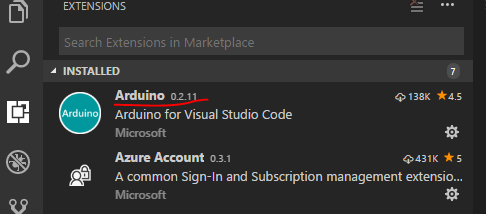
We just released 0.2.11 which should have fixed this issue, please upgrade to 0.2.11 and have a try.
 Sneezry
on 8 Mar 2018
Sneezry
on 8 Mar 2018
@Karlo-Emilo @angela-rph , can you upgrade the Arduino extension to version 0.2.11 and have a try again ?
czgtest
on 9 Mar 2018
Does not work as expected for me. I got some error messages now :

However Verification & Upload still work regardless of these errors.
angela-rph
on 9 Mar 2018
Switching C_Cpp.intelliSenseEngine to Tag Parser in user settings as described in these instructions fixed it for me - https://stackoverflow.com/questions/47401731/issues-setting-up-mxchip-vscode-arduino-mx3166-environment-on-mac/47448652#47448652
keyoke
on 10 Mar 2018
The original problem was solved. Close it.
 lirenhe
on 15 Mar 2018
lirenhe
on 15 Mar 2018
Related issues
 dreed47
·
22Comments
dreed47
·
22Comments
 shizn
·
24Comments
shizn
·
24Comments
 lamqhoang
·
19Comments
lamqhoang
·
19Comments
 0923416
·
44Comments
0923416
·
44Comments
 szormok
·
24Comments
szormok
·
24Comments
Most helpful comment
So it looks like this might be a VS Code bug, not related to this extension. To test, open a folder in VS Code (doesn't matter what kind of folder) and then try to run one of the Arduino commands. I can only replicate this issue when running in an empty workspace. The error seems to be coming from
vscode.workspace.findFileswhich seems to throw the error whenever the workspace is empty.