Vscode-arduino: Unable to open com port
Issue Type: Bug
Failed to open serial port COM15 due to error: + Error: \?\d:\PortableApp\VSCode\data\extensions\vsciot-vscode.vscode-arduino-0.3.2\out\node_modules\usb-detection\build\Release\detection.node is not a valid Win32 application.
\?\d:\PortableApp\VSCode\data\extensions\vsciot-vscode.vscode-arduino-0.3.2\out\node_modules\usb-detection\build\Release\detection.node
Extension version: 0.3.2
VS Code version: Code 1.49.0 (e790b931385d72cf5669fcefc51cdf65990efa5d, 2020-09-10T13:22:08.892Z)
OS version: Windows_NT x64 6.1.7601
System Info
|Item|Value|
|---|---|
|CPUs|Intel(R) Core(TM) i5-3340M CPU @ 2.70GHz (4 x 2691)|
|GPU Status|2d_canvas: enabled
flash_3d: enabled
flash_stage3d: enabled
flash_stage3d_baseline: enabled
gpu_compositing: enabled
multiple_raster_threads: enabled_on
oop_rasterization: disabled_off
opengl: enabled_on
protected_video_decode: unavailable_off
rasterization: enabled
skia_renderer: disabled_off_ok
video_decode: enabled
vulkan: disabled_off
webgl: enabled
webgl2: enabled|
|Load (avg)|undefined|
|Memory (System)|7.91GB (3.53GB free)|
|Process Argv||
|Screen Reader|no|
|VM|0%|
 tranvan110
All 30 comments
Have same issue. No problem using the port to upload to device.
Extension version 0.3.2
Version: 1.49.0 (system setup)
Commit: e790b931385d72cf5669fcefc51cdf65990efa5d
Date: 2020-09-10T13:22:08.892Z
Electron: 9.2.1
Chrome: 83.0.4103.122
Node.js: 12.14.1
V8: 8.3.110.13-electron.0
OS: Windows_NT x64 10.0.18363
 nullmind
on 16 Sep 2020
nullmind
on 16 Sep 2020
Having the same here on my end.
Extension version: 0.3.2
Version: 1.49.0 (user setup)
Commit: e790b931385d72cf5669fcefc51cdf65990efa5d
Date: 2020-09-10T13:22:08.892Z
Electron: 9.2.1
Chrome: 83.0.4103.122
Node.js: 12.14.1
V8: 8.3.110.13-electron.0
OS: Windows_NT x64 10.0.18363
 befungle
on 16 Sep 2020
befungle
on 16 Sep 2020
Have same issue.
Version: 1.49.0 (user setup)
Commit: e790b931385d72cf5669fcefc51cdf65990efa5d
Date: 2020-09-10T13:22:08.892Z
Electron: 9.2.1
Chrome: 83.0.4103.122
Node.js: 12.14.1
V8: 8.3.110.13-electron.0
OS: Windows_NT x64 10.0.18362
Extension version: 0.3.2
 Forailan
on 16 Sep 2020
Forailan
on 16 Sep 2020
Same issue. Can upload and verify, but cannot change serial port/nor see serial port menus. Additionally cannot access serial monitor as a result of this.
Version: 1.49.0
Commit: e790b931385d72cf5669fcefc51cdf65990efa5d
Date: 2020-09-10T17:39:53.251Z (6 days ago)
Electron: 9.2.1
Chrome: 83.0.4103.122
Node.js: 12.14.1
V8: 8.3.110.13-electron.0
OS: Darwin x64 19.6.0

 rroessler
on 17 Sep 2020
rroessler
on 17 Sep 2020
Same Problem here. VS Code 1.49.0 , Arduino extension 0.3.2.
cannot choose serial port from bottom-bar, cannot verify sketch, cannot upload sketch, cannot open serial monitor.
everything sucks.
Version: 1.49.0 (user setup)
Commit: e790b931385d72cf5669fcefc51cdf65990efa5d
Date: 2020-09-10T13:22:08.892Z
Electron: 9.2.1
Chrome: 83.0.4103.122
Node.js: 12.14.1
V8: 8.3.110.13-electron.0
OS: Windows_NT x64 10.0.19041
Update:
verify and upload problems was prior to not setting correct port in arduino.json, but the others are consistent.
 MaxBoyman
on 17 Sep 2020
MaxBoyman
on 17 Sep 2020
Having same issue, notable after a vscode update and C/C++ extension update. Uploads to device fine, only change was the update
 Ghakamo
on 17 Sep 2020
Ghakamo
on 17 Sep 2020
Tengo el mismo problema con el VSCode, puedo verificar los programas, puede subirlo, pero los puertos COM no los reconoces de forma automatica y tampoco puedo debugguear los programa.
 ciscojmg
on 17 Sep 2020
ciscojmg
on 17 Sep 2020
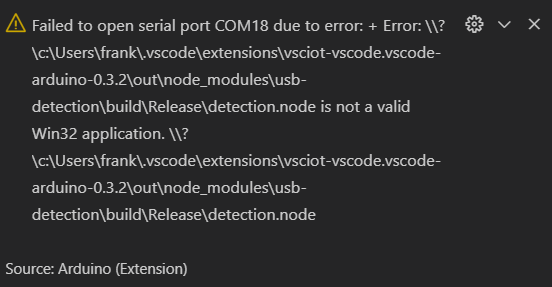
ciscojmg
on 17 Sep 2020
Tengo el mismo problema en Ubuntu

 jgusr
on 17 Sep 2020
jgusr
on 17 Sep 2020
Tengo el mismo problema: No puedo configurar de forma automática el puerto COM y tampoco puedo usar el debug.. Si me funciona la compilación.

 johanm57
on 17 Sep 2020
johanm57
on 17 Sep 2020
El problema se corrigio descargando la version VScode
Version: 1.48.2 (system setup)
Commit: a0479759d6e9ea56afa657e454193f72aef85bd0
Date: 2020-08-25T10:13:11.295Z
Electron: 7.3.2
Chrome: 78.0.3904.130
Node.js: 12.8.1
V8: 7.8.279.23-electron.0
OS: Windows_NT x64 10.0.18362
ciscojmg
on 18 Sep 2020
Same issue.
 dotponder
on 20 Sep 2020
dotponder
on 20 Sep 2020
Same Issue
 cdelcristo
on 20 Sep 2020
cdelcristo
on 20 Sep 2020
Same issue
 kbeaugrand
on 21 Sep 2020
kbeaugrand
on 21 Sep 2020
C'mon guys ... Who will solve this banal error? Don't release new version with so banal error. Visual studio code and Arduino extension is totally unusable with such an error. I understand, bugs could happen, but not such a stupid one. Does Micorsoft has fingers in this errror?
 Roberto6969
on 21 Sep 2020
Roberto6969
on 21 Sep 2020
Me too.

Downgrading Arduino extension alone to previous version dont work anymore....
Downgrading to VS Code 1.48.2 and Arduino extension to 0.30 restores expected function.
We are stuck on old versions here.
 iqapps
on 22 Sep 2020
iqapps
on 22 Sep 2020
+1 @iqapps
Downgrade. This is a solution. I fixed it by downgrading up to 1.48.2.
I hope you find this useful to fix your own situations.
 fidelbrea
on 1 Oct 2020
fidelbrea
on 1 Oct 2020
+1 @iqapps
Working now.
Downgraded to Visual Code 1.48.2 and Arduino extension 0.3.0
Have also turned off automatic updates on Visual Code, just not good enough to break stuff like this with updates.
 mattkemp
on 12 Oct 2020
mattkemp
on 12 Oct 2020
This is still a very serious problem for me.
Some of us developers are stuck on old code here.
What is keeping this issue from being solved ?
iqapps
on 12 Oct 2020
This issue is being alive for over than a month and no body's gonna send us at least a report from what's going on. Is there anybody in microsoft to fix this? or arduino extension from microsoft is like other microsoft garage projects?
MaxBoyman
on 12 Oct 2020
I've caused this by updating my version of Node.
But I now cant revert this by downgrading Node....
 trullock
on 19 Oct 2020
trullock
on 19 Oct 2020
@trullock: do you mean that you are the cause of this issue(!), or you now have the issue?
If the latter then you'll need to downgrade to VSCode 1.48.2 (and maybe also Arduino extension 0.3.0)
 simonl65
on 19 Oct 2020
simonl65
on 19 Oct 2020
I mean I caused it to myself :D
Or at least I think thats whats caused it. Guess I'll downgrade if thats a known workaround.
initially I updated node and got an issue with NODE_MODULE_VERSION 75 vs 80, then I deleted the arduino extension and reinstalled it and now I'm getting this error. Maybe it updated from 3.0 but I don't think so...
Update
VSC 1.48.2 with VSC-Arduino 0.32 on nvm node 12.19.0 (32bit): works
VSC 1.49.3 with VSC-Arduino 0.32 on nvm node 12.19.0 (32bit): detection.node' was compiled against a different Node.js version using NODE_MODULE_VERSION 75. This version of Node.js requires NODE_MODULE_VERSION 80
VSC 1.50.1 with VSC-Arduino 0.32 on nvm node 12.19.0 (32bit): detection.node is not a valid Win32 application
Ive also tried various combinations of Node versions (both 64 and 32 bit) and couldnt change the above, but I wasnt exhaustive
trullock
on 19 Oct 2020
Just got an MXChip and trying to follow the IoT DevKit Getting Started tutorial on Docs site and having issues with this silly COM port bug mentioned here. This is an abysmal user experience for beginners. I've decided to try PlatformIO and the tutorials there as many tell me that extension has far less pain-points getting in the way of learning this shizzle. Not sure yet whether Azure integration will be an issue though. Any updates to VS Code or Arduino extension should probably include a human doing a test run through the Microsoft Docs that use these tools and if you fail to successfully complete the tutorial, you don't get to release the update :)
 Seefer
on 20 Oct 2020
Seefer
on 20 Oct 2020
check the solution proposed here https://github.com/microsoft/vscode-arduino/issues/1113#issuecomment-714255377 if have a proper build environment on your machine.
 kseyhan
on 22 Oct 2020
kseyhan
on 22 Oct 2020
This can probably be due to an issue with Arduino Installation. I had the same issue. I uninstalled the Arduino existing installation and installed the latest version (1.8.13) it fixed the issue.
 WenukaB
on 1 Nov 2020
WenukaB
on 1 Nov 2020
Arduino extension 0.3.3 fixes this issue
simonl65
on 1 Nov 2020
problem still there even after updating to 0.3.3
MaxBoyman
on 2 Nov 2020
Arduino extension 0.3.3 and Visual Code 1.50.1 is working for me.
mattkemp
on 2 Nov 2020
fixed in 0.3.3
 adiazulay
on 18 Nov 2020
adiazulay
on 18 Nov 2020
Related issues
 Karlo-Emilo
·
17Comments
Karlo-Emilo
·
17Comments
 dreed47
·
22Comments
dreed47
·
22Comments
 rei-vilo
·
15Comments
rei-vilo
·
15Comments
 szormok
·
24Comments
szormok
·
24Comments
 jilouchu
·
34Comments
jilouchu
·
34Comments
Most helpful comment
This issue is being alive for over than a month and no body's gonna send us at least a report from what's going on. Is there anybody in microsoft to fix this? or arduino extension from microsoft is like other microsoft garage projects?