Visualstudio: Using a slash in the clone dialog
Rather than typing nunit, reaching for the mouse and clicking to expand the org 'nunit,' then finding nunit in the alphabetically sorted list and clicking on it, my instinct was to type a slash like I would at the command line or in the browser:
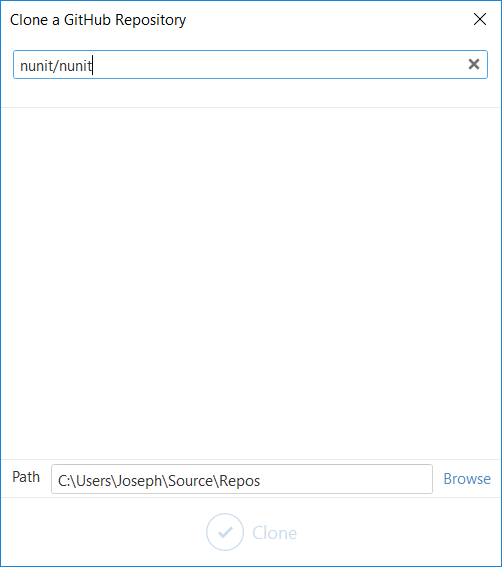
Do you already support something similar, or would you be interested in such a feature?
 jnm2
jnm2
All 16 comments
Our current clone functionality is terrible.
I'm hoping we can borrow some ideas from GitHub Desktop and add some of our own.

For example I'd like to paste in a GitHub URL and have it clone/open that exact branch and file (if specified). I'd also want it to suggest a sane default directory that includes the repository owner and name (not just a flat list of names).
Let me know what you think and if you have any other requests/suggestions.
 jcansdale
on 22 Jun 2018
jcansdale
on 22 Jun 2018
Wow, checking out the branch in the pasted URL would be cool! I wonder if I'd remember to use it?
I think that's awesome. Especially the part where I can specify the folder directly rather than only being able to control up to the Repos segment.
jnm2
on 22 Jun 2018
I think that's awesome. Especially the part where I can specify the folder directly rather than only being able to control up to the Repos segment.
I was imagining targeting a repository, branch, folder, file and line number, for example:
https://github.com/nunit/nunit/blob/master/src/CommonAssemblyInfo.cs#L65
We'd also need to do something sensible if a user targets a folder, e.g. just:
https://github.com/nunit/nunit/blob/master/src/CommonAssemblyInfo.cs#L65
Maybe simply expand the targeted folder in Solution Explorer?
jcansdale
on 22 Jun 2018
Yes! I'd love to be able to use that as a navigation feature without having to create a new clone.
jnm2
on 22 Jun 2018
If the repository already exists, we could offer to reuse it or clone a new repository at a different location. Using a git worktree would be ideal, but I'm not sure LibGit2Sharp supports worktrees yet. 🤞
jcansdale
on 22 Jun 2018
@jcansdale If it became a general navigation feature, if the file is unchanged, it could just navigate. If the file is changed it could track the line or warn, maybe resorting to cloning or worktrees as a last resort?
But if pasted into the clone dialog, of course it would clone. I wonder how often I'd really paste a path-specific URL when cloning, compared to how often I'd use it instead of the current Ctrl+T, \
jnm2
on 22 Jun 2018
@jnm2,
I wonder how often I'd really paste a path-specific URL when cloning, compared to how often I'd use it instead of the current Ctrl+T,
, Ctrl+G, which I use to jump in VS to the area I'm looking at in the browser.
Good question. I quite often find some code on GitHub that I'd like to dig into a bit further. Being able to quickly change context from the website to the code in VS would be handy. At the moment there's too much friction for me to do this on a whim. If we could make the process seamless enough, maybe users would be more inclined to do this.
I've done a quick and dirty spike of this functionality here: https://github.com/github/VisualStudio/pull/1763
Would you be up for installing this version and letting me know what you thank?
https://ci.appveyor.com/project/github-windows/visualstudio/build/2.5.4.3072/artifacts
There are a couple of restrictions:
- It will always check out or open code from the following location:
<DefaultClonePath>\GitHubCache\<RepositoryOwner>\<RepositoryName>(this is to avoid stomping on your current directory structure) - It will only open code from the
masterbranch. It could checkout a different branch, but I haven't implemented this yet.
You should find it works with GitHub code and PR URLs.
jcansdale
on 25 Jun 2018
Dang, this is cool!
I wasn't sure what had happened for a few seconds. Might prefer a UI with the clipboard contents prefilled into a text box so I can verify that the clipboard contains what I thought it did, and then hit enter and see a spinner while I wait.
Also would be nice to stay in the same repo rather than switching to GitHubCache if you can figure out how to do that safely. If switching branches fails due to changes, maybe then there could be an option to use GitHubCache?
jnm2
on 29 Jun 2018
Hey, can you make it set the text highlight to all lines when I use #L63-L70 for example?
Also could it center the selection rather than moving the minimum possible distance from the top of the file?
I really don't want to uninstall this CI build 😁
jnm2
on 29 Jun 2018
Oh, btw, on startup:

jnm2
on 29 Jun 2018
@jnm2,
I wasn't sure what had happened for a few seconds. Might prefer a UI with the clipboard contents prefilled into a text box so I can verify that the clipboard contains what I thought it did, and then hit enter and see a spinner while I wait.
Yes, we're planning to be more explicit about what's going on. For example show a dialog with the target URL and the action that will happen when confirmed. This would also allow the user to change the clone directory or which repository to open. It would also be nice to have a progress bar when cloning.
Also would be nice to stay in the same repo rather than switching to GitHubCache if you can figure out how to do that safely. If switching branches fails due to changes, maybe then there could be an option to use GitHubCache?
If the target file exists in the user's current solution, we'll give them the choice between opening the local file or cloneing/opening a different repo.
Hey, can you make it set the text highlight to all lines when I use #L63-L70 for example?
What? I didn't know that was possible! I see you can hold shift and select a range. How the heck did you even discover that?
Also could it center the selection rather than moving the minimum possible distance from the top of the file?
This that it's supposed to be doing, but there seems to be some issue with the way I'm opening the file. I'll investigate.
Oh, btw, on startup:
8 seconds is suspiciously close to how long MEF takes to refresh its cache. I'm guessing we're taking the blame for this (I don't think it's related to this PR). I'll open an issue.
jcansdale
on 29 Jun 2018
Hey, can you make it set the text highlight to all lines when I use #L63-L70 for example?

It appears we support this in the Copy link to clipboard command. I never realized. I'll definitely add support this. I'm keen for this functionality to be symmetrical.
jcansdale
on 29 Jun 2018
I originally discovered shift+click by deciding it should be a thing and trying it :D
Later on they made it fancy so that you could grab a permalink which would become a code window when pasted into a comment.
jnm2
on 29 Jun 2018
Later on they made it fancy so that you could grab a permalink which would become a code window when pasted into a comment.
Damn, I never knew you could do that either! 😆
jcansdale
on 29 Jun 2018
Oops, sorry. #1763 doesn't actually address this.
jcansdale
on 19 Jul 2018
@jnm2 this is the PR that will actually fix it #1787.
jcansdale
on 23 Jul 2018
Related issues
jcansdale
·
4Comments
 jharris1993
·
5Comments
jharris1993
·
5Comments
 laurentkempe
·
4Comments
laurentkempe
·
4Comments
 grokys
·
6Comments
grokys
·
7Comments
grokys
·
6Comments
grokys
·
7Comments