Visualstudio: Enterprise instance not detected.
From @awbushnell in #1457:
@meaghanlewis I am now having problems with the GitHub extension from showing anything... On my local system, all I do is load Visual Studio 2017.. Open the project I am working on that is being version controlled via Git. The Visual Studio Team Explorer properly sees it as a Git repo and shows me branch etc. information, but when I switch to the GitHub view, it simply displays:
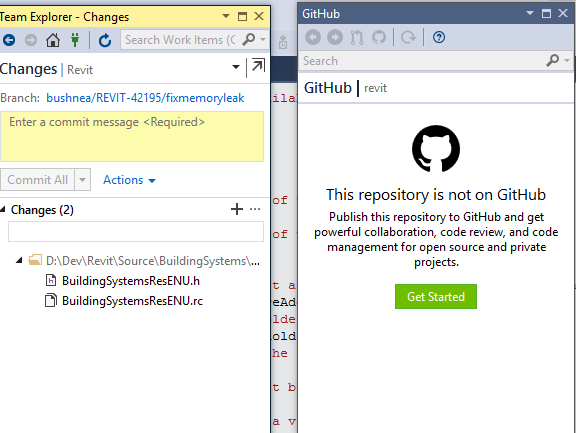
Notice in the image, GitHub empty, yet team explorer is properly showing Repo info...
Even clicking get started, just brings me to the team explorer view and nothing updates/happens.
I should note that in this case, I am NOT in any worktree at all, this is our main repo...
what is the output of running git remote -vv in the repository?
it looks correct, we are on GitHub enterprise and it spits the following 2 lines out:
origin [correcthttpspathtoourenterpriserepo] (fetch)
origin [correcthttpspathtoourenterpriserepo] (push)
 grokys
All 7 comments
@grokys One follow up question.. In team explorer, I signed out and am attempting to sign back in, thinking maybe that might wake things up, but when I go to sign in via GitHub Enterprise, it prompts me for the server and then when it validates it, it prompts for a "token" do you know where I get that information from? I am used to only having to provide my credentials for our server, never had to enter any token... so a little confused now.
 awbushnell
on 8 Feb 2018
awbushnell
on 8 Feb 2018
@awbushnell do you think you could create a new issue for that too? It gets a bit hard to track things when there are multiple issues in a single GitHub issue.
grokys
on 8 Feb 2018
@awbushnell I've been able to reproduce this here, we should have a fix shortly for this issue. Sorry about that.
grokys
on 8 Feb 2018
@grokys see #1474
awbushnell
on 8 Feb 2018
@awbushnell this should be fixed in release 2.4.2 which has just been released. Please let us know if you have any more problems.
grokys
on 8 Feb 2018
@grokys Hmm, I just updated to the version and it still only prompts for token.... FYI
awbushnell
on 8 Feb 2018
Yes, this is the issue for the repository not being detected. #1474 is the issue for the login, this will be in the next release - we didn't have time to get both of them in unfortunately.
grokys
on 8 Feb 2018
Related issues
 mponce1
·
3Comments
awbushnell
·
7Comments
grokys
·
7Comments
mponce1
·
3Comments
awbushnell
·
7Comments
grokys
·
7Comments
 jcansdale
·
4Comments
grokys
·
6Comments
jcansdale
·
4Comments
grokys
·
6Comments