Vega: Some rendered text can exceed calculated bounds.
The apparent issue is that titles get truncated in certain languages when padding is set to zero.
This is likely because the bounding box calculation for text marks is using some heuristics that doesn't generalize to all languages.
Example spec to reproduce:
{
  "$schema": "https://vega.github.io/schema/vega/v5.json",
  "title": "Hello World สวัสดีชาวโลก",
  "padding": 0
}
Expecting the Thai characters to look like:

But instead seeing:

on macOS with latest Chrome.
 donghaoren
All 5 comments
Bounding box height for text in Vega is calculated using the specified pixel height directly. No other tricks or heuristics. Can you first verify whether browsers respects the provided text height setting? For example if a client specifies "12px" as the text size, does the resulting Thai text respect that?
Looking at the image you shared, it appears that the Thai text has annotations that exceed the requested font size. If that is indeed the case, it would be useful to find a standards document that describes how browsers / CSS are supposed to handle pixel-based font size units.
 jheer
on 27 May 2020
jheer
on 27 May 2020
FWIW, this might be an issue specific to Thai typography since it can have two levels of ascending characters. Consider the following three sets of characters, containing 1-3 characters respectively: ด, ดี, ดิ์.
The occurences of two level of ascending character are actually not rare (and is perhaps quite important as my last name (วงศ์ศุภสวัสดิ์) also has it lol) .
 kanitw
on 27 May 2020
kanitw
on 27 May 2020
Here is a test script with new TextMetrics properties:
<!DOCTYPE html>
<meta charset="utf-8" />
<h1>Text Metrics Test</h1>
<p>Red line indicate the position of the TextMetrics property</p>
<canvas id="canvas"></canvas>
<script>
    const canvas = document.getElementById('canvas');
    const ctx = canvas.getContext('2d');

    const fontSize = 25;

    // 2x scale
    const width = 750;
    const height = 600;
    canvas.style.width = width + "px";
    canvas.style.height = height + "px";
    canvas.width = width * 2;
    canvas.height = height * 2;
    ctx.scale(2, 2);


    const baselinesAboveAlphabetic = ['fontBoundingBoxAscent', 'actualBoundingBoxAscent',
        'emHeightAscent', 'hangingBaseline'];
    const baselinesBelowAlphabetic = ['ideographicBaseline', 'emHeightDescent',
        'actualBoundingBoxDescent', 'fontBoundingBoxDescent'];
    const baselines = [...baselinesAboveAlphabetic, ...baselinesBelowAlphabetic, ".fontSize"];

    ctx.strokeStyle = 'red';
    ctx.lineWidth = 0.5;

    const texts = [",", "-", "jgpqy", "Hello วงศ์ศุภสวัสดิ์", "你好,世界"];

    for (let baseline of baselines) {
        ctx.translate(0, 50);

        ctx.save();
        ctx.translate(150, 0);
        for (let text of texts) {
            ctx.font = fontSize + "px sans-serif";
            let textMetrics = ctx.measureText(text);

            ctx.fillText(text, 0, 0);

            let lineY = -Math.abs(textMetrics[baseline]);
            if (baselinesBelowAlphabetic.includes(baseline)) {
                lineY = +Math.abs(textMetrics[baseline]);
            }

            if (baseline == ".fontSize") {
                lineY = -25;
            }

            ctx.beginPath();
            ctx.moveTo(-5, lineY);
            ctx.lineTo(textMetrics.width, lineY);
            ctx.stroke();

            ctx.translate(textMetrics.width + 20, 0);
        }
        ctx.restore();

        ctx.font = "10px sans-serif";
        ctx.fillText(baseline, 5, 0);
    }

    ctx.translate(0, 80);
    ctx.font = "10px sans-serif";
    ctx.fillText("Vega Bounding Box", 5, 0);

    ctx.translate(150, 0);
    ctx.font = fontSize + "px sans-serif";
    let text = texts.join(" ");
    ctx.fillText(text, 0, 0);


    ctx.beginPath();
    // From https://github.com/vega/vega/blob/0aec54ce686b08983a0c1e8c65debf7ec974c1d7/packages/vega-scenegraph/src/marks/text.js#L56
    ctx.moveTo(0, fontSize * -0.8);
    ctx.lineTo(550, fontSize * -0.8);
    ctx.moveTo(0, fontSize * 0.2);
    ctx.lineTo(550, fontSize * 0.2);
    ctx.stroke();
</script>
I'm getting this on latest Chrome:
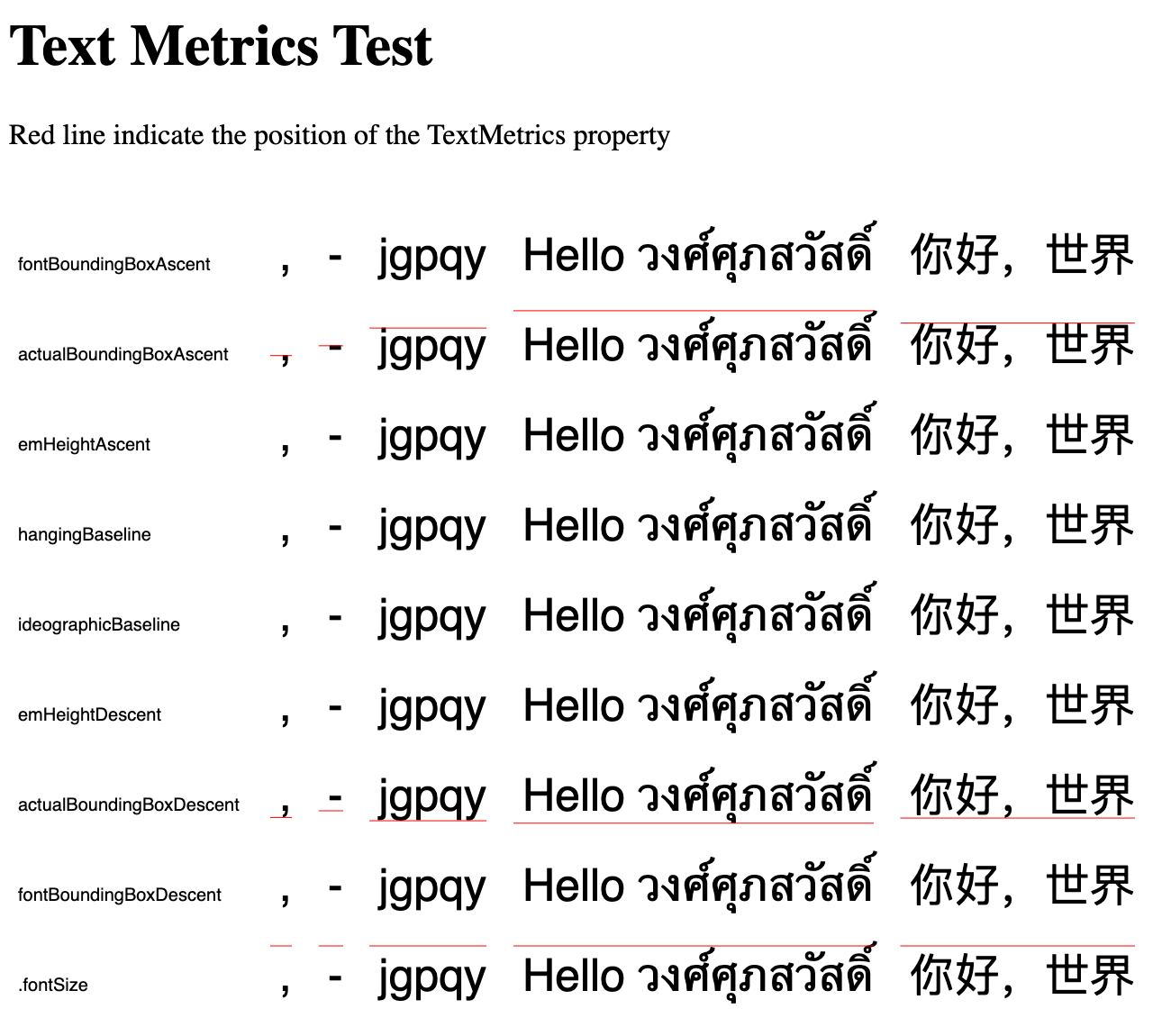
actualBoundingBoxAscent and actualBoundingBoxDescent are supported in Chrome, however, they change based on the actual text (e.g., for a comma, the values are smaller)
I think what we need should be fontBoundingBoxAscent and fontBoundingBoxDescent. However, these are not widely supported.
This is the current Vega bounding box calculation method, as from
https://github.com/vega/vega/blob/0aec54ce686b08983a0c1e8c65debf7ec974c1d7/packages/vega-scenegraph/src/marks/text.js#L56
It's actually taking the fontSize, and shifting it down by 1/5 fontSize:

This is good for English text, but for Thai for example, some characters are clipped, and the clipping looks pretty close to what's in the issue above.
donghaoren
on 28 May 2020
From the test code above, we can see that fontSize doesn't capture the 2nd level ascending characters in Thai. They seem to be only captured by actualBoundingBox, but actualBoundingBox changes when the text changes, and thus it may not be desirable for interactive charts.
A partial fix would be:
- Check for
fontBoundingBoxAscentandfontBoundingBoxDescent(returned bymeasureText), if they are available, use them. - Otherwise, use
fontSizeasfontBoundingBoxAscentand0.2 * fontSizeasfontBoundingBoxDescent. This should be a reasonable estimate (we can confirm the 0.2 ratio by testing it with a common font).
However this won't work for the 2nd level ascending characters in Thai.
donghaoren
on 28 May 2020
Actually you can add arbitrary number of ascending / descending characters with Unicode's character combination mechanisms, for example:
A A̴̘͋ A̴̘̘͋͋ A̴̘̘̘͋͋͋ A̴̘̘̘̘͋͋͋͋ A̴̘̘̘̘̘͋͋͋͋͋ ...
You can even make a bar chart:
-̂̂̂̂̂̂̂̂̂̂̂̂̂̂̂̂̂̂̂̂-̂̂̂̂̂̂̂̂̂̂̂̂̂̂̂̂̂̂̂̂-̂̂̂̂̂̂̂̂̂̂̂̂̂̂̂̂̂̂̂-̂̂̂̂̂̂̂̂̂̂̂̂̂̂̂̂̂̂̂̂̂̂̂̂-̂̂̂̂̂̂̂̂̂-̂̂̂̂-̂̂̂̂̂̂̂̂̂̂̂̂̂̂̂̂̂̂̂̂̂̂-̂̂̂̂̂̂̂-̂̂̂̂̂̂̂̂̂̂̂̂̂-̂̂̂̂̂̂̂̂-̂̂̂̂̂̂̂̂̂̂̂̂̂̂̂̂̂̂̂-̂̂̂̂̂̂̂ -̂̂̂̂̂̂̂̂̂̂̂̂̂̂-̂̂̂̂̂̂̂̂̂̂̂̂-̂̂̂̂̂̂̂̂̂̂̂̂̂̂̂̂̂̂-̂̂̂̂̂̂-̂̂̂̂̂̂̂̂̂̂̂̂̂̂̂̂̂̂̂̂̂̂̂̂-̂̂̂̂̂̂̂̂̂̂̂̂̂̂̂̂-̂̂̂̂̂-̂̂̂̂̂̂̂̂̂̂̂̂-̂̂̂̂̂-̂̂̂̂̂̂̂̂̂̂̂
There is a tool to generate these: https://onlineunicodetools.com/add-combining-characters
Given that Unicode allows a user to add arbitrary number of ascending characters, I think "maximum ascend and descend for a given font" doesn't really exist. So we should just use the font's ascent and descent information when computing text bounding box. We could also take user specified lineHeight into account (if lineHeight is given, it should overrides the font metrics information).
donghaoren
on 30 May 2020
Related issues
 mattijn
·
3Comments
mattijn
·
3Comments
 arvind
·
5Comments
arvind
·
5Comments
 nyurik
·
5Comments
nyurik
·
5Comments
 mo0om
·
3Comments
nyurik
·
3Comments
mo0om
·
3Comments
nyurik
·
3Comments