Vega: data is not sorted after points are added or removed
I have a visualization where I can add (on mousedown) and remove (shift + mousedown) a point in the chart. But the data is not reordered after a new point is added.
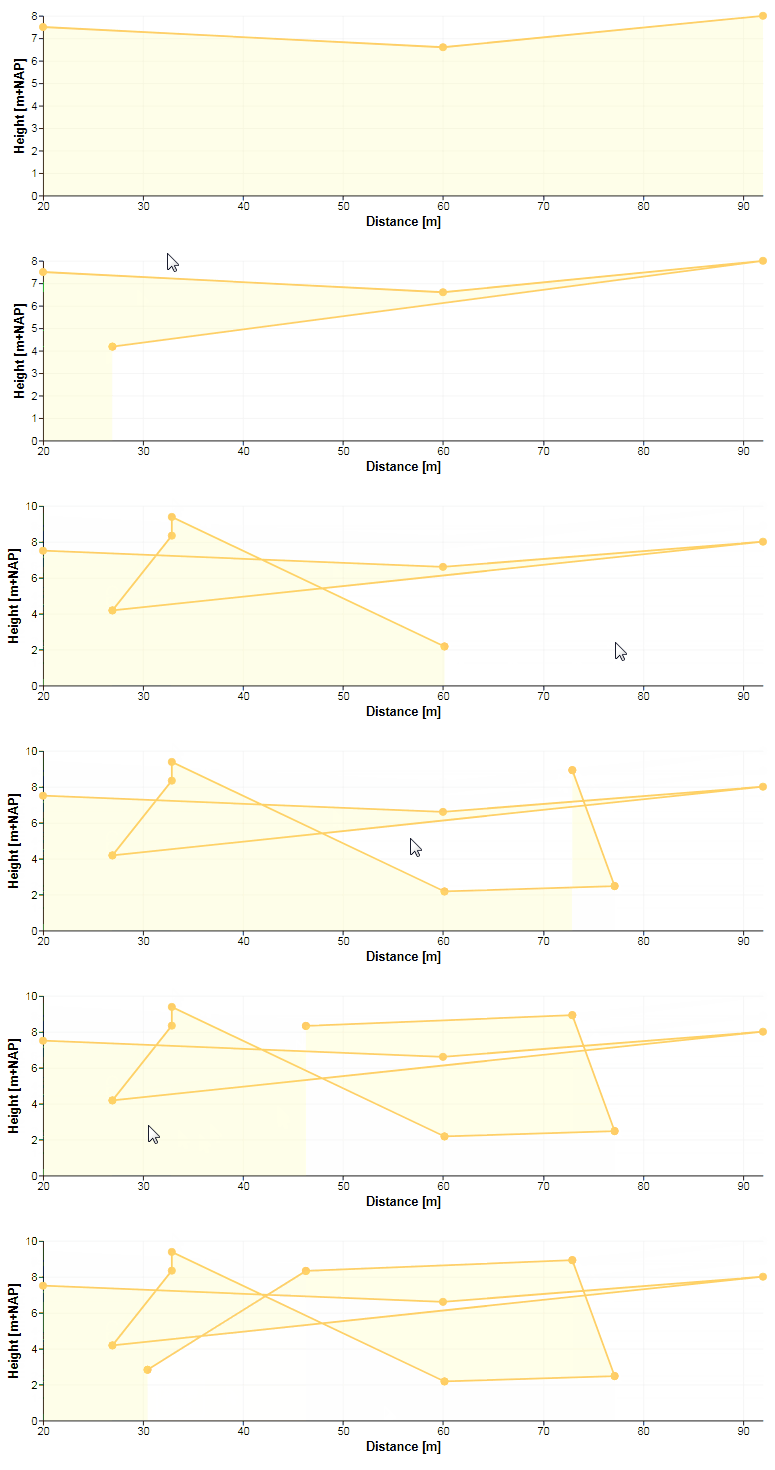
I expect it sorts the data based on field x since I use a collect transform including ordering:
  "data": [
    {
      "name": "data_points",
      "values": [{"x": 20, "y": 7.5}, {"x": 60, "y": 6.6}, {"x": 92, "y": 8}],
      "on": [
        {"trigger": "addPoint", "insert": "addPoint"},
        {"trigger": "remPoint", "remove": "remPoint"}
      ],
      "transform": [{"type": "collect", "sort": {"field": "x", "order": "ascending"}}]
    }
  ]
Spec in vega-editor: https://vega.github.io/editor/#/gist/vega/mattijn/f3ad3afa7c4738a2e334fb5b940c766f/fc9a0de233af39c485ac592677ad0d552c2bb25b/vega3_add_remove_points_sort.json
 mattijn
All 3 comments
I added an empty dataset {"name": "data_collector"} and a signal as such:
    {
      "name": "data_points_sorted",
      "update": "modify('data_collector', data('data_points'), true)"
    }
Now in the marks I use the data_collector in the from statement and it works.. somehow and somehow not:
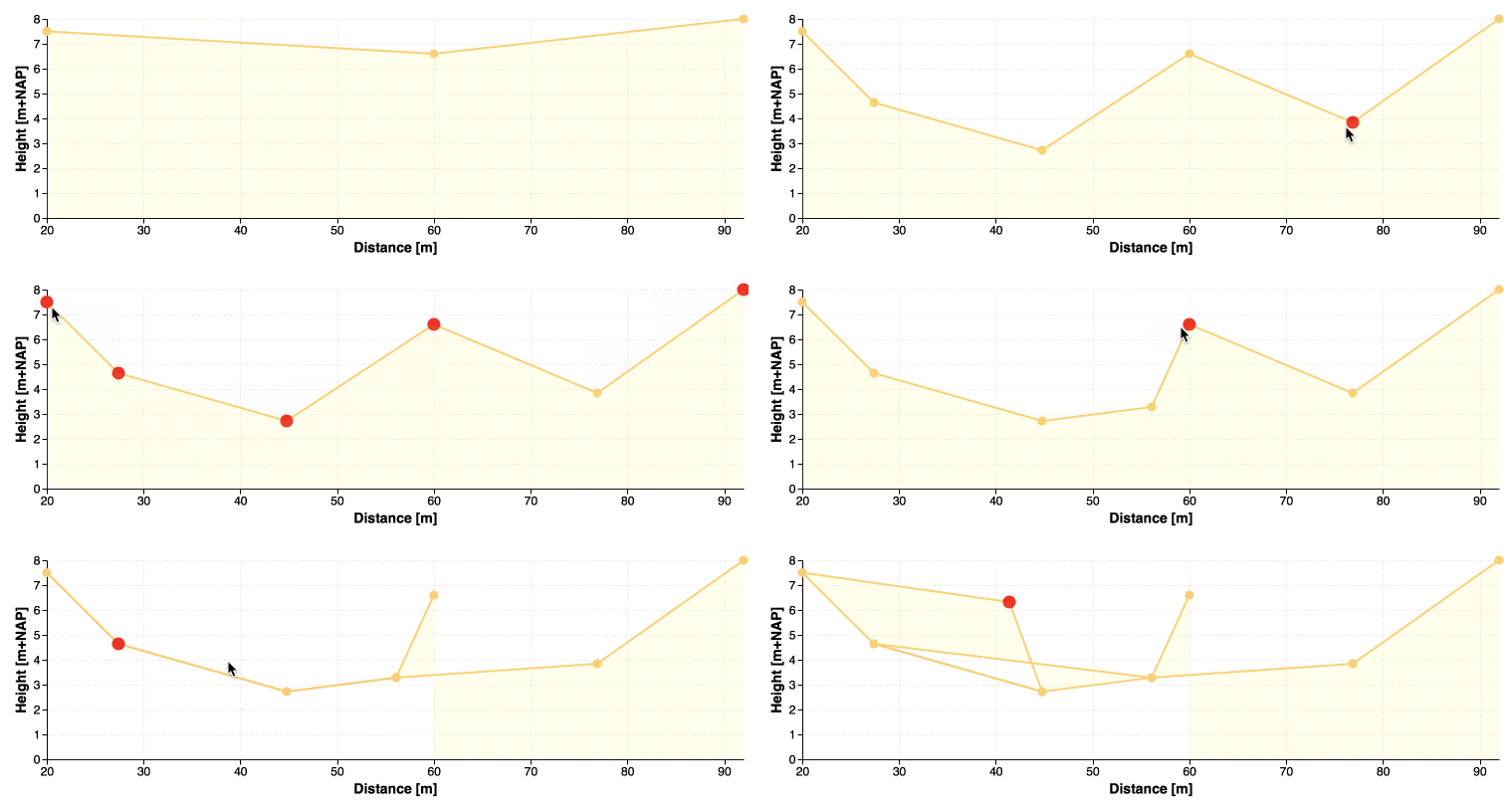
- I can add a datapoint in between others and the dataset is sorted by the
xfield. Great. - The hover is fixed on all points except for the latest point added, and only after adding a new point 'previous hovers' will disappear.
- Once I try to remove a point, the dataset becomes unsorted again and removing points becomes even impossible.
Spec (simplified):
{
  "$schema": "https://vega.github.io/schema/vega/v3.json",
  "width": 700,
  "height": 200,
  "padding": 5,
  "data": [
    {"name": "data_collector"},
    {
      "name": "data_points",
      "values": [{"x": 20, "y": 7.5}, {"x": 60, "y": 6.6}, {"x": 92, "y": 8}],
      "on": [
        {"trigger": "addPoint", "insert": "addPoint"},
        {"trigger": "remPoint", "remove": "remPoint"}
      ],
      "transform": [
        {"type": "collect", "sort": {"field": "x", "order": "ascending"}}
      ]
    }
  ],
  "signals": [
    {
      "name": "addPoint",
      "on": [
        {
          "events": "click[!event.shiftKey], mousedown[event.buttons && !event.shiftKey]{20}",
          "update": "{x: invert('xscale', x()), y: invert('yscale', y())}"
        }
      ]
    },
    {
      "name": "remPoint",
      "on": [
        {
          "events": "click[event.shiftKey], mousedown[event.buttons && event.shiftKey]{20}",
          "update": "datum"
        }
      ]
    },
    {
      "name": "data_points_sorted",
      "update": "modify('data_collector', data('data_points'), true)"
    }
  ],
  "scales": [
    {
      "name": "xscale",
      "type": "linear",
      "range": "width",
      "zero": false,
      "domain": {"data": "data_points", "field": "x"}
    },
    {
      "name": "yscale",
      "type": "linear",
      "range": "height",
      "zero": true,
      "domain": {"data": "data_points", "field": "y"}
    }
  ],
  "axes": [
    {
      "orient": "bottom",
      "scale": "xscale"
    },
    {
      "orient": "left",
      "scale": "yscale"
    }
  ],
  "marks": [
    {
      "type": "line",
      "interactive": false,
      "from": {"data": "data_collector"},
      "encode": {
        "update": {
          "x": {"scale": "xscale", "field": "x"},
          "y": {"scale": "yscale", "field": "y"},
          "stroke": {"value": "#ffcc66"},
          "strokeWidth": {"value": 2}
        }
      }
    },
    {
      "type": "symbol",
      "from": {"data": "data_collector"},
      "encode": {
        "update": {
          "x": {"scale": "xscale", "field": "x"},
          "y": {"scale": "yscale", "field": "y"},
          "stroke": {"value": "#ffcc66"},
          "fill": {"value": "#ffcc66"},
          "strokeWidth": {"value": 1}
        },
        "hover": {
          "strokeWidth": {"value": 5},
          "stroke": {"value": "red"},
          "fill": {"value": "red"}
        }
      }
    },
    {
      "type": "area",
      "interactive": false,
      "from": {"data": "data_collector"},
      "encode": {
        "update": {
          "x": {"scale": "xscale", "field": "x"},
          "y": {"scale": "yscale", "field": "y"},
          "y2": {"scale": "yscale", "value": 0},
          "fill": {"value": "#ffff66"},
          "fillOpacity": {"value": 0.15}
        }
      }
    }
  ]
}
Here's an explanation:
- The
sortdirective on acollecttransform will ensure the _data_ is sorted. However, this is not the same as sorting the _marks_ bound to the data. Initially, the data is sorted and this sort order in turn determines the order in which the data objects are bound to marks within a data join. However, this is not true across updates in which you add/remove points. - As you add and remove data points, the underlying data array is re-sorted. BUT, the data join processes tuples incrementally, simply appending or deleting marks as data points are added or removed. Across updates, the data join functions separate from the collector's sorting.
- To solve your problem, you want to sort the _marks_, not the _data_. Adding an appropriate
sortdirective to yourareamark definition should fix things. You can then also delete yourcollecttransform. Thesortdocumentation is under https://vega.github.io/vega/docs/marks/#top-level-mark-properties
Hope that helps!
 jheer
on 25 Apr 2018
jheer
on 25 Apr 2018
For future reference:
I solved this by the way some time ago:
- drag a point when mouse-down on point
- insert a point with shift+click on a location in the chart
- remove a point with alt+click on a point (on Mac this is option+click).
Vega-editor long-url
mattijn
on 1 Nov 2018
Related issues
 nyurik
·
5Comments
nyurik
·
5Comments
 arvind
·
5Comments
arvind
·
5Comments
 divico
·
4Comments
divico
·
4Comments
 chadbr
·
6Comments
chadbr
·
6Comments
 donghaoren
·
5Comments
donghaoren
·
5Comments
Most helpful comment
Here's an explanation:
sortdirective on acollecttransform will ensure the _data_ is sorted. However, this is not the same as sorting the _marks_ bound to the data. Initially, the data is sorted and this sort order in turn determines the order in which the data objects are bound to marks within a data join. However, this is not true across updates in which you add/remove points.sortdirective to yourareamark definition should fix things. You can then also delete yourcollecttransform. Thesortdocumentation is under https://vega.github.io/vega/docs/marks/#top-level-mark-propertiesHope that helps!