in my installation of vtkplotter, the plotter class doesn't seem to have a camera attribute. I see it in the source code...
In [1]: import vtkplotter

In [2]: vp = vtkplotter.Plotter()

In [3]: vp.camera
---------------------------------------------------------------------------
AttributeError                            Traceback (most recent call last)
<ipython-input-3-f88340b80664> in <module>
----> 1 vp.camera

AttributeError: 'Plotter' object has no attribute 'camera'

In [4]: print(vtkplotter.__version__)
2019.3.5
any idea what might be going on?
 fcollman
All 17 comments
i see i can set it, it just isn't there to start. Now i'm trying to figure out how to control the camera in the k3d widget.
fcollman
on 12 Jul 2019
HI, yes the vp.cameraonly exists after the first rendering.
The k3d backend is still a bit experimental and at present has a few limitations, loops , widget are not implemented... and camera positioning!
There are 2 ways out:
1 . use the k3d commands
from vtkplotter import settings

# ...
plt = vp.show(...)
plt

print(plt.camera) # a numpy object from k3d
see https://github.com/K3D-tools/K3D-jupyter/blob/master/examples/camera_manipulation.ipynb
- or
from vtkplotter import embedWindow
embedWindow(False)
# ...
vp.show(...)

print(vp.camera) # a vtkCamera object
 marcomusy
on 12 Jul 2019
marcomusy
on 12 Jul 2019
I see thanks… since vtk has a camera interface, can I suggest an alternative approach where you pass in a vtkCamera object, and you have convivence methods for making camera objects more easily and then you translate those camera parameters into k3d for the user?
This would let users setup their camera programmatically and pass it in in a unified way if they choose.. the present dictionary based method is a bit confusing as vtk parameterizes their camera in an odd way… I want to set the focalpoint, the up_vector and the distance, and have the camera’s position modified to make that true. However, vtk will move the focalpoint when you SetDistance, and so passing in those keyword arguments as you have it now doesn’t work so well… If I could just setup my camera as I like and then pass it in that would be better.
I’ve got a function for example that does this already so I can parameterize my camera initialization in the units I care to.
https://github.com/sdorkenw/MeshParty/blob/master/meshparty/trimesh_vtk.py#L512
fcollman
on 12 Jul 2019
Thanks a lot! Indeed you can already pass a whole camera object to vp.camera, the thing is that this is not yet translated to the k3d format.
One can either (not yet in jupyter):
vp = Plotter()

# place vtkCamera at a specific position
# (get these numbers by pressing Shift-C)
vp.camera.SetPosition([2.5, 2.5, 5.5])
vp.camera.SetFocalPoint([0.4, 0.4, 0.4])
vp.camera.SetParallelScale(1.8)
vp.camera.SetViewUp([-0.1, 1, -0.3])
or with your nice function:
vp = Plotter()

vp.camera = oriented_camera((1,1,1), up_vector=(0, -1, 0), backoff=500, backoff_vector=(0,0,1))
i'll see if I can extend it to the k3d backend.
marcomusy
on 12 Jul 2019
@fcollman
the latest version includes the camera functions from your meshparty project:
"cameraFromQuaternion",
"cameraFromNeuroglancer",
"orientedCamera",
"vtkCameraToK3D"
the last function is the one you were suggesting in the above messages, I hope this is addressing it, I wrote an example here:
https://github.com/marcomusy/vtkplotter/blob/master/examples/notebooks/manipulate_camera.ipynb
marcomusy
on 4 Aug 2019
I think this does address it.. except for not yet in jupyter?
fcollman
on 19 Aug 2019
in jupyter:
https://github.com/marcomusy/vtkplotter/blob/master/examples/notebooks/manipulate_camera.ipynb
You can form your vtkCamera object
vtkcam = orientedCamera(...)
and then apply it to the rendered scene as
settings.notebook_plotter.camera = vtkCameraToK3D(vtkcam)
..or maybe you were suggesting something different?
While playing with it I realize that K3D camera has some bug (viewup is not updated if the position is not modified): https://github.com/K3D-tools/K3D-jupyter/issues/180
marcomusy
on 20 Aug 2019
Got it working.. sorry was just confused by your comment about not in Jupyter earlier in the thread
fcollman
on 20 Aug 2019
Is there any convenient way to set camera parameters like in pyrender?
 LogWell
on 31 Oct 2019
LogWell
on 31 Oct 2019
@LogWell
we can easily add a method in Plotter class to set camera from a numpy array..
is the k3d format adequate for it? e.i.
[posx,posy,posz, targetx,targety,targetz, upx,upy,upz]
shape in this case is (9,), or should it maybe (3,3)?
marcomusy
on 31 Oct 2019
 NaGenhao
on 5 Nov 2019
NaGenhao
on 5 Nov 2019
Try with
vp.show(..., resetcam=False)
marcomusy
on 5 Nov 2019
from vtkplotter import *

vp = Plotter()
s1 = load('dog3.off')
vp.show(s1, resetcam=False, interactive=1)
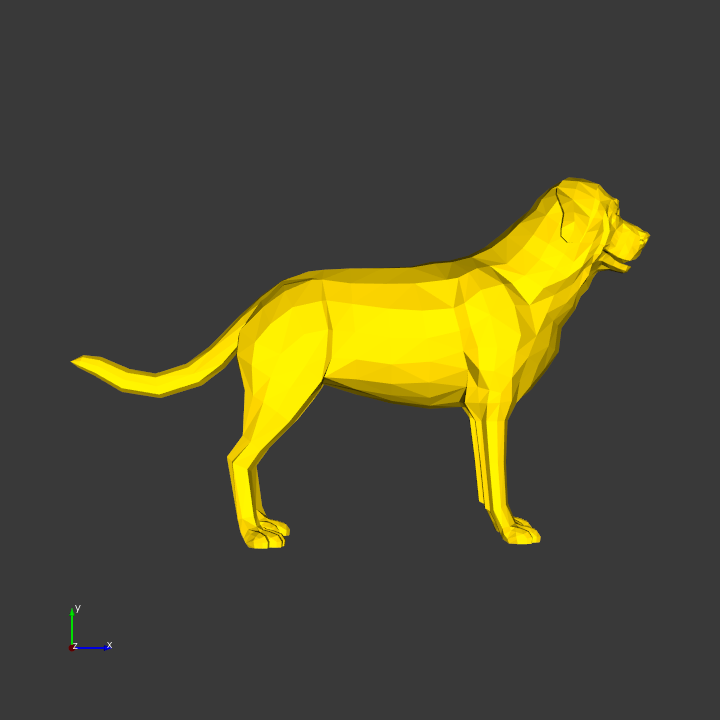
Then interact with the window, and press Shift-C, 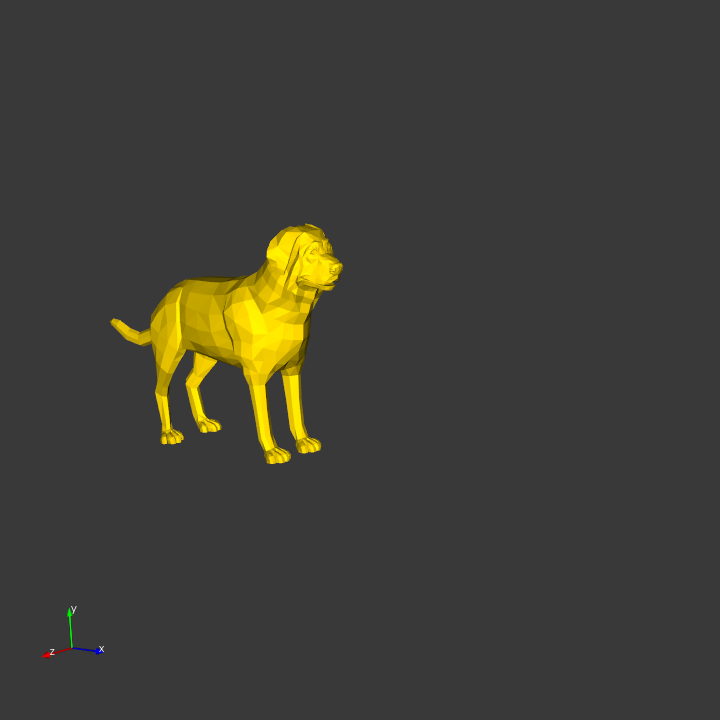
Add the output:
from vtkplotter import *

vp = Plotter()

s1 = load('dog3.off')
vp.camera.SetPosition([13.215, 3.279, 14.645])
vp.camera.SetFocalPoint([1.382, -0.444, -1.514])
vp.camera.SetViewUp([-0.066, 0.982, -0.178])
vp.camera.SetDistance(20.371)
vp.camera.SetClippingRange([16.588, 25.183])

vp.show(s1, resetcam=False, interactive=1)
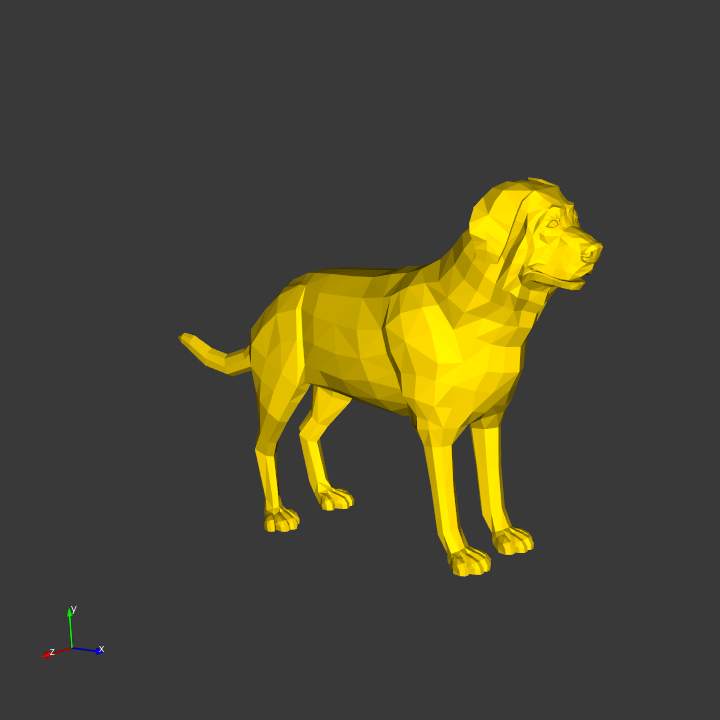
I still can't get the result of figure 2.
NaGenhao
on 6 Nov 2019
@marcomusy @LogWell I also has the problem, vp.camera.SetPosition() setted value will be replaced by default value when rendered. Is this a bug?
 jby1993
on 6 Nov 2019
jby1993
on 6 Nov 2019
This should be now fixed in the latest commit:
from vtkplotter import *

vp = Plotter()
s1 = load(datadir+'cow.vtk')

vp.camera.SetPosition( [6.316, -3.586, 1.36] )
vp.camera.SetFocalPoint( [-0.195, -0.762, -0.802] )
vp.camera.SetViewUp( [-0.245, 0.166, 0.955] )
vp.camera.SetDistance( 7.42 )
vp.camera.SetClippingRange( [4.283, 11.386] )

vp.show(s1, resetcam=0)

Thanks @LogWell and @jby1993 for spotting the issue.
marcomusy
on 6 Nov 2019
At present, it seems that you can install by python ./setup.py install rather pip install vtkplotter.
Thank for your nice work!
NaGenhao
on 7 Nov 2019
thanks @NaGenhao for your feedback.
- the command
pip install vtkplotter -Uinstalls the latest release on the pip server - the command
python ./setup.py installorcd vtkplotter; pip install .
will install the local copy that you may have downloaded from the git repo.
marcomusy
on 7 Nov 2019
Related issues
 jrdkr
·
7Comments
jrdkr
·
7Comments
 mahendra-ramajayam
·
3Comments
mahendra-ramajayam
·
3Comments
 MarkusRosen
·
5Comments
MarkusRosen
·
5Comments
 vigji
·
3Comments
vigji
·
3Comments
 kemo993
·
6Comments
kemo993
·
6Comments