Twindle: Twitter Developers Documentation
There are two Twitter API versions v 1.1 and v2.0 early access - which one should we use?
https://developer.twitter.com/en/docs/api-reference-index
 Mira-Alf
All 23 comments
I think we should use v1.1 for now, untill v2 gets out of beta.
The beta build of the API will be unstable and I will not recommend it for any such huge projects as the API may change without any prior notice
 thunder-coding
on 14 Oct 2020
thunder-coding
on 14 Oct 2020
There are two Twitter API versions v 1.1 and v2.0 early access - which one should we use?
https://developer.twitter.com/en/docs/api-reference-index
I think latest.
 proful
on 14 Oct 2020
proful
on 14 Oct 2020
The v 1.1 is the best for now.
 therealJimoh
on 14 Oct 2020
therealJimoh
on 14 Oct 2020
But as soon our project will complete I think the Twitter API v2 will get out of beta. So, we should use that only. Also after coming out of beta, Twitter will only allow us to use v2, v1.1 will no longer we available.
thunder-coding
on 15 Oct 2020
V1.1 had oauth 2 and other features missing for a long time. So in my opinion V2 is definitely better.
Mira-Alf
on 15 Oct 2020
As beginners will not be able to handle such hard tasks like API calls. We can manage that. No need to worry about it, we can discuss what version will be used. :)
thunder-coding
on 15 Oct 2020
I think it is fine that we use the current stable version. It would give everyone an opportunity to learn how to upgrade APIs once the new one is out. And they won't throw away the current stable one as soon as the new one is out. We will have enough time 🙂
 johnjacobkenny
on 15 Oct 2020
johnjacobkenny
on 15 Oct 2020
the latest version is still a beta , i think it is safe to use the stable version
 ThulaneMakofane
on 15 Oct 2020
ThulaneMakofane
on 15 Oct 2020
I think in the second meeting @proful said that even though Twitter 2 is still in beta, because we are learning, it is stable enough for us to use the latest version. If we can come to a conclusion, we can close this issue.
Mira-Alf
on 17 Oct 2020
Use v2 beta.
proful
on 17 Oct 2020
@Mira-Alf you may create a page on wiki for technical implementation integration details or something along those lines. Can say that we concluded on beta and just add link to this issue there
johnjacobkenny
on 17 Oct 2020
Will do it first thing tomorrow. Thanks @johnjacobkenny
Mira-Alf
on 17 Oct 2020
A wiki was created that documents this issue and the decision to go with Version 2.
https://github.com/twindle-co/twindle/wiki/Twitter-Developers-Documentation
Closing out this issue. @johnjacobkenny letting you know..
Mira-Alf
on 18 Oct 2020
Thanks @Mira-Alf the wiki looks very exhaustive! ❤️
johnjacobkenny
on 18 Oct 2020
Hi people,
I took a look at the twitter v2 docs, and here is what I understood.
We can obtain the first tweet ID by looking at the URL for that tweet
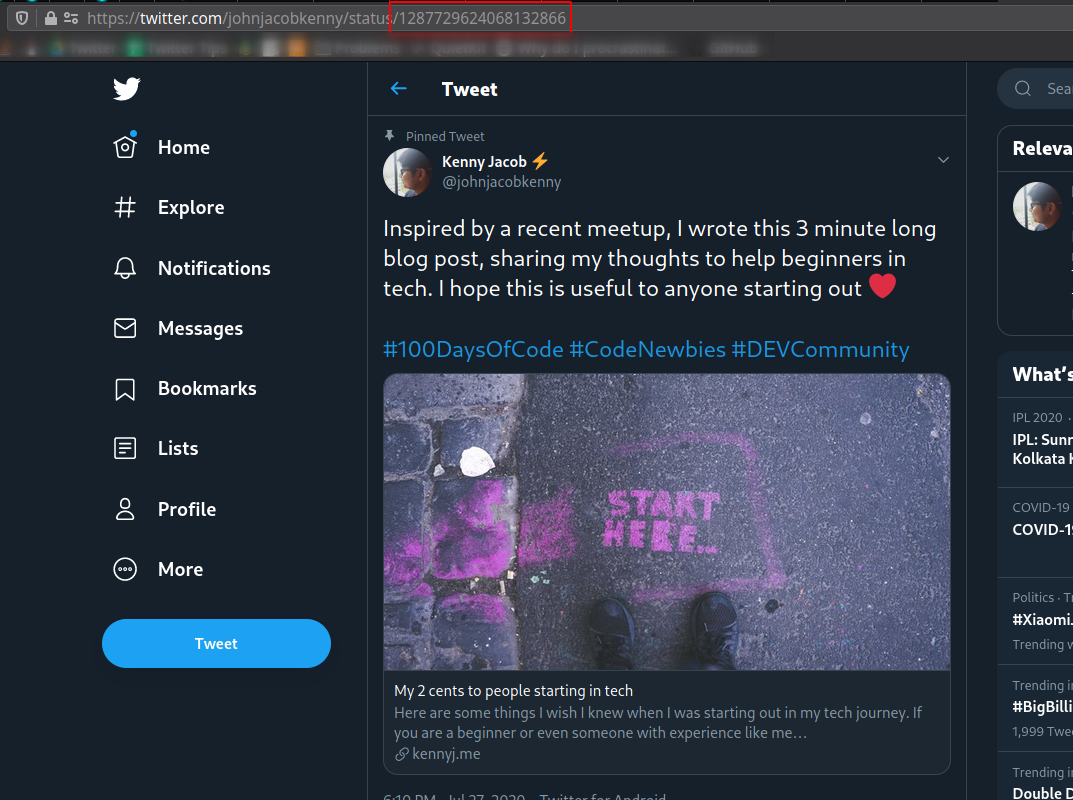
Once we get that, we can make a call to the API https://api.twitter.com/2/tweets/1287729624068132866?tweet.fields=author_id,created_at,entities,geo,id,in_reply_to_user_id,text,conversation_id,referenced_tweets&expansions=author_id,in_reply_to_user_id,referenced_tweets.id&user.fields=name,username
These parameters just mention what all content is to be returned in the response. Here is a sample response for the same,
{
    "data": {
        "entities": {
            "hashtags": [
                {
                    "start": 163,
                    "end": 177,
                    "tag": "100DaysOfCode"
                },
                {
                    "start": 178,
                    "end": 190,
                    "tag": "CodeNewbies"
                },
                {
                    "start": 191,
                    "end": 204,
                    "tag": "DEVCommunity"
                }
            ],
            "urls": [
                {
                    "start": 206,
                    "end": 229,
                    "url": "https://t.co/ARet2tppKY",
                    "expanded_url": "https://kennyj.me/my-2-cents-to-people-starting-in-tech",
                    "display_url": "kennyj.me/my-2-cents-to-…",
                    "images": [
                        {
                            "url": "https://pbs.twimg.com/news_img/1297531952170319872/rtfduM82?format=jpg&name=orig",
                            "width": 1200,
                            "height": 675
                        },
                        {
                            "url": "https://pbs.twimg.com/news_img/1297531952170319872/rtfduM82?format=jpg&name=150x150",
                            "width": 150,
                            "height": 150
                        }
                    ],
                    "status": 200,
                    "title": "My 2 cents to people starting in tech",
                    "description": "Here are some things I wish I knew when I was starting out in my tech journey. If you are a beginner or even someone with experience like me…",
                    "unwound_url": "https://kennyj.me/my-2-cents-to-people-starting-in-tech"
                }
            ]
        },
        "id": "1287729624068132866",
        "author_id": "391224534",
        "text": "Inspired by a recent meetup, I wrote this 3 minute long blog post, sharing my thoughts to help beginners in tech. I hope this is useful to anyone starting out ❤️\n\n#100DaysOfCode #CodeNewbies #DEVCommunity\n\nhttps://t.co/ARet2tppKY",
        "created_at": "2020-07-27T12:40:41.000Z",
        "conversation_id": "1287729624068132866"
    },
    "includes": {
        "users": [
            {
                "id": "391224534",
                "name": "Kenny Jacob ⚡",
                "username": "johnjacobkenny"
            }
        ]
    }
}
And we can see a field called conversation_id which is what is used to identify the specific thread. Now here since this was the first tweet, both the tweet's id and conversation_id are the same.
Now we can use this conversation_id to create a subsequent request to https://api.twitter.com/2/tweets/search/recent?query=conversation_id:1287729624068132866&tweet.fields=in_reply_to_user_id,author_id,created_at,conversation_id&expansions=author_id,in_reply_to_user_id,referenced_tweets.id
What we get in the response is
{
    "data": [
        {
            "text": "@dev_chivee Thanks 🙂❤️ hope you make it useful",
            "in_reply_to_user_id": "1310833950110224385",
            "created_at": "2020-10-18T03:29:39.000Z",
            "author_id": "391224534",
            "id": "1317669144028942336",
            "conversation_id": "1287729624068132866",
            "referenced_tweets": [
                {
                    "type": "replied_to",
                    "id": "1317558505147146248"
                }
            ]
        },
        {
            "text": "@johnjacobkenny Awesome content, thanks for sharing",
            "in_reply_to_user_id": "391224534",
            "created_at": "2020-10-17T20:10:01.000Z",
            "author_id": "1310833950110224385",
            "id": "1317558505147146248",
            "conversation_id": "1287729624068132866",
            "referenced_tweets": [
                {
                    "type": "replied_to",
                    "id": "1287729624068132866"
                }
            ]
        }
    ],
    "includes": {
        "users": [
            {
                "id": "391224534",
                "name": "Kenny Jacob ⚡",
                "username": "johnjacobkenny"
            },
            {
                "id": "1310833950110224385",
                "name": "Chioma Vera Nkanmuo",
                "username": "dev_chivee"
            }
        ],
        "tweets": [
            {
                "text": "@johnjacobkenny Awesome content, thanks for sharing",
                "in_reply_to_user_id": "391224534",
                "created_at": "2020-10-17T20:10:01.000Z",
                "author_id": "1310833950110224385",
                "id": "1317558505147146248",
                "conversation_id": "1287729624068132866",
                "referenced_tweets": [
                    {
                        "type": "replied_to",
                        "id": "1287729624068132866"
                    }
                ]
            },
            {
                "text": "Inspired by a recent meetup, I wrote this 3 minute long blog post, sharing my thoughts to help beginners in tech. I hope this is useful to anyone starting out ❤️\n\n#100DaysOfCode #CodeNewbies #DEVCommunity\n\nhttps://t.co/ARet2tppKY",
                "created_at": "2020-07-27T12:40:41.000Z",
                "author_id": "391224534",
                "id": "1287729624068132866",
                "conversation_id": "1287729624068132866"
            }
        ]
    },
    "meta": {
        "newest_id": "1317669144028942336",
        "oldest_id": "1317558505147146248",
        "result_count": 2
    }
}
I think you can see the problem that all the responses to the tweet are not captured in this response. And as per the documentation here - https://developer.twitter.com/en/docs/twitter-api/tweets/search/introduction - this response will return only the past week's worth of data.
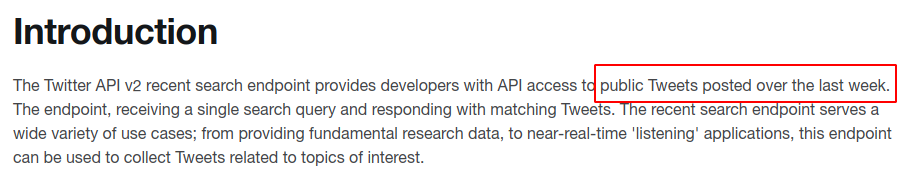
Towards the end of this documentation they do mention this,

So from what I understand, we may be restricted for now, but I would like someone else to also cross-check whether there is any other endpoint or documentation that I am missing.
johnjacobkenny
on 18 Oct 2020
I'm intrigued to get started with interacting with the API see the response and play around and create mappers to transform data; poor me got my hands in UI design now
 sarathkumar6
on 18 Oct 2020
sarathkumar6
on 18 Oct 2020
Wow @johnjacobkenny , I think it's awesome what you already discovered and made. was reading it and it says
_"Soon, we plan to release a full-archive version which will make the entire archive of public Tweets available. The recent and full-archive search endpoints will share common design and features and are part of the Search Tweets group of endpoints."_

The 'Search Tweets' is available for v1 > https://developer.twitter.com/en/docs/twitter-api/v1/tweets/search/overview and it has premium options.
 piratelicorne
on 19 Oct 2020
piratelicorne
on 19 Oct 2020
@piratelicorne I think that @Mira-Alf has taken a look at both APIs and will share some ideas during the call today. Please pitch in with your thoughts too.
johnjacobkenny
on 19 Oct 2020
@Mira-Alf @ad3rinto comments?
proful
on 26 Oct 2020
@Mira-Alf Could you share your thoughts about doing the same with the v1 API? I think you mentioned some limitation during our call.
johnjacobkenny
on 26 Oct 2020
Hey guys, sorry I missed the call today. But I have looked at both versions and here are some of my random thoughts:
V1.1
a) From User Timeline
https://api.twitter.com/1.1/statuses/user_timeline.json?screen_name=AparnaSailam&since_id=1320717265717719041
default count is 20 and max is 200 for standard account - maybe for premium it is different
b) From Search Endpoint
https://api.twitter.com/1.1/search/tweets.json?q=from:profulsadangi+to:profulsadangi
Standard Query to get Tweets from Proful and directed to Proful -
last 7 days data only - default number of tweets seems to be 15. If count parameter is mentioned,
then it goes up to that level but max I have tried is 200
From the response we need to filter in_reply_status_str to the initial tweet id
V2.0 - Conversation ID
GET https://api.twitter.com/2/tweets?ids=1225917697675886593&tweet.fields=author_id,conversation_id,created_at,in_reply_to_user_id,referenced_tweets&expansions=author_id,in_reply_to_user_id,referenced_tweets.id&user.fields=name,username
Get the conversation ID
https://api.twitter.com/2/tweets/search/recent?query=conversation_id:1279940000004973111+from:
But this returns only last 7 days worth of tweets.
With Version 2.0 We must wait for Twitter to make data available for more than 7 days - but with version 1.1 I think we can look at premium accounts and see if we can get archived data.
I will create a wiki detailing this after we decide the course of action.
Sorry about the delay guys. Holidays and Relatives created some delay.
Mira-Alf
on 26 Oct 2020
Good job @Mira-Alf :partying_face:
johnjacobkenny
on 28 Oct 2020
done
proful
on 31 Oct 2020
Related issues
johnjacobkenny
·
5Comments
johnjacobkenny
·
4Comments
johnjacobkenny
·
8Comments
 shekhar10feb
·
3Comments
proful
·
4Comments
shekhar10feb
·
3Comments
proful
·
4Comments
Most helpful comment
I think it is fine that we use the current stable version. It would give everyone an opportunity to learn how to upgrade APIs once the new one is out. And they won't throw away the current stable one as soon as the new one is out. We will have enough time 🙂