Trenchbroom: Add "Quake3 (Valve)" map format
As @neogeographica suggested here: https://github.com/kduske/TrenchBroom/issues/2427#issuecomment-609063149 adding a Valve mode for Q3 would be the easiest way to get "fully featured" texture alignment in TB's Q3 support.
This should just be a couple line change since it's almost the same as our existing "Quake2 (Valve)".
 ericwa
All 14 comments
It may only be a couple of line changes for now but it will still need to support patches & detail/structural later.
 ensiform
on 4 Apr 2020
ensiform
on 4 Apr 2020
As a developer I'm pretty sure he is aware of that.
 eGax
on 4 Apr 2020
eGax
on 4 Apr 2020
Is there anything missing with our detail/structural handling? afaik it's fully supported.
Yes patches are a whole separate project, AFAIK they store UV coordindates directly though so they are independent of the various texture formats used for brushes (valve, classic, BP, etc.)
ericwa
on 4 Apr 2020
I'll attach a few mapfiles that I made with netradiant-custom and compiled with q3map2, for reference.
There are four files covering the variations of: either using BP or 220 format, and either including a patch mesh or not. The resulting compiled bsps look identical, except for the presence/absence of a patch mesh in some cases.
In the 220 format it does look like the patch is exactly the same as in the BP format. BP-vs-220 only affects the "normal" brushes.
 neogeographica
on 5 Apr 2020
neogeographica
on 5 Apr 2020
Is there anything missing with our detail/structural handling? afaik it's fully supported.
Yes patches are a whole separate project, AFAIK they store UV coordindates directly though so they are independent of the various texture formats used for brushes (valve, classic, BP, etc.)
Been a while since I tested, but is there a button to force selected brushes as detail/structural? Q3 does not have detail as an entity type like q1/half life and it is not supposed to be used as shader parameter.
ensiform
on 5 Apr 2020
@ensiform I don't see a way to do that, but I'm just starting to look at the Q3 support in TB myself. There is a "make structural" context menu option but I think that's just to pull a brush out of a brush entity and back into worldspawn.
More on Valve format:
FWIW a naive modification to add a "Quake3 (Valve)" format that uses the "Quake2 (Valve)" parser and serializers resulted in Trenchbroom being able to load that 220 no-patches test map, and texture the axially-oriented brushes correctly, but it fails the texture placement on the funky rotated brush. Maybe the formats aren't actually the same, maybe I screwed up the change, we'll see.
The rightclick menu is also giving me the "make structural" option on any brush that has a caulked face, even though they are part of worldspawn. (And the caulk shader does not have surfaceparm detail.) I don't think this is because of my changes tho.
I'll probably continue to poke at it tomorrow!
neogeographica
on 5 Apr 2020
@ensiform @neogeographica Regarding detail, it could be more accessible, but you can bind a key to apply detail to the selected brushes, here I bound Alt+D: (this is 2019.6)
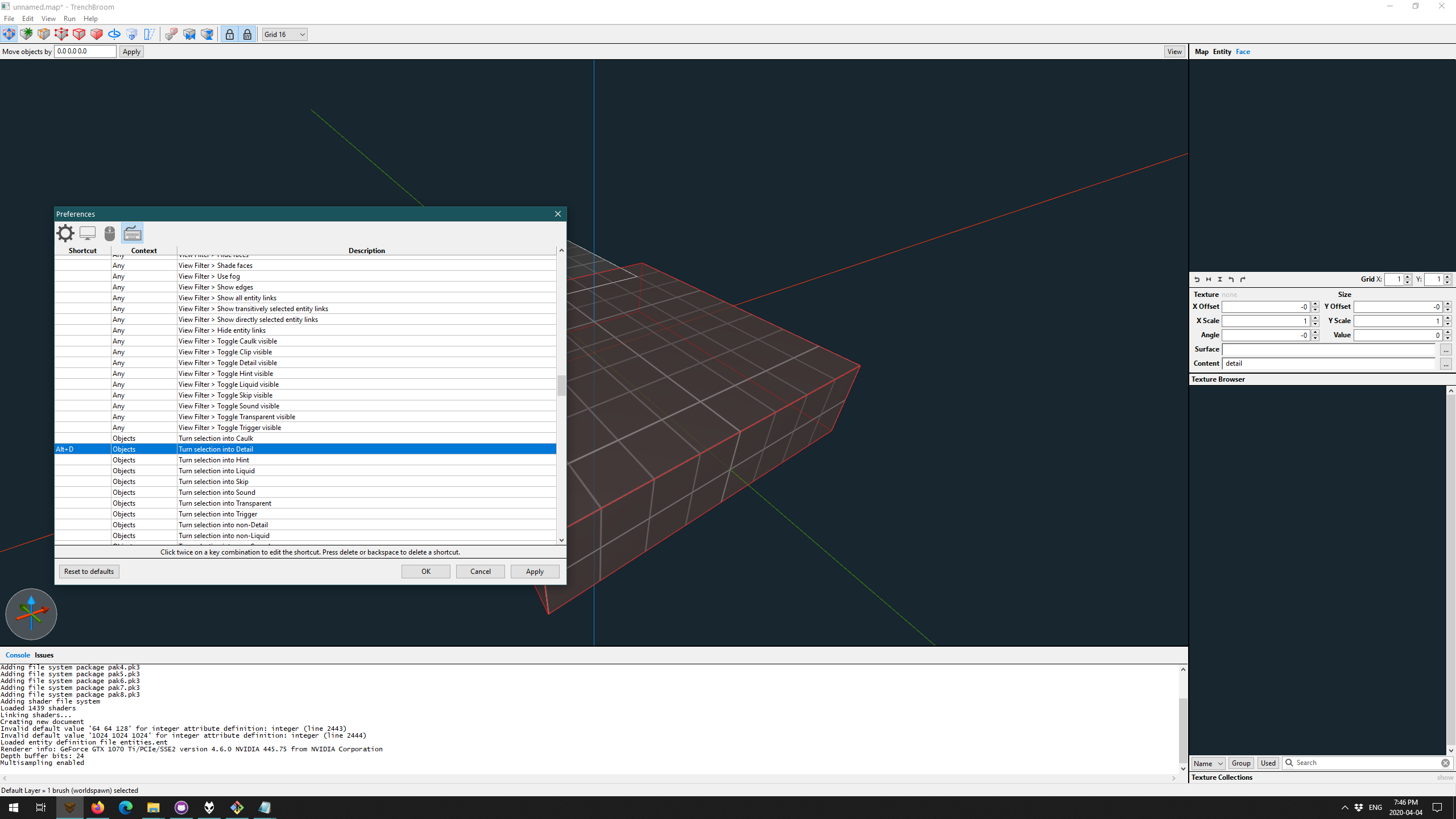
(selected brush serializes to:
// entity 0
{
"classname" "worldspawn"
// brush 0
{
( -64 -80 -16 ) ( -64 -79 -16 ) ( -64 -80 -15 ) __TB_empty -0 -0 -0 1 1 134217728 0 0
( -64 -80 -16 ) ( -64 -80 -15 ) ( -63 -80 -16 ) __TB_empty -0 -0 -0 1 1 134217728 0 0
( -64 -80 -16 ) ( -63 -80 -16 ) ( -64 -79 -16 ) __TB_empty -0 -0 -0 1 1 134217728 0 0
( 64 48 16 ) ( 64 49 16 ) ( 65 48 16 ) __TB_empty -0 -0 -0 1 1 134217728 0 0
( 64 48 16 ) ( 65 48 16 ) ( 64 48 17 ) __TB_empty -0 -0 -0 1 1 134217728 0 0
( 64 48 16 ) ( 64 48 17 ) ( 64 49 16 ) __TB_empty -0 -0 -0 1 1 134217728 0 0
}
}
)
This is equivalent to clicking in the "..." button of Content in the face inspector and selecting Detail there.
IIRC the "make structural" does a combination of: clear all surface and content flags, and remove the selected brushes from any brush entities.
but it fails the texture placement on the funky rotated brush. Maybe the formats aren't actually the same, maybe I screwed up the change, we'll see.
Hmm, this is concerning - I've never run into inconsistencies in Valve220 implementations before. Will need more investigation.
ericwa
on 5 Apr 2020
The proximate cause of the weirdness loading these maps in TB seems to be that netradiant-custom often writes out a zero for the "rotate" value, that first float after the texture axis tuples.
I see that netradiant-custom throws that value away when reading the file, and I would guess that q3map2 does as well. It must be redundant with the info in the tuples? But it seems that TB needs/uses it -- I've done some simpler test files where I can manually add in a rotate value there and TB will then interpret it in the same way as netradiant-custom.
So anyway, it looks like TB is self-consistent and can do "Q3 220" editing. But it has problems if opening a 220 file created by netradiant-custom. (I would guess this is true for any game, not just Quake 3, but I haven't checked.) Not sure how much of a problem-to-solve you would feel that to be.
The changes I'm playing with are at https://github.com/kduske/TrenchBroom/compare/master...neogeographica:q3220 if anyone wants to peek.
Edit: hold on, I had missed a change and I think everything is working now... will update in a bit.
neogeographica
on 5 Apr 2020
Yeah all good now I think. (My missing change was in ModelFactoryImpl.cpp.)
It _looks_ like the only oddity that now results from having a 0 in the "rotate" scalar is that the UV editor will initially show an angle value of 0 regardless of the texture's apparent rotation. I'm not sure if that has any bad consequences.
neogeographica
on 5 Apr 2020
Yikes, this is a serious bug in our Valve220 support if we're rotating textures by the amount in the "rotate" field. All compilers ignore that, it's just meant to persist the state of a rotation widget in the UI.
ericwa
on 5 Apr 2020
Yeah I figured at some point that must be its primary purpose. No worries, it's looking good now... I assume you were typing that yikes while I was typing my retraction/correction. :-)
Edit: to be clear, the texture looks correct in the UV editor and reacts correctly to manipulation, including rotations. It's just that the displayed "angle" value initially is 0.
(That said, I haven't figured out why me manually adding rotate values into the file had seemed to fix things. Maybe I goofed something in my test steps there; haven't tried to reproducs that.)
neogeographica
on 5 Apr 2020
Without the ModelFactoryImpl.cpp change, we'd load them using the "Classic" texture projection where the "rotation" value from the map actually matters and the texture gets rotated by that amount on load. It's pretty confusing, but I think that might explain what you were seeing. (Also this reminds me that the design's not scalable, with stuff like if (m_format == MapFormat::Valve || m_format == MapFormat::Quake2_Valve || m_format == MapFormat::Quake3_Valve) - we should probably split the texture projection from the .map format variants into two enums, because most if not all combinations are possible/valid. e.g. you could have Hexen2 with brush primitives, hypothetically - my qbsp handles it.) Anyways thanks for looking into this, feel free to make a PR whenever!
ericwa
on 5 Apr 2020
Sounds like a good explanation.
Yep I can throw up a PR fairly soon. Should I look into modifying the tests? ... I took a quick peek in there and it looks like the existing tests still cover this since I haven't really added any new code, but let me know.
The other thing I was wondering about was whether Model::MapFormat::Quake3 should be removed from the current docs and gameconfig since it doesn't actually do the new brush primitives format yet?
neogeographica
on 5 Apr 2020
Sure a test would be great - for reference here's the commit where I added Q2 Valve support, the tests are at the bottom: https://github.com/kduske/TrenchBroom/commit/3cc43de21541046e23ba7eaca786196d7c2d078e
Looking closer my tests aren't great ,the WorldReaderTest.parseQuake2ValveBrush one doesn't check that the faces are actually in Valve format.
The other thing I was wondering about was whether Model::MapFormat::Quake3 should be removed from the current docs and gameconfig since it doesn't actually do the new brush primitives format yet?
Hmm, the only thing Model::MapFormat::Quake3 does is let you load maps with brush primitives in them by dropping the brushes entirely (!) which is not useful. So yeah removing it from the docs and game config would make sense to me (you'll get a parse error if you try to load a map with brush primitives in it then).
ericwa
on 5 Apr 2020
Related issues
 bstordeur
·
3Comments
bstordeur
·
3Comments
 antopilo
·
4Comments
antopilo
·
4Comments
 dumptruckDS
·
5Comments
dumptruckDS
·
5Comments
 kduske
·
4Comments
kduske
·
4Comments
 amatecha
·
4Comments
amatecha
·
4Comments
Most helpful comment
I'll attach a few mapfiles that I made with netradiant-custom and compiled with q3map2, for reference.
There are four files covering the variations of: either using BP or 220 format, and either including a patch mesh or not. The resulting compiled bsps look identical, except for the presence/absence of a patch mesh in some cases.
In the 220 format it does look like the patch is exactly the same as in the BP format. BP-vs-220 only affects the "normal" brushes.
maptests.zip