Toolkit-for-ynab: [Probably easy fix] Accept both comma and point as a separator regardless of the budget settings
There is a long-standing feature request about this, and I wouldn't reopen it if not for the fact that it seems that now, with the integration of the new math library, it can be easily fixed. The problem and the rationale behind the request are described in #755. Discussion in Trello.
Shortly, if you use the decimal comma as a separator, a decimal point is not parsed correctly. 73.50 becomes 7350. I now noticed that if I add +0 to the amount (e.g. 73.50+0), it works as it should, resulting in 73.50, not 7350. So the math library treats both decimal separators equally.
Can we trigger this behaviour (maybe as an option): always parse all numerical inputs through the math library, even when no math operators were entered by the user? This should solve the problem some of us, multi-language users, have.
 dsent
dsent
All 5 comments
@dsent Would you think that the POS style input is required to be on for this to work? It seems we would need to make a new feature to support this. The feature has 15 votes in Trello so it's clearly desired, unfortunately, it's just a matter of someone having time to work on it :(
 joshmadewell
on 13 Nov 2019
joshmadewell
on 13 Nov 2019
@joshmadewell I don't myself use POS style input. Seems that with POS-style input this problem is not a problem already, as you don't type in decimal separators at all.
Creating this request, I just wanted the app to treat 123,45 and 123.45 as the same number regardless of the regional settings. YNAB 4 behaved exactly that way, and I consider this to be a regression in the new YNAB.
When the simple math operations became possible in YNAB input fields, I noticed that in these, numbers are already treated like I wanted! I can type in 100.1+100,1, and it will correctly compute to 200.2. I tried to enter numbers as simple expressions (e.g. instead of 123.45 I type 123.45+0), and it also works! 123.45+0 and 123,45+0 both evaluate to 123.45 regardless of the regional settings.
I believe that the acceptable workaround is just one step from this. There is already an expression parser built-in. Maybe there is a way to make all typed numbers go through the expression parser, even if no math operations are typed in the number field? That would do the trick (most probably)! And if not, it's probably possible to modify any input as it is submitted, adding +0 at the end? This would do it for sure (as it does when I do that manually).
I couldn't figure out myself how that expression parser is triggered in the code. But there is other stuff that enhances the behavior of the input fields, like the POS-style input you mentioned, and popup calculator. So there should definitely be a way to hook up into the input process and modify it/make it go through the math parser.
dsent
on 16 Nov 2019
@joshmadewell sorry to bother you, but can you please comment on the possibility of making all numbers go through the math parser (even if no math operations are entered into the input field)? Thanks!
dsent
on 21 Jan 2020
Okay, everyone, I can't figure out how to fix this in the Toolkit, so here is my workaround:
- Install Custom JS extension https://chrome.google.com/webstore/detail/custom-javascript-for-web/ddbjnfjiigjmcpcpkmhogomapikjbjdk
- Open YNAB
- Click on the CJS button, select inject predefined one: jQuery 3.2.1
- Put this code into the code field:
$('body').keyup(function(evt){
  if ($(evt.target).hasClass('ember-text-field') && evt.key == ".") {
    evt.target.value = evt.target.value.replace('.',',');
    evt.preventDefault();
  }
});
- Click Save (at the top left of CJS window)
Should look like this:
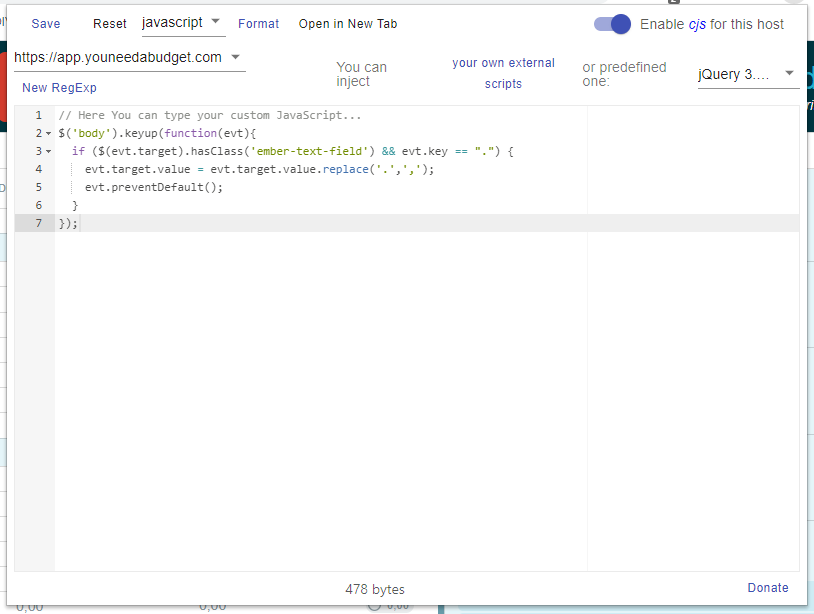
This will replace all points in the entry fields to commas. If you need it the other way around,
use evt.key == "," and .replace(',','.'); instead.
dsent
on 2 May 2020
Okay, that fix caused more problems than it fixed. Below is a version with less or (hopefully) no bad side effects. No injection needed, so you should set injection to None (in the top right corner of CJS window):
document.addEventListener('keydown', function(e) {
  var t = e.target;
  if (e.key == '.' && t.nextElementSibling.classList.contains('currency') || t.parentNode.classList.contains('currency-input')) {
    setTimeout(function(el) { el.value = el.value.replace('.', ',') }, 0, t)
  }
});
Related issues
 u86
·
5Comments
u86
·
5Comments
 GittyGee
·
7Comments
GittyGee
·
7Comments
 kev88au
·
7Comments
kev88au
·
7Comments
 colinbroccoli
·
6Comments
colinbroccoli
·
6Comments
 StigHetl
·
6Comments
StigHetl
·
6Comments
Most helpful comment
@joshmadewell I don't myself use POS style input. Seems that with POS-style input this problem is not a problem already, as you don't type in decimal separators at all.
Creating this request, I just wanted the app to treat 123,45 and 123.45 as the same number regardless of the regional settings. YNAB 4 behaved exactly that way, and I consider this to be a regression in the new YNAB.
When the simple math operations became possible in YNAB input fields, I noticed that in these, numbers are already treated like I wanted! I can type in 100.1+100,1, and it will correctly compute to 200.2. I tried to enter numbers as simple expressions (e.g. instead of 123.45 I type 123.45+0), and it also works! 123.45+0 and 123,45+0 both evaluate to 123.45 regardless of the regional settings.
I believe that the acceptable workaround is just one step from this. There is already an expression parser built-in. Maybe there is a way to make all typed numbers go through the expression parser, even if no math operations are typed in the number field? That would do the trick (most probably)! And if not, it's probably possible to modify any input as it is submitted, adding +0 at the end? This would do it for sure (as it does when I do that manually).
I couldn't figure out myself how that expression parser is triggered in the code. But there is other stuff that enhances the behavior of the input fields, like the POS-style input you mentioned, and popup calculator. So there should definitely be a way to hook up into the input process and modify it/make it go through the math parser.