Toolkit-for-ynab: [BUG] Can't choose date on manual transactions
When clicking on "Add Transaction", I'm not able to choose the date. The dates have disappeared.
Screenshots
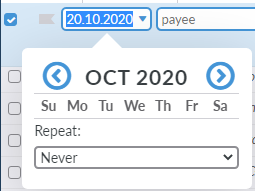
Desktop:
- OS: Windows 64bit
- Browser: Chrome
- Toolkit Version: 2.28.1
 StigHetl
All 6 comments
I can confirm this, has been happening for me for a few days. Disabling the toolkit fixes the date picker
 prognostikos
on 20 Oct 2020
prognostikos
on 20 Oct 2020
Also experiencing this issue. I have been disabling the toolkit when needed but that isn't a sustainable solution.
 drc525
on 20 Oct 2020
drc525
on 20 Oct 2020
It seems to be related to the calendar first day feature. When I turn it back to the default of Sunday the days are shown again.
prognostikos
on 20 Oct 2020
It seems to be related to the calendar first day feature. When I turn it back to the default of Sunday the days are shown again.
Also seeing the same error, If you chose Monday no dates are not visible, if you chose Sunday (default) the days are visible
 OricTosh
on 20 Oct 2020
OricTosh
on 20 Oct 2020
Duplicate of #2175
 Geiseku
on 21 Oct 2020
Geiseku
on 21 Oct 2020
Closing this in favor of #2175, we'll have a fix in the next release.
 joshmadewell
on 21 Oct 2020
joshmadewell
on 21 Oct 2020
Related issues
 u86
·
5Comments
u86
·
5Comments
 colinbroccoli
·
6Comments
colinbroccoli
·
6Comments
 LeMyst
·
5Comments
LeMyst
·
5Comments
 dsent
·
5Comments
dsent
·
5Comments
 kev88au
·
7Comments
kev88au
·
7Comments
Most helpful comment
It seems to be related to the calendar first day feature. When I turn it back to the default of Sunday the days are shown again.
https://github.com/toolkit-for-ynab/toolkit-for-ynab/tree/master/src/extension/features/accounts/calendar-first-day