Todo-tree: Todo Tree doesn't find numbered to-do lists in my files.
Hi,
It works great for to-do lists that are not numbered but doesn't work for numbered lists for me. Is there any setting I can change to make it detect numbered to-do lists?
Thank you.
 absconditus87
All 10 comments
Please can you give me an example of what you want it to find? (including the language).
 Gruntfuggly
on 10 Mar 2021
Gruntfuggly
on 10 Mar 2021
Thank you for replying.
I installed the Todo Tree extension for VSCode and ran it on markdown files. It finds to-do lists without numbers:
- [ ] todo1
- [ ] todo 2
- [ ] todo 3
but not numbered lists:
- [ ] todo1
- [ ] todo2
- [ ] todo3
absconditus87
on 10 Mar 2021
Ah OK - you'll need to modify the regex. Try something like
"todo-tree.regex.regex": "((//|#|<!--|;|/\\*|^)\\s*($TAGS)|^\\s*(-|\d+\\.) \\[ \\])",
There is an issue (#459) with the highlighting at the moment (that I am working on), which is also impacting the finding of markdown TODOs when scanning open files.
For now, if you right click the tree and do Scan Workspace Only the above should work.
Gruntfuggly
on 10 Mar 2021
Sorry to bother you again but I when I changed the regex (to the expression you posted above) it couldn't find any to-do items (numbered or not numbered). When I reset the setting, it went back to being able to only find to-do lists that are not numbered.
absconditus87
on 10 Mar 2021
There is a mistake in what I posted, sorry. Try
"todo-tree.regex.regex": "((//|#|<!--|;|/\\*|^)\\s*($TAGS)|^\\s*(-|\\d+\\.) \\[ \\])"
I am assuming you are changing the settings in settings.json. If you're changing them in the setting GUI, then you don't need the extra backslashes, e.g. set it to:
((//|#|<!--|;|/\*|^)\s*($TAGS)|^\s*(-|\d+\.) \[ \])
Gruntfuggly
on 10 Mar 2021
The important part is (-|\d+\.) which tells it to match either a dash (-) or one or more digits and a period (\d+\.).
Gruntfuggly
on 10 Mar 2021
There is a mistake in what I posted, sorry. Try
"todo-tree.regex.regex": "((//|#|<!--|;|/\\*|^)\\s*($TAGS)|^\\s*(-|\\d+\\.) \\[ \\])"I am assuming you are changing the settings in
settings.json. If you're changing them in the setting GUI, then you don't need the extra backslashes, e.g. set it to:
((//|#|<!--|;|/\*|^)\s*($TAGS)|^\s*(-|\d+\.) \[ \])
Works now :) Where can I find the settings.json file? I tried to but couldn't, so just worked with the GUI.
absconditus87
on 10 Mar 2021
There is a button at the top right that looks like a document with a file. If you click it it swaps to the settings.json file which was the old way to modify settings. It's also the only way to modify some settings which are too complex for the GUI.
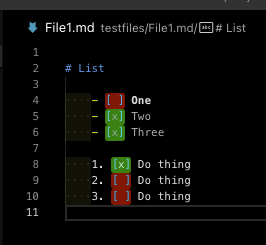
This issue has inspired me to improve the handling of markdown TODOs. In the next release there will be an option to update the regex automatically, but basically if you change the settings as follows:
"todo-tree.regex.regex": "(//|#|<!--|;|/\\*|^|^\\s*(-|\\d+.))\\s*($TAGS)"
"todo-tree.general.tags": [
        "BUG",
        "HACK",
        "FIXME",
        "TODO",
        "XXX",
        "[ ]",
        "[x]"
    ],
It will work a lot nicer - you can have custom highlights for the "done" and "not done" TODOs and it also works better with the counters in the status bar, for example, and when grouping by tag.

Gruntfuggly
on 10 Mar 2021
Are you OK for me to close this issue now?
Gruntfuggly
on 10 Mar 2021
Are you OK for me to close this issue now?
Yes. Thanks a lot for your help. Looking forward to the next update :)
absconditus87
on 10 Mar 2021
Related issues
 luqiudi
·
9Comments
luqiudi
·
9Comments
 WORMSS
·
6Comments
WORMSS
·
6Comments
 emanuelenardi
·
3Comments
emanuelenardi
·
3Comments
 josbalcaen
·
5Comments
josbalcaen
·
5Comments
 rickstaa
·
5Comments
rickstaa
·
5Comments