Todo-tree: TODO only shows file path
So today, I updated VSCode to the latest version, there was a quick flash of "TODO settings have moved" (or something to that, I didn't have time to read it)
I returned to my normal settings, "Flat List" "Group By Tag",
And I am greeted with a wall of file paths, not very useful.
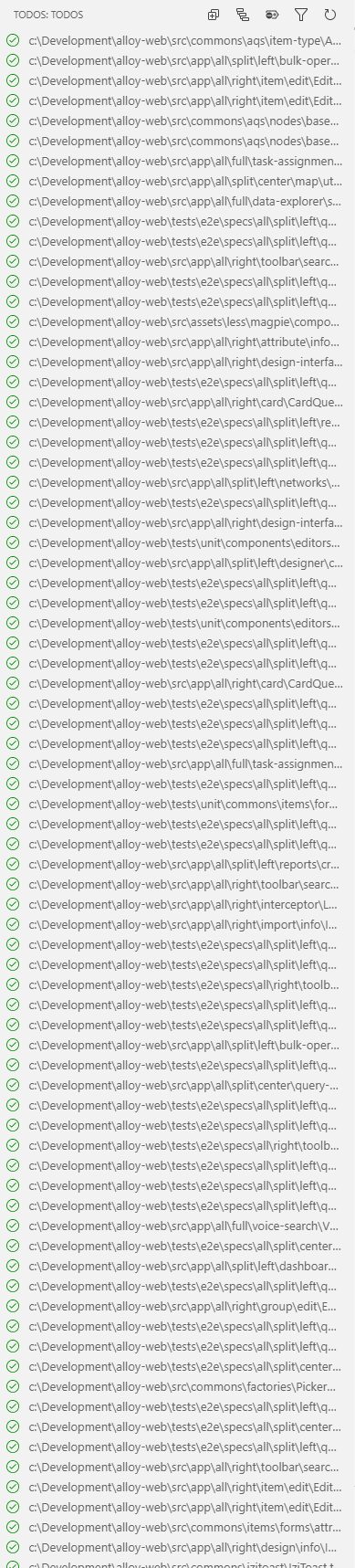
but also "Ungrouped by tag" does the same thing.
If I start clicking on a file, it flashes the panel and loads it into panel. But I am not gonna go through and start clicking on each file individually.
Does anyone know how to get back to the old VS code version and/or old version of this extension to get the thing working again quickly?
 WORMSS
All 6 comments
If you go to the extensions view you can click the 'cog' icon and install a previous version of the extension - you should probably go back to version 0.0.145.
Please could you post your todo-tree settings so I can try to recreate the problem. It sounds like the same problem as #205
 Gruntfuggly
on 10 Sep 2019
Gruntfuggly
on 10 Sep 2019
Ah - it's OK - I've recreated it.
Gruntfuggly
on 10 Sep 2019
{
  // My obsolete ones
  "todo-tree.excludeGlobs": ["**/node_modules/**", "**/dist/**", "**/dist_electron/**"],
  "todo-tree.defaultHighlight": {
    "foreground": "green",
    "type": "none"
  },
  "todo-tree.flat": true,
  "todo-tree.grouped": true,
  "todo-tree.statusBar": "top three",
  "todo-tree.showCountsInTree": true,

  // What ever wasn't classed as obsolete
  "todo-tree.tree.flat": true,
  "todo-tree.tree.grouped": true,
  "todo-tree.tree.showCountsInTree": true,
  "todo-tree.general.statusBar": "top three"
}
Edit: Ahh, didn't see you replied
WORMSS
on 10 Sep 2019
OK - found the problem.
Gruntfuggly
on 10 Sep 2019
Please update to the latest version - hopefully you should be back working again.
Gruntfuggly
on 10 Sep 2019
I can confirm this has fixed the issue.. Thank you very much @Gruntfuggly
WORMSS
on 10 Sep 2019
Related issues
 alystair
·
9Comments
alystair
·
9Comments
 emanuelenardi
·
3Comments
emanuelenardi
·
3Comments
 beebase
·
6Comments
beebase
·
6Comments
 josbalcaen
·
5Comments
josbalcaen
·
5Comments
 jabacchetta
·
8Comments
jabacchetta
·
8Comments