Todo-tree: Additional tag styling
This might be out of scope for this extension, but figured I would throw the idea out there.
Currently, in addition to this extension, I also have the Better Comments extension installed, which has a lot of overlap with this extension. Primarily because I need two features, which could potentially be added to Todo Tree:
- To get highlighting for tags in files that don't belong to the workspace (
untitled-1,settings.json), which I don't want in the tree view, but I still want to be highlighted. And although there is ahideFromTreeoption for the styling, the tags themselves don't appear to get picked up. - For strikethrough styling, used for the
//tag, so that comments that belong to commented-out code (// // Inactive comment) can be clearly marked.
 jabacchetta
All 8 comments
I think you can do 2. already - you can use (for example):
    "todo-tree.defaultHighlight": {
        "type": "text",
        "textDecoration":"line-through"
    },
I'm not sure I understand 1. though. Do you want to exclude some files from being highlighted?
 Gruntfuggly
on 11 Sep 2019
Gruntfuggly
on 11 Sep 2019
@Gruntfuggly Thanks for the quick reply.
Strikethrough
I think I've figured this out with your suggestion. One note is that todo-tree.general.tags requires that the tag be prepended with the comment syntax, which seems to be unintuitive, since the other tags do not require the comment syntax. Strangely, the tag inside of todo-tree.highlights.customHighlight works as expected, only requiring the tag itself.
Here are my settings with this feature working, for anyone who might be looking for the same functionality:
  /* Todo Tree */

  "todo-tree.highlights.customHighlight": {
    "TODO": {
      "foreground": "#FFEB95",
    },
    "NOTE": {
      "foreground": "#FFEB95",
      "icon": "note",
    },
    "FIXME": {
      "foreground": "#FFEB95",
      "icon": "alert",
    },

    // Clearly mark comments that belong to disabled (commented-out) code.
    "//": {
      "textDecoration": "line-through",
      "type": "text",
      "hideFromTree": true,
    },
  },
  "todo-tree.tree.grouped": true,
  "todo-tree.tree.hideIconsWhenGroupedByTag": true,
  "todo-tree.tree.labelFormat": "∙ ${after}",
  "todo-tree.tree.showCountsInTree": true,
  "todo-tree.tree.showInExplorer": false,
  "todo-tree.tree.showScanOpenFilesOrWorkspaceButton": true,
  "todo-tree.tree.tagsOnly": true,
  "todo-tree.highlights.highlightDelay": 0,
  "todo-tree.general.tags": [
    "TODO",
    "FIXME",
    "NOTE",
    "// //",
  ],
Highlights Not Working
Regarding the other issue, highlights work great for files in the workspace, but I'd like them to also show up in my settings.json file and in new, untitled files (see screenshots below).
Working in workspace file:

Not working in unsaved, untitled file:
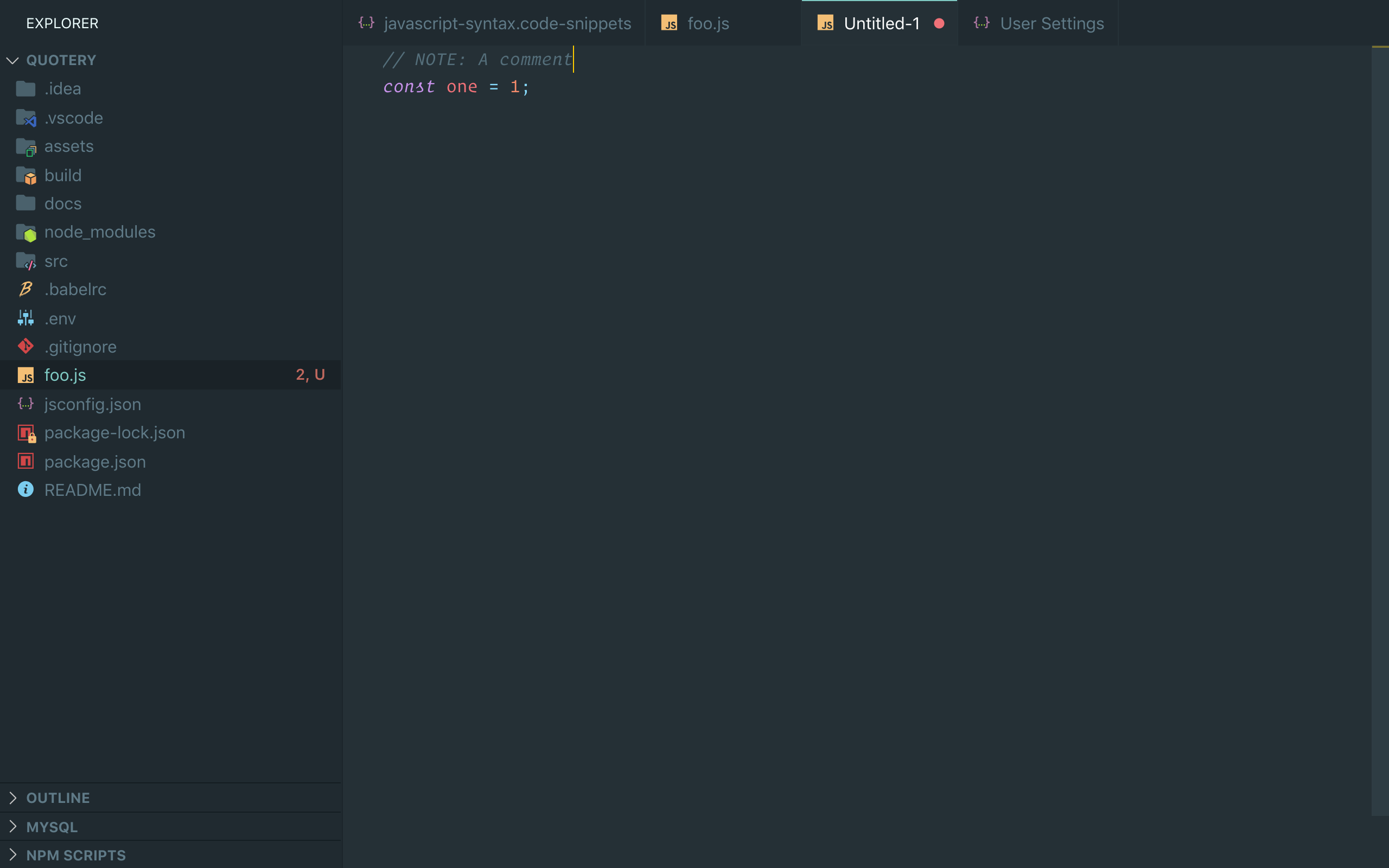
Not working in settings.json file:

jabacchetta
on 11 Sep 2019
I'll try and work out why you need the tag to be prepended by the comment syntax - but I'm guessing it's do do with what the regex ends up looking like.
I think the extension currently ignores editors which are not 'files' which maybe why you don't see them in the settings and the untitled files. I'll investigate that too...
Gruntfuggly
on 12 Sep 2019
I've got a fix for adding the highlights to untitled and settings files which I'll include in the next update.
Gruntfuggly
on 13 Sep 2019
I've just uploaded a new version which allows you to specify which file schemes should have highlights applied. See "todo-tree.highlights.schemes" in the README.md.
Gruntfuggly
on 26 Sep 2019
Perfect, thanks!
jabacchetta
on 27 Sep 2019
Many thanks for the donation!
Gruntfuggly
on 27 Sep 2019
For anyone else who may have been seeking to make this a bit more similar to "Better Comments" rather than running them side by side, here's where I left off:
"todo-tree.highlights.customHighlight": {
      "TODO": {
        "foreground": "#FFEB95", //FF8C00
        "type": "whole-line",
      },
      "NOTE": {
        "foreground": "#FFEB95",
        "icon": "note",
        "type": "whole-line",
      },
      "FIXME": {
        "foreground": "#FFEB95",
        "icon": "alert",
        "type": "whole-line",
      },
      "// //": {
        "foreground": "#474747",
        "textDecoration": "line-through",
        "type": "text",
        "hideFromTree": true,
        "rulerLane": "none",
      },
      "!": {
        "foreground": "#ff6961", //FF2D00
        "type": "text-and-comment",
        "rulerLane": "none",
      },
      "?": {
        "foreground": "#3498DB", //3498DB
        "type": "text-and-comment",
        "rulerLane": "none",
      },
      "*": {
        "foreground": "#98C379", //98C379
        "type": "text-and-comment",
        "rulerLane": "none",
        "hideFromTree": true,
      }
    },
    "todo-tree.highlights.schemes": [
      "file",
      "untitled",
      "vscode-userdata"
    ],
    "todo-tree.tree.grouped": true,
    "todo-tree.tree.hideIconsWhenGroupedByTag": true,
    "todo-tree.tree.labelFormat": "∙ ${after}",
    "todo-tree.tree.showCountsInTree": true,
    "todo-tree.tree.showInExplorer": false,
    "todo-tree.tree.showScanOpenFilesOrWorkspaceButton": true,
    "todo-tree.tree.tagsOnly": true,
    "todo-tree.highlights.highlightDelay": 0,
    "todo-tree.general.tags": [
      "TODO",
      "FIXME",
      "NOTE",
      "// //",
      "!",
      "?",
      "*"
    ],
    "todo-tree.filtering.ignoreGitSubmodules": true,
    "todo-tree.regex.regexCaseSensitive": false,
    "todo-tree.regex.regex": "((.*\\*)|(//) )\\s*($TAGS).*(\\n\\s*(//|/\\*|\\*\\*)\\s{2,}.*)*",
The commented color codes are the better comments defaults, I'm color-blind and adjusted them to my own needs a bit.
Thanks to @ShadabFaiz for the regex
 lando-cal
on 6 Nov 2019
lando-cal
on 6 Nov 2019
Related issues
 WORMSS
·
6Comments
WORMSS
·
6Comments
 Therzok
·
5Comments
Therzok
·
5Comments
 rickstaa
·
5Comments
rickstaa
·
5Comments
 ghost
·
7Comments
ghost
·
7Comments
 onetrev
·
5Comments
onetrev
·
5Comments