Todo-tree: "magenta" not working as background for customHighlight
version: 0.0.136 (but already noticed this a couple of months ago)
For some reason I can't get background: "magenta" to work.
iconColour: "magenta" works ok for the tree-view icons.
All other colours work fine for both iconColour and background.
Can someone reproduce this behaviour?
"todo-tree.customHighlight": {
    "backlog1>": {
      "iconColour": "magenta",
      "background": "magenta"
    }
 beebase
All 6 comments
That's weird - but I can reproduce it.
 Gruntfuggly
on 30 Jun 2019
Gruntfuggly
on 30 Jun 2019
I had a flawed isHex function - basically it stripped non A-F characters out of the string and checked the length. Magenta -> 'aea' which looks like valid hex.
Should work properly now.
Gruntfuggly
on 1 Jul 2019
Could it be, this bug is reappearing in 0.0.141 ?
setting iconColour to 'magenta' results to white icons in the tree. 'red' for instance, does work.
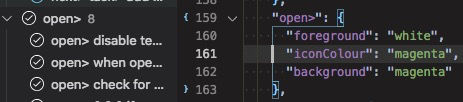
beebase
on 15 Aug 2019
It's because the icons were updated to match the new vscode style. Looks like the magenta ones were given the wrong colour.
Why is it always the magenta one?! :grin:
Gruntfuggly
on 15 Aug 2019
According to aviation psychologists, magenta is very well suited for drawing human attention in the cockpit...I hope they double checked 😐
beebase
on 15 Aug 2019
New version with the magenta icon reinstated.
Gruntfuggly
on 21 Aug 2019
Related issues
 the-vampiire
·
6Comments
the-vampiire
·
6Comments
 JonathanTroyer
·
5Comments
JonathanTroyer
·
5Comments
 luqiudi
·
9Comments
luqiudi
·
9Comments
 Therzok
·
5Comments
Therzok
·
5Comments
 WORMSS
·
6Comments
WORMSS
·
6Comments