todo-tree.excludeGlobs is not working
i config todo-tree like this:
"todo-tree.excludeGlobs": [
"node_modules"
],
without this config,my todo-tree will list a lot of todo item with node_modules.
could you give me some suggestion?
By the way,there are not error in console
 luqiudi
All 9 comments
Hi - are you saying it is not working when you set it like that?
Please try:
"todo-tree.excludeGlobs": [
   "**/node_modules/*"
],
 Gruntfuggly
on 14 Dec 2018
Gruntfuggly
on 14 Dec 2018
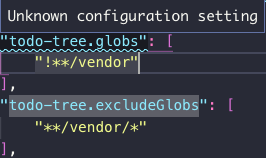
Yeah, it looks like I can confirm that. I used to have in my config this setting:
"todo-tree.globs": [
    "!**/vendor"
],
For some time now VSC always told me this is deprecated and asked if I would like to auto-migrate. I always said yes but the migration never worked.
Today I finally wanted to fix this and tried to manually migrate to the new format. I found the new key actually was created but the old one was not removed. Which is the cause for the daily reminder. The new setting looks like this:
"todo-tree.excludeGlobs": [
    "**/vendor"
],
As soon as I remove the old key todo-tree.globs the plugin lists all todos inside the vendor folder. So it looks like it's not working. Also with a trailing wildcard like in your above example it is the same.
Interestingly, the settings show me a validation error on the old key. Though this is the one actually working.
 udondan
on 21 Dec 2018
udondan
on 21 Dec 2018
That's odd - when it does the migration it should set a flag to note that it's been done, and not ask again. The old globs setting has been removed from the configuration which is why you get the invalid indication, but the extension still uses it if it's defined (just in case).
So if you remove the old setting and use 'excludeGlobs' as **/vendor/* it still matches them?
Could you copy and paste the contents of the "todo-tree" debug console (from the output view) please.
I might need to get you to do some remote debugging too if that's OK.
Gruntfuggly
on 21 Dec 2018
So if you remove the old setting and use 'excludeGlobs' as
**/vendor/*it still matches them?
Yes, that is correct. With the settings as seen in the screenshot above it works. When I remove the old block and hit reload in the TODO pane, all the TODOs from the vendor folder show up. If I add the old block again and push the reload button, they're gone again.
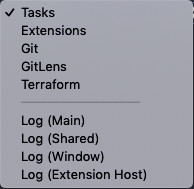
Could you copy and paste the contents of the "todo-tree" debug console (from the output view) please.
I would love to, but couldn't figure it out within 10 minutes. I believe you ask me to switch to the output console and then on the right side select the todo-tree extension, but there ain't no entry like that. 😕
I might need to get you to do some remote debugging too if that's OK.
Absolutely!
udondan
on 21 Dec 2018
I also just uninstalled and reinstalled Todo Tree to see if that helps. Same behaviour.
udondan
on 21 Dec 2018
Sorry - I should have asked you to turn on debug first - set todo-tree.debug to true.
Just to make sure I understand - it works correctly (filters out the matches) with
"todo-tree.globs": {
    "!**/vendor/"
},
"todo-tree.excudeGlobs": {
   "**/vendor/*"
}
but if you remove
"todo-tree.globs": {
    "!**/vendor/"
},
It doesn't filter them out?
What does it do if you remove?
"todo-tree.excudeGlobs": {
   "**/vendor/*"
}
I think the debug log would be useful...
Gruntfuggly
on 21 Dec 2018
Yeah, now it looks better. Sorry, I never worked on plugins themselves before.
Just to make sure I understand...
Yes, correct.
Here is the output, once with the old config in place and once without.
This config:
    "todo-tree.globs": [
        "!**/vendor"
    ],
    "todo-tree.includeGlobs": [],
    "todo-tree.excludeGlobs": [
        "**/vendor"
    ],
produces this debug output:
Searching /project/path...
Command: /Applications/Visual\ Studio\ Code.app/Contents/Resources/app/node_modules.asar.unpacked/vscode-ripgrep/bin/rg --no-messages --vimgrep -H --column --line-number --color never  -e "((//|#|<!--|;|/\*|^)\s*(TODO|FIXME)|^\s*- \[ \])" -g "!**/vendor" "/project/path"
*** SNIP - all the matches ***
Found 18 items
Applying globs to 18 items...
Remaining items: 18
This config:
    //"todo-tree.globs": [
    //    "!**/vendor"
    //],
    "todo-tree.includeGlobs": [],
    "todo-tree.excludeGlobs": [
        "**/vendor"
    ],
produces this debug output:
Searching /project/path...
Command: /Applications/Visual\ Studio\ Code.app/Contents/Resources/app/node_modules.asar.unpacked/vscode-ripgrep/bin/rg --no-messages --vimgrep -H --column --line-number --color never  -e "((//|#|<!--|;|/\*|^)\s*(TODO|FIXME)|^\s*- \[ \])" "/project/path"
*** SNIP - all the matches ***
Found 235 items
Applying globs to 235 items...
Remaining items: 235
At the end it says _Applying globs to 235 items..._ but all 235 remain. The pattern is not shown in the debug output.
I also tried it the other way around. This config:
    //"todo-tree.globs": [
    //    "!**/vendor"
    //],
    "todo-tree.includeGlobs": [
        "**/vendor"
    ],
    "todo-tree.excludeGlobs": [],
filters out everything. I would have expected to only see the results inside the vendor dir, but 0 remain:
Searching /project/path...
Command: /Applications/Visual\ Studio\ Code.app/Contents/Resources/app/node_modules.asar.unpacked/vscode-ripgrep/bin/rg --no-messages --vimgrep -H --column --line-number --color never  -e "((//|#|<!--|;|/\*|^)\s*(TODO|FIXME)|^\s*- \[ \])" "/project/path"
Found 235 items
Applying globs to 235 items...
Remaining items: 0
And I just figured it out the second I send the previous reply!
I tried **/vendor and **/vendor/*. Both don't work.
But this does works: **/vendor/**
And looking at the linked documentation, it actually makes perfect sense.
* expands only to a single path segment and of course all the results in the vendor dir are in nested directories.
I assume, the reason why it worked before with !**/vendor is that this pattern was passed to ripgrep which applies the glob on each directory while it moves through the tree. The glob from the new setting instead is applied on the whole filepath of every match.
User error. Case closed :) Thanks for looking into it!
udondan
on 21 Dec 2018
I'm glad it's sorted. Not sure why you had problems with the migration though...
Gruntfuggly
on 22 Dec 2018
Related issues
 Therzok
·
5Comments
Therzok
·
5Comments
 emanuelenardi
·
3Comments
emanuelenardi
·
3Comments
 alexwall
·
6Comments
alexwall
·
6Comments
 JonathanTroyer
·
5Comments
JonathanTroyer
·
5Comments
 the-vampiire
·
6Comments
the-vampiire
·
6Comments
Most helpful comment
And I just figured it out the second I send the previous reply!
I tried
**/vendorand**/vendor/*. Both don't work.But this does works:
**/vendor/**And looking at the linked documentation, it actually makes perfect sense.
*expands only to a single path segment and of course all the results in the vendor dir are in nested directories.I assume, the reason why it worked before with
!**/vendoris that this pattern was passed to ripgrep which applies the glob on each directory while it moves through the tree. The glob from the new setting instead is applied on the whole filepath of every match.User error. Case closed :) Thanks for looking into it!