Todo-tree: Wrapping / multiline TODO text content in sidebar
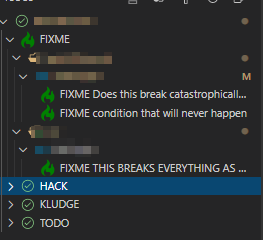
Could we get an option to wrap TODO contents a few times in the sidebar so I don't need to open the actual file to quickly review them? Currently they cut off after a single line
 alystair
All 9 comments
Could save even more space by having a "Hide Tag when grouped by tag" option to go with the current "Hide icon when grouped by tag" option :D
alystair
on 21 Mar 2020
Unfortunately the API doesn't allow for wrapping, and splitting manually would be difficult as there's no way to know how wide the sidebar is.
I could add the TODO content to the tooltip? At the moment it just shows the location.
Regarding hiding the tag, you could change the label format with todo-tree.tree.labelFormat. By default it is set to ${tag} ${after} so you could remove the ${tag} part. This would save space, especially if you use the 'Tags Only' view.
 Gruntfuggly
on 22 Mar 2020
Gruntfuggly
on 22 Mar 2020
Thanks for the label format hint! Tooltip could work assuming you can set a sane max-width and have a hard limit ellipses cut off if someone happened to write single-line novel :p
alystair
on 22 Mar 2020
Won't be as intuitive as native sidebar but should be sufficient until someone implements API based wrapping
alystair
on 22 Mar 2020
lol - yeh, there's scope for some runaway cases, but I can't think of another way really. I'll add it in the next release - I'll probably make it configurable like the label so that people can set it up how they want.
Gruntfuggly
on 22 Mar 2020
Try the latest version - there's a setting todo-tree.tree.tooltipFormat which uses the same placeholders as the label format option. It defaults to ${filepath}, line ${line} so the existing functionality is changed, but if you change it to something like ${after} you'll get the content after the tag.
Let me know what you think, or if you have any further ideas.
Gruntfuggly
on 23 Mar 2020
Just tried the labelFormat trick, can see why it's not a default considering 'empty' TODOs show up as invisible strings - although in my case it forces me to actually give the reason I put in the tags to begin with... documentation is good!
I'll wait for the update to hit the wire as it's not showing up in VSC yet. Your response turnaround time is incredible :D
alystair
on 23 Mar 2020
Yes, sorry I got delayed with the publish step. Should be there now.
Gruntfuggly
on 23 Mar 2020
This is perfect and well documented - thanks so much again for the active maintenance! Hope others gain functionality from these additions <3
alystair
on 23 Mar 2020
Related issues
 bitjson
·
7Comments
bitjson
·
7Comments
 WORMSS
·
6Comments
bitjson
·
8Comments
WORMSS
·
6Comments
bitjson
·
8Comments
 Therzok
·
5Comments
Therzok
·
5Comments
 nickPietrass
·
9Comments
nickPietrass
·
9Comments