Todo-tree: Enable highlight by default
I see in https://github.com/Gruntfuggly/todo-tree/issues/26 that highlighting is disabled by default:
The latest version now supports highlighting. It's off by default as I figure most people will be using todo highlight.
I like to recommend extensions in the .vscode/extensions.json file in some of my larger projects, and right now I have to include both for users to see the highlighting without messing with their configuration:
"recommendations": [
    "gruntfuggly.todo-tree",
    "wayou.vscode-todo-highlight"
  ],
Can I suggest that you enable highlighting by default now? I'd love to switch to recommending todo-tree alone.
 bitjson
All 8 comments
I've thought about this too - as there is quite a lot of highlight functionality which people might miss out on, it probably makes sense.
The only thing stopping me really is what to use as the default highlight?
I could keep it relatively simple and just use bold text, for example, which would avoid having to pick a colour.
Alternatively I could use a colour from the theme, but there are lots to choose from.
 Gruntfuggly
on 30 Oct 2019
Gruntfuggly
on 30 Oct 2019
For my personal use, the color choices made by wayou.vscode-todo-highlight have been great, I've never considered customizing them at all. I think you'd be very safe copying those.
If you have a different color palette you already use personally, that's probably a reasonable option too.
The only thing I'd add: it would be best if the default was extremely visible. When other developers on my team install TODO Highlight, I know that the TODO comments will almost always be extremely visible for all of us, which is really helpful. (If a user cares enough, they can tone it down in their own settings, or better yet, complete the TODO item. 😆)
bitjson
on 30 Oct 2019
I've just done some experiments and it seems the the easiest (and probably most visible) is to simply invert the standard editor background and foreground colours.
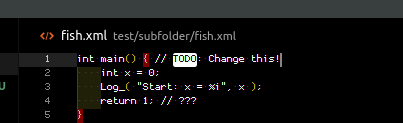
I've added 'none' to the list of colours too, which will allow users to turn off the highlights if they still want to use another extension for highlighting.
Gruntfuggly
on 30 Oct 2019
That sounds great to me.
Related – is there a way to set a value of todo-tree.highlights.defaultHighlight to be a theme color? I.e. can I use editor.foreground and editor.background? (Doesn't seem to be mentioned in the readme.)
bitjson
on 30 Oct 2019
Not currently - should be a simple change though.
Gruntfuggly
on 30 Oct 2019
I've added a flag todo-tree.highlights.enabled which defaults to true, so there is no need to use 'none' if you don't want the highlights.
It will allow any theme colours now too, provided they contain "background" or "foreground".
Gruntfuggly
on 30 Oct 2019
Just uploaded a new version with theme colour support.
Gruntfuggly
on 31 Oct 2019
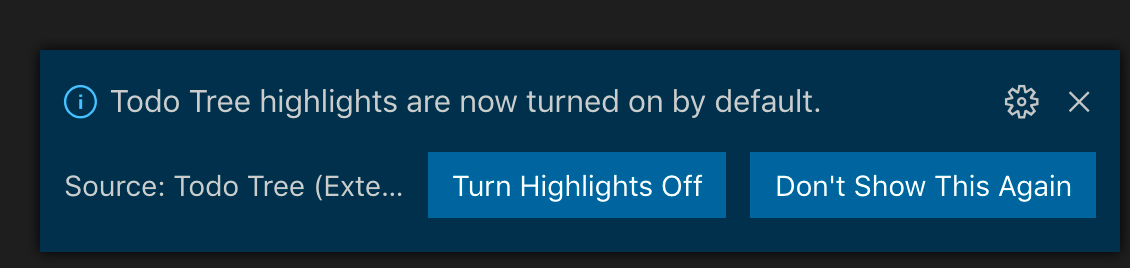
Fantastic, thank you! And nice touch with the notice!
bitjson
on 31 Oct 2019
Related issues
 diminutivesloop
·
5Comments
diminutivesloop
·
5Comments
 ghost
·
7Comments
ghost
·
7Comments
 Cloud7050
·
9Comments
Cloud7050
·
9Comments
 alystair
·
9Comments
alystair
·
9Comments
 the-vampiire
·
6Comments
the-vampiire
·
6Comments