Thingsboard: Interaction over Widgets
I need to do something on a widget(A) when something is changed on the other widget(B).
I used state controller to save the changed values of B to params and then got that values on A.
The problem is, how to get notified whenever the status of B changes.
Any idea?
e.g.
Code on Widget B to save startDate to params:
var stateId = self.ctx.stateController.getStateId();
var params = self.ctx.stateController.getStateParams();
params.startDate = self.ctx.$scope.startDate;
self.ctx.stateController.updateState(stateId, params);
Code on Widget A to get startDate from params:
var startDate = self.ctx.stateController.getStateParams().startDate;
How can I update startDate on A whenever startDate on B changes?
 openedhardware
All 24 comments
I noticed that the interaction feature was already implemented in your demo dashboard - https://thingsboard.io/smart-metering/
So if I select District A on the map widget, the titles of the right-bottom widget are also changed.
How did you integrate this feature?
openedhardware
on 1 Aug 2018
You can use Action API
https://thingsboard.io/docs/user-guide/contribution/widgets-development/#actions-api
Also, take a look at this videos
https://thingsboard.io/docs/iot-video-tutorials/#dashboard-development-guide-part-2-dashboard-states-aliases-and-widget-actions
 vparomskiy
on 1 Aug 2018
vparomskiy
on 1 Aug 2018
Thanks, @vparomskiy !
Closing this issue now...
openedhardware
on 2 Aug 2018
@vparomskiy
I couldn't find what I needed... :cry:
So I just need to execute something on a widget when another widget changes.
Impossible?
openedhardware
on 2 Aug 2018
Possible with custom widgets and some event bus, I am not expert in front-end development but it should be possible.
 ashvayka
on 2 Aug 2018
ashvayka
on 2 Aug 2018
Could you share the details of the event bus?
openedhardware
on 2 Aug 2018
Any details about the ActionAPI?
https://thingsboard.io/docs/user-guide/contribution/widgets-development/#actions-api
openedhardware
on 2 Aug 2018
If you are using custom widgets, then you can implement basic messaging using events:
For example, you want to send an event from custom widget A to the custom widget B.
In widget A (send event)
$scope.$emit('my-custom-event',
            {startTime: vm.currentEntity.startedAt, endTime: vm.currentEntity.endedAt, deviceId: vm.currentEntity.deviceId}
        );
In widget B (receive event)
$scope.$on('my-custom-event', function (event, data) {
                if (data) {
                    actOnEvent(data);
                }
            });
Perfect!
Let me try right now. :)
openedhardware
on 2 Aug 2018
@vparomskiy
Hmm, it does not work...
Here are simple widgets that sends/receives events with your code:
Would you like to import these widgets and test on your end?
Pretty simple widgets.
Cheers.
openedhardware
on 2 Aug 2018
Send Event Widget:
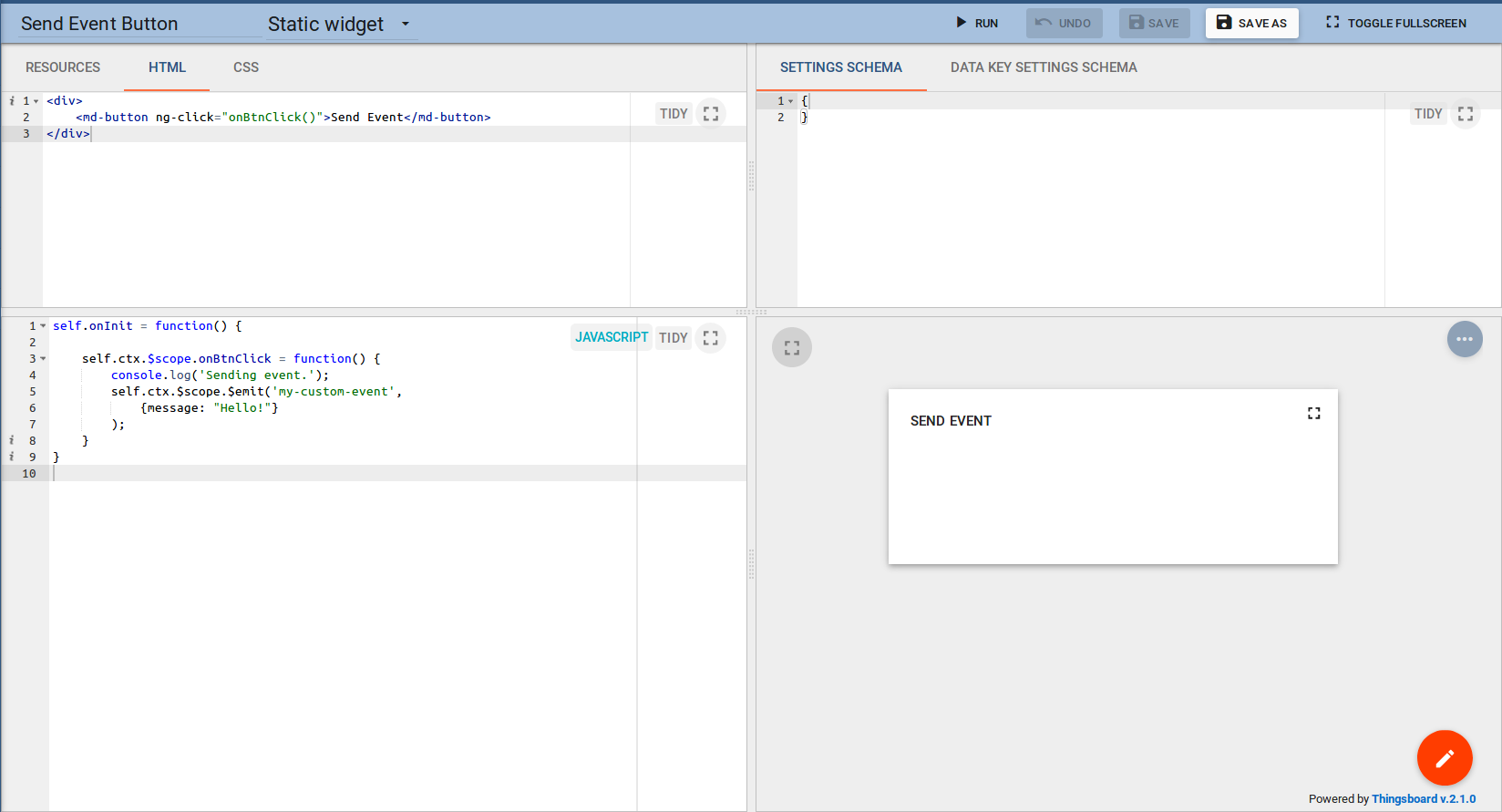
Receive Event Widget:

openedhardware
on 2 Aug 2018
Can't get to work. Anyone else tried this?
 ghost
on 31 Jan 2019
ghost
on 31 Jan 2019
Here is my solution:
sendEvent.zip
 doranagy
on 1 Feb 2019
doranagy
on 1 Feb 2019
Thank you @doranagy It works!
ghost
on 1 Feb 2019
I think that issue can be closed.
vparomskiy
on 5 Feb 2019
Here is my solution:
sendEvent.zip
after update to TB 3.0 it doesn't work(
 anzorayubov
on 10 Aug 2020
anzorayubov
on 10 Aug 2020
there was the migration to the angular 9
you may refer to this link regarding those: https://thingsboard.io/docs/user-guide/contribution/widgets-development/
 Karabiy
on 10 Aug 2020
Karabiy
on 10 Aug 2020
there was the migration to the angular 9
you may refer to this link regarding those: https://thingsboard.io/docs/user-guide/contribution/widgets-development/
thanks, where i can read about all updates in TB 3? I so understand that delivered angular material also
anzorayubov
on 12 Aug 2020
there was the migration to the angular 9
you may refer to this link regarding those: https://thingsboard.io/docs/user-guide/contribution/widgets-development/
and yet, how I can transfer event from widget to widget?
anzorayubov
on 12 Aug 2020
This is a new issue in TB3.0+ as $broadcast and $on have been deprecated. If anyone has found a Solution I'm also struggling with this issue.
 Manusisko
on 19 Oct 2020
Manusisko
on 19 Oct 2020
For anyone facing this issue, I've found services are actually maintained across all widget contexts. So if you define a function in a service in one widget, it can be called in a different widget.
For example, I tested:
//This is defined in the action of a widget or on it's Javascript with self.ctx.userService
widgetContext.userService.onThisCalled = function(message){
     console.log("MESSAGE", message);
}
if(widgetContext.userService.onThisCalled !== undefined){
       widgetContext.userService.onThisCalled("This works!");
}
Hope this helps anyone
Manusisko
on 20 Oct 2020
For anyone facing this issue, I've found services are actually maintained across all widget contexts. So if you define a function in a service in one widget, it can be called in a different widget.
For example, I tested:
//This is defined in the action of a widget or on it's Javascript with self.ctx.userService widgetContext.userService.onThisCalled = function(message){ console.log("MESSAGE", message); }
if(widgetContext.userService.onThisCalled !== undefined){ widgetContext.userService.onThisCalled("This works!"); }Hope this helps anyone
i can't get widgetContext.userService.onThisCalled..how to achieve this
 ajithkumar222
on 29 Oct 2020
ajithkumar222
on 29 Oct 2020
For anyone facing this issue, I've found services are actually maintained across all widget contexts. So if you define a function in a service in one widget, it can be called in a different widget.
For example, I tested:
//This is defined in the action of a widget or on it's Javascript with self.ctx.userService widgetContext.userService.onThisCalled = function(message){ console.log("MESSAGE", message); }
if(widgetContext.userService.onThisCalled !== undefined){ widgetContext.userService.onThisCalled("This works!"); }
Hope this helps anyonei can't get widgetContext.userService.onThisCalled..how to achieve this
You need to define such function in a custom widget or in a widget's action (defined when action executes).
Manusisko
on 7 Nov 2020
For anyone facing this issue, I've found services are actually maintained across all widget contexts. So if you define a function in a service in one widget, it can be called in a different widget.
For example, I tested:
//This is defined in the action of a widget or on it's Javascript with self.ctx.userService widgetContext.userService.onThisCalled = function(message){ console.log("MESSAGE", message); }
if(widgetContext.userService.onThisCalled !== undefined){ widgetContext.userService.onThisCalled("This works!"); }
Hope this helps anyonei can't get widgetContext.userService.onThisCalled..how to achieve this
You need to define such function in a custom widget or in a widget's action (defined when action executes).
i defined widgetContext.userService.onThisCalled on javascript window in custom widget,but it shows a error
ajithkumar222
on 9 Nov 2020
Related issues
 dejwoo
·
14Comments
dejwoo
·
14Comments
 myfreescalewebpage
·
22Comments
myfreescalewebpage
·
22Comments
 fotis400
·
14Comments
fotis400
·
14Comments
 gopirathnamt
·
21Comments
fotis400
·
28Comments
gopirathnamt
·
21Comments
fotis400
·
28Comments
Most helpful comment
and yet, how I can transfer event from widget to widget?