Thingsboard: RPC Shell interface
I am trying to use the RPC Shell widget.
As I see, when I open the dashboard the widget sends an RPC command requesting data from the client. For each command I send it seems it has a specific structure, and the widget waits for a response.
I couldn't find any documentation on how this widget works.
What are the commands that this widget sends, and what are the expected responses?
 fotis400
All 14 comments
+1
 fatihyasar
on 19 Jun 2018
fatihyasar
on 19 Jun 2018
rps shell sends RPC command to the connected device. If the device connected via MQTT, then from the device you need to subscribe to the RPC topic "v1/devices/me/rpc/request/+"
when shell command executed, RPC requested transferred via MQTT to the device:
- topic - v1/devices/me/rpc/request/$request_id
- payload - {'{"method":"sendCommand","params":{"command":"hi"}}'}
the device should respond to this command - publish the message to the topic "v1/devices/me/rpc/response/$request_id"
response payload will be displayed in the shell.
https://thingsboard.io/docs/reference/mqtt-api/#rpc-api
https://thingsboard.io/docs/user-guide/rpc/
 vparomskiy
on 20 Jun 2018
vparomskiy
on 20 Jun 2018
@vparomskiy
I think that what you describe is applicable for the RPC Debug widget only.
As far as I can understand the RPC Shell widget has a different API. Take a look at the following image.
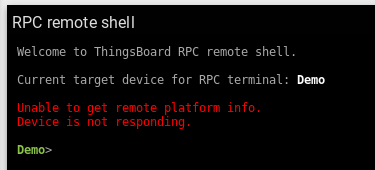
The Shell widget seems to expect some information from the device. But what should the response be?
Also commands seem to have different structure than the RPC Debug widget.
fotis400
on 20 Jun 2018
@vparomskiy any news on this?
Will the remote shell functionality be documented? Or at least any hints?
fotis400
on 20 Nov 2018
I'd also like to know how my responses should be formatted. Primarily to remove the "Device is offline" message, and to print messages from the device onto the shell.
 Rileyjs
on 29 Nov 2018
Rileyjs
on 29 Nov 2018
+1
 ddomit
on 20 Mar 2019
ddomit
on 20 Mar 2019
Response should look like
{
            ok: true,
            platform: os.platform(),
            type: os.type(),
            release: os.release()
        }
@ddomit @fotis400 @Rileyjs
 alfredayibonte
on 1 Apr 2019
alfredayibonte
on 1 Apr 2019
Hi, excelent work!
Im making a IoT dashboard and need to use the RPC command shell.
Although this response works great for releiving data from the sensor
{
ok: true,
platform: os.platform(),
type: os.type(),
release: os.release()
}
Im having problem replyng to any other RPC command.
If i put a RPC Debug Console, i can see my reponse on the shell.
But on the non-Debug Console, the console just hangs or it shows "Device Offline" depending on the kind of answer i send.
Whats the format of the response I should send?
Note: If i reply this
{
ok: true,
platform: os.platform(),
type: os.type(),
release: os.release()
}
to my RPC command, then the shell responds me "{"method":"getCommandStatus"}" but i dont know how to respond to this.
 OH-F
on 26 Apr 2019
OH-F
on 26 Apr 2019
@OH-F what I did was, in sending my response I add another field called output. I then customized my rpc terminal so that I will be able to echo the response. ie terminal.echo(responseBody.output).
alfredayibonte
on 26 Apr 2019
Thank you!
Im doing a custom RPC terminal widget now ( https://thingsboard.io/docs/user-guide/contribution/widgets-development/ )
If that doesnt work, ill try your suggestion!
Thank you once again.
OH-F
on 26 Apr 2019
rps shell sends RPC command to the connected device. If the device connected via MQTT, then from the device you need to subscribe to the RPC topic "v1/devices/me/rpc/request/+"
when shell command executed, RPC requested transferred via MQTT to the device:
- topic - v1/devices/me/rpc/request/$request_id
- payload - {'{"method":"sendCommand","params":{"command":"hi"}}'}
the device should respond to this command - publish the message to the topic "v1/devices/me/rpc/response/$request_id"
response payload will be displayed in the shell.https://thingsboard.io/docs/reference/mqtt-api/#rpc-api
https://thingsboard.io/docs/user-guide/rpc/
can it work with demo.thingsboard ?
I couldn't manage it
 vcmorini
on 8 Jun 2019
vcmorini
on 8 Jun 2019
if anyone is still interested, i've figured out the format of the response expected after the getCommandStatus call:
_{"done": "true", "data": [{"stdout": "Hello"}]}_
Now the RPC shell works as expected! If you remove done, the getCommandStatus will get called again after a while. Useful if the command execution is still in progress.
Also, terminateCommand is called on Ctrl+C
 govorox
on 23 Jul 2019
govorox
on 23 Jul 2019
if anyone is still interested, i've figured out the format of the response expected after the getCommandStatus call:
_{"done": "true", "data": [{"stdout": "Hello"}]}_
Now the RPC shell works as expected! If you remove done, the getCommandStatus will get called again after a while. Useful if the command execution is still in progress.
Also, terminateCommand is called on Ctrl+C
Great work! Ill try it as soon as i can
May I ask how did you got it? I've read the widget code, but couldnt get any valuable info
OH-F
on 23 Jul 2019
I've read through the JavaScript code that the RPC Shell widget emits, then put together a python script to test.
Forgot to mention that the data field is an array of objects containing stdout and/or stderror. I've only tested a single line return per call so far, but will eventually have it returning multiples. Not sure how it handles terminal escape sequences either, will have a go tomorrow
govorox
on 23 Jul 2019
Related issues
 nitinware
·
21Comments
fotis400
·
18Comments
nitinware
·
21Comments
fotis400
·
18Comments
 openedhardware
·
24Comments
openedhardware
·
24Comments
 dejwoo
·
14Comments
dejwoo
·
14Comments
 jeansey
·
15Comments
jeansey
·
15Comments
Most helpful comment
if anyone is still interested, i've figured out the format of the response expected after the getCommandStatus call:
_{"done": "true", "data": [{"stdout": "Hello"}]}_
Now the RPC shell works as expected! If you remove done, the getCommandStatus will get called again after a while. Useful if the command execution is still in progress.
Also, terminateCommand is called on Ctrl+C