Since installing TeslaMate on my Synology NAS, my Model 3 has not fallen asleep even for a minute. I assume this is keeping my vehicle awake, is there a setting somewhere I need to toggle to allow my car to sleep?

 friedmannn2
All 30 comments
What happens if you manually try to suspend logging with the TeslaMate API call?
What firmware version is your car running?
 mjpcomp
on 9 Jul 2020
mjpcomp
on 9 Jul 2020
What happens if you manually try to suspend logging with the TeslaMate API call?
What firmware version is your car running?
Not sure how to manually suspend logging, are there instructions somewhere?
friedmannn2
on 10 Jul 2020
Not sure how to manually suspend logging, are there instructions somewhere?
The main TeslaMate screen where it shows your car should have button "try to sleep".
It might also be worth to look at the logs: docker-compose logs teslamate.
 adriankumpf
on 10 Jul 2020
adriankumpf
on 10 Jul 2020
Not sure how to manually suspend logging, are there instructions somewhere?
The main TeslaMate screen where it shows your car should have button "try to sleep".
It might also be worth to look at the logs:
docker-compose logs teslamate.
I do not see the try to sleep button anywhere, unless it is in Grafana somewhere? When I tried that command line, I got this in response:
root@Friedman:/volume1/@docker# docker-compose logs teslamate
Attaching to docker_teslamate_1
teslamate_1 | WARNING: no logs are available with the 'db' log driver
friedmannn2
on 11 Jul 2020
The sleep button should be on the main Teslamate, not Grafana:
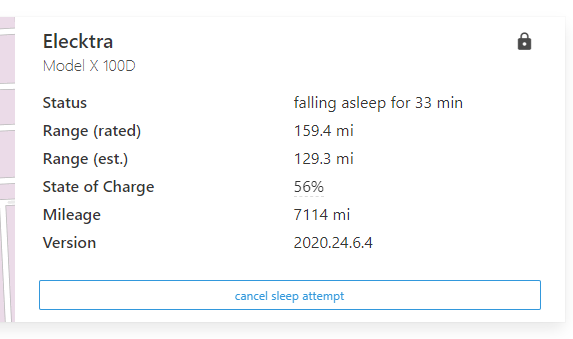
You can see mine is attempting to sleep, so, the button says Cancel Sleep Attempt...
In terms of using the API to get it sleep manually, you have to do an HTTP PUT - here's a website that goes over using Tasker to accomplish it, but, the URL and the PUT command are all you need (a long with your AUTH if using it):
https://satheesh.net/2019/09/28/teslamate-digitalocean-docker-step-by-step-installation-guide/
Excerpt:
– Request Type is PUT
– URL is https://YOUR_FQDN/api/car/1/logging/suspend (replace YOUR_FQDN with the FQDN_TM url in the .env file)
– If following the guide, use Basic Auth and your credentials used in the .htpasswd file
mjpcomp
on 11 Jul 2020
Just noticed this with my Model 3 after receiving 2020.24.6.4 and enabling the don’t lock at home option on the car. Just changed the option in Teslamate to not require the car to be locked for sleep mode and it is trying to sleep now.
 xwingfighter
on 11 Jul 2020
xwingfighter
on 11 Jul 2020
After my car updated to 2020.20.12 it refused to go to sleep.
I initially thought this was caused by ABetterRoutePlanner, but after updating to 2020.24.6.1 it went back to normal and continued sleeping after inactivity.
This seems to have been a software bug in 2020.20.XX.
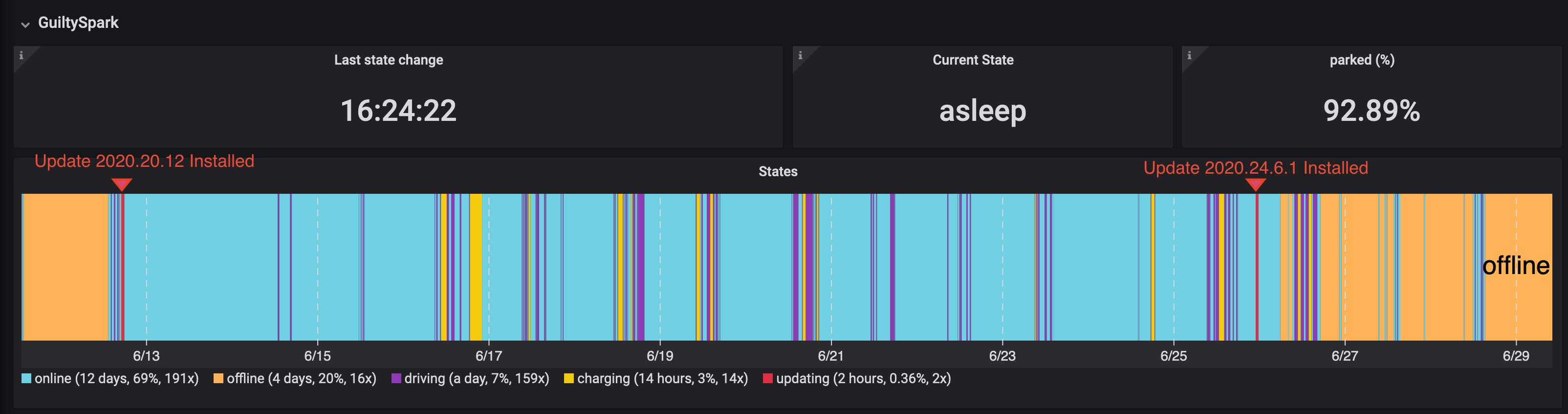
Did you have a different logger before installing teslamate so that you know it did sleep before you installed telsamate, or did teslamate simply make you aware of the problem?
 kimma
on 11 Jul 2020
kimma
on 11 Jul 2020
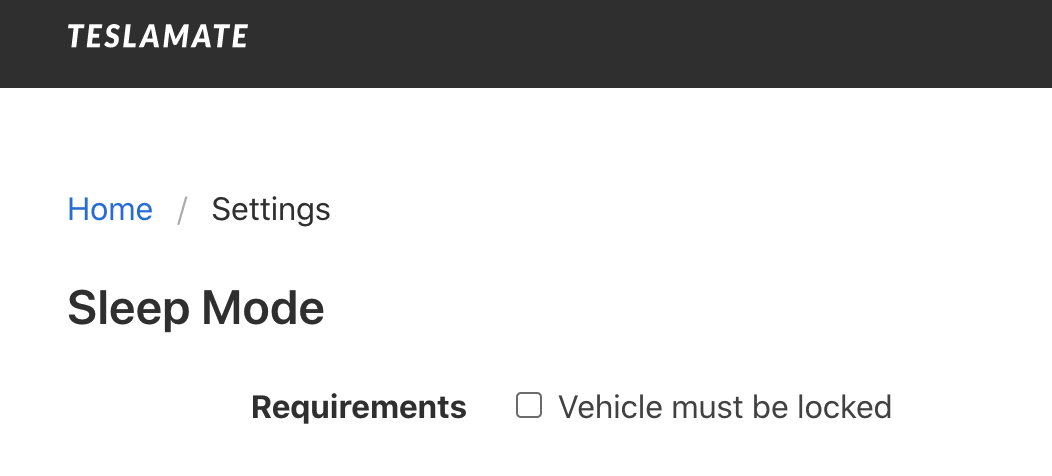
I noticed this too, now I have flipped the switch "Vehicle must be locked" and see if it goes to sleep. I left the car unplugged for a week and lost about 80 miles. Teslamate shows it was online the whole time.
Edit: after flipping the switch off on the teslamate main settings screen, the car went to sleep overnight.
Sleep Mode
Requirements
Vehicle must be locked
 dkropman-Slalom
on 12 Jul 2020
dkropman-Slalom
on 12 Jul 2020
I'm having the same issues as well. Ever since I got Teslamate running, my car refuses to sleep.

 trulow
on 14 Jul 2020
trulow
on 14 Jul 2020
I'm having the same issues as well. Ever since I got Teslamate running, my car refuses to sleep.
Are you leaving your car unlocked? If you are change the setting in teslamate Sleep Mode Requirements.
dkropman-Slalom
on 14 Jul 2020
I'm having the same issues as well. Ever since I got Teslamate running, my car refuses to sleep.
Are you leaving your car unlocked? If you are change the setting in teslamate Sleep Mode Requirements.
I always leave my car locked. Even so, I have the "Vehicle must be locked" unchecked within the Teslamate UI and yet it still does not go to sleep.
Here are my logs
teslamate_1 | 08:51:34.107 [info] GET /
teslamate_1 | 08:51:34.110 [info] Sent 200 in 3ms
teslamate_1 | 08:51:35.137 [info] GET /
teslamate_1 | 08:51:35.141 [info] Sent 200 in 4ms
teslamate_1 | 08:51:36.365 [info] GET /
teslamate_1 | 08:51:36.369 [info] Sent 200 in 3ms
teslamate_1 | 08:51:37.549 [info] GET /
teslamate_1 | 08:51:37.554 [info] Sent 200 in 4ms
teslamate_1 | 08:51:40.243 [info] GET /settings
teslamate_1 | 08:51:40.248 [info] Sent 200 in 4ms
teslamate_1 | 08:51:42.736 [info] GET /
teslamate_1 | 08:51:42.740 [info] Sent 200 in 3ms
teslamate_1 | 08:51:44.666 [info] GET /
teslamate_1 | 08:51:44.671 [info] Sent 200 in 5ms
teslamate_1 | 08:51:45.998 [info] GET /settings
teslamate_1 | 08:51:46.003 [info] Sent 200 in 4ms
teslamate_1 | 08:51:50.221 [info] GET /
teslamate_1 | 08:51:50.224 [info] Sent 200 in 3ms
teslamate_1 | 09:03:12.234 [info] GET /settings
teslamate_1 | 09:03:12.239 [info] Sent 200 in 4ms
teslamate_1 | 09:03:16.283 [info] GET /
teslamate_1 | 09:03:16.287 [info] Sent 200 in 3ms
teslamate_1 | 09:03:16.344 [info] GET /
teslamate_1 | 09:03:16.347 [info] Sent 200 in 3ms
teslamate_1 | 09:03:17.444 car_id=1 [info] Resuming logging
teslamate_1 | 09:03:20.714 car_id=1 [info] Suspending logging [Triggered manually]
teslamate_1 | 09:03:20.769 car_id=1 [info] Unhandled fetch result: {:ok,
trulow
on 14 Jul 2020
I decided to try the new feature to leave my car unlocked at home, too. I enabled it for each car profile in my car. As mentioned above, ensure you are unchecking the box in TeslaMate settings to require it to be locked as mentioned above and things will return to normal
 natrlhy
on 14 Jul 2020
natrlhy
on 14 Jul 2020
So I just noticed, I think my car is going to sleep but Teslamate is not registering when it actually does go to sleep.
trulow
on 16 Jul 2020
I do have a similar problem.
Teslamate is trying to put the car into sleep state, I see a "falling asleep for 1h 28".
During that time I may drive around - and Teslamate does not see that, when I've activated Streaming API.
Does anyone have any clue?
thanks
rog-NB
 rog-NB
on 24 Jul 2020
rog-NB
on 24 Jul 2020
Update: Problem solved and it was not Teslamate's fault. Sorry for any inconveniences! For details see my new comment below.
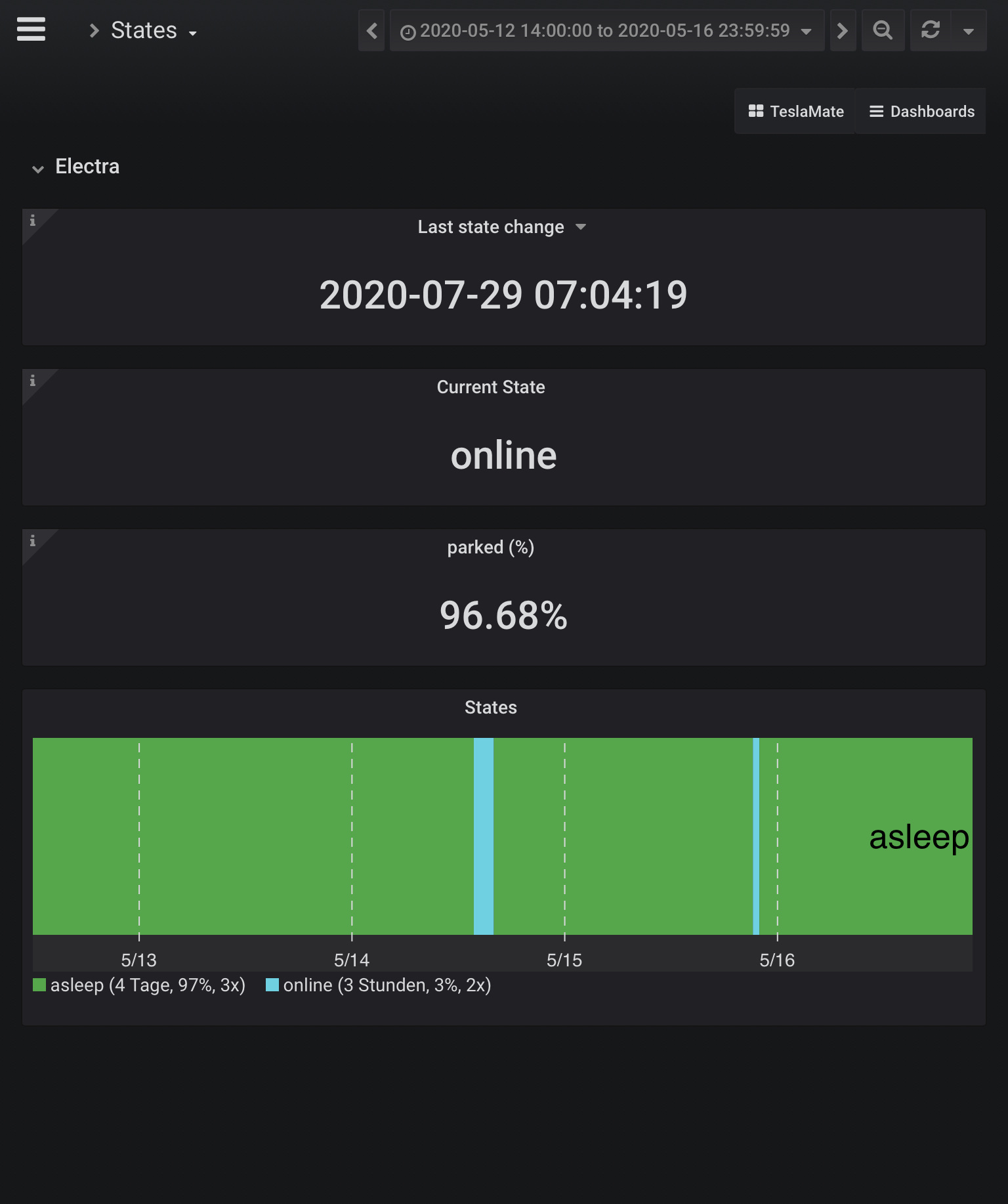
I have the same problem. However I have access to historical data, as I used TeslaFi before and did a full data import.
My scenario is that I regularly drive my Model 3 to a garage where I park another car. I then leave the M3 there for a few days at a time, unplugged, locked and without Sentry Mode.
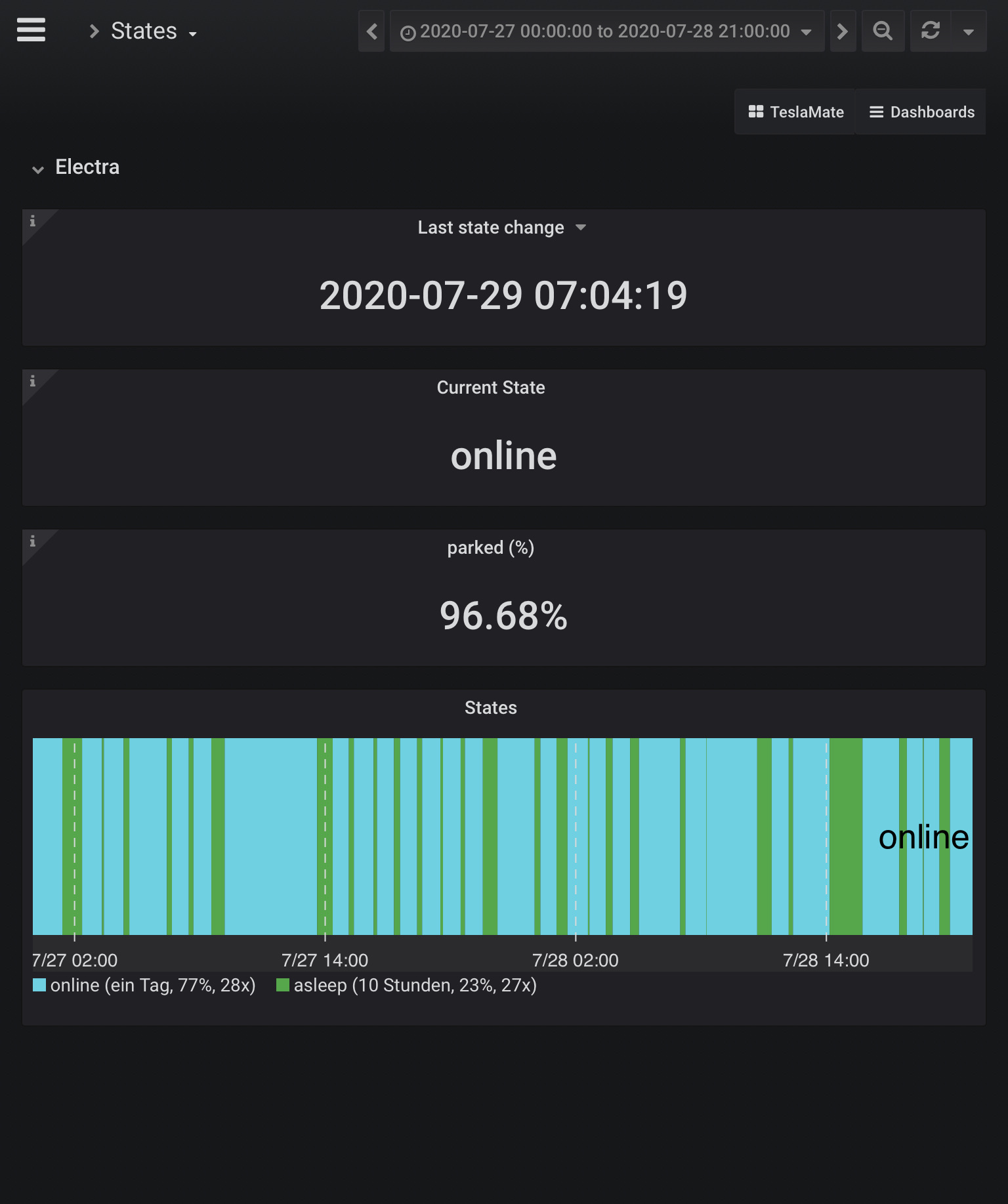
Below you see data from May while still using TeslaFi and from July, with Teslamate.
May was on 2020.12.11.1
July is on 2020.24.6.9
I am located in Germany, if that is relevant.
I initially left all Teslamate settings on default and am now busy trying if sleep without locked and no streaming API make a difference.
 JanBe
on 30 Jul 2020
JanBe
on 30 Jul 2020
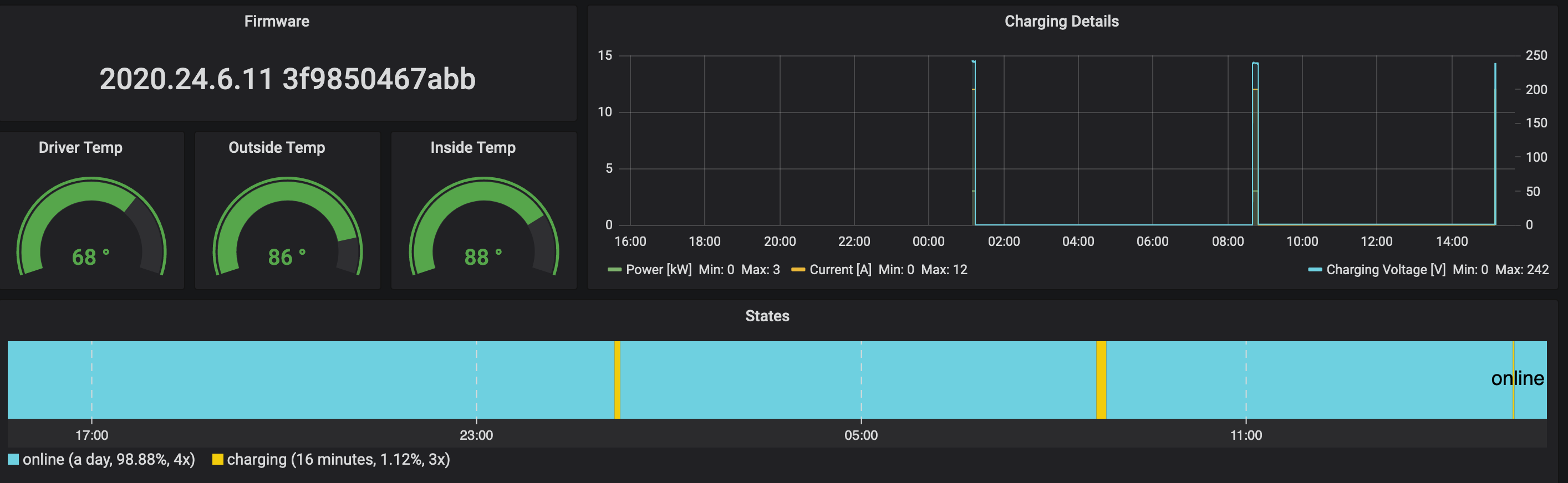
So I've been running Teslamate for about 2 weeks now and have tried different combinations to try and make Teslamate register that my car went to sleep. I've disabled the "Vehicle must be lock" Sleep Mode requirement setting, disabled COP, disabled always connected, etc. and Teslamate has yet to detect when my car goes to sleep. However, I'm sure my car goes does indeed go to sleep because when I haven't driven for awhile, I have to "wake" the car up before I can start driving.
trulow
on 31 Jul 2020
Update on my issue: It's solved and it wasn't Teslamates fault. Sorry for the inconvenience. Around the same time that I started using Teslamate, I also started using Watch for Tesla. I now dug deeper into my Teslamate / TeslaFi data and realized that the issue actually already started before I switched to Teslamate. Only then I realized, that I installed the watch app a few days before. Completely disabling background updates in the watch app fixed my issue.
At first I thought that disabling "require lock" on Teslamate fixed the issue, however coincidentally I also didn't use my Watch during that day 🤦♂️.
About the Watch for Tesla issue: The app has a setting to do background updates, but not wake the car while doing those. This setting seems broken however. There is an issue for that on their repository and it is already fixed in the Testflight beta, but not yet on the AppStore. Details can be found here: Kemmey/Kemmey-TeslaWatch-Public#32
If anybody in this thread is also using the Watch for Tesla app, check out the linked issue over in their repository, it contains the link to join the Testflight beta.
JanBe
on 1 Aug 2020
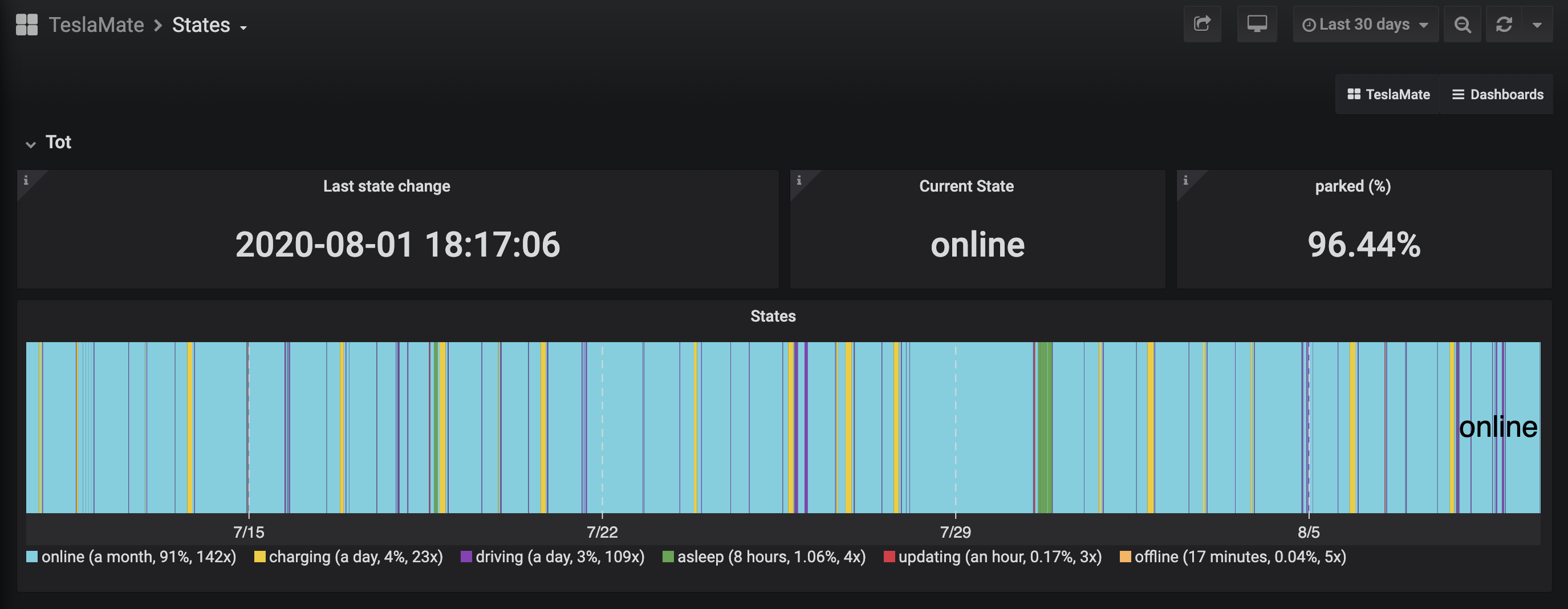
I have been unable to get my vehicle to sleep while using Teslamate, and I am averaging just under 1%/hr lost because of this. I have tried toggling 'vehicle must be locked' on and off (vehicle is always locked when parked), and also toggled the streaming API in various on/off states, however vehicle has only gone to sleep once for a few hours since enabling Teslamate. Anyone have success fixing this, or advice on where to check? I doubt it is a car software issue, it is running the latest 2020.32.1 firmware.
friedmannn2
on 10 Aug 2020
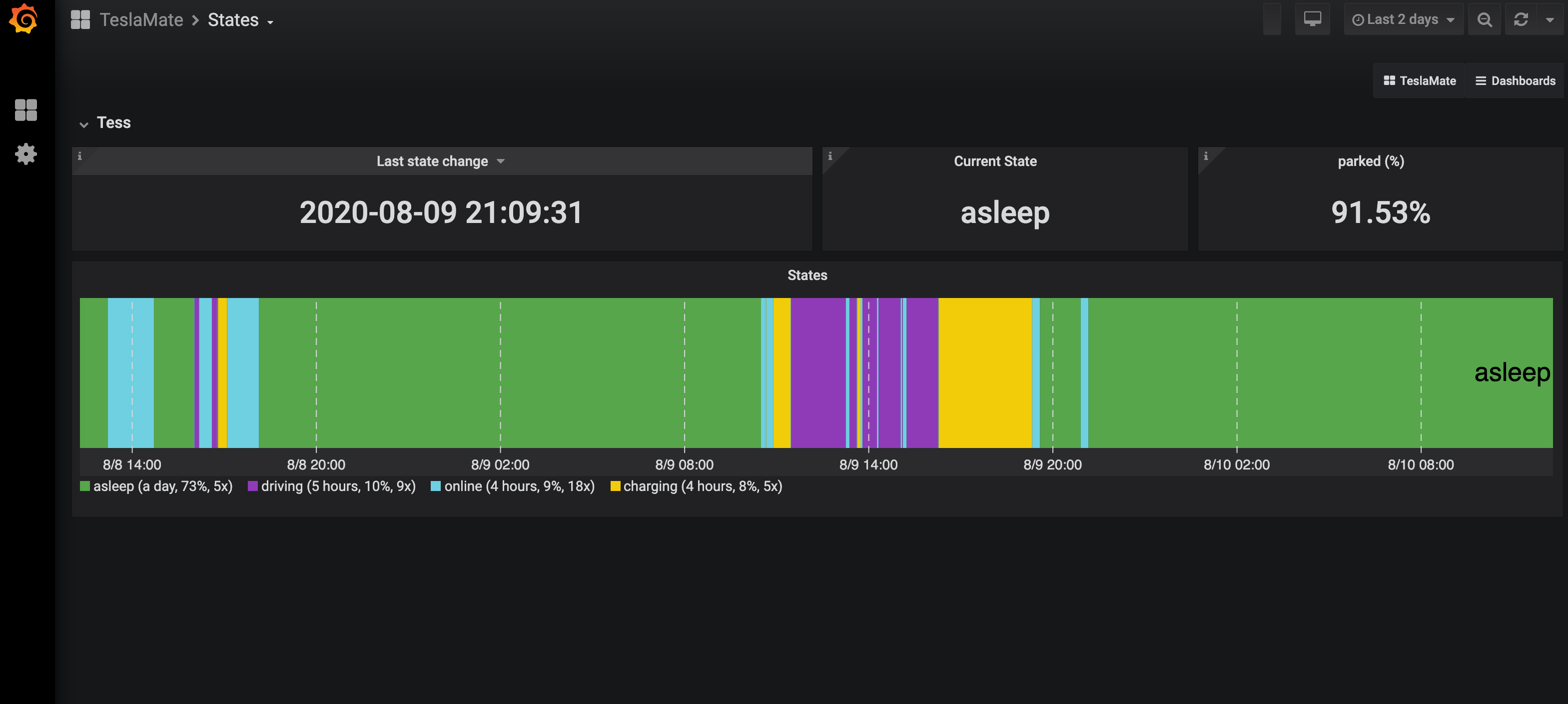
I have a Y running 2020.28.6 and it sleeps.
What model do you have and is it locked?
 jason-kates-informa
on 10 Aug 2020
jason-kates-informa
on 10 Aug 2020
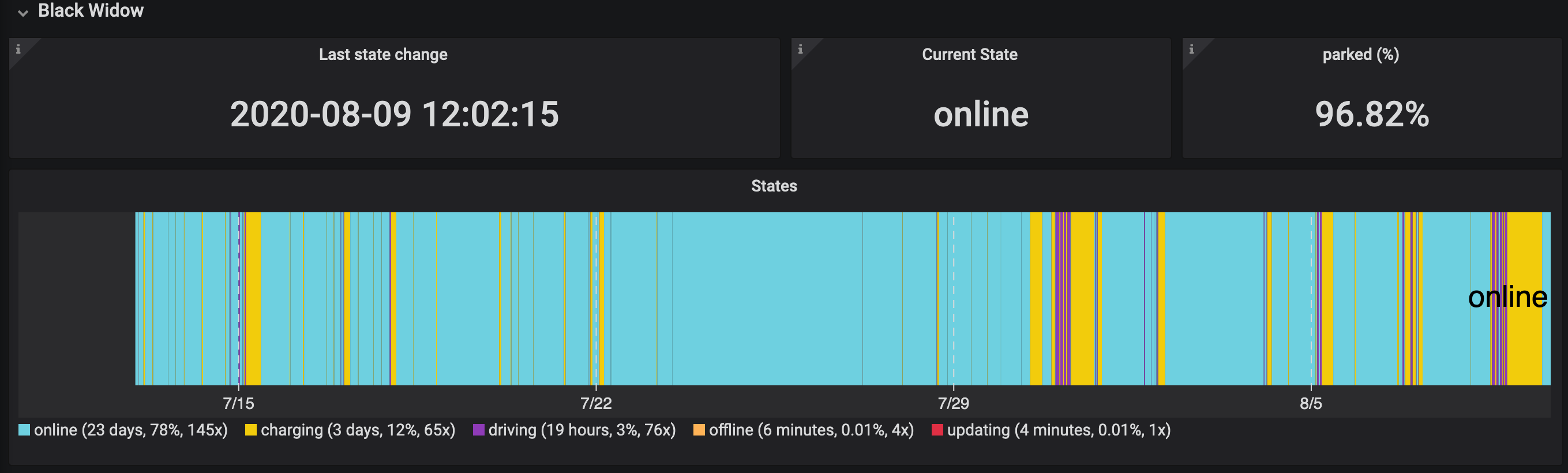
I have a 2015 Model S running 2020.24.6.11
I've tried it with the car locked and unlocked. Either way, teslamate refuses to see if the car went to sleep and always shows that the state is online.
I have not once seen Teslamate show that the car was asleep in the full month of running Teslamate.
trulow
on 10 Aug 2020
I have a Y running 2020.28.6 and it sleeps.
What model do you have and is it locked?
I have a 2018 LR AWD Model 3 - it is always locked when parked.
friedmannn2
on 10 Aug 2020
I have a 2015 Model S running 2020.24.6.11
I've tried it with the car locked and unlocked. Either way, teslamate refuses to see if the car went to sleep and always shows that the state is online.
I have not once seen Teslamate show that the car was asleep in the full month of running Teslamate.
I see other people have reported that it just does not show it as asleep - are you sure yours is actually sleeping? Mine consistently loses almost 1%/hour sitting idle, which is significantly higher vampire drain that should occur if the car is sleeping and more than what it would lose when sitting parked before enabling Teslamate.
friedmannn2
on 10 Aug 2020
I noticed that after awhile of sitting in my garage, either while plugged in or not, eventually the dash behind the wheel would need to start up as it would take at least a full minute or two before it actually displays anything. During that time, I'm not positive but I believe that that car is in sleep mode. I also tested that while unplugged, I'll loose about 3-5% of charge per 24 hours.
Yet, Teslamate still does not register as the car is asleep so I'm not entirely sure if it did go to sleep or not.
trulow
on 10 Aug 2020
This might be the reason: Some firmware versions may report the vehicle as offline when it may actually be asleep. An option which will indicate offline sessions as being asleep when the vehicle was in an idle session will fix this..
 mobile26
on 13 Sep 2020
mobile26
on 13 Sep 2020
I’ve setup TeslaMate a few days ago and have the same issue:
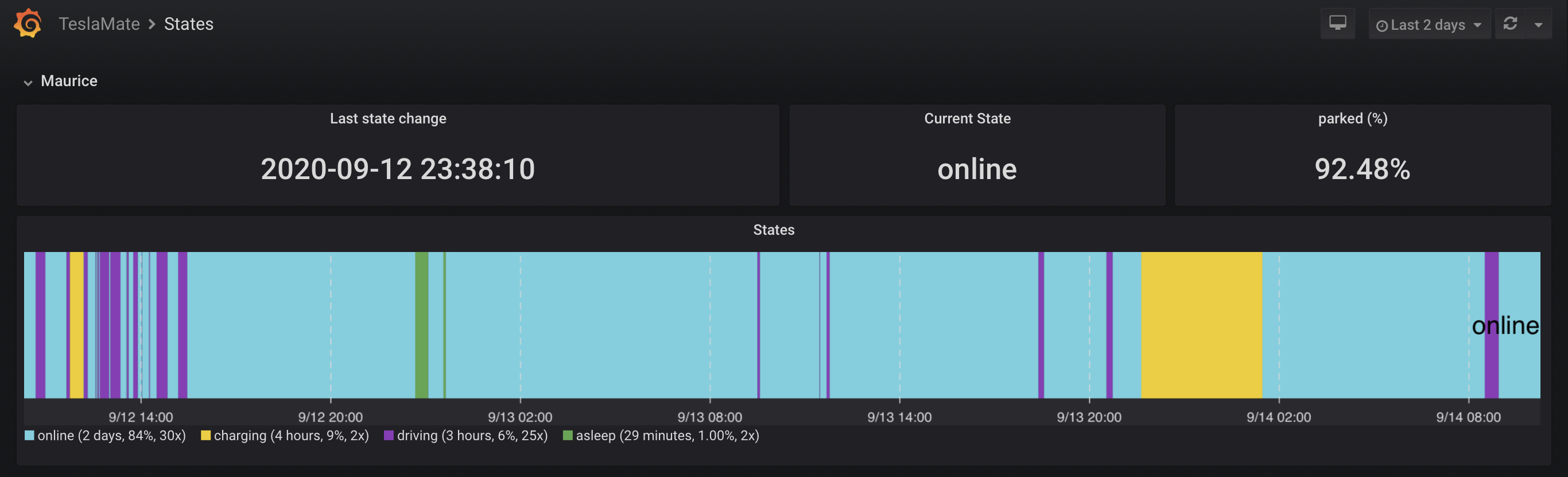
Also high vampire drain:

Unchecking the ‘when locked’ setting does not seem to help.
 jojost1
on 14 Sep 2020
jojost1
on 14 Sep 2020
I’ve setup TeslaMate a few days ago and have the same issue:
Also high vampire drain:
Unchecking the ‘when locked’ setting does not seem to help.
So I figured out that it is sentry mode causing this, I use sentry 24/7 due to my home/work parking situations and found that turning it off allowed the vehicle to go to sleep. Is this normal? I was under the impression that sentry mode kept some parts of the system online, but let the overall vehicle sleep.
Are you using sentry mode?
friedmannn2
on 14 Sep 2020
So I figured out that it is sentry mode causing this, I use sentry 24/7 due to my home/work parking situations and found that turning it off allowed the vehicle to go to sleep. Is this normal? I was under the impression that sentry mode kept some parts of the system online, but let the overall vehicle sleep.
Are you using sentry mode?
Yes it is normal that the vehicle never sleeps when in sentry mode. It uses the AP cameras and motion detection software in order to make sentry work, which would drain the 12V battery in a few hours. Therefore the high voltage battery pack is being kept connected and the vehicle will never sleep.
I use sentry mode, but not at home or at long time parking spots, where I expect the vehicle to sleep.
JanBe
on 14 Sep 2020
I have a 2015 Model S running 2020.24.6.11
I've tried it with the car locked and unlocked. Either way, teslamate refuses to see if the car went to sleep and always shows that the state is online.
I have not once seen Teslamate show that the car was asleep in the full month of running Teslamate.
Hey @trulow,
i had the problem with my S85D from 2015. I figured out that the problem was not tesla mate related. If you go to your car setting -> display -> power saving. You have to check this option to yes and uncheck the "always connected" option. After these changes every thing works like expected.
 d3f3kt
on 15 Sep 2020
d3f3kt
on 15 Sep 2020
To mention is that also any 3rd party power use, such as 3rd party dash cams in older cars without sentry, will cause the car to stay awake. I had to put a separate battery and a switch to allow my Blackvue cameras to work after vehicle shutdown, and allow my car to sleep during it.
 wooter
on 20 Sep 2020
wooter
on 20 Sep 2020
This issue has been automatically marked as stale because it has not had recent activity. It will be closed if no further activity occurs. Thank you for your contributions.
![stale[bot] picture](https://avatars.githubusercontent.com/in/1724?v=4&s=40) stale[bot]
on 19 Nov 2020
stale[bot]
on 19 Nov 2020
Related issues
 spacecosmos
·
5Comments
spacecosmos
·
5Comments
 bahree
·
5Comments
bahree
·
5Comments
 jun3280net
·
4Comments
jun3280net
·
4Comments
 cwanja
·
3Comments
cwanja
·
3Comments
 kongomongo
·
5Comments
kongomongo
·
5Comments