Teslamate: Alert to know when service is down?
So I have had a couple of times when one of the containers was stopped for some reason and I only realized this at the end of the day when wanting to review the logs and the drives. The fix was simple - restarted everything.
I was wondering - would there be any benefit to send an alert out when some service is down - could be as simple as email, or via IFTTT or something. I don't know if this is a edge case but would we all benefit from it,
Thoughts?
Thanks.
 bahree
All 5 comments
Actually I'd love to have some kind of status port that I could query and that sends back a simple http 200 or something. Probably not that easy to actively send out a signal because when something crashes there's probably nothing left to send out a signal. But being able to use some kind of server monitoring... sounds interesting.
 Helmi
on 8 Sep 2019
Helmi
on 8 Sep 2019
Some sort of healthcheck route could be useful especially when running with docker / kubernetes. However, sending an alert via IFTT etc. should not be part of TeslaMate in my opinion. This task should be performed by specialized third-party tools.
I'm not sure if all that is worth the effort though. In the last 5 months I had to restart TeslaMate once. That was because Tesla decided to change the IDs of some cars (#90). That shouldn't happen _that_ regularly ;) In general, TeslaMate is pretty fault-tolerant – in case of an unexpected error specific parts of the application are automatically restarted. In the unlikely event of a crash, docker restarts the whole container.
 adriankumpf
on 8 Sep 2019
adriankumpf
on 8 Sep 2019
https://serverfault.com/questions/806934/bash-script-for-checking-remote-webserver-health-status
Try this idea. You can run it on the docker host or on any other computer with access to TeslaMate endpoint.
 virtualm2000
on 8 Sep 2019
virtualm2000
on 8 Sep 2019
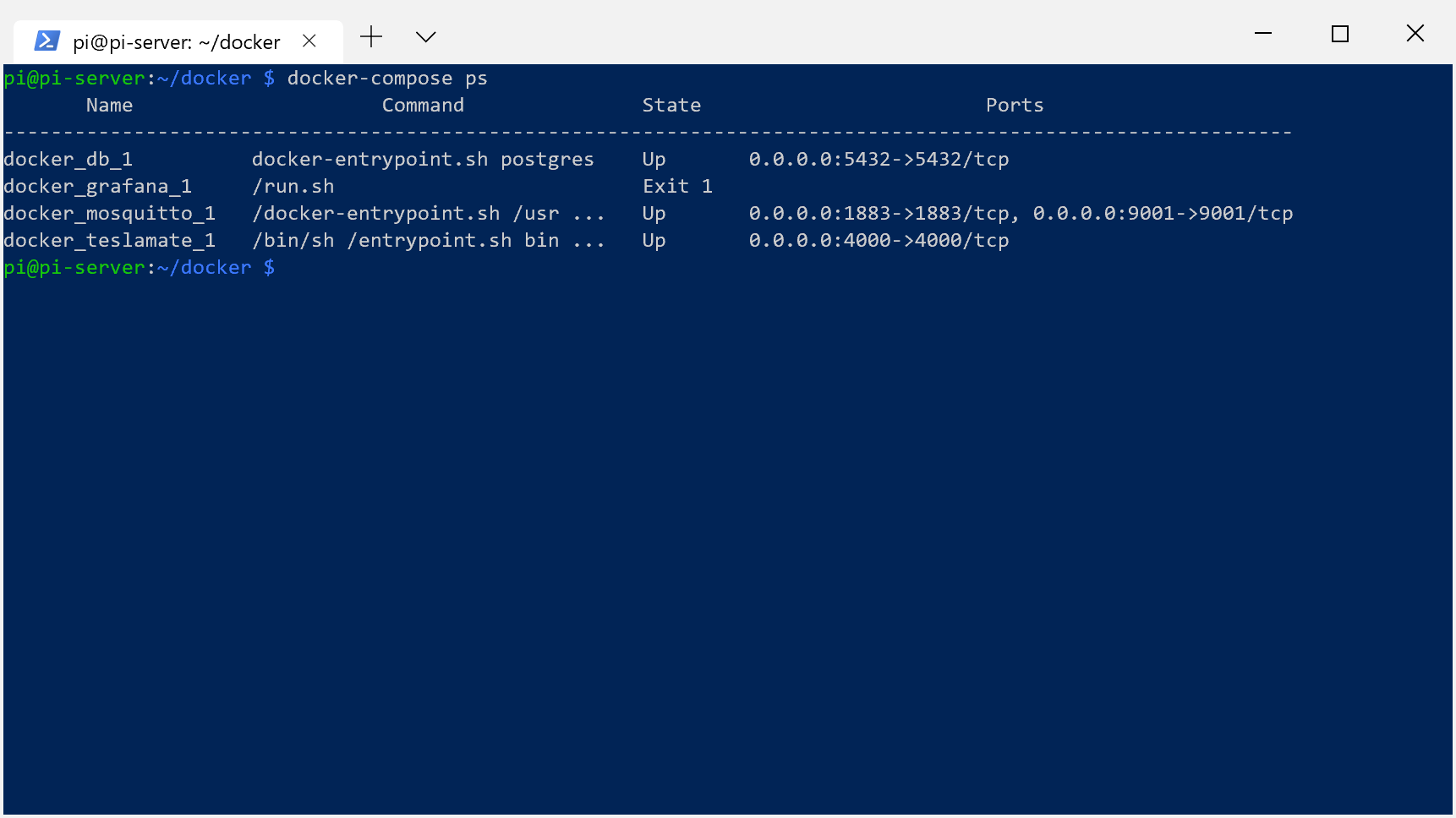
Thanks @virtualm2000 - will have a look. So this happened again - here is what I see. I don't know why.
bahree
on 9 Sep 2019
Exit 1 means that the container wasn't able to start successfully. To get more detailed information about the problem that caused this to happen check out the logs. As mentioned in the comments of your other threads, you can do this with e.g. docker-compose logs grafana.
adriankumpf
on 9 Sep 2019
Related issues
 Try2Fly
·
5Comments
bahree
·
5Comments
Try2Fly
·
5Comments
bahree
·
5Comments
 tobiasehlert
·
4Comments
tobiasehlert
·
4Comments
 DrMichael
·
4Comments
DrMichael
·
4Comments
 jun3280net
·
4Comments
jun3280net
·
4Comments
Most helpful comment
Some sort of healthcheck route could be useful especially when running with docker / kubernetes. However, sending an alert via IFTT etc. should not be part of TeslaMate in my opinion. This task should be performed by specialized third-party tools.
I'm not sure if all that is worth the effort though. In the last 5 months I had to restart TeslaMate once. That was because Tesla decided to change the IDs of some cars (#90). That shouldn't happen _that_ regularly ;) In general, TeslaMate is pretty fault-tolerant – in case of an unexpected error specific parts of the application are automatically restarted. In the unlikely event of a crash, docker restarts the whole container.