Teslamate: Connected ... But weird error message I can't get rid of (proxy_1 error)
I recently updated my Teslamate container, and ran into the following issues :
-issue 597 : Tesla unauthorized
-issue 679 : No more than one token pair
I was able to follow the suggestions in each thread which helped resolve the issues. I went to my Tesla account and updated my password. I regenerated a new token. I updated Teslamate DB to pass in the token instead of using login/pass to Teslamate. In doing so, it created issue 679. I addressed this by deleting my original token (id=1).
My remaining issue is more cosmetic at this point, but I have no clue what's causing it or how to get rid of it :
ISSUE : dummy-grafana.zapto.org and dummy-teslamate.zapto.org are not even used in my setup. My .env file references grafana.sub.domain.com and teslamate.sub.domain.com - which clearly work as those are the websites I navigate to. The "zapto" addresses were originally used when I was experimenting with the advanced http auth installation . I went through a number of iterations and updates to get to where I'm at now.
Any help on how to get rid of this error message would be greatly appreciated.
**proxy_1 | time="2020-05-04T20:57:14Z" level=error msg="Error renewing certificate from LE: {dummy-grafana.zapto.org []}, acme: Error -> One or more domains had a problem:\n[dummy-grafana.zapto.org] acme: error: 400 :: urn:ietf:params:acme:error:dns :: No valid IP addresses found for dummy-grafana.zapto.org, url: \n" providerName=tmhttpchallenge.acme
proxy_1 | time="2020-05-04T20:57:20Z" level=error msg="Error renewing certificate from LE: {dummy-teslamate.zapto.org []}, acme: Error -> One or more domains had a problem:\n[dummy-teslamate.zapto.org] acme: error: 400 :: urn:ietf:params:acme:error:dns :: No valid IP addresses found for dummy-teslamate.zapto.org, url: \n" providerName=tmhttpchallenge.acme**
My log is as follows :
proxy_1 | time="2020-05-04T20:57:07Z" level=info msg="Configuration loaded from flags."
mosquitto_1 | 1588625827: mosquitto version 1.6.9 starting
mosquitto_1 | 1588625827: Config loaded from /mosquitto/config/mosquitto.conf.
mosquitto_1 | 1588625827: Opening ipv4 listen socket on port 1883.
mosquitto_1 | 1588625827: Opening ipv6 listen socket on port 1883.
database_1 |
database_1 | PostgreSQL Database directory appears to contain a database; Skipping initialization
database_1 |
database_1 | 2020-05-04 20:57:09.017 UTC [1] LOG: listening on IPv4 address "0.0.0.0", port 5432
database_1 | 2020-05-04 20:57:09.017 UTC [1] LOG: listening on IPv6 address "::", port 5432
database_1 | 2020-05-04 20:57:09.018 UTC [1] LOG: listening on Unix socket "/var/run/postgresql/.s.PGSQL.5432"
database_1 | 2020-05-04 20:57:09.030 UTC [24] LOG: database system was shut down at 2020-05-04 20:53:31 UTC
database_1 | 2020-05-04 20:57:09.049 UTC [1] LOG: database system is ready to accept connections
database_1 | 2020-05-04 20:57:10.461 UTC [31] LOG: incomplete startup packet
teslamate_1 | 20:57:12.648 [info] Already up
proxy_1 | time="2020-05-04T20:57:14Z" level=error msg="Error renewing certificate from LE: {dummy-grafana.zapto.org []}, acme: Error -> One or more domains had a problem:\n[dummy-grafana.zapto.org] acme: error: 400 :: urn:ietf:params:acme:error:dns :: No valid IP addresses found for dummy-grafana.zapto.org, url: \n" providerName=tmhttpchallenge.acme
teslamate_1 | 20:57:18.802 [info] Version: 1.19.3
teslamate_1 | 20:57:19.293 [info] Refreshed api tokens
teslamate_1 | 20:57:19.293 [info] Scheduling token refresh in 40d
teslamate_1 | 20:57:19.297 [info] Running TeslaMateWeb.Endpoint with cowboy 2.7.0 at :::4000 (http)
teslamate_1 | 20:57:19.299 [info] Access TeslaMateWeb.Endpoint at http://teslamate.sub.domain.com
proxy_1 | time="2020-05-04T20:57:20Z" level=error msg="Error renewing certificate from LE: {dummy-teslamate.zapto.org []}, acme: Error -> One or more domains had a problem:\n[dummy-teslamate.zapto.org] acme: error: 400 :: urn:ietf:params:acme:error:dns :: No valid IP addresses found for dummy-teslamate.zapto.org, url: \n" providerName=tmhttpchallenge.acme
teslamate_1 | 20:57:22.128 [info] tzdata release in place is from a file last modified Wed, 11 Sep 2019 19:35:17 GMT. Release file on server was last modified Fri, 24 Apr 2020 04:15:20 GMT.
teslamate_1 | 20:57:23.084 [info] Tzdata has updated the release from 2019c to 2020a
teslamate_1 | 20:57:29.800 [warn] TeslaApi.Error / %TeslaApi.Error{
teslamate_1 | env: %Mojito.Response{
teslamate_1 | body: %{
teslamate_1 | "error" => "upstream_timeout",
teslamate_1 | "error_description" => "",
teslamate_1 | "response" => nil
teslamate_1 | },
teslamate_1 | complete: true,
teslamate_1 | headers: [
teslamate_1 | {"server", "nginx"},
teslamate_1 | {"date", "Mon, 04 May 2020 20:57:29 GMT"},
teslamate_1 | {"content-type", "application/json; charset=utf-8"},
teslamate_1 | {"content-length", "67"},
teslamate_1 | {"connection", "keep-alive"},
teslamate_1 | {"x-frame-options", "SAMEORIGIN"},
teslamate_1 | {"x-xss-protection", "1; mode=block"},
teslamate_1 | {"x-content-type-options", "nosniff"},
teslamate_1 | {"cache-control", "no-cache"},
teslamate_1 | {"x-request-id", "1a989cbdf752c4a27f9283241ab084e2"},
teslamate_1 | {"x-runtime", "10.046331"}
teslamate_1 | ],
teslamate_1 | status_code: 504
teslamate_1 | },
teslamate_1 | message: nil,
teslamate_1 | reason: :timeout
teslamate_1 | }
teslamate_1 | 20:57:29.800 [info] Starting logger for 'XYZ's Model S'
mosquitto_1 | 1588625849: New connection from 172.18.0.6 on port 1883.
mosquitto_1 | 1588625849: New client connected from 172.18.0.6 as TESLAMATE_302E3331323 (p2, c1, k60).
teslamate_1 | 20:57:29.818 [info] MQTT connection has been established
teslamate_1 | 20:57:40.528 [error] TeslaApi.Error / 504 – %{"error" => "upstream_timeout", "error_description" => "", "response" => nil}
teslamate_1 | 20:57:40.528 car_id=1 [error] Error / :timeout
teslamate_1 | 20:58:20.709 [error] TeslaApi.Error / 504 – %{"error" => "upstream_timeout", "error_description" => "", "response" => nil}
teslamate_1 | 20:58:20.709 car_id=1 [error] Error / :timeout
teslamate_1 | 20:59:01.460 [error] TeslaApi.Error / 504 – %{"error" => "upstream_timeout", "error_description" => "", "response" => nil}
teslamate_1 | 20:59:01.460 car_id=1 [error] Error / :timeout
teslamate_1 | 20:59:41.885 [error] TeslaApi.Error / 504 – %{"error" => "upstream_timeout", "error_description" => "", "response" => nil}
teslamate_1 | 20:59:41.885 car_id=1 [error] Error / :timeout
teslamate_1 | 21:00:22.158 [error] TeslaApi.Error / 504 – %{"error" => "upstream_timeout", "error_description" => "", "response" => nil}
teslamate_1 | 21:00:22.158 car_id=1 [error] Error / :timeout
teslamate_1 | 21:01:02.931 [error] TeslaApi.Error / 504 – %{"error" => "upstream_timeout", "error_description" => "", "response" => nil}
teslamate_1 | 21:01:02.931 car_id=1 [error] Error / :timeout
teslamate_1 | 21:01:40.075 car_id=1 [info] Start / :online
teslamate_1 | 21:01:40.094 car_id=1 [info] Connecting ...
teslamate_1 | 21:01:40.098 car_id=1 [info] Suspending logging
grafana_1 | t=2020-05-04T21:03:22+0000 lvl=warn msg="Failed to get slug from database, Dashboard not found"
teslamate_1 | 21:31:51.312 [error] TeslaApi.Error / 504 – %{"error" => "upstream_timeout", "error_description" => "", "response" => nil}
teslamate_1 | 21:31:51.312 car_id=1 [error] Error / :timeout
 jun3280net
All 4 comments
Two things.
1) Your real domain name is still in there, you should re-check and scrub it.
2) That's a Traefik error, it's using the old domain name to try and generate and/or renew certs. You should check your Traefik config and also try to clear out those certs from the Traefik container or volume.
 tacotran
on 5 May 2020
tacotran
on 5 May 2020
Thanks @tacotran for the suggestions. Unfortunately, I'm not well versed in any of this, and I require a little more guidance.
- I checked with NO-IP.com, and the hostname.ZAPTO.COM addresses no longer exist. They expire after 30 days if unconfirmed, which was why I migrated to a different DNS provider.
- With regards to configuring Traefik, I'm not sure where to start. The docker-compose.yml and .env file make no reference to hostname.ZAPTO.COM. As noted previously, the .env FQDN makes reference to grafana.sub.domain.com and teslamate.sub.domain.com, which are both working properly.
-is hostname.ZAPTO.COM somehow being referenced in the JSON file in the ACME folder?
-How do I make the changes to Traefik container/volume? I've got Portainer included in my Container now - so is there something I can do there?
Thanks in advance
jun3280net
on 5 May 2020
So I don't know how Traefik works specifically as I've never used it, my assumptions are based on what I understand of LetsEncrypt. Here are some tips I can give you.
In the docs, the only mounted volumes are
      - ./.htpasswd:/auth/.htpasswd
      - ./acme/:/etc/acme/
      - /var/run/docker.sock:/var/run/docker.sock:ro
So I would check the acme folder. The certificates have to exist in persistent storage somewhere otherwise they would need to be regenerated everytime the container was updated. Maybe that's what's happening, I don't know.
You can try deleting the stuff in ./acme, or rather just moving them. You can also try deleting the container and re-pulling it.
tacotran
on 5 May 2020
@tacotran thanks for the direction. I knew it shouldn't be .htpasswd, as I literally just changed it to address another problem I ran into. So next step was to address the JSON file in the ACME folder. however, I didn't have permissions to it. In terminal, I ran :
cd /acme
sudo nano acme.json
I could see the legacy references to ZAPTO.COM. However, trying to edit the file through nano proved cumbersome - as I couldn't select and clear the desired text. Literally, needed to delete character by character.
I ended up using Files Manager :
- Navigate to My Computer
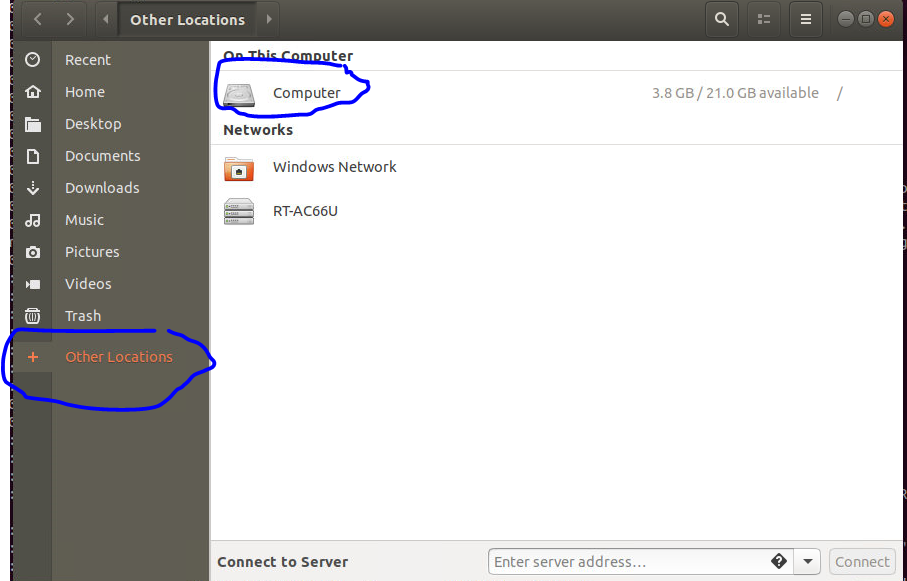
Navigate to Root to Authenticate to Root Privilege
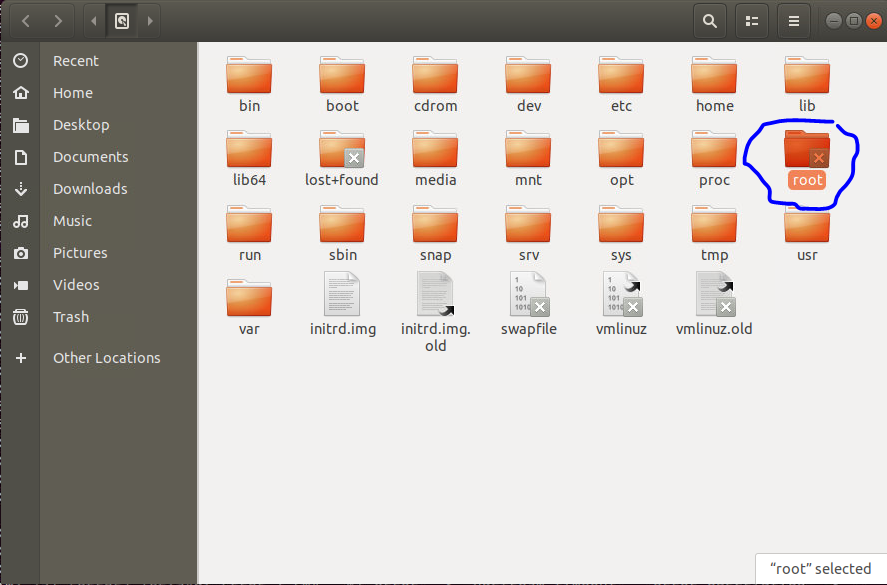
Move up from Root folder and navigate to your ACME folder
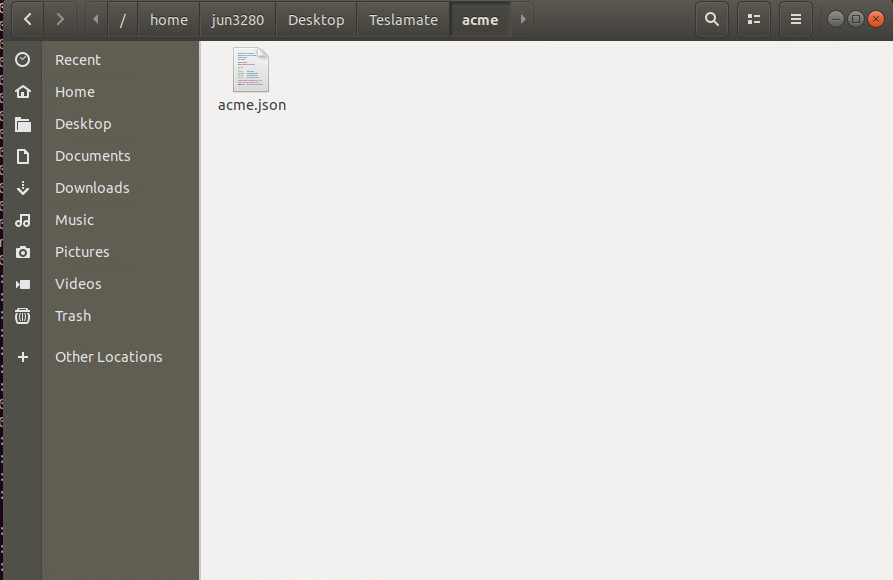
Edit the acme.json file with text editor and Save
This cleared up my error message!
Thanks a bunch for your help!
jun3280net
on 5 May 2020
Related issues
 Try2Fly
·
5Comments
Try2Fly
·
5Comments
 spacecosmos
·
5Comments
spacecosmos
·
5Comments
 virtualm2000
·
4Comments
virtualm2000
·
4Comments
 bahree
·
5Comments
bahree
·
5Comments
bahree
·
5Comments
bahree
·
5Comments
Most helpful comment
Two things.
1) Your real domain name is still in there, you should re-check and scrub it.
2) That's a Traefik error, it's using the old domain name to try and generate and/or renew certs. You should check your Traefik config and also try to clear out those certs from the Traefik container or volume.