Teslamate: Blank column in Drives dashboard
Describe the bug
There is a blank column in the Drives dashboard table
To Reproduce
Steps to reproduce the behavior:
- Launch TeslaMate and go to Grafana or open Grafana directly
- Open Drive Dashboard
- See blank column in Drives dashboard
Expected behavior
Not sure _what_ to expect here.
Relevant entries from the logs
N/A
Screenshots
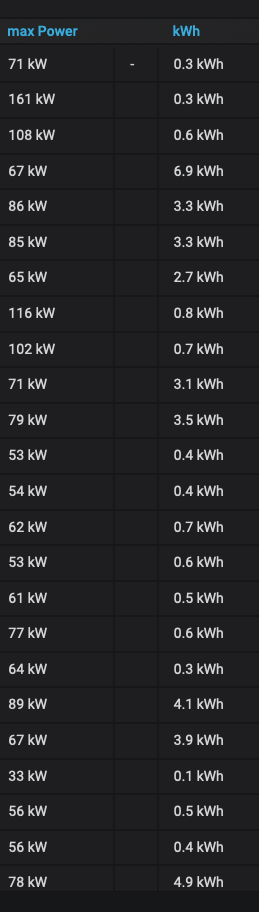
Data
N/A
Operating environment
- TeslaMate Version: [v19.0]
- Type of installation: [Docker]
- OS: [Raspbian]
 cwanja
👍1
All 3 comments
Hi @cwanja,
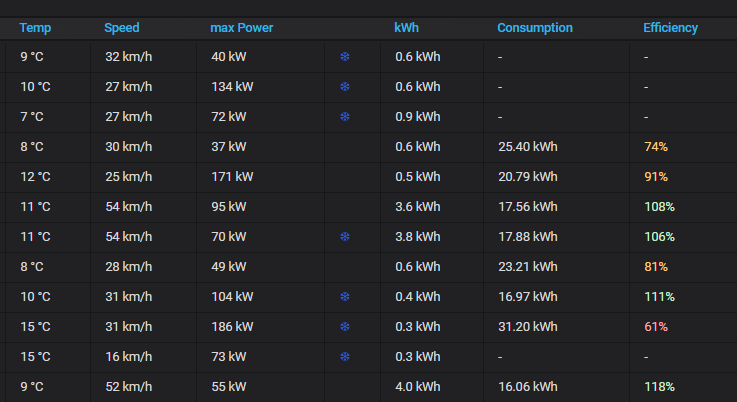
That column is the has_reduced_range one.
If you live in colder climate, you will have a snowflake appear there, telling that you had reduced range.
Here is an example of my drives view:
Regards,
Tobias
 tobiasehlert
on 23 Apr 2020
tobiasehlert
on 23 Apr 2020
👍2
Ah, yes! I recall now seeing that _once or twice_ in South Texas. Perfect. Thanks @tobiasehlert. Maybe @adriankumpf we can think of a header title for it?
cwanja
on 23 Apr 2020
👍2
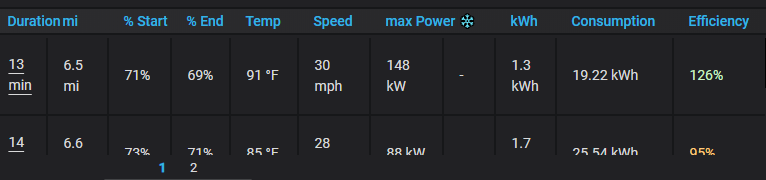
I bet it was done to keep the column header small, I added ❄ as the header to keep it small. I never noticed this either!
 Dulanic
on 29 Apr 2020
Dulanic
on 29 Apr 2020
👍1
Was this page helpful?
0 / 5 - 0 ratings
Related issues
 phantom1584
·
4Comments
phantom1584
·
4Comments
 bastrik
·
3Comments
bastrik
·
3Comments
 petariga
·
5Comments
petariga
·
5Comments
 detritu5
·
4Comments
detritu5
·
4Comments
 JakobLichterfeld
·
6Comments
JakobLichterfeld
·
6Comments
Most helpful comment
Ah, yes! I recall now seeing that _once or twice_ in South Texas. Perfect. Thanks @tobiasehlert. Maybe @adriankumpf we can think of a header title for it?