Terra-core: [terra-list] List items display as hovered on mobile when not hovering
Bug Report
Description
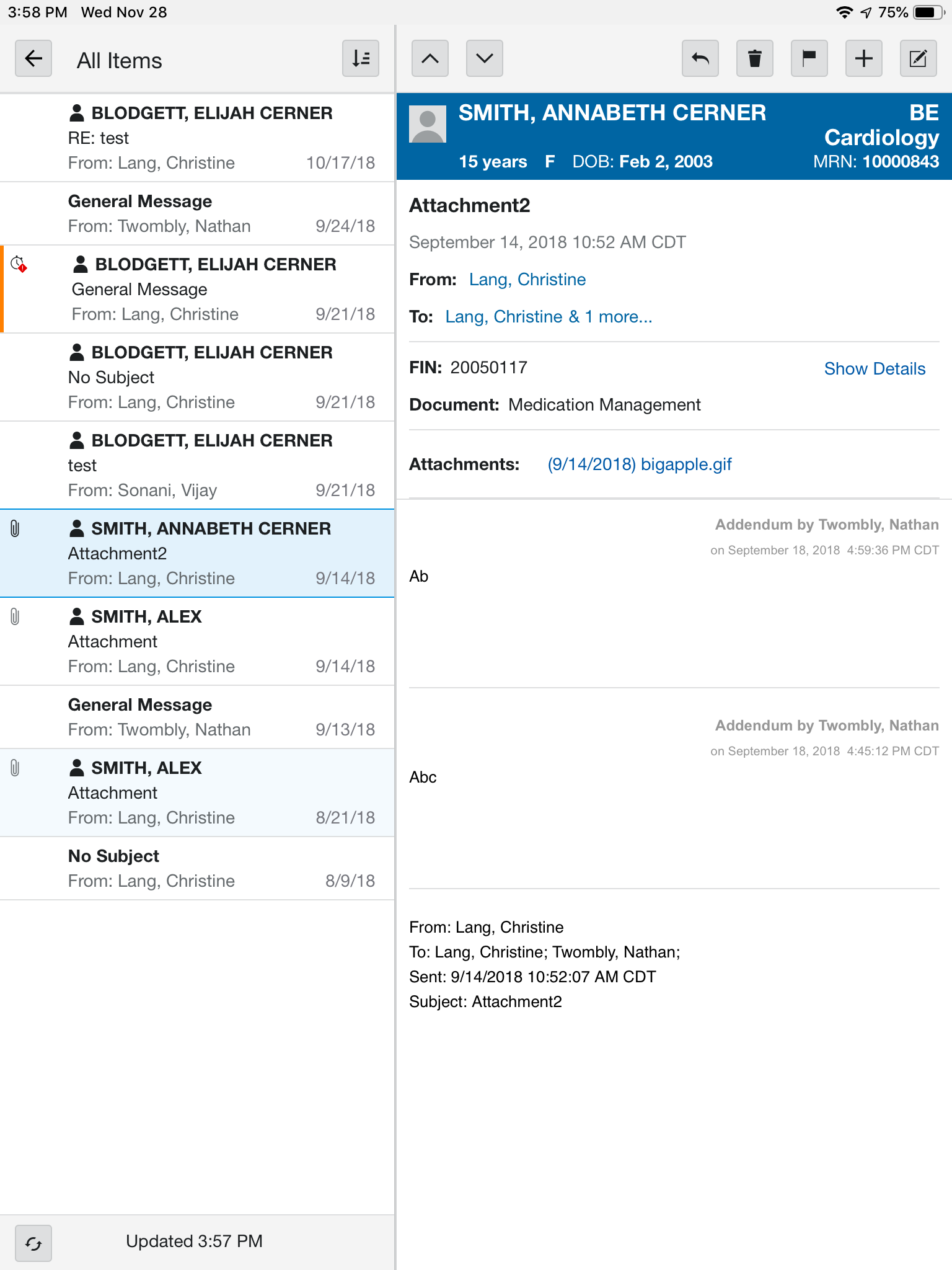
List items are appearing as hovered when user lightly touches the item but does not tap hard enough to select. The hover does not disappear once the user lifts finger from device.
Expected Behavior
Item should not continue to appear hovered once the user's finger in no longer on device.
Environment
- Component Name and Version: terra-list 2.25.0
@ Mentions
@StephenEsser
 christinelang
All 11 comments
@christinelang The attached screenshot shows that it is on an iPad, is this issue reproducible on the desktop and phones as well? Could I also possibly get a piece of sample code for me to reproduce this issue?
I haven't been able to reproduce the issue using [email protected] as well as the latest [email protected], it appears as selected when I tap on an list item on Mobile Safari and could not see the hover issue.
Example Used: https://engineering.cerner.com/terra-ui/#/components/terra-list/list/guides/single-select-list
@StephenEsser
 nramamurth
on 8 Apr 2019
nramamurth
on 8 Apr 2019
@nramamurth, this was only happening on iPad for us. We will be uplifting to terra-list 4.x soon.
christinelang
on 8 Apr 2019
@nramamurth
The issue can be reproduced here using mobile safari:
https://engineering.cerner.com/terra-core/#/tests/terra-list/list/list-item
Steps:
- Open the link above in Safari on a mobile device.
- Click the list item labeled
row selectable - Observe the row is now appearing in a hovered / focused state.
The core of the issue is that mobile safari activates hover pseudo selectors when they are clicked on mobile.
Here is a reduced test case that demonstrates the issue on mobile safari. https://codesandbox.io/embed/0mxvp7402w
 StephenEsser
on 8 Apr 2019
StephenEsser
on 8 Apr 2019
I now see what you are saying after playing around with different brighter colours on the test page. I was able to reproduce this issue on the following mobile browsers:
- Chrome 73.x
- Safari 12
- Firefox 16
Browser Bugs:
There are bugs logged to Chrome[1] and Safari [2] around this issue.
[1] https://bugs.chromium.org/p/chromium/issues/detail?id=370155
[2] https://bugs.webkit.org/show_bug.cgi?id=158517
Workaround (?):
Upon further investigation, I found out that there is not really a very elegant workaround to fix this issue ourselves. A _possible workaround_ that is mentioned in an article[3] and an implementation[4] is to support hover styles only on non-touch devices (possibly _only_ desktop browsers).
More context: https://github.com/twbs/bootstrap/pull/13049
[3] https://humanwhocodes.com/blog/2012/07/05/ios-has-a-hover-problem/
[4] https://github.com/twbs/mq4-hover-shim/blob/master/src/browser/mq4-hover-shim.js
I then simply went ahead and audited the styles for :active and :hover to see if they could be distinguished in a better way so that the interaction looks better.
Unfortunately, :active does not really apply at all on Chrome and Safari on iOS according to the article [5].
On mobile devices 📱, like the :focus pseudo-class, the :active pseudo-class applies on the tap of the element. And again, it doesn’t apply at all in the mobile Safari browser.
[5] https://bitsofco.de/when-do-the-hover-focus-and-active-pseudo-classes-apply/
I am not really sure if there is an elegant way to do it. @bjankord @neilpfeiffer @StephenEsser I'd like to have your input on this issue to further proceed. Thanks.
nramamurth
on 9 Apr 2019
Let's test wrapping the hover style in the following media query.
@media(hover: hover) and (pointer: fine) {
 ```

e.g.
```scss
.is-selectable {
  @media(hover: hover) and (pointer: fine) {
    &:hover {
      background-color: var(--terra-list-item-hover-active-background-color, lighten(#ebf6fd, 2%));
    }
  }

  &:active {
    background-color: var(--terra-list-item-hover-active-background-color, lighten(#ebf6fd, 2%));
  }
}
More info on this media query: https://blog.usejournal.com/finally-a-css-only-solution-to-hover-on-touchscreens-c498af39c31c
 bjankord
on 9 Apr 2019
bjankord
on 9 Apr 2019
@bjankord I had not tested it out because the specification[1] had tagged it as 'at risk', I'll anyways try it out and give an update.
nramamurth
on 9 Apr 2019
@bjankord
Using the media query suggestion, here is what I noticed on the test page.
Chrome 73.x and Safari 12 on iOS: hover styles are not applied upon tapping on a list-item.
Firefox 16 on iOS: hover styles are applied upon tapping on a list-item but they are not sticky like they used to be sans the media query 👇

Also, I believe that the hover effect over 'selected' items should also be addressed here.
nramamurth
on 9 Apr 2019
Ok let's move forward with this. Let's also wrap the 'selected' items :hover in that media query.
bjankord
on 9 Apr 2019
FYI the interaction media features are not supported on IE 11 and I could confirm it in-house.
https://caniuse.com/#feat=css-media-interaction
nramamurth
on 9 Apr 2019
@bjankord @ryanthemanuel Should we possibly hold up on this given that the media interaction feature are not available in IE yet?
nramamurth
on 10 Apr 2019
A potential media query we could explore using would be the following:
@media screen and (-ms-high-contrast: active), (-ms-high-contrast: none), (hover: hover) and (pointer: fine) {
...hover styles here...
}
This should apply styles to IE browsers or browsers that support hover & pointer: fine.
bjankord
on 10 Apr 2019
Related issues
bjankord
·
3Comments
 neilpfeiffer
·
3Comments
bjankord
·
3Comments
neilpfeiffer
·
3Comments
bjankord
·
3Comments
 noahbenham
·
5Comments
noahbenham
·
5Comments
 SpartaSixZero
·
5Comments
SpartaSixZero
·
5Comments